The Why Now Community Challenge: Veeam Data Platform 13.1. It’s time to vote!
News, guidelines and various community projects
Recently active
Yesterday, during a conversation with my colleagues at Veeam Brazil, one of them shared a very important link with me related to the Compliance Portal. It’s available inside My Veeam, where partners can download official badges.I will use seals in technical and commercial presentations; I'm sure they will be valuable. Many clients are still unaware of the wide range of certifications that Veeam offers.Take a look here:https://my.veeam.com/compliance-portal
I have been approached by the book publishing company (Packt) for my latest release - Mastering Veeam Backup & Replication 13 to see if there are 3–4 people out there that would like a copy. There are however some conditions for receiving the book -You must read the book and complete an Amazon review of it You need to help spread the word on socials about the book and even a blog post if you canIf there is anyone in the community that is interested and can meet these conditions, drop me a DM with your details for shipping and once I have the 3–4 people I will submit that to Packt to send out your books.
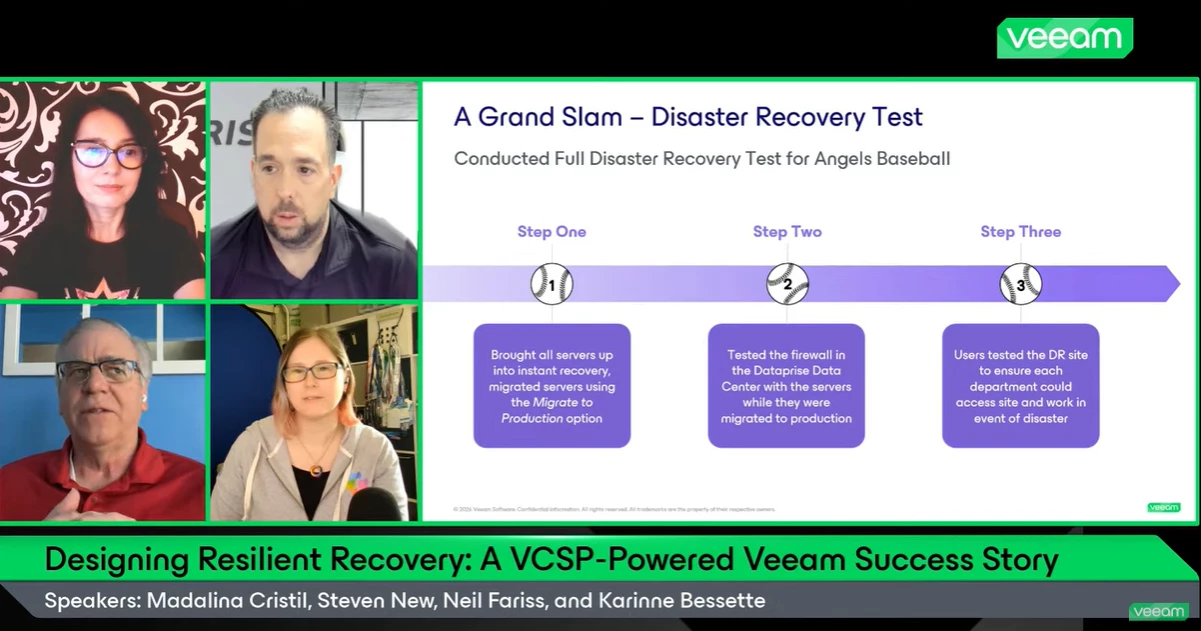
What a fantastic Veeam 100 Show we just had! Thank you Neil , @stevennew , @Rin ! We got to hear a real customer story around deploying Veeam, enabling Veeam Vault, and actually validating disaster recovery through real-world testing. Really great discussion around what worked well, why the VCSP relationship was such an important part of the journey, and what comes next.In case you missed it, you can watch it in here: Best,Madi
Hello,as in the title, given the software stopped being able to make backups after the April windows update that changed vss and a few other things , is there anyone knowing when the situation may get fixed ?And will be fixed with an update to Agent , or need to wait for a new monthly update from microsoft ? I’m a bit new but other vendors have been I think more vocal publishing info and/or in some cases updates to their software , while I think I didn’t see anything about Agent
Drive D: is a 15k rpm SAS drive, so not at all slow
Hello All, We are currently using Veeam Backup and Replication at my company and we’re using object storage (S3) as our primary backup repository, we are planning to implement a secondary on-prem NAS storage to store full backups every once in a while as an extra safety measure.I’m evaluating NAS options and would like your recommendation for a model that is fully compatible and optimized for VBR. My required capacity for NAS is ~24 TB usable. Specifically: 1. Recommended NAS vendors/models validated with VBR 2. Preferred protocol (SMB vs NFS) for performance and stability 3. Minimum hardware specifications (CPU, RAM, RAID type, network) 4. Any known limitations or best practices for NAS as a secondary repository Thanks.
Hi, I have a few chained vsphere backup and replication jobs that can be finished in 1 hour or 10 hours or 30 hours, so scheduling them is a bit of a pain in the butt. If the network/raid is already slow at the moment, I don’t want multiple jobs running at the same time, getting more over time, causing vsphere snapshot problems etc.Is it possible to define “Don’t start this job if there is any job running already”?And if not, is it possible to insert pauses between chained jobs, so you could create a loop where 5 jobs are executed one after another, then there’s a 3 hour break, then the first job is started again? ...ideally with a window where no job is allowed to start? Thanks in advance.
I speak with customers all the time about Disaster Recovery and if they test. Most of the time, the answer is no. In a recent customer demo, they were looking for just that. How would you simulate a Disaster Recovery with Veeam? This is what I presented to themLet’s be honest—most disaster recovery plans look great on paper. That's if you have a Disaster Recovery Plan available. I ask my customers and most don't have one. What's even worse is they don't test their restores.Diagrams are clean. Runbooks are written. Backups are “successful.”But until you simulate a real disaster, you don’t actually know if any of it works.And the worst time to find out is when production is already down.This is how to simulate a disaster recovery (DR) event step-by-step using Veeam—the same way you’d handle it in the real world, just without the panic. What You’re Trying to ProveA DR test isn’t just “can I restore a VM.”You’re validating:Can we recover critical systems in the right order? Do we meet RTO/
Hello community,After upgrading a Veeam Backup & Replication environment from version 12 to version 13, we started experiencing some unexpected behavior related to remote script execution, user permissions, and MFA. I’d like to check if anyone else has faced a similar situation. EnvironmentVeeam Backup & Replication recently upgraded from v12 to v13 Monitoring solution relies on PowerShell scripts executed remotely Use of Operator role / custom non‑Administrator users Scripts used for status collection and integration with external monitoring tools Issue 1 – Remote Script ExecutionAfter the upgrade to Veeam v13, scripts no longer work when executed remotely unless the user is a Veeam Backup Administrator.Before (v12): ✅ Scripts worked with Operator or custom roles After (v13): ❌ Scripts only work when executed by a Backup Administrator ❌ Direct impact on monitoring (scripts no longer return data) Error MessageWhen attempting to run PowerShell commands using a non‑administrator
A couple weeks ago I had the opportunity to attend and present at the Atlantic Security Conference (ATLSECCON) in Halifax, Nova Scotia. Established in 2011, this information security conference focuses on fostering innovation, strengthening collaboration and building resilience. The conference agenda centers on everything security related; challenges, complexity and emerging threats. This was not my first time attending ATLSECCON, I have had different working roles at the event throughout the years, meaning I’ve worked booth operations, I’ve presented at the event, and I probably have coordinated just the sponsorship opportunity in the past. I am unsure of the exact number of times I have attended, but I can say I look forward to this event every year, and it only gets better over time! After I got back, I was thinking about all the sessions I attended and some key takeaways. When I attend conferences, I really focus on what I can learn and bring with me into my everyday work. Two key
Anyone can help me to understand about this picture?When the tape retention is over then backup day 1 will be removed and this mean 1st full backup wlll be removed. Then how we can restore the VM to the Monday? Isn’t restoring the incremental need the last full backup?
Hi Team,Currently we are facing an issue.We have multiple full backup file for NAS backup, with condition:Backup file 1 on repository A --> inactive backup chain.Backup file 2 on repository A --> actively running.Our goal is to move all backup files (1 & 2) to another repository, because we have concern about capacity on repository A almost full.Our customers do not want to lose all the backup data stored in Repository A.My question is:Is there a way to move or copy all backup files 1 and 2 from repository A to repository B without having to disable the existing backup job that is currently running? This is because when we copy the backups, it disables the existing backup job. Our customers’ file shares are very large (ranging from tens to hundreds of TB), so backups take several days to complete, and we don’t want to lose any RPO during the daily incremental.We already use backup copy, but not all backup files are copied to another repository.Thanks and regards.
Migrating between sites is rarely straightforward, especially when you don't have access to the virtual infrastructure to create a replication job between sites. In this post I'll walk through a real-world migration from another provider to our own Virtual Private Cloud on VMware vCloud Director. This will not be a build guide, but more of a high level overview of how it was accomplished and some of my findings, positive and negative. Project Background Our customer had expressed a desire to offboard from their previous service provider and onto our platform. They did not want to approach the provider before migrating, and suspected that the provider would not cooperate with setting up replication jobs to another service provider.They asked us to come up with a solution that had a low Recovery Point Objective to minimize interruption to public facing services. Key Constraints:The customer did not have access to the virtualization layer and were unable to configure a Veeam replication
DCOM timeout on {740FE937-01F7-4482-AA62-C83F0AD3D6D0}, package Microsoft.WidgetsPlatformRuntime 1.6.14.0, VSS writer enumeration hang.In the last two weeks, running Veeam Windows Agent CE on my laptop and office computer were hanging for hours showing “Preparing for backup”. I was also unable to cancel these jobs, requiring reboots.The problem here is likely a post April 15 update of Microsoft.WidgetsPlatformRuntime 1.6.14.0.Removing this package in an elevated Powershell withGet-AppxPackage *WidgetsPlatformRuntime* | Remove-AppxPackage And possibly a reboot, repairs the issue and allows backups to proceed to “Creating VSS snapshot”.You can test if you have this issue by verifying the following hangs without producing output:vssadmin list writersIt is possible that any Windows 11 machine with this widget’s runtime version will have VSS hang issues in a variety of applications, including Veeam Agent for Windows Community Edition.
Backup and recovery move fast and the stakes are high. Additionally, every environment has its own mix of platforms, workloads, policies, and pressure points. For example, one team may be protecting a handful of critical virtual machines (VMs). Another may be juggling physical servers, cloud workloads, and strict retention requirements across multiple sites. That’s exactly why we at Veeam offer so many ways to protect and recover your data.However, this flexibility comes with choices, and you don’t have to choose on your own.Veeam Intelligence an AI-powered assistant layer embedded within Veeam products and technical documentation that’s designed to help you quickly find the right path for your environment. Whether you’re setting up a new deployment, reviewing best practices, comparing feature options, or trying to figure out your next steps, it gives you practical guidance that fits whatever you’re working with.You can access Veeam Intelligence within your product and within Veeam tec
Hello, I have some File Backup and Proxmox VE Backup jobs configured in Veeam Backup & Replication. However, one of them shows an "Outdated data mover" error. When I go to Backup Infrastructure, rescan the Linux Server, and run the backup job, the error disappears and the backup runs normally.However, after a few minutes, the data mover error reappears, and the scheduled backups fail. In other words, every day I have to rescan the server to update the data mover service and perform the backup manually.I have already tried uninstalling and reinstalling the Veeam Transport service directly on the server, I deleted the /opt/veeam folder and then rescanned the server in Veeam to reinstall the agent, but the problem persists.I'm using Veeam Backup e Replication version 13, but this error started occurring when I was using version 12.The server in question is running Debian 12.I have two other servers, one also with Debian 12 and another with Debian 13, where the file backup jobs run nor
I recently deployed the Veeam Plug-in for HPE Morpheus VM Essentials version 13 (RTM) on my Veeam Backup lab server, which is running v13.0.1. Once tested, I'll have it available to demonstrate to my customers. Veeam has introduced a dedicated plug‑in that enables image‑level backup and restore for virtual machines running on HPE VM Essentials. This integration brings VM Essentials into the same unified protection workflow as VMware, Hyper‑V, and other supported hypervisors. The plug‑in is not bundled with the main Veeam Backup & Replication installer, so it must be added separately. What the Veeam Plug‑in for HPE VM Essentials DoesThe plug‑in extends Veeam Backup & Replication to understand and interact with HPE VM Essentials resources. Without it, Veeam cannot discover or protect VM Essentials servers or workers. Once installed, the plug‑in enables:Discovery of HPE VM Essentials hosts Backup and restore of VMs running on VM Essentials Integration with Veeam’s policy‑based job
I have Veeam 13 installed , I removed it and tried to install it again ,I mounted the ISO and click setup , then got the below error message So any suggestions as seems still detect previous setup while i completely cleanup it
You open the Add Server wizard in Veeam Backup and Replication. You pick Microsoft Hyper-V. The next screen gives you three choices. Microsoft System Center Virtual Machine Manager. Microsoft Hyper-V cluster. Microsoft Hyper-V server (standalone).Here is the part that catches people at times. SCVMM is the first option listed in the wizard. If you do not have SCVMM in your environment and you click Next without changing the selection, VBR throws this error: "Veeam Backup & Replication server does not have Virtual Machine Manager Administrator Console installed." That is KB4351. It is not a bug. You picked the wrong type.Each option changes how VBR discovers your VMs, tracks Live Migration, deploys components, and handles backup proxy behavior. This post covers what each option does, what it requires, and when to use it. It also covers how the same choice applies in Veeam ONE.What VBR Deploys on Every Hyper-V HostRegardless of which type you select, VBR pushes the same set of servic
I’m flying solo this week as @Madi.Cristil is on special assignment! We’ll talk more about that next week :) As I have no supervision, I broke the rules and featured four pieces of content this week. Watch this week’s episode here: Featured Contentvia @Michael Melter via @Mohamed Ali via @Marcel.K via @Chris.Childerhose Special Department Newsvia VUG USA - New Yorkvia VUG New Zealandvia VUG FinlandVeeamON is coming! Be sure to register for the virtual experience: VeeamON 2026 | NYC, London, SydneyFinal VeeamON Push!No Who’s New this week, but we’ll be under normal circumstances next week. Have a great weekend everyone!
I have to replace a SCSI tape drive with SAS to upgrade to Veeam 12. I have to replace the OS on the Veeam server to upgrade to 13. I am still on Veeam 11. I have HP Z840 workstation that is on Windows 10 Hyper-V. I am moving VMs from VMWare 6 to this workstation. I have so far installed our children’s minecraft servers on Ubuntu 24.04 as virtual machines. I setup for file level backups. I want to backup each VM in E:\Hyper-V separately. Each VM has its own folder and VM structure in this directory. E:\VMBackups has a script that removes and replaces each of these VMs.# Import the Hyper-V moduleImport-Module Hyper-V# Define parameters$BackupDriveLetter = "E" # Change to your backup drive$VMHost = "localhost" # Change if backing up from a different host$VMNames = @("Bedrock2404_10.10.10.3", "Bedrock2404_10.10.10.4", "Bedrock2404_10.10.10.5", "Java2404_10.10.10.6", "Java2404_10.10.10.7", "PaperMC_10.10.10.8" ) # List of VMs to back upRemove-Item -Path
I recently had an issue after updating both my VBR v12 Servers to the latest patch v12.3.2.4465. As most of you know, Veeam released a Vulnerability KB back on 12 March. See below:https://www.veeam.com/kb4830From this page, there is a link to direct you to VDP v12.3 Release information:https://www.veeam.com/kb4696 , which provides the download to the latest VDP v12 Patch. A few weeks ago, I downloaded the small patch and updated both my VBR servers. All good. But, with this patch, there is a bug. And let me be more specific here, a non-functional disruption bug. (i.e. more cosmetic than anything; Jobs are unaffected)IssueThe bug is on how VBR detects the latest update/release information. Even after I installed the Patch, upon logging into the VBR Console, I was prompted to get the latest VBR Update. I checked the Help > About section, as well as the notification bar on the bottom of the Console, and both show I’m on the latest VBR v12 Build. So why would the Console prompt me to up
Hi thereTime to update the Lab, this time, easy monitoring for VMs, Services and Webs.UPTIME - KUMAIm going to show you how to easily deploy an instance inside Proxmox, containerized, ready to go.First, go to this website and search the community script to deploy it:https://community-scripts.org/?q=uptimeCopy the command, as shown in the pictureGo to your Proxmox Host, open a terminal, and paste the commandHit EnterLets follow the script steps, as always, with screenshots:Default is okStorage for template, in my case, NFS, for future HAContainer Storage, same thing, NFS for future HAScript running, great looking.update found, lets apply it and continuecontinue...Done!Now you can see the Ip from our DHCP were Uptime Kuma is running.Open up in a browser, and follow the initial wizard,I selected SQLite.language and credentials.Done!Next entry, initial config, notifications and initial monitors.cheers.
I have a requirement to make monthly backup and store to different tape catridge.Example for January will be store to media pool januari, februari to media pool februari and etc and should use full backup. So January 2026 will be full backup and on January 2027 will overwrite Januari 2026 and make full backup for Januari 2027.I try to make job backup ro running monthly and set the retention to 1 days then for 1st time the job running full like what i expected. Then i try to run in next day for simulate the job running on Januari 2027 then the backup running in incremental and not full backup.Can someone help for my issue here?
I am currently migrating my backup repository.Previously, I used a Linux Hardened Repository for primary backups, but I have now switched to an ExaGrid backup appliance. The primary backup to the new ExaGrid device has been successfully completed.Now, I want to reuse the backup data stored in the old Linux repository as a secondary target using the Backup CopyBefore: Primary (Linux Repository only)After: Primary (ExaGrid) --> Backup Copy --> Secondary (Linux Repository)However, when I try to select the existing Linux repository and use the "Map Backup" option in the Backup Copy job settings, it fails to recognize the existing backup data. I have already deleted the original backup job from the Linux repository, and the data is currently showing as Disk (Orphaned)The Veeam version is 12.3.2, and the backup source is a vSphere VM. My questions are:Is it impossible to reuse backup data created by a regular "Backup Job" for a "Backup Copy Job" via the Map Backup feature? Is there an
Already have an account? Login
Enter your E-mail address. We'll send you an e-mail with instructions to reset your password.