Question

Veeam Backup for Microsoft 365 - Restore deleted jobs


Hi All, 

I really hope someone can help! 

I have Veeam Backup for Microsoft 365 which is now running in community edition. I had two backup jobs, S3 to Wasabi and they have been deleted. 

I can see the repositories contain large amounts of data but when I attempt to restore files utilising the Veeam M365 console it only shows one restore point date.

Previous backup jobs (excluding the deleted backup jobs) I had created and ran a backup copy from the existing backup job from Wasabi to a newly created Azure storage account and this appears to have worked. 

As I no longer have the backup jobs, what are my options of being able to restore these backups once I no longer have access to Wasabi?


Thank you,
Scott

19 comments

Stabz
Forum|alt.badge.img+9
  • Veeam Legend
  • May 21, 2026

Hello ​@ScottEvans26 Scott, 

I don’t really get it, you still have your VBM365 server but the backup jobs have been deleted right ?

The backup repositories are still present ? If yes you should be able to browse the backups and restore your data.
Why will you no longer have access to wasabi?


  • Author
  • New Here
  • May 21, 2026

Hi Stabz, 

Thanks for the quick reply, I was just editing my post as you replied. 

The backup repos are still present but backing up to Wasabi, we are ending our contract with Wasabi and need to migrate the data from Wasabi to either a local disk or an Azure storage account and still have the option to restore from these repos.


Thanks,

Scott


Stabz
Forum|alt.badge.img+9
  • Veeam Legend
  • May 21, 2026

You could use RClone if you have to move S3 data between S3 storage

But you created a backup copy, have you try to create a new backup job and link it to the new Azure repository ?


  • Author
  • New Here
  • May 21, 2026

Yeah, if I create a new backup job and even try and link it to the repo it was originally connected to (Wasabi) it doesn`t show any restore options and the backup copy doesn`t find any files to process.

Does the Wasabi file explorer not complete the same job as RClone?


dips
Forum|alt.badge.img+7
  • On the path to Greatness
  • May 21, 2026

Hi ​@ScottEvans26 

Do you have any storage policies on Wasabi?

Also, what if you download from Wasabi to a local repository and then try to access the data that way?


  • Author
  • New Here
  • May 21, 2026

Hi dips, 


I have a couple of policies but these are generally require MFA and admin access. These are linked to accounts rather than the buckets I`m experiencing this issue with. 

If I download from Wasabi (using Wasabi File Explorer) and create a local repository, create a backup job, and select this repo when I right click the job there`s no option to explore the backups. 

Thanks,
Scott


tm67
Forum|alt.badge.img+2
  • Veeam Legend
  • May 21, 2026

Officially, this is not supported.. Have a look at this post where this exact feature request is discussed: [Feature Request] Object Storage Migration (Migrate Bucket A to Bucket B) - Page 3

Technically, you could download / mirror the exact s3 data to another object storage repository with some s3 migration tools (I know there is mc - minio/mc: Unix like utilities for object store, but I never tested it and as I said, it is not supported..)


  • Author
  • New Here
  • May 21, 2026

Hi tm76, 

OK, let`s say I keep Wasabi for LTR purpose until the data becomes stale or Veeam releases a tool/process. How do I recover/link the existing Wasabi repo/bucket back to a Veeam backup job so I`m able to restore any data if needed?

Thanks,

Scott


coolsport00
Forum|alt.badge.img+22
  • Veeam Legend
  • May 21, 2026

Hmm...I wonder if ​@MicoolPaul can provide some clarity for you Scott?


  • Author
  • New Here
  • May 21, 2026

Thank you coolsport00 👍


coolsport00
Forum|alt.badge.img+22
  • Veeam Legend
  • May 21, 2026

Thank you coolsport00 👍

Sure Scott...no problem. Also, reaching out to Veeam Support would be highly suggested as well.


eblack
Forum|alt.badge.img+2
  • Influencer
  • May 21, 2026

It used to be you could move the files and adb to another repo fairly easy. Moving to S3 file structures made that much more difficult /w the layouts now. I’ve had success with cloning S3 as mentioned above. I wouldn’t call it simple, but it did work. Other option is to make use of the Wasabi still until either the data ages out or you can make Azure backup copies of existing over. I’d consider opening a case on this one if you can. 


Stabz
Forum|alt.badge.img+9
  • Veeam Legend
  • May 21, 2026

Hi tm76, 

OK, let`s say I keep Wasabi for LTR purpose until the data becomes stale or Veeam releases a tool/process. How do I recover/link the existing Wasabi repo/bucket back to a Veeam backup job so I`m able to restore any data if needed?

Thanks,

Scott

Normaly you just have to create the repository with your Wasabi bucket. You should explore the backup for your organization, I dont remember if you have to recreate a backup job or not to be honest.


tm67
Forum|alt.badge.img+2
  • Veeam Legend
  • May 21, 2026

Hi tm76, 

OK, let`s say I keep Wasabi for LTR purpose until the data becomes stale or Veeam releases a tool/process. How do I recover/link the existing Wasabi repo/bucket back to a Veeam backup job so I`m able to restore any data if needed?

Thanks,

Scott

You have to have the m365 organization added to your vb365 server. Also the backup repository pointed to the s3 bucket. 

Then right click on the organization and select to restore from this organization. 

You basically need the s3 bucket, the repository and the m365 organization added to your vb365 server. You don’t need to have the backup job. 


Stabz
Forum|alt.badge.img+9
  • Veeam Legend
  • May 21, 2026

Hi tm76, 

OK, let`s say I keep Wasabi for LTR purpose until the data becomes stale or Veeam releases a tool/process. How do I recover/link the existing Wasabi repo/bucket back to a Veeam backup job so I`m able to restore any data if needed?

Thanks,

Scott

You have to have the m365 organization added to your vb365 server. Also the backup repository pointed to the s3 bucket. 

Then right click on the organization and select to restore from this organization. 

You basically need the s3 bucket, the repository and the m365 organization added to your vb365 server. You don’t need to have the backup job. 

Thanks for this confirmation ​@tm67 


HangTen416
Forum|alt.badge.img+11
  • Influencer
  • May 21, 2026

@ScottEvans26 Quick question, when you are trying to explore restore points, are you doing it at the job level or organization level?


HangTen416
Forum|alt.badge.img+11
  • Influencer
  • May 21, 2026

Yeah, if I create a new backup job and even try and link it to the repo it was originally connected to (Wasabi) it doesn`t show any restore options and the backup copy doesn`t find any files to process.

Does the Wasabi file explorer not complete the same job as RClone?

I believe Wasabi File Explorer is like Cloudberry or S3Browser and can only copy/move data within one S3 connection. RClone allows you to connect to two S3 buckets and copy between them.


  • Author
  • New Here
  • May 21, 2026

Thank you everyone, appreciated so many helpful comments! 

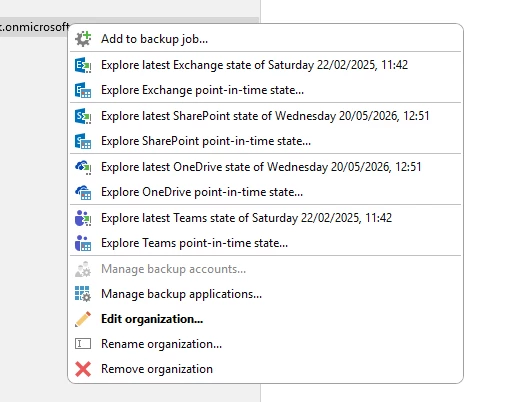
I did try this process prior to creating this post, I have tried with multiple Wasabi buckets and total of 5 TB data and when I right click the org (screenshot below) there`s only one restore point (excluding a test I completed yesterday) 


@HangTen416 I`m attempting to browse the available restore points but only the 22/02/25 is available to choose from (as shown above). Thank you for the info re RClone, that`s very useful!


Thank you,

Scott


HangTen416
Forum|alt.badge.img+11
  • Influencer
  • May 21, 2026

What happens when you select the point in time option? Does a calendar pop up with other available restore points?