Join discussions around Veeam community projects, Veeam events, industry and technology news
Recently active
Hi All,If we keep our Veeam VBR on V12.3.2.4165 and we upgrade the Veeam backup for AWS appliance from V9 to V10 what has integration with this VBR. Will that break the integration. Is there only integration with VBR V13?I did request this question in a case and got the following answer backRegarding Veeam Backup for AWS, upgrading from version 9.1.0.45 to version 10 will not impact integration with VBR 12.3.2.4165. There are no documented version dependencies or incompatibilities between these specific versions.However on a Reddit forum I found a topic where customers told that the upgrade did break the connection with there VBR on V12.3.2.4165Veeam Backup for AWS 10 : r/VeeamOr is there a newer version of the plugin that repairs this connection if it gets broken.Counting on your experienceThanks,Benny
Customer has Wasabi for M365 backups -- needs to migrate to on-premise S3-compatible storage -- what is the best and fastest (if not the same) options do I have
I try to migrate my vmware VM to hyper-v using veeam and i always got ‘failed to modify disks”. Anyone know how to fix this?
Hi everybody, currently we’re working with a customer who has build already 5yrs of retention with AvePoint. Migrating the backupchain from one to another product is in most cases not possible. Is anybody aware of the existence of ‘standby’ licenses where the customer pays less but has the ability to restore for a certain period without adding new points ? This gives him then the time to build op the retention on Veeam Backup for M365. It would be nice if we could create here a list of products / vendors who have such and option. (mostly not public available on their website) Then we can already now during onboarding what route we have to go.
I have been using BackBlaze for cloud storage for about 5 years with Veeam12. I am now moving to Veeam 13 and want to attach to a new bucket. I created the bucket and attached to BB using a new application key. The problem I am having is when I got to ‘Select Folder’ I can see the bucket but cannot list any folders under the bucket. Since I cannot list the folders I cannot select a folder which means I cannot continue. There are no errors generated. Any ideas aside from open a support ticket?
Hi all,We have been using veeam backup and replication for some time with no issues, test restores work every time. Our licence on B&R shows enterprise plus, and the package shows as essentials. We have always renewed through an MSP.They have just quoted for renewal and i noticed the price had doubled and they had moved to monthly billing, so i queried it and was told they were offering a different package now called ‘Data platform advanced’ - hence the higher pricing.I am a bit confused about what actual licence we need to carry on as we are with the software which we are happy with? On the actual software the licence says ‘Edition enterprise plus, package essentials’When logging into veeam the licences say we currently have ‘Veeam Data Platform Essentials Universal’ And our MSP want to sell us ‘Data platforms advanced’ Are ‘edition enterprise plus, package essentials’ and ‘veeam data platform essentials universal’ the same thing?If i accept the MSP ofer of ‘data platforms advanc
I have setup a new server on our network. Connected to domain, network, hyper-v installed and I am unable to add this server to the Virtual Infrastructure > Microsoft Hyper-V > Standalone Hosts > (server). I have my Veeam server trying to contact our new server and there seems to be a road block. I am running Veeam V11a trying to setup a new 2019 windows server. During the hyper-v setup process I have added the name and/or IP address, I have selected the last option (standalone) which matches the description of the new server. My credentials do work because I ran a test to setup a VM running server 2019 and I was able to set that up right away. For some reason the physical server is blocking the Veeam connection. Is there a firewall exception I need to add? I did attempt to manually add the physical server to Veeam so the agent might create its own firewall exceptions. I was unsuccessful at that as well.
When trying to add a Hyper-V host to VBR 13 from either the web console or GUI, we receive the error ‘Samba failed with error: NT_STATUS_ACCESS_DENIED - Can’t load /etc/samba/smb.conf. The same error occurs when trying to add MS Server 2022 and 2025. The MS server has it’s firewall disabled.Anyone else experienced this issue?Dave
Hello All, Can I use the new linux based appliance as a community version like the on-premise windows edition?Has anybody tried using it?I am very curious about the experience of it.
I was trying to configure a VBR location profile for my OpenShift cluster, but it says ‘Repository not found’.When I runcurl -v -k -u Administrator:<password> https://<vbr-ip>:9419/api/v1/repositories, it doesn’t return any value.
Hello,I have a problem with configuring the Backup Job.We have one server hosted on Hetzner and I need to backup it just once and restore it.I don’t know what could be the prerequisites for this, do I need to expose our VBR ports to the Hetzner?Currently I manage to create protection group, added Hetzner server without any problems, rescaning is working, but when I try to create a backup job using Veeam agent it fails with the following error message:3/4/2024 14:03:40 :: Failed to send backup job configuration to X Error: Failed to update backup job Managed by agent job name: Agent Backup Policy 3.Invalid job configuration.Connection problems.Exception has been thrown by the target of an invocation.Failed to establish connection: no valid IP addresses were found.A connection attempt failed because the connected party did not properly respond after a period of time, or established connection failed because connected host has failed to respond VBR IP Addres:10005
Hi, my backup is showing this error, can someone please help me? Both machines are VMs in Hyper-V.
Hello Veeam People,I have problems with opening Guest File Restore from Backups.I’m trying to configure some restores for our Revit Server scenarios.The problem is that I choose which point I want, proced to browse the files and then I’m stuck with the following popup window: What can be the issue here, I checked the Mount Server, it’s the VMs where our Repos are connected via iSCSi.Windows Server VMsThank you in advance.
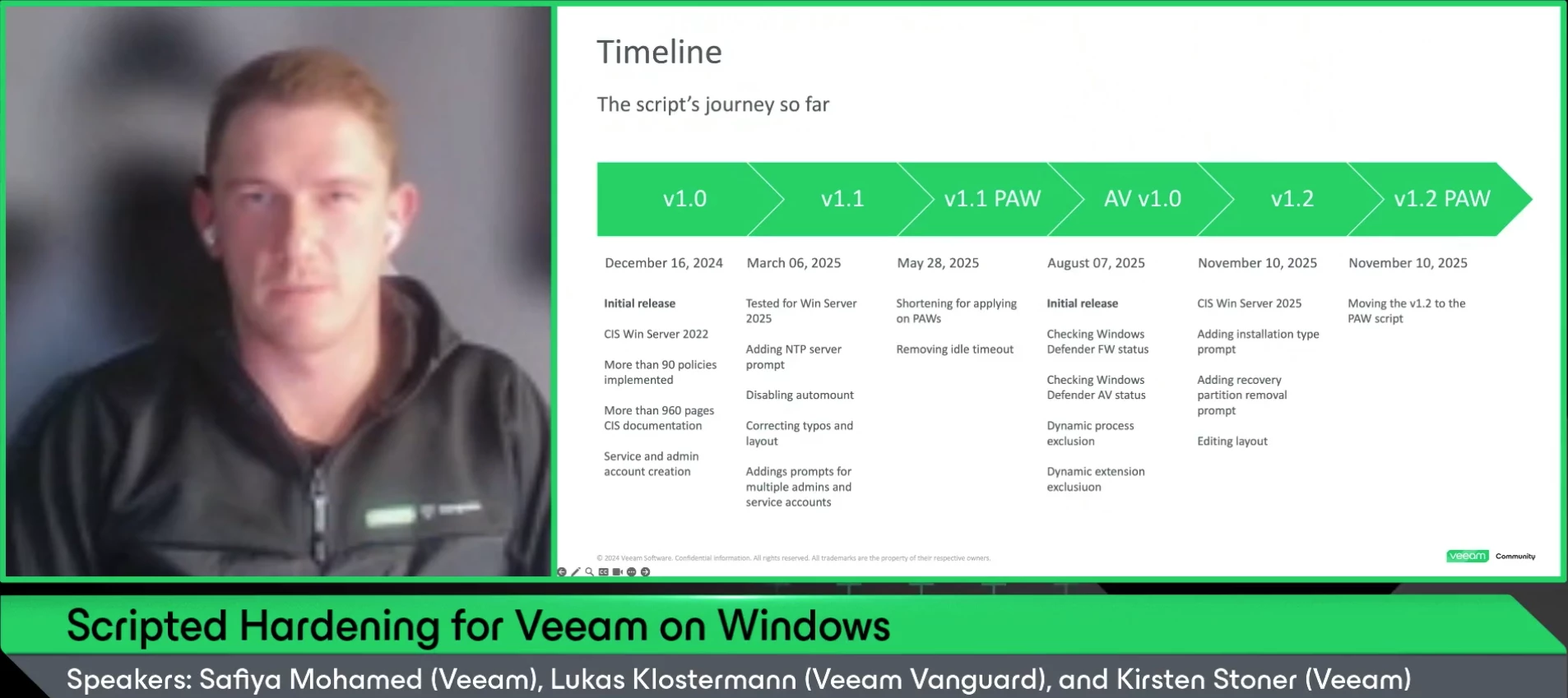
ICYMI We had our 20th V100 Show last Thursday with Veeam Vanguard (and incoming Veeam Employee) @lukas.k How do you bring Windows Server to a solid security baseline - CIS-aligned and tested with Veeam - in just under 5 minutes? ⏲️ In this episode, Lukas shares his field-tested script: secure defaults, Workgroup support, clean rollout for both new and existing installs, plus lessons learned and ready-to-use snippets. He'll also show a live demo and give an overview about his roadmap for further developing the script. Catch the replay below! Thanks @lukas.k @kirststoner12 for joining the show again! We’ll return in a few weeks with our final, special V100 Show of the year. 💫 Stay tuned!
Hi Community, I just keep getting this error on one of my esxii and I am stuck in here. we already tried to troubleshoot the esxii by restarting every servicies and the esxii itself but it is not working. We have 3 other esxii that are just working fine but this one just show this error.NB: We gave an account with max privilege to try the backup Error: Failed to open VDDK disk [[Datastore_DELL_PowerEdge_120] VM-DNS1/VM-DNS1-1-000001.vmdk] ( is read-only mode - [true] ) Logon attempt with parameters [VC/ESX: [192.168.1.170];Port: 443;Login: [xxx];VMX Spec: [moref=vm-32];Snapshot mor: [snapshot-135];Transports: [nbd];Read Only: [true]] failed because of the following errors: Failed to open disk for read. Failed to upload disk 'vddkConnSpec>' Agent failed to process method {DataTransfer.SyncDisk}.
I’m testing several On-Prem S3 Object Backups ( Backing up Object Storage in 12.1) no matter which of the 4 systems I try I get the attached error. All of the systems have “buckets” that Veeam 12.1 has written to, and they have data in them, and are set as repo’s in VBR that I am using for this test. Suggestions? Error is attached - I get it on all of them.
I am having trouble accessing the remaining 3 workstations I don't know where they are I only have 4 workstations here. I am here at the VBR.
Hi, I have a protection group of 8 windows machines. The machines were added to the protection group using their host names. The machines get their ip from a DHCP server. I see that one of the machines, originally with ip 192.168.1.151, is not 192.168.1.155 and is not being backed up. Is there a way to update the protection group for the new ip? Unfortunately, I cannot revert back to the original ip because that ip is now being used by another machine (that’s not part of the protection group).
Hello Everyone,We are using Veeam Data Cloud for Microsoft 365 Flex with a license for 250 users.During the initial setup, we tested with 1 user to validate the configuration. After confirming everything was working properly, we deleted this backup job and created a new policy to protect the actual 250 production users.However, we are still seeing the backup for the original test user, and the license usage shows 251 users consumed, even though our license count is 250.I have a few questions regarding this situation: How can we delete or revoke this test user so that it no longer consumes a license? If we keep the test user without removing it, will this impact production users (e.g., only 249 users protected)? Is there any automatic cleanup or retention process that eventually removes old test accounts from the license count, or must it always be handled manually? Any guidance on how to properly handle this case would be greatly appreciated.Thanks in advance for your support.
Object First storage is used in our main data center.Regional backups are first stored locally, then copied to Object First at the main site using a forever incremental job (using Scale Out repo and Object First configured as capacity tier)Now If full backup data needs to be sent to AWS (e.g., when decommissioning a regional application server), it can be done from the main site through a secondary copy—without using the regional office’s primary copy.
I always having this issue when perform the backup or replication, the virtual machine will create the snapshot and once finish will delete the snapshot. When this activity happen the VM will like stun and loss ping. How can we perform resolve this?
Build new windows (2022) server for Veeam B7R 12.3.2.4165 and imported the config from older server.Since then every backup job has a warning “Sending e-mail report Details: Failed to wait mutex VeeamMailServiceAzureToken: timeout 00:01:00 sec exceeded” Opening options takes sometimes 10 min or more, but when it does I can send test mails successfully.After saving the first backups work with email, after a day its the same error.When opening options sometimes this message appears: I don't know what's wrong here server has plenty of power.Grtz.Bart P.s. old server did not have this problem.
We are getting a VMAStopDrivers error message when trying to uninstall the Veeam Backup & Replication software. We are running from Programs & Features on an account with full admin access to the computer, on Windows 11 Pro v25H2.Trying to update to the most recent version of Veeam (in order to refresh the program files) doesn’t go through, due to the same error message, so stuck in a position with an older version installed (vulnerability) but unable to remove or update
Hello Community, This is a failover cluster setup, and node one is working fine; the second node is having the error below. While taking the DB level backup, including logs being truncated every second? Unable to retrieve next block transmission command. Number of already processed blocks: [173]. Error: bad allocation
Hi,I have a few backups running to a Repository on an NAS, shared by nfs3://[IP ADDX]/Backups/etc…It works fine for my esxi backups. I’m trying too backup a hyper-V VM and and getting the below message. It does succeed in creating as folder in the repository for the packup to go, and the permissions are are same as the others, so I’m not sure what credentials its trying to use since it’s writing to the same place that works for other backup jobs:“… Processing … Error: Failed to reset previous connection exception: Permission deniedFailed to open storage for read/write access. Storage: [target path] ....Agent failed to process method {Stg.OpenReadWrite}. “I’m not sure if this means it can’t read the source or can’t write the target. If the former, what do I have to do because use a local admin to access the source? If the letter, why can this job not write to the repository when other jobs can?Thanks,
Already have an account? Login
Enter your E-mail address. We'll send you an e-mail with instructions to reset your password.