
Bug of updage the Veeam Enterprise Manager to v12.3.2.4165?

  • October 15, 2025
  • 18 comments
  • 529 views

CarySun
Forum|alt.badge.img+7

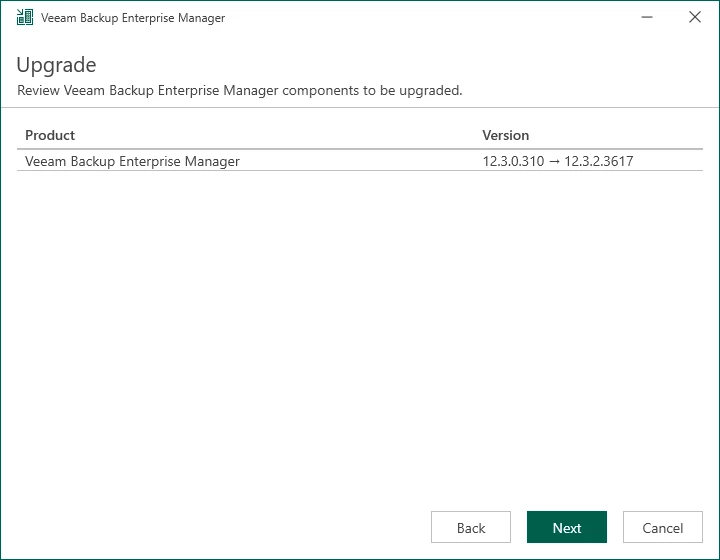
I was trying to upgrade the Veeam Enterprise Manager to v12.3.2.4165, I noticed the version is showing 12.3.2.3617 on the Upgrade page.
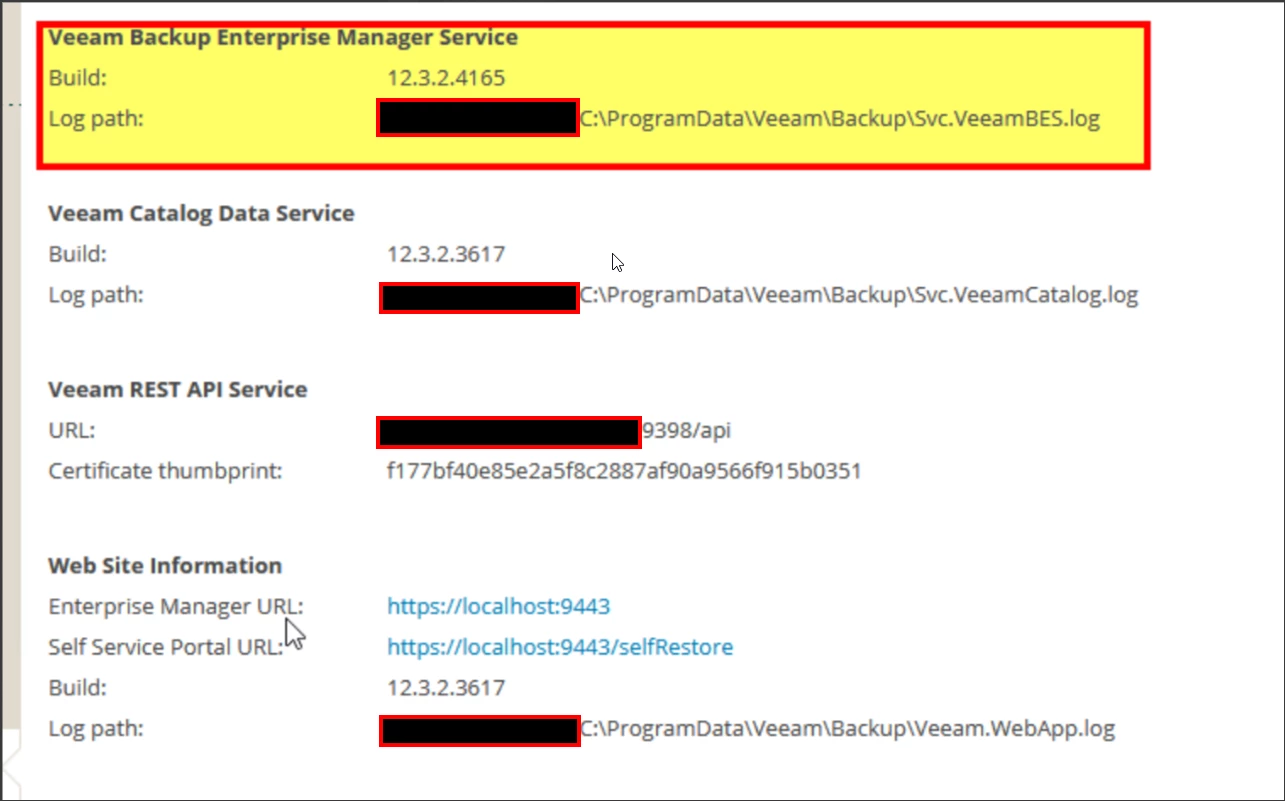
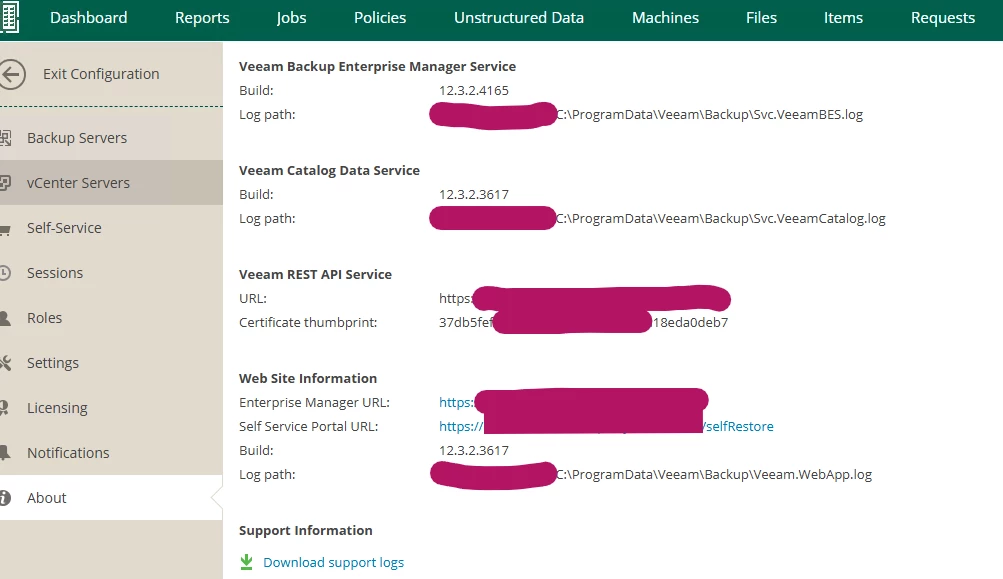
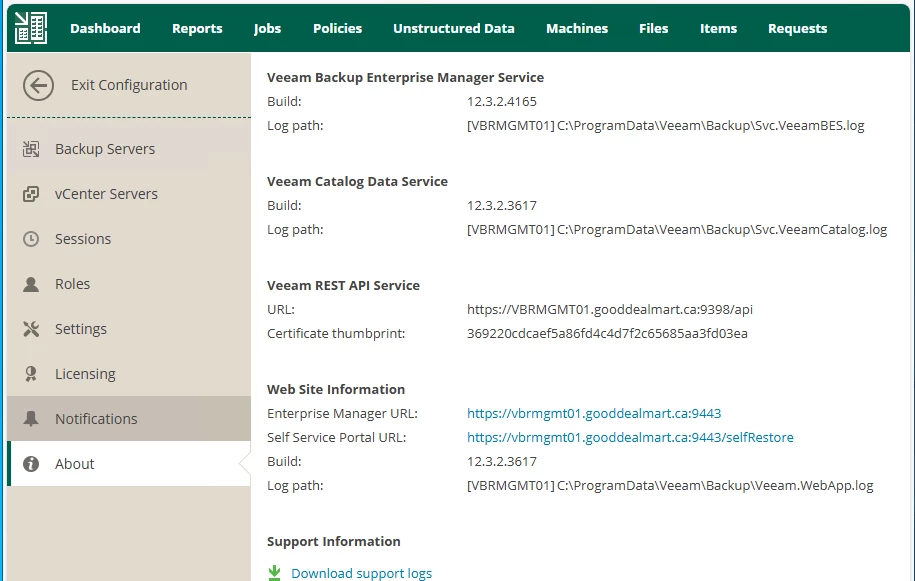
I view detailed information about Enterprise Manager and its components, the Veeam Backup Enterprise Manager Service build: 12.3.2.4165

Veeam Catalog Data Service build:12.3.2.3617

Web Site Information Build: 12.3.2.3617
bugs?

18 comments

Chris.Childerhose
Forum|alt.badge.img+21
  • Veeam Legend, Veeam Vanguard
  • October 15, 2025

To me this should be all the same.  Maybe try an uninstall and reinstall to the same DB as a cleanup.  Otherwise support would be next step.


CarySun
Forum|alt.badge.img+7
  • Author
  • Veeam Vanguard
  • October 15, 2025

To me this should be all the same.  Maybe try an uninstall and reinstall to the same DB as a cleanup.  Otherwise support would be next step.

I know they should be the same. Did you install the 12.3.2.4165 patch on your Veeam Enterprise Manager server? What are they showing? I would like to ensure that before installing the patch on the production Veeam Enterprise Manager server.


coolsport00
Forum|alt.badge.img+21
  • Veeam Legend
  • October 15, 2025

Best bet is to check with Support Cary. At the very least they'll be able to create a bug report. 


Chris.Childerhose
Forum|alt.badge.img+21
  • Veeam Legend, Veeam Vanguard
  • October 15, 2025

To me this should be all the same.  Maybe try an uninstall and reinstall to the same DB as a cleanup.  Otherwise support would be next step.

I know they should be the same. Did you install the 12.3.2.4165 patch on your Veeam Enterprise Manager server? What are they showing? I would like to ensure that before installing the patch on the production Veeam Enterprise Manager server.

Have not yet but we will next week.  I will update then.


Link State
Forum|alt.badge.img+11
  • Veeam Legend
  • October 16, 2025

I was trying to upgrade the Veeam Enterprise Manager to v12.3.2.4165, I noticed the version is showing 12.3.2.3617 on the Upgrade page.

I view detailed information about Enterprise Manager and its components, the Veeam Backup Enterprise Manager Service build: 12.3.2.4165

Veeam Catalog Data Service build:12.3.2.3617

Web Site Information Build: 12.3.2.3617

bugs?

Did you use the patch executable or the full ISO?


Link State
Forum|alt.badge.img+11
  • Veeam Legend
  • October 16, 2025


@CarySun  

There seems to be a problem with the EM update. Using the ISO and exe patch did not upgrade EM, as verified from the web console.


If I use the full ISO, it says that all components are already updated to the latest version.


Using this command results in an update; it is a cosmetic bug.

(Get-Item "C:\Program Files\Veeam\Backup and Replication\Enterprise Manager\Veeam.Backup.EnterpriseService.exe").VersionInfo | 
Select-Object ProductVersion, FileVersion


Chris.Childerhose
Forum|alt.badge.img+21
  • Veeam Legend, Veeam Vanguard
  • October 16, 2025

Just verified myself and as noted is cosmetic but should be reported nonetheless.


waqasali
Forum|alt.badge.img+4
  • On the path to Greatness
  • October 16, 2025

thank you for sharing this. I will check this 


CarySun
Forum|alt.badge.img+7
  • Author
  • Veeam Vanguard
  • October 16, 2025

I was trying to upgrade the Veeam Enterprise Manager to v12.3.2.4165, I noticed the version is showing 12.3.2.3617 on the Upgrade page.

I view detailed information about Enterprise Manager and its components, the Veeam Backup Enterprise Manager Service build: 12.3.2.4165

Veeam Catalog Data Service build:12.3.2.3617

Web Site Information Build: 12.3.2.3617

bugs?

Did you use the patch executable or the full ISO?

As you saw, I tried to upgrade it from previous versions (not 12.3.2), which supports full ISO only.


Link State
Forum|alt.badge.img+11
  • Veeam Legend
  • October 16, 2025

Perhaps some components have simply not been updated here?


Rick Vanover
Forum|alt.badge.img+10
  • RICKATRON
  • October 18, 2025

Have notified PM!


  • New Here
  • November 12, 2025

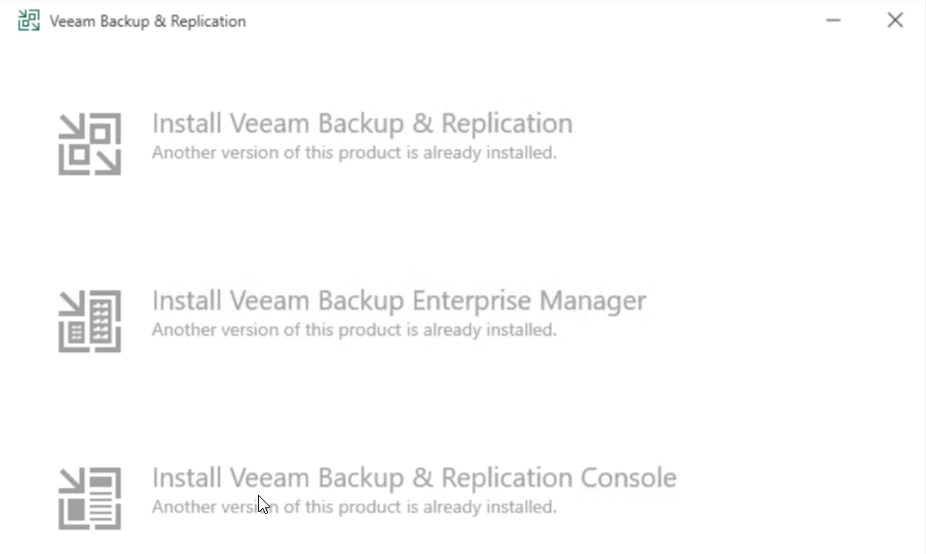
I also had issue -unable to upgrade to v12.3.2.4165 from full ISO
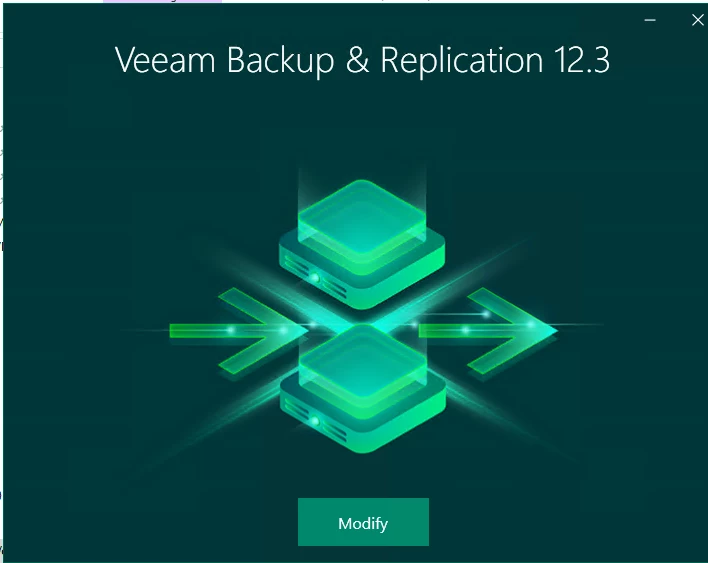
I’m seeing “Modify” instead of “Upgrade”  and I have confirmed that VEM Build: 12.3.2.3617
I’m using VEM and VBR on this server so I need to upgrade VEM first
for other VBRs, the patch is working good. 

I run recommend command as below. 

PS C:\Windows\system32> (Get-Item "C:\Program Files\Veeam\Backup and Replication\Enterprise Manager\Veeam.Backup.EnterpriseService.exe").VersionInfo | Select-Object ProductVersion, FileVersion

ProductVersion FileVersion
-------------- -----------
12.3.2.3617    12.3.2.3617

am i missing something? any advise? 


Chris.Childerhose
Forum|alt.badge.img+21
  • Veeam Legend, Veeam Vanguard
  • November 12, 2025

I also had issue -unable to upgrade to v12.3.2.4165 from full ISO
I’m seeing “Modify” instead of “Upgrade”  and I have confirmed that VEM Build: 12.3.2.3617
I’m using VEM and VBR on this server so I need to upgrade VEM first
for other VBRs, the patch is working good. 

I run recommend command as below. 

PS C:\Windows\system32> (Get-Item "C:\Program Files\Veeam\Backup and Replication\Enterprise Manager\Veeam.Backup.EnterpriseService.exe").VersionInfo | Select-Object ProductVersion, FileVersion

ProductVersion FileVersion
-------------- -----------
12.3.2.3617    12.3.2.3617

am i missing something? any advise? 


Not missing anything as the upgrade should work.  Maybe a support ticket to see if they see anything out of the ordinary?


waqasali
Forum|alt.badge.img+4
  • On the path to Greatness
  • November 12, 2025

thank you for sharing this. I will check this 


I have successfully upgraded to the latest version with zero errors.


  • New Here
  • December 4, 2025

Hi,

I have the same issue.

Veeam Backup Enterprise Manager Service: 12.3.2.4165

Veeam Catalog Data Service: 12.3.2.3617

Web Site Information: 12.3.2.3617


Update of Enterprise Manager and then Veeam did not work.

The only option in the ISO was modify.

The patch zip file did work, but now there are different versions exactly like on the screenshot from waqasali.


Is this ok or should I open a case?


Thanks and regards!


Chris.Childerhose
Forum|alt.badge.img+21
  • Veeam Legend, Veeam Vanguard
  • December 4, 2025

Hi,

I have the same issue.

Veeam Backup Enterprise Manager Service: 12.3.2.4165

Veeam Catalog Data Service: 12.3.2.3617

Web Site Information: 12.3.2.3617


Update of Enterprise Manager and then Veeam did not work.

The only option in the ISO was modify.

The patch zip file did work, but now there are different versions exactly like on the screenshot from waqasali.


Is this ok or should I open a case?


Thanks and regards!

This is a cosmetic bug in the UI.  Nothing to be concerned over or open a case for.  v13 fixes it.


  • New Here
  • December 4, 2025

Hi,

I have the same issue.

Veeam Backup Enterprise Manager Service: 12.3.2.4165

Veeam Catalog Data Service: 12.3.2.3617

Web Site Information: 12.3.2.3617


Update of Enterprise Manager and then Veeam did not work.

The only option in the ISO was modify.

The patch zip file did work, but now there are different versions exactly like on the screenshot from waqasali.


Is this ok or should I open a case?


Thanks and regards!

This is a cosmetic bug in the UI.  Nothing to be concerned over or open a case for.  v13 fixes it.


Thanks for making things clear!


  • New Here
  • December 4, 2025

Another question:


The update order with the ISO is:


  1. Enterprise Manager
  2. Veeam


The setup routine from the patch .zip did not ask what to update first.

Anything I should do or is it just fine?


Thanks.