
Question

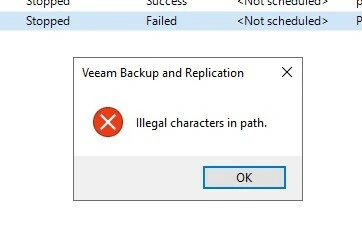
Illegal characters in path message in surebackup job

  • December 3, 2025
  • 7 comments
  • 24 views

hello


Hi, can you help me please? I have a problem with a SureBackup job in Veeam version 12.3.2.4165. When creating a script, I entered an invalid character, and Veeam let it through, but I can't delete, modify, or disable the job. I've already entered several scripts via PowerShell, but it won't delete the job. Any ideas on how I can delete it?



7 comments

Tommy O'Shea
Forum|alt.badge.img+5
  • Veeam Legend
  • December 3, 2025

Do you have a configuration backup that was taken prior to this? Restoring that is probably the easiest way to fix this problem.

Beyond that, I would reach out to Veeam support who can help you by going into the database and removing the offending job. (Do not attempt to do this on your own without the assistance of Veeam support)


Chris.Childerhose
Forum|alt.badge.img+21
  • Veeam Legend, Veeam Vanguard
  • December 3, 2025

Did you try using Powershell to remove the job instead of the console?  That is the only other way I can think of and if that does not work either then Support is the next best route to try.

Tommy's option of config backup restore works too but try PS first.


  • Author
  • Not a newbie anymore
  • December 3, 2025

Do you have a configuration backup that was taken prior to this? Restoring that is probably the easiest way to fix this problem.

Beyond that, I would reach out to Veeam support who can help you by going into the database and removing the offending job. (Do not attempt to do this on your own without the assistance of Veeam support)

The backup location only contains one .bco file; there are no others, and the backup is active.

  • Author
  • Not a newbie anymore
  • December 3, 2025

Did you try using Powershell to remove the job instead of the console?  That is the only other way I can think of and if that does not work either then Support is the next best route to try.

Tommy's option of config backup restore works too but try PS first.


The job is to create a secure backup; it does not have a backup of that configuration or repository, only of others.


Chris.Childerhose
Forum|alt.badge.img+21
  • Veeam Legend, Veeam Vanguard
  • December 3, 2025

Then I would suggest you open a support ticket to troubleshoot the issue if configuration backup restore or PowerShell do not work for the situation.


AndrePulia
Forum|alt.badge.img+9
  • Veeam Vanguard
  • December 3, 2025

@Eduardo Nolasco I think the ticket will be the best option!


  • Author
  • Not a newbie anymore
  • December 3, 2025

Veeam software shouldn't have allowed that character or those characters to pass through, or at least it should be possible to remove them without opening a case that's just my opinion.





