

Answer

Backup Job using Storage Snapshot Unable to Find Ontap SnapMirror Relationship for Secondary Target

  • October 27, 2025
  • 14 comments
  • 100 views

Forum|alt.badge.img+1

Backup Job using Storage Snapshot Unable to Find Ontap SnapMirror Relationship for Secondary Target.


Backup finished with Warning: Cannot find any relevant ONTAP SnapMirror and SnapVault relationships  
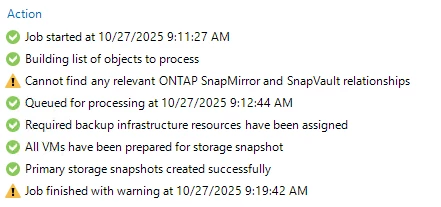
 

Storage Replication between the Source and Target destinations is working. I was looking at the job log and saw that Veeam was able to identify Primary SnapProtections. 



There were lines showing WARNING: Replication of all disk snapshots of vm asdasdfasf is not possible for ‘Snapshot Replication’.


Thanks again for your input as to possible reasons why this is happening. 

 

Best answer by spider32

Instead of using snapmirror, Veeam support advised to use snapvault. Prior to using the snapvault our SAN engineer created data protection policies on the NetApp side so that snapvault can be used. 


14 comments

MatzeB
Forum|alt.badge.img+5
  • Veeam Vanguard
  • October 27, 2025

Hey, here are some typical steps...


- make sure source and destination storage Systems are added to veeam

- issue "snapmirror list-destination" on source system. If you See the relation there veeam should also

- which replication type do you use? I recommend to configure "Snapvault" in Veeam. On destination side create a Snapvault policy, because a snapvault policy could never be without rule simply create one with Snapmirror Label "Veeam" With retention of 1

- does manual Snapmirror Update work? In worst case make a Snapmirror update with the Parameter - source-snapshot and select a snapshot thats newer than the last one on destination. 


With this Snapmirror should work. 


Just to provide you more hints for maybe your next issue. Please mount volume, configure nfs, attach Export policy and create lif in destination. I always tell my customer configure it like your prod datastore. Also veeam needs a connection to nfs network to detect content and be able to apply retention correctly. 

Thats true for nfs...if you use other protocols you need to adjust. 


Matze


Chris.Childerhose
Forum|alt.badge.img+21
  • Veeam Legend, Veeam Vanguard
  • October 27, 2025

There is a KB for NetApp on Version 11 of Veeam but might still apply - https://kb.netapp.com/on-prem/ontap/DP/SnapMirror/SnapMirror-KBs/Veeam_cannot_find_SnapMirror_relationship

You need an account to login and see the article though.


coolsport00
Forum|alt.badge.img+21
  • Veeam Legend
  • October 28, 2025

@spider32 - Hi Spider...not sure how long ago you configured Netapp to use the secondary storage, but maybe you need to simply rescan your VBR-connected arrays? It should happen daily (iirc...don’t remember the exact timeframe), but sometimes manual rescans for array changes need to occur. I don’t use Netapp specifically...rather Nimble...but I had an issue after I made a change and had to rescan my storage arrays.

Let us know how it goes.

Best.


Forum|alt.badge.img+1
  • Author
  • Influencer
  • October 28, 2025

I followed the steps in  https://kb.netapp.com/on-prem/ontap/DP/SnapMirror/SnapMirror-KBs/Veeam_cannot_find_SnapMirror_relationship but did not work.


I also rescanned a couple of times but also did not work. 


Snapmirror is working that is why we are trying to use this instead of creating Snapvault. I will try a different volume with a different snapmirror policy and see if that works. 


Thanks for all your inputs.


coolsport00
Forum|alt.badge.img+21
  • Veeam Legend
  • October 28, 2025

May have to get ahold of Support Spider...unless others have another suggestion.


Chris.Childerhose
Forum|alt.badge.img+21
  • Veeam Legend, Veeam Vanguard
  • October 28, 2025

Let us know how it goes but I agree with Shane about contacting support as the final step to see what might be happening in your environment.


Forum|alt.badge.img+1
  • Author
  • Influencer
  • October 31, 2025

Yes, I did open a support ticket. So far, we just added a reg entry for more verbosity as far as Netapp api calls are concerned. Sent the support logs and waiting for next steps. 

Thanks!


coolsport00
Forum|alt.badge.img+21
  • Veeam Legend
  • October 31, 2025

Ok..thanks for the update Spider 


Forum|alt.badge.img+1
  • Author
  • Influencer
  • November 7, 2025

Support still looking…..


Chris.Childerhose
Forum|alt.badge.img+21
  • Veeam Legend, Veeam Vanguard
  • November 7, 2025

Support still looking…..

Looking forward to the outcome and hopefully you getting this resolved.


coolsport00
Forum|alt.badge.img+21
  • Veeam Legend
  • November 7, 2025

Thanks for the update....let us know what they find out when you get a resolution. 


Forum|alt.badge.img+1
  • Author
  • Influencer
  • Answer
  • December 2, 2025

Instead of using snapmirror, Veeam support advised to use snapvault. Prior to using the snapvault our SAN engineer created data protection policies on the NetApp side so that snapvault can be used. 


Chris.Childerhose
Forum|alt.badge.img+21

Instead of using snapmirror, Veeam support advised to use snapvault. Prior to using the snapvault our SAN engineer created data protection policies on the NetApp side so that snapvault can be used. 


Glad you got the issue resolved.


coolsport00
Forum|alt.badge.img+21
  • Veeam Legend
  • December 2, 2025

Thanks for sharing what worked for you Spider 👍🏻



