Join discussions around Veeam community projects, Veeam events, industry and technology news
Recently active
veeam console on remote server unable to open when click sign in without any error or activity
Good morning everyone.Our company has just installed Veeam version 12.To save databases we use the MSSQLRecoveryManager.exe executable.However, we don't understand how to exclude databases that are Offline. Thanks in advance. Claudio
Hi All,Unable to install the veeam agent to a windows server, this was working earlier.The service status is as below on the affected VMPS C:\Windows\system32> Get-Service *Veeam* Status Name DisplayName------ ---- -----------Running VeeamDeploySvc Veeam Installer ServiceStopped VeeamEndpointBa... Veeam Agent for Microsoft WindowsRunning VeeamTransportSvc Veeam Data Mover Service We have killed the msi and veeam services, uninstalled the veeam agents from control panel - cannot find the veeam agent for windows in the control panel though, restarted the server, still the status remains same. Kindly advise.
Please help me with this problemFailed to connect to backup server: Server Veeam Backup Server Certificate certifikate is not trusted
Hi Community. I am unable to resolve the above referenced issue. This happened after an update to v13. After the install, it worked for 2-3 days. I then started to configure my tape infrastructure and when I finished, I was prompted to reboot the server. Now I can’t get back into the console. Any help would be greatly appreciated.
I'm using Veeam Backup & Replication Community Edition 13.1.1.18 in a home lab with Veeam Agent for Microsoft Windows 13.1.1.700.I'm seeing extremely poor performance with physical Windows Agent jobs configured as:Server -> Managed by backup server -> Veeam backup repositoryThe problem reproduces on multiple physical Windows PCs.The same machines perform normally when configured as:Server -> Managed by agent -> Shared folderThe difference is enormous.Example managed-by-backup-server test:- Destination was a LOCAL NVMe repository on the VBR server- Approximately 49 GB read- Approximately 30 GB transferred- Duration: approximately 4 hours 16 minutes- Average processing rate: approximately 3 MB/s- Veeam reported Network as approximately 99% of the bottleneckThe transfer frequently drops into the hundreds of KB/s or even tens of KB/s, with occasional short bursts of normal/high throughput.I specifically tested a local NVMe repository to eliminate the NAS/SMB repository path
Hi,I’m working with MongoDB backups, and everything was going well until the restoration part.I was able to test all the restore options except: Restoring multiple collections to a point in time Publishing the instance I’m not sure why these two aren’t working. Has anyone faced the same issue before?
I’m facing an Active Directory security audit, and the account used for the backup job generate a discussion.If i’m correct the account used must me member of builtin\administrator group, and the security team do not like at all that the password is set as never expire.i’ve already implemented that the account cannot be used for interactive login, but it is not considered “enough”So i’m trying to echange my posture without breaking the restore functionality, and i’m evaluating several option:The Veeam Server in in a workgroup and in a segmented network.1) do not do application aware and use only the vmware tools.it seem that the backup of AD is done in a correct wayPS C:\Windows\system32> repadmin /showbackupRepadmin: running command /showbackup against full DC localhostLoc.USN Originating DSA Org.USN Org.Time/Date Ver Attribute======= =============== ========= ============= === =========DC=DomainDnsZones,DC=intrane
Today, I built a new Veeam environment using Veeam Backup & Replication 13.1 with oVirt KVM Plugin 13.8.0.395.When deploying the OLVM worker, the worker deployment completed successfully. However, the worker's network was not working afterward:Veeam could not retrieve the worker's IP address information. The worker could not be pinged from the Veeam server. The worker appeared to be deployed successfully in OLVM, but there was no functional network connectivity.To troubleshoot, I downgraded the environment to:Veeam Backup & Replication 13.0.3.63 oVirt KVM Plugin 13.7.3.63After the downgrade, I redeployed the OLVM worker using the same OLVM/network configuration, and everything worked as expected. The worker obtained an IP address, Veeam was able to detect it, and network connectivity was working normally.This makes me suspect there may be a compatibility issue or regression in Veeam 13.1 / oVirt Plugin 13.8.0.395 related to OLVM worker networking.
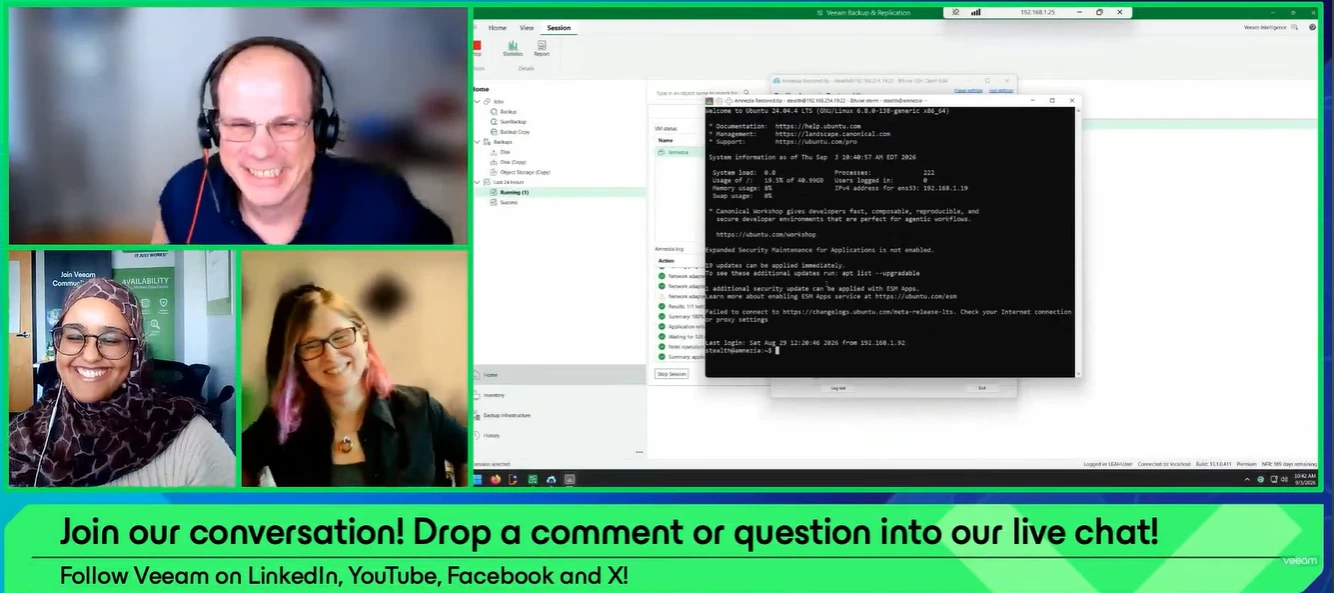
The proof is in the pudding! Yesterday, the September episode of the Veeam 100 Show aired: Proof, Not Hope: Validating Recovery with Veeam SureBackup. Thank you to @NicBackup for joining, and to @Rin for co-hosting 🤗If you missed the show or want to rewatch, catch it below ⬇ Overview:How do you know your backups will recover when you need them most? Join us for a quick look at Veeam SureBackup and how it automatically validates backup recoverability in an isolated lab environment. We'll walk through the fundamentals, build a SureBackup lab live, and demonstrate connecting directly to a machine running from backup. What you'll learn:Verify backup recoverability with automated SureBackup testing. Build and launch a SureBackup virtual lab in a live demo. Connect to and validate a workload running directly from backup.📖 Read Nico’s blog on Veeam Surebackup: https://nicostein.com/proof-not-hope-validating-recovery-with-veeam-surebackup/
Hi everyone,I am surprised that I could not find anything regarding this topic.Here is the situation :I have no issue adding a vCenter server in the console.But when Veeam does the volume discovery, I get the warning in the title. In the screenshot it show up for two hosts actually.The ESXi hosts belong to the same datacenter under that same vCenter.Weirdly, as you can see in the screenshot, the next steps is successful.I tried to edit the vCenter object to see if it would prompt me to accept an untrusted certificate, but nothing appears.Also I tried to edit the properties of the ESXi objects but still no prompt to accept certificates.Does anyone have an idea about what is happening and how to fix this issue ?Best regards
Hi Everyone, I installed Veeam 13.1 on Windows Server 2022 without joining an AD domain and in an environment without internet access. I used IP addresses when adding the PVE9.2, but when I deployed the workers, the installation failed with the error “Veeam Updater is unavailable.” Later, I set up DNS forward and reverse lookups for the PVE and worker IPs, but the same error persisted. I unchecked the “Check for updates online” option for the workers.Does Veeam require an internet connection for the worker to install packages? Translated with DeepL.com (free version)
I am in need of some assistance from the community with Veeam Backup & Replication. I upgraded the server to 13.0.1.2067. No errors were thrown during the upgrade, logs don’t show any red flags that stick out; however the service hangs when attempting to access the localhost database server.Here is what I see:When the Veeam console is run, the “Specify backup server” page appears:After the localhost database is selected, the next window appears: The console goes no further than this, and the system doesn’t show any signs of activity. All services show as running on the server:I also tried updating .NET 8 dependencies to newer versions in case these were what may be causing the issue, but there was no change in results. I have attempted to upgrade this application twice with little success. As of now, I may need to revert back to the older version and try again, which may lead me back to here.Has anyone else encountered this when upgrading to 13.0.1.2067? If so, how was it remediate
Hello Community, Sharing an update that Veeam announced about production license distribution. This will matter for anyone who handles orders or helps customers access their license files. What’s changingStarting December 4, 2025, production license files will no longer be sent as attachments in order confirmation emails.This includes purchases through the online store, public marketplaces, and distributor marketplaces.Going forward, the designated license administrator for the customer will need to download the production license directly from the My Account portal under Production Licenses.Trial and NFR licenses are not affected. Why this matters• Improves security and keeps license access tied to the right admins• Makes it easier for customers to retrieve licenses in one place• Partners need to make sure the correct customer license admin is specified on every order or the customer may not see their license in the portal Figured this would be helpful for the community since many of
Hi. We followed the Veeam documentation to install the IBM AIX agent in "pre-installed agent" mode, but we later realized it could also work within an "individual computer" protection group. We believe the latter approach is better because the pre-installed agent method requires manually triggering synchronization on the AIX host or waiting up to six hours for it to occur. I found a Veeam article explaining how to migrate between protection group types, which I’ve included at the end of this message.The agent—version 13—has just been installed; we used the XML file provided by the Veeam console, and the connection was successful. Since we prefer the "individual computer" method, and I believe moving it avoids the need to revert to standalone mode (allowing everything to be managed from the console), could you please confirm that this procedure works as expected? I’d like to proceed with this change.Here is the link:https://helpcenter.veeam.com/docs/vbr/userguide/agents_protected_comput
Hi everyone. I have a question: I want to upgrade from Veeam 12.3.2.4854 to Veeam 13.0.3.63. However, I have an immutable repository running on RHEL 10.2; as you know, the SSH port is disabled. Since the new version needs to be applied to the components on the immutable repository, is it necessary to enable port 22, or can the upgrade proceed even with that port disabled? I hope that makes sense.
I enabled MFA for login and if I login from veeam server then I asked to enter the MFA every I open the console.If i login from veeam console from my laptop then i’m only asked to enter the MFA when 1st time connect to the server. After that even i already reboot my laptop then i never asked to enter the MFA again.
I just want to confirm if my understanding is correct.Lets say my veeam managed oracle rman plugin backup has this configuration:control_file_record set to 30 days.rman retention is set to 30daysveeam retention is set to 30 days.I also send the veeam backup to that offsite location, with retention period of 1 year.If I want to restore my database to 1 year ago, and rman and veeam repository already deleted the metadata, so is this the step:copy the backup from offsite back to repository (.vab, .vasm, .vacm) (should I replace the .vacm?) rescan the repository, then it will show under DISK (IMPORTED), will I be able to restore the control file to 1 yr ago now? Or do I need to run --remap backup first ? will the RMAN channel for this old backup files be different from the current one?thanks
Hi All, I want to use Veeam 13.1.0.411 for Windows.When I try to add the Veeam Infrastructure Appliance as a handheld repository, it fails.
Hello. I have installed the newly released version 13 of the software appliance. I also have a Synology DS923+ NAS. Both devices are separate and are not added to any domain. Could you please advise me on the safest way to connect this NAS to the newly released appliance? I tried to connect to the SMB share, but I am getting Kerberos errors. I have version 12 installed on Windows Server, and the connection works there. Now I am testing the appliance and encountering connection problems. Thank you in advance for your help.
Hi everyone, i’ve been having this problem for a while now…Email notifications after backup completion are not being sent anymore to the specified email address, but when i test the credentials the email arrives successfully to my email account. I’m using the Veeam Agent 5.0 on a windows server 2012 r2. No veeam B&R is implied, just the agent making backups to a local disk.Additional informations:i recently changed the email server for the email account, before changing it everything was fine and the backup emails arrived, so at a first glance it seemed a problem with the email server; but i made a clean installation of veeam agent 5.0 on another server, using the same credentials, and the emails for the backup job are arriving regularly; so this excludes the fact that it may be a problem of the new email server(and also the fact that the email tests arrive without any problem).So i thought this may be a problem related to some veeam files regarding the old installation, so here’s
I just upgraded Veeam B&R from 12.3 to 13.1 and everything appears to have gone smoothly, with all components being upgraded without issue. The only problem we have is that we are notified each morning with a Software Update Summary email that our Veeam server ‘VBR’ Failed to synchronize update settings. Error: Failed to connect to the Veeam updater service.I was wondering if anyone is familiar with this error and how to resolve? Going through some steps online, I have verified the Veeam Updater service is running, backups are working, SQL connectivity and internet/DNS is working. Tried restarting service as well as a server reboot. Only the scheduled update-settings sync task is failing.My next step was going to be mounting the ISO and trying to repair the program, but wondering if anyone may know how to resolve this before I go that route. Everything else seems to be working just fine, so hoping to avoid a full reinstall. Thanks!
Hi All,I am new the the community and fairly new to Veeam and was wondering if anyone would mind sharing their own opinions and/or pitfalls experienced using the Inline Entropy Analisis feature?My organization uses Veeam for Vsphere backup and DR and I have been asked to gather information prior to using in production. I sounds great but from what I’ve read so far it has its limitations. Has anyone experienced any performance issues with backups or any other gotchas? Have you found the feature useful? Any feedback would be greatly appreciated.Thank you!
We’re having a major tape library issue with one of our clients. Do you perhaps have any ideas or solutions to suggest?(I’ve already asked the AI about this, but it didn’t help.)In their Veeam Backup & Replication environment, our client originally had four libraries:- Scalar i3-i6 03255- Scalar i3-i6 03256- Scalar i3-i6 305G- Scalar i3-i6 341G (Offline)I updated the Scalar i3-i6 03256 and Scalar i3-i6 03255 libraries at Quantum’s request following an incident involving one of the drives.Once the update was complete, Veeam took the Scalar i3-i6 03256 library offline and changed the status of the Scalar i3-i6 341G library—which had been offline—to bring it back online. Veeam thus reversed their statuses.I opened a ticket with Veeam Support, but I’m unable to provide them with the log bundles via SFTP (the file is empty every time, even though I verify that it isn’t before closing the connection), and they’re referring me to the standard documentation for tape libraries.
Hello Veeam Community!I’m thrilled to write my first post here and what better topic than the big news that just dropped? For those who haven’t heard yet, Veeam have officially acquired Object First! 🎉 As someone who’s been working with Object First’s immutable storage solution a few month at G0T0, I can confidently say: this is a game-changer for data protection, and here’s why. 🔍 Why This Acquisition MattersObject First isn’t just another backup appliance—it’s purpose-built for immutability, designed to eliminate ransomware risks and simplify compliance. At G0T0, we’ve been deploying them for our clients, and the results speak for themselves: ✅ True Immutability Out of the BoxNo misconfigurations (the #1 cause of failed restores).Hardware-enforced immutability (not just software-based). ✅ Blazing-Fast DeploymentPre-optimized for Veeam, so setup takes minutes. ✅ Cost-Effective & PredictableNo hidden licensing fees or undesirable maintenance surprises. 🚀 What This Means for the
Already have an account? Login
Enter your E-mail address. We'll send you an e-mail with instructions to reset your password.