Solved

Error when logging into console after upgrade: "Failed to retrieve user account information"

  • January 20, 2026
  • 14 comments
  • 258 views

Tommy O'Shea
Forum|alt.badge.img+5

I’m getting the below error after upgrading Veeam servers from v12 to the latest release of v13. It’s a windows based install of Veeam, and it is connected to a (dedicated to Veeam only) AD domain.

My user has local administrator permissions, Veeam Backup Administrator permissions, and MFA disabled for testing/troubleshooting purposes. The is happening across each of the Veeam v13 servers I have on the domain.

It is only happening for mine and one other engineer’s user accounts, but other engineer’s accounts are not affected. We are all in the same AD groups so permissions are the same.

I have tried removing Veeam Backup Administrator permissions from my account, rebooting, and re-adding, to no effect.

Has anyone seen this before? Any suggestions for what else to check? In the meantime I have a case open with Veeam support, and hoping they can come up with something.
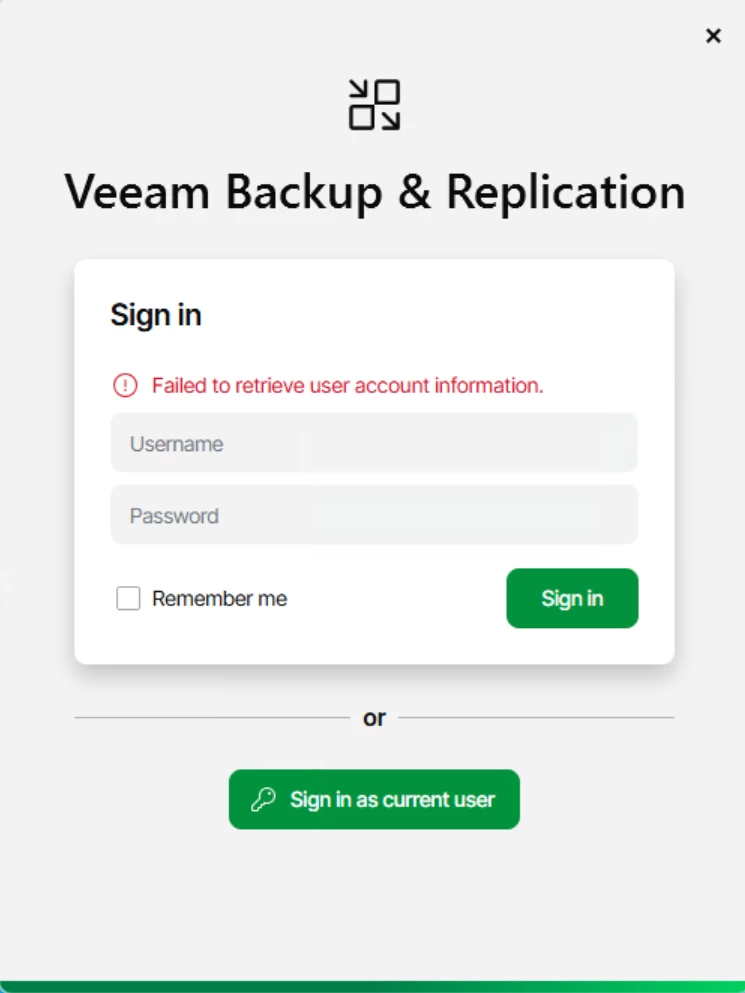
Relevant logs:

[19.01.2026 21:07:36.194]   <126>   Error (1)    Veeam.Backup.IdentityService.Shared.CSystemAccountProvider [TraceId: '400000e0-0024-fb00-b63f-84710c7967bb'] Unable to get user S-1-5-21-████-████-████ (SID redacted)
identity from account

[19.01.2026 21:07:36.194]   <126>   Error (1)    Veeam.Backup.Identity.Server.GssEndpoint [TraceId: '400000e0-0024-fb00-b63f-84710c7967bb'] Could not get identity after success authentication for
'DOMAIN\Username'


Best answer by Tommy O'Shea

Veeam support just got back to me asking if my account’s userPrincipalName attribute was set in AD or was empty. ​@Chris.Childerhose checked for me, and it was indeed <not set>. 

Once we corrected that, I was able to log into the Veeam server again.

What’s interesting is that I had no problem logging into v12 server like this, only v13. Perhaps v13 has a requirement for that attribute to be set. 

14 comments

CMF
Forum|alt.badge.img+8
  • Veeam Legend
  • January 20, 2026

Hi ​@Tommy O'Shea,

Could it be that there is an issue with the user itself? Otherwise it would not make any sense if all the other users are still working fine. 

Have you tried to recreate the User?


lukas.k
Forum|alt.badge.img+13
  • Influencer
  • January 20, 2026

Hi ​@Tommy O'Shea,

Have you review this article already? https://helpcenter.veeam.com/docs/vbr/userguide/kerberos_authentication.html?ver=13


I’d recommend trying to re-join your Veeam server to the domain, maybe somethings got lost during the process of the upgrade.

In case you don’t have access anymore (with any account), you should reach out to Veeam support to troubleshoot this.


Best

Lukas


Forum|alt.badge.img+3
  • Comes here often
  • January 20, 2026

@Tommy O'Shea what’s the user name? Or more specifically, does it have a $ in the name or some other special character?

I’m aware of an issue where some special characters ($ is one I remember) can cause this

Even if it’s not using special characters, open a Support case and let them review.

Looks like the auth ended up working, but Identity Service couldn’t handle it for some reason based on the last line.


Link State
Forum|alt.badge.img+11
  • Veeam Legend
  • January 20, 2026

Hi ​@Tommy O'Shea 


Hello, please try these tests:

1) Have you verified that the Veeam server reaches the Domain\Domain controller\DNS on the TCP ports?
2) It seems to be a Check SID resolution issue. Have you accidentally deleted and recreated the domain account used by Veeam?
3) Is the username the same? Is the password correct? 
 Try removing the domain account from the Local Administrator group and close the console. Restart the services

Restart-Service VeeamBackupSvc  Restart-Service VeeamBrokerSvc


Add the domain user back to the Local Administrator group and assign the Backup Administrator rule


Check the SID  wmic useraccount where sid="S-1-5-21-XXXXXXXXXX" get name,domain
Check the domain user you use to log in to the Veeam server whoami /user
Test the correct domain resolution: nltest /dsgetdc:YOURDOMAIN

Let me know


coolsport00
Forum|alt.badge.img+21
  • Veeam Legend
  • January 20, 2026

Hmm..weird behavior there. Curious what Support finds Tommy.


Chris.Childerhose
Forum|alt.badge.img+21
  • Veeam Legend, Veeam Vanguard
  • January 20, 2026

Hi ​@Tommy O'Shea,

Have you review this article already? https://helpcenter.veeam.com/docs/vbr/userguide/kerberos_authentication.html?ver=13


I’d recommend trying to re-join your Veeam server to the domain, maybe somethings got lost during the process of the upgrade.

In case you don’t have access anymore (with any account), you should reach out to Veeam support to troubleshoot this.


Best

Lukas

This is not necessary because my account and others work on the Veeam server (I work with Tommy).  So it is not a domain join issue.


Chris.Childerhose
Forum|alt.badge.img+21
  • Veeam Legend, Veeam Vanguard
  • January 20, 2026

@Tommy O'Shea what’s the user name? Or more specifically, does it have a $ in the name or some other special character?

I’m aware of an issue where some special characters ($ is one I remember) can cause this

Even if it’s not using special characters, open a Support case and let them review.

Looks like the auth ended up working, but Identity Service couldn’t handle it for some reason based on the last line.

There are no special characters in the usernames we use.  I am the one that set up the new domain for our Veeam servers and worked on all this so it should be good. 😁

We will wait on the current support case to see what is going on.


Tommy O'Shea
Forum|alt.badge.img+5
  • Author
  • Veeam Legend
  • January 20, 2026

Hi ​@Tommy O'Shea,

Could it be that there is an issue with the user itself? Otherwise it would not make any sense if all the other users are still working fine. 

Have you tried to recreate the User?


I’d rather not recreate the user at this stage, since it seems more like it’s authenticating fine, just Veeam can’t find the association between the AD account and the Veeam database. I don’t want this cropping up later and affecting other users. Like Chris said, hopefully Veeam support comes back with a fix for the identity error.

I was just wondering if anyone else had seen this specific error message already.


Tommy O'Shea
Forum|alt.badge.img+5
  • Author
  • Veeam Legend
  • Answer
  • January 20, 2026

Veeam support just got back to me asking if my account’s userPrincipalName attribute was set in AD or was empty. ​@Chris.Childerhose checked for me, and it was indeed <not set>. 

Once we corrected that, I was able to log into the Veeam server again.

What’s interesting is that I had no problem logging into v12 server like this, only v13. Perhaps v13 has a requirement for that attribute to be set. 


Chris.Childerhose
Forum|alt.badge.img+21
  • Veeam Legend, Veeam Vanguard
  • January 20, 2026

Veeam support just got back to me asking if my account’s userPrincipalName attribute was set in AD or was empty. ​@Chris.Childerhose checked for me, and it was indeed <not set>. 

Once we corrected that, I was able to log into the Veeam server again.

What’s interesting is that I had no problem logging into v12 server like this, only v13. Perhaps v13 has a requirement for that attribute to be set. 

I am guessing the UPN is needed in v13 for some reason.  I already have a PowerShell script to fix any other users we find too.  😋


Forum|alt.badge.img+3
  • Comes here often
  • January 20, 2026

Veeam support just got back to me asking if my account’s userPrincipalName attribute was set in AD or was empty. ​@Chris.Childerhose checked for me, and it was indeed <not set>. 

Once we corrected that, I was able to log into the Veeam server again.

What’s interesting is that I had no problem logging into v12 server like this, only v13. Perhaps v13 has a requirement for that attribute to be set. 

Ah, funny :) Support had asked me about this very thing, I didn’t realize they were talking about your case.

Yes, Veeam has a check right now to retrieve the userPrincipalName property from AD -- I’m not an AD / Kerberos expert, but seems we expect it to be there. 

I’ll bring it up internally and confirm it’s required, and we’ll add it to the User Guide.


Chris.Childerhose
Forum|alt.badge.img+21
  • Veeam Legend, Veeam Vanguard
  • January 20, 2026

Veeam support just got back to me asking if my account’s userPrincipalName attribute was set in AD or was empty. ​@Chris.Childerhose checked for me, and it was indeed <not set>. 

Once we corrected that, I was able to log into the Veeam server again.

What’s interesting is that I had no problem logging into v12 server like this, only v13. Perhaps v13 has a requirement for that attribute to be set. 

Ah, funny :) Support had asked me about this very thing, I didn’t realize they were talking about your case.

Yes, Veeam has a check right now to retrieve the userPrincipalName property from AD -- I’m not an AD / Kerberos expert, but seems we expect it to be there. 

I’ll bring it up internally and confirm it’s required, and we’ll add it to the User Guide.

Thanks David.  Seems it was not required in v12 but is in v13.


coolsport00
Forum|alt.badge.img+21
  • Veeam Legend
  • January 20, 2026

Ok...well Veeam using the UPN for AD accounts makes sense. Thanks for sharing the resolution Tommy. Glad they got it resolved for you all.


CMF
Forum|alt.badge.img+8
  • Veeam Legend
  • January 20, 2026

Thanks for sharing ​@Tommy O'Shea