Question

"Veeam Data Cloud for MS 365" created for EWS Access

  • September 28, 2026
  • 4 comments
  • 29 views

I enabled EWS via Veeam Data Cloud - and it created a new enterprise that seems to be needed for this task (we did it manually anyway) - but it stays after completion of the task.
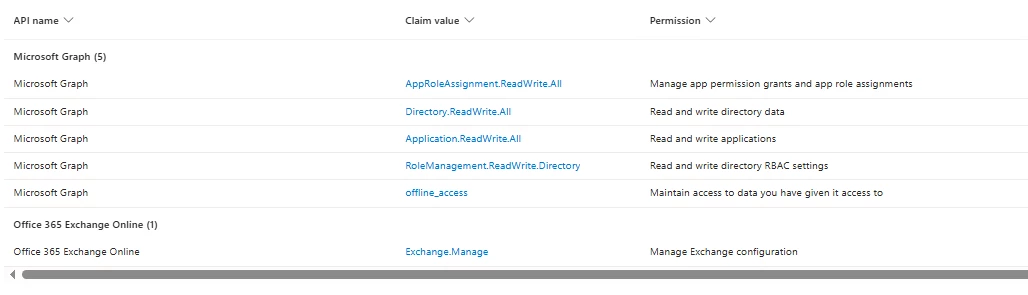

Can we delete that?

BR

Stephan

4 comments

tm67
Forum|alt.badge.img+3
  • Veeam Legend
  • September 28, 2026

Hi Stephan

Currently, EWS is still needed for M365 backups. For the moment it has to stay active. 

Check this KB article for the current state: KB4820: What Microsoft's EWS Retirement Means for Your Veeam Backups

The plan is to remove all EWS APIs but Veeam is waiting for Microsoft to close the feature gap for Graph API to take over. 

Hope this helps

Timo


  • Author
  • New Here
  • September 28, 2026

I understand that - but this Enterprise App does not seem to perform the backup - but just adding the EWS exception.

The other one has the rights to do so:


tm67
Forum|alt.badge.img+3
  • Veeam Legend
  • September 28, 2026

You should have two enterprise apps (Veeam Data Cloud for Microsoft 365 & Veeam Data Cloud for MS 365). Second one is for Express backups as far as I know. 

Microsoft Entra Application Permissions - Veeam Data Cloud User Guide

Here you can also see the required permissions and those two (full_access_as_app & Exchange.ManageAsApp) are listed in the helpcenter so I assume everything is fine and you need to keep them for the moment. 


  • Author
  • New Here
  • September 28, 2026

Yes - but we do not utilize Express Backup and i do not want an unused Enterprise App in my tenant. I will open a ticket at Veeam if it is needed in our case.