
Question

Hyper-V – Orphaned/chained Veeam Recovery Checkpoints cannot be deleted – Catastrophic failure 0x8000FFFF

  • September 9, 2026
  • 2 comments
  • 40 views

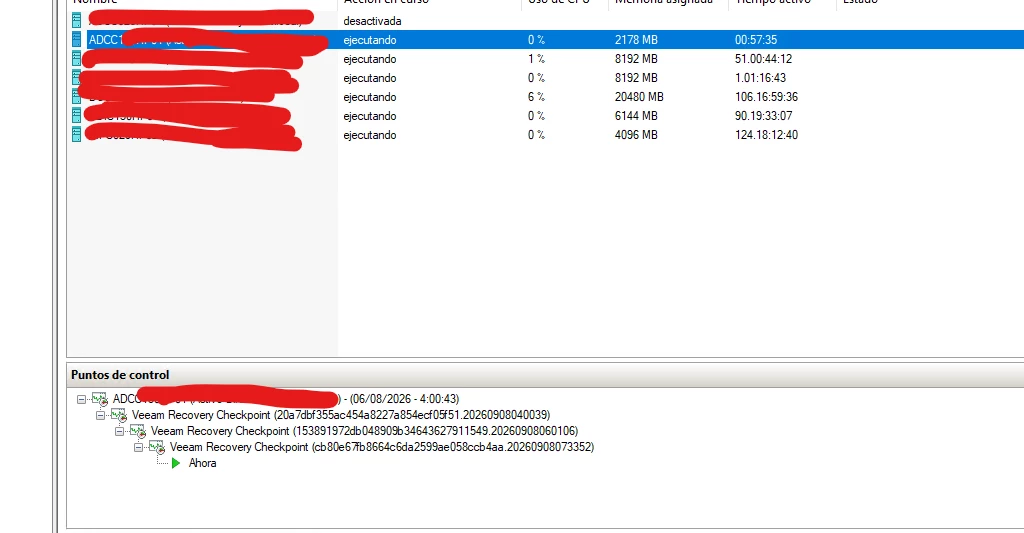
After a failed Veeam backup, a Hyper-V VM (ADCC130HP01) was left with multiple nested Veeam Recovery Checkpoints that cannot be removed.

Current situation:

  • 4 Recovery Checkpoints are chained together.
  • The oldest Recovery Checkpoint dates back to 06/08/2026.
  • The VM is still running normally.
  • The VM disks currently point to the base VHDX files.
  • Multiple AVHDX files still exist on disk.

When attempting to delete the checkpoints from Hyper-V Manager, I receive the following error:

"Cannot delete checkpoint: Catastrophic failure (0x8000FFFF). Virtual machine failed to generate VHD tree."

When attempting removal via PowerShell, I receive:

"Cannot delete a checkpoint subtree that contains a recovery checkpoint."

I have already tried:

  • Deleting checkpoints from Hyper-V Manager.
  • Deleting checkpoints using PowerShell.
  • Attempting manual merge operations.

Has anyone experienced a similar issue and successfully removed these orphaned/chained Veeam Recovery Checkpoints without rebuilding the VM or risking data loss? Any guidance would be greatly appreciated.



2 comments

  • New Here
  • September 22, 2026

i am also having the same issue but no solution if any have any solution kindly update please. 


eblack
Forum|alt.badge.img+4
  • Influencer
  • September 23, 2026

This is a sticky one.

This may work, but I’d be pretty cautious with the steps from here. You really want to know what Hyper-V thinks the disk chain looks like before merging or deleting anything.

The VM being attached to the base VHDX while the AVHDX files are still there is where I’d start.

Get-VMHardDiskDrive -VMName "VMName" | Format-Table ControllerType,ControllerNumber,ControllerLocation,Path

Get-VMSnapshot -VMName "VMName" | Format-List Name,Id,SnapshotType,CreationTime,ParentSnapshotId

Then run Get-VHD against the AVHDX files and check the ParentPath on each one.

I’d disable the Veeam job for that VM while you’re working through it too. No sense having another backup run while you’re trying to clean this up.

If the VM is really writing directly to the base VHDX, I wouldn’t assume the AVHDX files need to be merged back in. They may just be leftover checkpoint files.

If you have a maintenance window, I’d shut the VM down and try removing the checkpoint again. Hyper-V may clean it up properly once the VM is offline.

Before doing any manual merge or repair, make a copy of the VHDX and AVHDX files.

And definitely don’t delete the AVHDX files directly.

If you can post the Get-VMHardDiskDrive, Get-VMSnapshot, and Get-VHD output, we can probably figure out what happened to the chain.
