Join discussions around Veeam community projects, Veeam events, industry and technology news
Recently active
Hello Community! European summer is officially coming to an end — I honestly can’t believe how quickly it went! I hope you’ve all managed to enjoy some well-deserved time off and come back refreshed. Meanwhile, the Community Hub definitely didn’t go on vacation! It’s been great to see how active everyone has been throughout the summer, with so many interesting contributions coming in.And once again, choosing just six blogs for August’s Blog of the Month was no easy task. I have a feeling I’m not going to make your voting decision any easier either! 😄But I need your help — which one deserves to take the August crown? Here are my top picks for this month and good luck to all of you: @kciolek , @Scott , @Michael Melter , @eprieto , @fabian.papenfuss , @Jean.peres.bkp
Hello, I need some advices for a new setup with VSA and Proxmox. The setup :1 cluster with 2 Proxmox node with 1 volume for the OS and 1 volume for the storage of the VMThe storage is done with Datacore Sansymphony (HCI solution). 1 VSA + 2 worker + 1 VIA repository for backup + 1 Synology NAS NFS for backup copy I read Veeam documentation and limitation and I have 2 mainly questions :The Snapshot storage must be file level storage. In my scenario, that mean I need to use the volume available on the same disk as the OS right ? Because the storage used for the VM will be block storage … For the worker, same issue if I understand it correctly, it must be file-level storage that supports snapshots. That mean I also need to use the same volume right ?How do you usually manage it ? Finally, for the File system of it, do you use ZFS or XFS or EXT4 ? Thanks for your answer
Hi,We have a 2-node Microsoft Hyper-V cluster managed by Veeam Backup & Replication Community Edition.The two nodes are:- BETELGEUSE – works normally- SAIPH – affectedThe problem is that Veeam sees SAIPH as a Hyper-V server, but its Physical Host association appears to be broken.Veeam shows:SAIPH → PhysHostId = 00000000-0000-0000-0000-000000000000and:Get-VBRPhysicalHostdoes not return SAIPH, while BETELGEUSE is returned normally.We verified that:- SAIPH is reachable- VeeamHvIntegrationSvc is installed and RUNNING- WinRM/DNS connectivity to SAIPH works- the Hyper-V host itself is operationalThe impact is that VMs hosted on SAIPH are not being backed up correctly. As a temporary workaround, we moved the VMs from SAIPH to BETELGEUSE using Failover Cluster Manager, and the existing backup jobs then work normally.An important detail: the problem appeared after the network interface cards (NICs) were replaced on SAIPH.We also checked the Veeam PostgreSQL configuration database. The hosts
2025-11-06 Subject: VBR 12.3.2.4165 Installation Failure Version provider was not found in suite context on Windows 11 Pro ARM ParallelsHello,I am attempting a fresh installation of Veeam Backup & Replication Community Edition (ISO: 12.3.2.4165) on a newly created virtual machine, but the Veeam Setup Engine consistently fails with the error: An error has occurred: Version provider was not found in suite context.Environment Details: My host is a MacBook Air running macOS Tahoe 26.1 and I am using Parallels Desktop 26 for Mac. The guest operating system is Windows 11 Pro, Version 25H2. The system type is a 64-bit operating system with an ARM-based processor. The ARM architecture may be a factor in the installer's execution checks.Troubleshooting Steps Completed:I have tried running Setup.exe as administrator, unblocked the ISO file in its Properties, and also extracted the entire ISO contents to a local folder and tried the setup again.I have confirmed that .NET Framework 4.8.1 or la
I want to upgrade my veeam one server and it crashed à stage 3 . every time I need to roll back on backup or snaphot because it uninstalls veeamone services
One of my VM is showing FIB summary.txt issue in backup copy job. I would like to run Active full backup on only this problem VM . But this backup copy job has 20 VMs which i don’t want to run full backup as it will cause issue in wasabi bucket. Copy job goes to wasabi bucket. I know individual full backup can initiated in Backup job, but it is not showing BCJ . Please advise.Ver 12.1.2
Hi everyone,I'm running into a strange issue with a Veeam Backup & Replication Appliance v13.0.2.29 on a physical HPE Gen10 server with iLO 5 (firmware 3.13).The appliance boots normally and displays the Veeam Host Management screen, but I can't access the network configuration because the keyboard input doesn't seem to work correctly.ENTER to change the network config!What I've tried:HTML5 Remote Console Java Integrated Remote Console (v252) Different browsers Hotkey programming Ctrl+X Ctrl+Shift+X Fn combinations Java updated to the latest versionThe problem is that Enter does not activate the "Sign in" button, so I can't get into the Host Management menu to change the appliance IP address. The appliance currently has an incorrect IP configured, so I can't access the web interface or SSH.The server is in a remote datacenter, so connecting a physical keyboard isn't an easy option.Has anyone experienced this with the Veeam Appliance or iLO 5?Is there a known workaround to get Enter
Veeam CDP Issue ConfirmationQuestion: Which version of Veeam includes Veeam CDP?
In the dialog where I can add servers there is no ption for Proxmox.I have Veeam Backup & Replication 13.0.2.29 Enterprise Plus Edition.How do I get the option for Proxmox
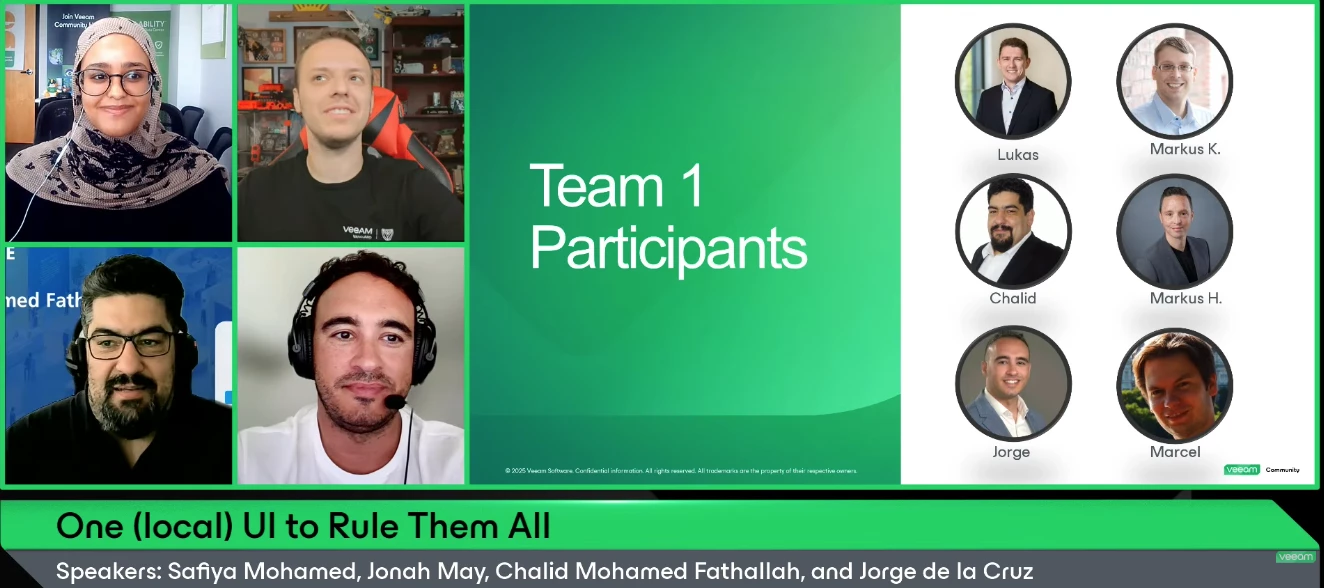
Hello Veeam Community!We just wrapped up our Hackathon-themed August V100 Show: One (local) UI to Rule Them All. Thank you to @jorge.delacruz, @CMF, and @JonahMay for joining, and to @Dynamic for his involvement in this show’s content 🤗Register for the Veeam Community Hackathon today! Registration is open until September 30. If you missed the show or want to rewatch, catch it below ⬇Overview:Born from the Veeam Community Hackathon 2025, Open Backup UI is a unified, self-hosted dashboard that brings VBR, Recovery Orchestrator, and Backup for Microsoft 365 together in a single modern web UI — built entirely by the community, for the community. In this special edition of The V100 Show, we go behind the scenes and dive into:How Team 1 turned a hackathon idea into a working monitoring dashboard — live demo included The tech behind it: Next.js, TypeScript, and the Veeam REST APIs, container-ready with Podman/Docker Lessons learned from building as a distributed community team From Jorge
Hello,A client have a Quantum LTO server connected by DAS cable to a Windows Server that host Veeam Backup Server. Is it possible in this case to migrate VBveeam Backup Server to a VM and keep access to the tape server ?
We have a scenario where the customer has a Tape Library currently connected to Bacula. Due to an issue with Bacula, they are carrying out a reconstruction or recovery process of the existing backups, which they intend to run from Monday to Friday.At the same time, the customer wants to incorporate Veeam Backup & Replication to perform Backup to Tape jobs during the weekends, using the same Tape Library.The question is to determine how feasible and advisable this approach is, considering that both applications would use the same library at different times, and what considerations or limitations should be taken into account to avoid conflicts in the access and control of the tape drives and media.
Hi, I’m having trouble implementing an immutable repository using Red Hat 10 with Veeam version 12.3.2. I installed it a few days ago and it was working fine, but today the Veeam server was shut down to fix an issue with an HBA card. Upon restarting, the machine failed to reconnect to the immutable repository, throwing errors such as: "Unexpected socket shutdown, Failed to rescan repository (...) Error Unexpected socket shutdown, host discovery failed," as well as warnings like: "Refresh linux host failed error: Unexpected socket shutdown, failed to rescan repository (...) Unexpected socket shutdown." I’ve run a number of tests: changing the user password to match what is configured in Veeam, disabling the Red Hat firewall, testing connections on ports 6160 and 6162 in both directions, and re-enabling port 22—yet nothing works. Oh, I almost forgot this warning that appears when rescanning the Linux host: "Unable to collect hardware info: Unexpected socket shutdown." It’s really frustra
It would be nice if you could also upgrade a Cloud Connect server from the Service Provider Console.
I have veeam backup server running in primary site with vcenter integration and backup scheduled and running. Now, I am creating another veeam backup server in DR site, and I want to the same vcenter and esxi to be integrate with DR site veeam backup server. kindly clarify the above approach is correct
Greetings. On a Veeam 12.3 install, whether there be an NFS or SBM datastore, and even while trying to hold the [CTRL] key and right-clicking on any datastore, the “Access Permissions...” menu does not show up, nor is there a ribbon icon visible for “Set Access Permissions” option.The logged in user into Veeam is a Veeam Backup Administrator. This option is visible on any other Veeam servers tested.What would be the cause for this effect? Thanks in advance.
Unprotected DB from the primary node in SQL AG. Other DBs are being backed up successfully on the same primary server.Configured to run transactional logging periodically but one large DB shows as unprotected. The problem started when the old primary node was switched over to a new server and evicted. After the eviction, it started not backing up the DB(error: Transaction logs from some databases were not backed up for the last 8 intervals).Ran image level backup (the parent job), this was successful but transaction logging still not working. However, the error now shows as (error: SQL Server transaction log backup took longer than desired log backup intervalFailed to upload SQL Server transaction log backup for DB to LogShip server: Repository agent is stoppedSQL Server transaction log backup could not be completed within 10 RPO intervals and will not be retried)This was working before and no changes to any of the Veeam servers so this error is not accurate. Confirmed application-awar
Hi everyone,Another week, another little project. 😀I’ve been spending some of my spare time practicing and experimenting with Codex again, and last weekend’s result is AgentBridge. The idea came from something that has bothered me for a while when working with Veeam Agent management in v13 VSA:VBR does a great job managing Agents once a machine is under management — but starting from V13, onboarding Windows machines in non-domain environments is no longer as straightforward as simply pushing via username and password. Linux certification also require SSH-based preparation and manual steps before they can be added cleanly.For one or two machines, that’s fine. But once you start dealing with more hosts, it quickly becomes painful.So I built AgentBridge.It’s a small open-source tool focused specifically on that initial bootstrap and enrollment process.You run AgentBridge as a single application on Windows, Linux, or macOS, open its local Web UI, connect it to your VBR 13.1 server, and us
Hi, we have a Fast LTA with 5 Silent Bricks. We plan to remove them weekly, and have one brick only in the system. We want to have weekly backups rotating offsite for one month (thatswhy 5 bricks). Whats the best strategy? Currently we have one volume and one S3 share per brick, and 5 backup copy jobs, they are running on first saturday, second saturday and so on, copy of the latest backups to the brick for the current week.But what happens if there are only 4 saturdays? I have no other scheduling options to get 5 weeks. How would you implement this? Thanks.Rene
Hello everyone!A quick update for all of you!The waiting has an end!Veeam has officially released Data Platform 13.1 along with all its core components.Don't let the "point release" label fool you—this update is packed with over 70 new features!If you want to dive into the details, you can find all the essential information and documentation right here:🛡️ Veeam Backup & Replication 13.1:• What’s New: https://www.veeam.com/veeam_backup_13_1_whats_new_wn.pdf• Release Notes: https://helpcenter.veeam.com/rn/veeam_backup_13_1_release_notes.html📊 Veeam ONE 13.1:• What’s New: https://www.veeam.com/veeam_one_13_1_whats_new_wn.pdf• Release Notes: https://helpcenter.veeam.com/rn/veeam_one_13_1_release_notes.htmlAnd for the service providers under you like me, Version 9.3 of the service provider console has also been released!☁️ Veeam Service Provider Console 9.3:• What’s New: https://www.veeam.com/veeam_console_9_3_whats_new_wn.pdf• Release Notes: https://helpcenter.veeam.com/rn/vspc_9_3_r
Hi,I created a full system backup with veeam agent for windows on a dell laptop with Win 11 installed. I boot from Veeam recovery media to a new laptop, select the backup from external usb drive, select bare metal recovery and whatever i do (Entire, volume, manual) i receive the same error message: Restore failed: The stub received bad data
So it's very simple, our backup server (infrastructure appliance) had a proxy server configured for access to Internet (in order to fetch updates etc.)Everything good in 13.0.In 13.1 it seems to be trying to use internet proxy to connect to anything http(s), even “localhost”. Goes without saying that Backup server doesn't even properly start (system services can't connect to local identity service bc that sends them to internet proxy).After defining proxy exceptions for localhost etc., connections to data movers still fail, again because those connections attempt to go through internet proxy.Case is open with support. Reverted to 13.0. Careful!
We are reviewing our Veeam Backup for Microsoft Azure design to optimise Azure storage costs while maintaining best practices. Currently, our Azure VM backups are stored in GRS storage accounts, with daily backups (31-day retention), monthly backups, yearly backups in a separate GRS repository, and hourly snapshots. We also have a 125TB Veeam Data Vault subscription and use Backup Copy Jobs to maintain an immutable offsite copy of all backups. Given that we already have a secondary immutable copy in Veeam Data Vault, we are questioning whether GRS is still providing sufficient additional value to justify the extra cost compared to LRS.We are considering creating new LRS-based repositories and directing future backups there while leaving existing backups in the current GRS repositories until they age out naturally. Is this the recommended approach, and would restores continue to work from the existing GRS repositories during the transition? Also, if we retain GRS, can someone explain th
Hi everyone, During the execution of a backup in Veeam Backup & Replication version 13.0.1.29 , integrated with Prism Central pc.2024.3.1.14 the snapshot creates a recovery point, and this recovery point has a retention period of 60 days.I cannot find where this 60-day retention period is configured. I checked the backup job, but I cannot find any information or setting related to this retention. where this retention is configured? does anybody know?
Hi everyone,I’m testing the Malware Detection capabilities in Veeam Backup & Replication v12.1 (or latest) and wanted to check if this behavior is expected.Here is what I did step-by-step: Enabled Inline Entropy Analysis under the main menu's Malware Detection settings. Placed .onion links and ransomware notes inside a test VM. Enabled the Malware Detection option within the Backup Job settings as well. Executed the Backup Job. The job completed successfully without throwing any warnings, alerts, or failures.However, when I ran a SureBackup job on the same VM, it successfully flagged and detected both the onion links and the ransomware notes.Is Inline Entropy Analysis intended to catch file-based artifacts like text notes during the live backup process, or is deep artifact/file scanning primarily deferred to SureBackup/YARA scans?Any insights on how these two detection layers interact would be appreciated!Veeam version: 13.1
Already have an account? Login
Enter your E-mail address. We'll send you an e-mail with instructions to reset your password.