Question

Schedule daily backup job reports using powershell - backup server

  • July 22, 2026
  • 9 comments
  • 31 views

Forum|alt.badge.img

Hello everyone,


I am looking to schedule daily backup jobs and copy jobs reports using powershell in veeam backup server. Could you please provide me the suitable script for reports as per jobname, server, latest backup run time, status.


Backup version is 13.0

9 comments

Andanet
Forum|alt.badge.img+13
  • Veeam Legend
  • July 22, 2026

Hi ​@Bennet 

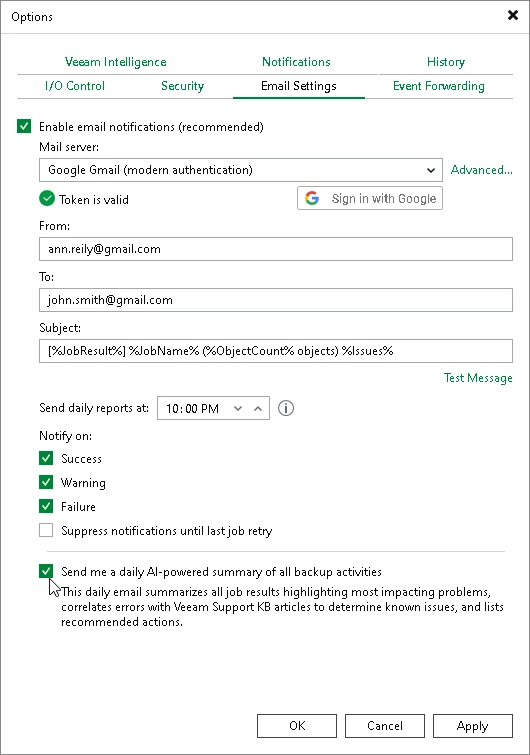
a simple question…. why use Powershell when you can use native tools? 

you can configure the emeail notification: 

https://helpcenter.veeam.com/docs/vbr/userguide/general_email_notifications.html?zoom_highlight=daily&ver=13

last check box permit you to have an AI-powered summary called Morning Coffee Report

(a good explanation From ​@Mohammed Ali here )

At the end you can use the report from Enterprise Manager https://helpcenter.veeam.com/docs/vbr/em/em_notifications_on_job_results.html?ver=13


My 2 cents. 


coolsport00
Forum|alt.badge.img+23
  • Veeam Legend
  • July 22, 2026

And, if you really want to use POSH, you can simply open up ChatGPT, Claude, Copilot, etc and type in what you want & it’ll spit out some code you can use.

Or, there are a couple I found in a quick search:

(I really couldn’t get the above one to work with VSA; needs some ‘tweaking’ for Windows)

https://www.powershellgallery.com/packages/Get-VeeamBackupReport/1.0/Content/Get-VeeamBackupReport.ps1

And then of course there are Reports in VONE you can retrieve as well as what Antonio shared above.


Chris.Childerhose
Forum|alt.badge.img+22

For what you want in your post, the settings Antonio recommended would do just fine.  If you really need a PowerShell report then just Google or use AI like Claude which helps out with scripts.  The one above posted with the AI-Powered summary report is great.


Chris.Childerhose
Forum|alt.badge.img+22

Yes Veeam ONE is another great source for reports too as Shane mentioned.


Forum|alt.badge.img
  • Author
  • July 22, 2026

Hi ​@Bennet 

a simple question…. why use Powershell when you can use native tools? 

you can configure the emeail notification: 

https://helpcenter.veeam.com/docs/vbr/userguide/general_email_notifications.html?zoom_highlight=daily&ver=13

last check box permit you to have an AI-powered summary called Morning Coffee Report

(a good explanation From ​@Mohammed Ali here )

At the end you can use the report from Enterprise Manager https://helpcenter.veeam.com/docs/vbr/em/em_notifications_on_job_results.html?ver=13


My 2 cents. 


Can you provide sample AI generated summary report ? we are particularly looking for report in following format - job name, servers, last run , status


Chris.Childerhose
Forum|alt.badge.img+22

Hi ​@Bennet 

a simple question…. why use Powershell when you can use native tools? 

you can configure the emeail notification: 

https://helpcenter.veeam.com/docs/vbr/userguide/general_email_notifications.html?zoom_highlight=daily&ver=13

last check box permit you to have an AI-powered summary called Morning Coffee Report

(a good explanation From ​@Mohammed Ali here )

At the end you can use the report from Enterprise Manager https://helpcenter.veeam.com/docs/vbr/em/em_notifications_on_job_results.html?ver=13


My 2 cents. 


Can you provide sample AI generated summary report ? we are particularly looking for report in following format - job name, servers, last run , status

Look in the link at the Morning Coffee report that Antonio posted it will show you an example.


Andanet
Forum|alt.badge.img+13
  • Veeam Legend
  • July 22, 2026

Yes Veeam ONE is another great source for reports too as Shane mentioned.

I ruled out VONE from the start because if he’s asking a PS script probably he doesn’t have the license to use it. 


Chris.Childerhose
Forum|alt.badge.img+22

Yes Veeam ONE is another great source for reports too as Shane mentioned.

I ruled out VONE from the start because if he’s asking a PS script probably he doesn’t have the license to use it. 

Yes, true but also good to mention as well.


coolsport00
Forum|alt.badge.img+23
  • Veeam Legend
  • July 22, 2026

@Bennet - selecting the AI-generated report doesn’t produce code specifically. It sends you a daily report via email. What the report looks like in the email is shown in the link Antonio shared.