The Why Now Community Challenge: Veeam Data Platform 13.1. It’s time to vote!
News, guidelines and various community projects
Recently active
I am looking for Veeam powershell script to list jobname, server, status and last run for last 24 hours . this should include backup and copy jobs. Kindly assist.
Hello everyone,I have a question regarding MFA in Veeam Host Management.During the initial installation, I enabled MFA on the default veeamadmin account. However, my goal is to use veeamadmin only as a break-glass account and instead create separate admin accounts with MFA enabled.The issue I’m facing is the following:When I enable MFA on another admin account, either:the verification code is sent to the veeamadmin account, or the MFA validation fails completely.This prevents me from properly configuring MFA for individual admin users.Has anyone encountered this behavior?Is there a recommended way to configure MFA for multiple admin accounts while keeping veeamadmin as a fallback account?Thanks in advance for your help.
Hi,Over the past week, the checkpoint removal process has been completing with warnings. I receive notifications 2–3 times, and then it returns to normal and completes successfully without warnings.However, for the past 4 days, I’ve been receiving the same warnings again. I’ve checked everything, and everything seems normal. When I review the statistics, there’s no clear reason for these warnings.Could someone help me understand what might be causing this issue?Thank you in advance.
In recent months, Veeam has been making a series of changes to its certifications. We have changes in the certification model and in the format of the courses and teaching methods. I'll discuss the main changes and alterations on this topic here. Retired CertificationsThe Veeam certification path has always consisted of two levels of knowledge. These are:VMCE (Veeam Certified Engineer) – a technical level focused on operationsVMCA (Veeam Certified Architect) – an advanced level focused on architecture design and project implementationFrom the beginning, this model was very well received by the market and widely adopted. Its success is largely due to the absence of an entry-level (foundation) certification. As a result, the certification exams have always been considered highly challenging; however, the knowledge gained has consistently delivered significant value, enabling rapid career growth and professional development.However, with continuous technological advancements and the evolu
windows agent backup fails after server upgraded from 2012 to 2016 In protection group shows the server name by both OS versions : 2012 OS ( last seen 5 days ) and 2016 OS - ( Last seen - Online ), however the rescan option gives the error :Failed to connect server:11731The veeam agent is in running state and is restarted, still no luck
Backup failure for single nas file share , rest of the file shares ( CIFS ) are completing successfully. 4/8/2026 3:47:51 AM Failed : Calculating file share size4/8/2026 3:47:51 AM Failed : Backing up 0 files and 0 folders (0 B) transferred at 0 KB/s4/8/2026 3:47:51 AM Failed : Container doesn't exist in backup.Folder: [Id: [2cfxxxxxxxxxxxxxxxxxxxxxxxxxxxxxxxxxxxxxxxxxxxxxxxxxxxxx582f], Object key: [56dxxxxxxxxxxxxxxxxxxxxxxxxxxxxxxxxxxxxxxxxxxxxxxxxxxxxxxxxxxxxxxxxxxxxxxxxxxxxxxxxxxxxxxxxxxxxxxxxxxxxxxxxxxxxxxxxxxxxxxxxxxxxxxxxxxxxxxeac1], Relative path: [Path [|.copy_offload], Nodes: [[.copy_offload]], Nodes count: 1, RootId [0000000000000000]]]
Today, March 31, is World Backup Day. This date exists because, even today, I still see many companies continuing to lose critical data. In the vast majority of cases, these losses are not related to a lack of technology, but rather to strategy and process failures, and especially to an underestimation of risk.And these risks are not limited to lost files or servers with software issues. They involve systemic failures in operations, security, and even architecture. Real CaseI will cover a real case I went through recently, where I will share more details not only about the problem, but also about how it was possible to recover from the disaster. The ScenarioIn a virtualization environment made up of multiple clusters, a ransomware attack impacted the environment and made a number of virtual servers unavailable. Fortunately (or thanks to good judgment), only one cluster was affected. ContainmentIn parallel, the entire security team immediately began working to understand the incident a
It started as a routine alert—unusual login activity flagged by our monitoring system. Within minutes, multiple backup jobs began failing, and that’s when we knew: this wasn’t random—it was targeted.The attacker had gained access using compromised credentials and was attempting something we’ve all seen becoming more common—destroy the backups first before encrypting production systems.But this time, things didn’t go as planned.Our backup environment was built with immutability and zero-trust principles using Veeam Backup & Replication integrated with hardened repositories. Even though the attacker had access to certain systems, they couldn’t modify or delete backup data due to immutable storage policies.While the security team contained the breach, we verified the backup integrity.Everything was intact.A few production workloads were still impacted—some files were encrypted before containment—but recovery was where the real difference showed.Instead of panic, we executed a clean re
This blog post was inspired by an excellent article that explores recovery scenarios beyond the typical restoration approaches often covered.In-place upgrades represent the standard and vendor-recommended approach for advancing Veeam Backup & Replication (VBR) to newer releases, ensuring continuity of configuration, and retention of job etc without requiring a full reinstallation. But without a test lab, you are essentially performing a high-wire act. While everyone talks about restoring data during “World Backup Day”, few share stories of how protecting the protector. Veeam’s own configuration backup can literally rescue your Veeam Backup and Replication (VBR) when an upgrade goes sideways. You can take a look at this Veeam kb2645. Note: Exiting skips finalization steps that initialize IdentityService config, DB schemas, certs, and token dirs, leaving services “running” but incomplete leaves VBR unusable. Ensures you get the wizard that displays the completion of the upgrade.Veeam
Some of Hyper-V VM have Veeam recovery Checkpoint. The backup job is running successfull every day but why seem veeam not delete this checkpoint? I tried to remove this but there no option to delete this checkpoint.
This is the English version of a selected article from Climb Japan Engineer Blog series. When you use Veeam Backup & Replication to process a backup or backup copy to be saved in the object storage such as Amazon S3, there might be a case where you receive the alert message below.Subject: [Warning] Background checkpoint removal. Backup server: <your Veeam server name>Body text: Failed to remove checkpoints from the backup repository <your repository name>This alert is issued when obsolete checkpoint (i.e. restore point) removal process on the object storage where backup data are stored has been failed.Removal of such checkpoints has been a part of the backup job in Veeam Backup & Replication Version 12.1 and earlier. From Version 12.2 onwards, the checkpoint removal is an independent task and can be processed in the background contineously.Separating the removal task from the backup job was a good update to help reduce the object storage loads.Even if you receive th
1. Why Job Design Matters Anybody can create a backup job. Open the wizard, add VMs, pick a repository, set a schedule, click finish. The job runs. The question is whether it runs well at scale, whether it makes SureBackup testing practical, whether it handles application consistency correctly, and whether it does not create operational headaches six months from now when the environment has grown.Job design is the difference between a backup environment that runs itself and one that requires constant intervention. Bad job design produces jobs that run too long, compete for proxy and repository resources, break application log chains, make restore operations slow, and make SureBackup configurations a nightmare. This article covers the patterns that work and the anti-patterns that do not. 2. Per-VM Backup Chains vs Per-Job Chains VBR offers two backup file layout options: per-VM backup chains (one backup file chain per VM) and per-job backup chains (one backup file chain for the entire
The veeam backup version is patched to 13.0.1.2067 after that few proxy servers are not getting updated. Failed to upgrade host components. Error: 'The process cannot access the file because it is being used by another process. Failed to invoke rpc command (The process cannot access the file because it is being used by another process.) (Failed to invoke rpc command)' (0:00:10)
I’ve installed Veeam Backup & Recovery 12 on a Windows 11 device (it used to have Veeam installed and was working fine but accidentally got removed, we’re not sure what version).It was used to backup a Esxi Linux VMI’ve setup a computer and a VM backup job but neither complete with a message ‘failed to perform backup policy operation.The only messages I see in the login relates to Disposed or retry are not supported.Some fixes relate to restating the veeam backup service...but i see no backup service and even when i run the MSI, there are no errors after installing as account prompted by default.Any suggestions?Thanks
Immutable backups are one of the best things to happen to data protection.They’ve become the go-to answer for ransomware resilience—and for good reason:Backups can’t be deleted They can’t be modified Attackers can’t encrypt themThat’s a huge win.But here’s the part that doesn’t get said enough: Immutability is a layer of protection—not a complete strategy.I’ve seen environments check the “immutable” box and assume they’re covered.They’re not.Because when something actually goes wrong, immutability alone doesn’t guarantee you can recover cleanly, quickly, or safely.Let’s talk about what else you actually need. 1. Recovery Testing (Because “Protected” Doesn’t Mean “Recoverable”)You can have perfectly immutable backups that are:Corrupted Incomplete Misconfigured Or just… not usable the way you expectIf you haven’t tested restores, you’re still guessing.What you should be testing:Full VM restores File-level recovery Application item restores (SQL, AD, email) Instant Recovery performance
As a follow-up to my previous blog on the VSA HA Clustering setup, I decided to do a companion blog about using Veeam ONE for monitoring. Check it out below and link to my blog.Monitoring Your Veeam VSA HA Cluster with Veeam ONE Monitoring Your Veeam VSA HA Cluster with Veeam ONE Getting visibility into your Veeam VSA High Availability (HA) Cluster is critical for ensuring backup continuity. Veeam ONE provides the dashboards, alarms, and reporting you need to stay ahead of issues before they impact your recovery objectives. This post walks through configuring Veeam ONE to effectively monitor your VSA HA Cluster — from initial connection through tuning alarm thresholds and automating the whole thing with PowerShell via the Veeam ONE REST API.What Is the Veeam VSA HA Cluster?The Veeam VSA HA Cluster provides redundancy for your Veeam Backup & Replication environment by pairing a primary and secondary node. If the primary node fails, the secondary automatically takes over, maintainin
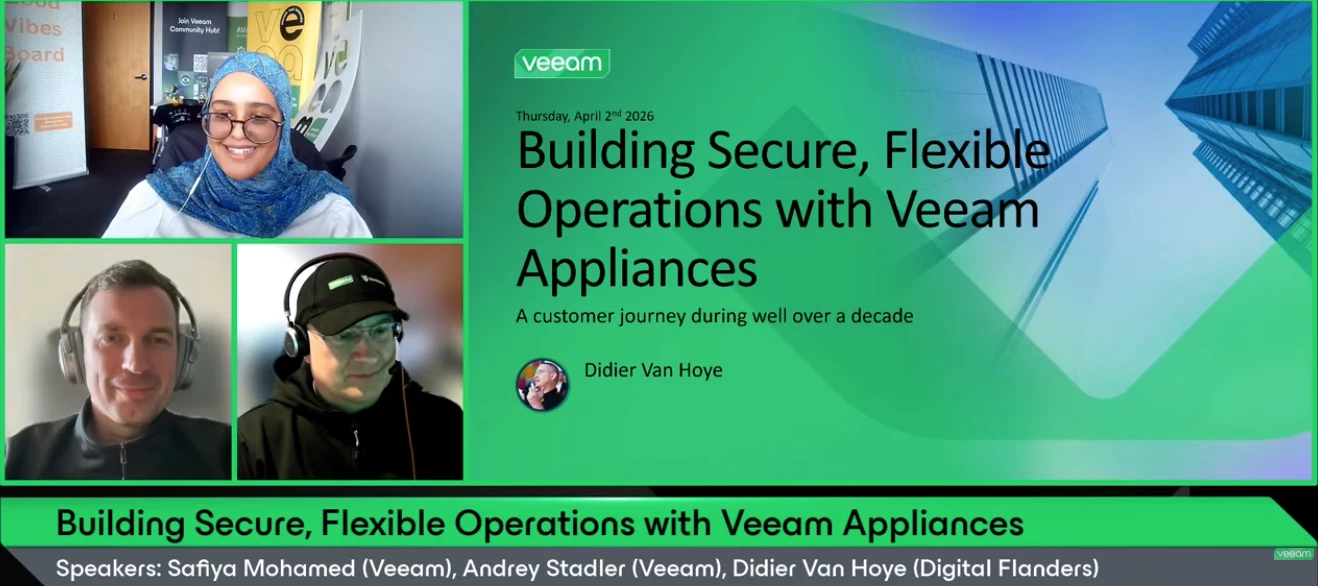
Hello Veeam Community!We just concluded our April V100 Show, Building Secure, Flexible Operations with Veeam Appliances. Thank you to Veeam Vanguard, Didier @WorkingHardInIT for joining and sharing your journey and expertise, and @Andrey Stadler for co-hosting and bringing the commentary. 😄If you missed the show or want to rewatch, catch it below ⬇Overview:Building secure and flexible backup operations is an evolutionary process shaped by shifting threats and operational demands. This session walks through more than a decade of progression—from early, basic designs to fully isolated and hardened environments. As architectures mature and automation becomes standard, teams gain the time and headspace to focus on resilience, monitoring, and modern threat‑detection capabilities. If you're planning the next stage of your backup strategy, this session offers a grounded look at how that evolution unfolds. If you have any questions/feedback about the session, please be sure to leave a comme
The copy backup jobs (secondary target) for two of physical server backup jobs are generating two emails per backup instead of one. For each backup copy job run, two “Success” emails within minutes:Example:11:05 PM – Success 11:07 PM – Success Subjects are identical, EnvironmentProduct: Veeam Backup & Replication 13.0.1.2067 Workload: Veeam Agent for Windows (Physical Servers) Jobs impacted: Physical Servers 7PM Daily Copy to Archive Physical Servers 7PM Daily Copy to Immutable Physical Servers 10PM Daily Copy to Archive Physical Servers 10PM Daily Copy to Immutable Notification Settings Review1. Protection Group (Physical Servers Group 1)Send daily agent status report: Disabled2. Primary Agent Backup JobsJob-level email notifications: Disabled Setting: Uses global notification settings only3. Backup Copy Jobs (Secondary Target)Job-level email notifications: Disabled Confirmed in job logs: <EmailNotification>False</EmailNotification><UseCustomEmailNotif
World Backup Day is often treated as a reminder—a checklist item to verify that backups exist, are recent, and are recoverable. But for those of us working in infrastructure and disaster recovery, it represents something much more concrete: the difference between operational continuity and complete outage. This is not a theoretical discussion. This is a real incident.This is my experienceThe Incident: Ransomware at ScaleRecently, I was involved in managing a critical ransomware attack that impacted a large virtualized environment. After an initial assessment, it became clear that we were dealing with a full-scale ransomware infection.Roughly “150 virtual machines” in a VMware environment were affected. The situation escalated quickly, requiring immediate containment measures. All impacted systems were powered off to prevent further propagation.At that point, a **war room** was established, and we moved into a structured incident response process:-Detection & Analysis-Containment-
Hi everyone, We plan to integrate Veeam Backup and Replication with our SIEM as part of our security hardening. I would like guidance on the best way to forward Veeam logs and events to a SIEM platform. Looking for advice on supported methods, required settings, and any best practices or limitations.
This is the English version of a selected article from Climb Japan Engineer Blog series.-----Veeam Backup & Replication enables the agentless protection of Hyper-V virtual machines. In order to maintain the data integrity of Hyper-V VMs, when you process a Veeam backup, a temporary Hyper-V checkpoint is automatically created and it is then deleted when the data capture is completed.However, in some exceptional situations, e.g. as a result of antivirus software interference, the checkpoint may remain on the protected VM. In that case, you might see the remaining checkpoint named “Veeam Recovery Checkpoint (XXXX)” on the Hyper-V Manager screen as below. The red marked section shows the remaining checkpoint. Note the UI is in Japanese.The Hyper-V checkpoint size may increase as time goes by, because it will reflect the protected VM’s data changes. Therefore, if the checkpoint is left there for a longer period, the size may become large enough to negatively impact the performance of th
While working in a lab with multiple silos, minimal change control, and backup processes in place, not everyone informs the backup administrator of new servers or devices added to the infrastructure that require backups. As the backup administrator, it's my responsibility to ensure that all servers have a reliable backup and can be restored in the event of a disaster. I make that extra effort so that, in situations like the one below, we can get everything back online in a timely manner.It was an early normal Monday morning, and I was reviewing the weekend backups when a Teams call came in from our Network Lead for the lab.When the Network Goes QuietAt first, a few users reported they couldn’t access shared drives.Then applications started timing out.Then monitoring lit up.Within minutes, it was clear: We weren’t dealing with a slow network. We were dealing with a broken one.Core services were unreachable.Critical systems were effectively offline.And the worst part?We didn’t imme
What could be the issue? Failed to send certificate, but certificate is required for remote agent management Error:
Hi Community,Has anyone successfully reverted Veeam ONE from version 13 to version 12? Are there recommended steps or considerations to avoid issues during the downgrade? Any official guidance or lessons learned would be greatly appreciated.
This week @Madi.Cristil is on leave and Rickatron activated an ad-hoc Spring Break trip mid-week, so no video recording. We have a sneaky plan for next week schemed however. We have an absolutely cracking list of content and an amazing amount of content that was shared from World Backup Day 2026! Let’s dive in.Featured Contentvia @eblack via @Chris.Childerhose via @Jason Orchard-ingram micro Special Department NewsMany events have been added over the next few months around the world. You can always check the listings here: Events | Veeam Community Resource Hub - let’s highlight a few in the next two weeks:via VUG Argentinavia VUG USA - Milwaukeevia VUG Germany - KolnRecently @Rick Vanover, @ertelle1 and @michaelcade presented at Tech Field Day Extra at RSAC - you can watch these sessions here: Veeam Presents at Tech Field Day Extra at RSAC 2026 - Tech Field DayL-R: Michael Cade, Rickatron, Emilee TellezYesterday, the Veeam 100 Show was a good one with @WorkingHardInIT, @Andrey
Already have an account? Login
Enter your E-mail address. We'll send you an e-mail with instructions to reset your password.