Question

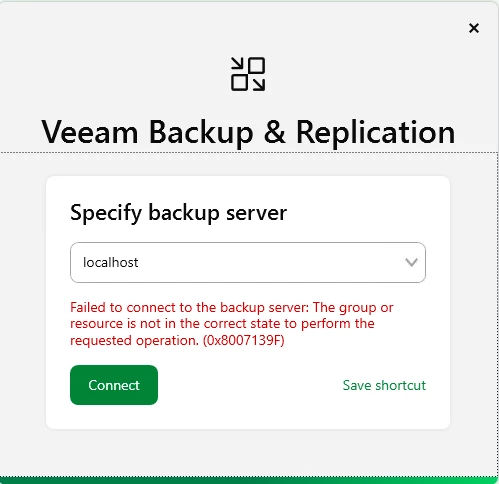
Veeam 13 console - The group or resource is not in correct state 0x8007139F

  • March 17, 2026
  • 7 comments
  • 46 views

After upgrading to Veeam 13 on Windows, I am unable to login with UI console. Access throw WEB conole works.

 

7 comments

Chris.Childerhose
Forum|alt.badge.img+21

Are all the services running on the server?  This is one typical issue for this.  If they are check the logs or open a support ticket.


coolsport00
Forum|alt.badge.img+22
  • Veeam Legend
  • March 17, 2026

Hi ​@Kikoos - Welcome to the Community!

Did you make sure the Veeam Backup Service and/or Veeam RestAPI Service is running? If the Backup Service isn’t running, you won’t be able to login with the Veeam Console, but the error you get is a bit different than what you shared. Maybe try to do a repair of your Veeam install, or a repair of the Console install.

You can attempt to check the Console logs located at:
%UserProfile%\AppData\Local\Veeam\Backup and see if anything shows there. But your best bet is probably just to get in touch with Veeam Support.

Let us know.


kciolek
Forum|alt.badge.img+4
  • Influencer
  • March 17, 2026

Yes - please verify all services are running. Also, if you can try rebooting the server. if that doesn’t work open a ticket with support


  • Author
  • New Here
  • March 18, 2026

All services are running. Where did you found that this specific error code is a standard error?


Marcel.K
Forum|alt.badge.img+12
  • Veeam Legend
  • March 20, 2026

did you try reboot or installation as “repair”?


kciolek
Forum|alt.badge.img+4
  • Influencer
  • March 20, 2026

All services are running. Where did you found that this specific error code is a standard error?

did you try rebooting as ​@Marcel.K suggested? If still an issue I would contact support. One more thing you can try is install the console on another machine and connect remotely. I had issues with running the console from the server but would work remotely. I still need to troubleshoot my issue. 


Chris.Childerhose
Forum|alt.badge.img+21

@Kikoos  - just following up to see if your issue was resolved and if you received an answer.  If so please update this thread and mark the best answer even if it is the one you post with the update if none of the others were satisfactory.






