Question

Veeam M365 editing Organisation - Certificate

  • April 21, 2026
  • 4 comments
  • 32 views

I'm getting in my own way right now.

I've set up an organization in Veeam M365. I want to edit it, but when I go to the connection settings, I'm asked for the application ID and a certificate.

Which certificate should I select here? Veeam only suggests three options:

1. Self-Service Patch Certificate

2. Restful API

3. (without friendly name)


I didn’t have to specify a certificate during setup; I just followed the wizard.

How can i choose the correct certificate?

Maybe I'm just being stupid today.

 

4 comments

MicoolPaul
Forum|alt.badge.img+23

Hi,


The certificate is used by your App Registration for authentication to your tenant, I’d expect it to be certificate 3 based on your description. But you can always create a new app registration if needed and let Veeam generate a new certificate for you


tm67
Forum|alt.badge.img+2
  • Veeam Legend
  • April 21, 2026

Hi

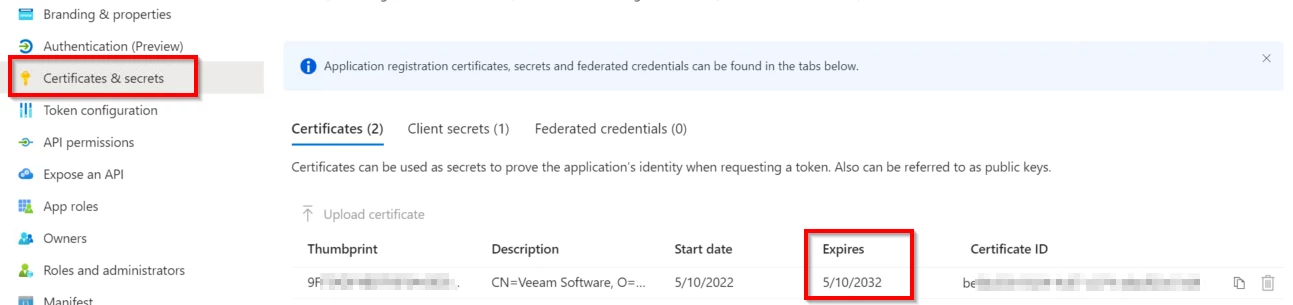
You can always check the used certificate in Entra. 

Go to entra.microsoft.com → App registrations

Search your app, click on “certificates / secrets”

In the “certificate” tab, you can see the certificate that is used to authenticate against Entra ID. 

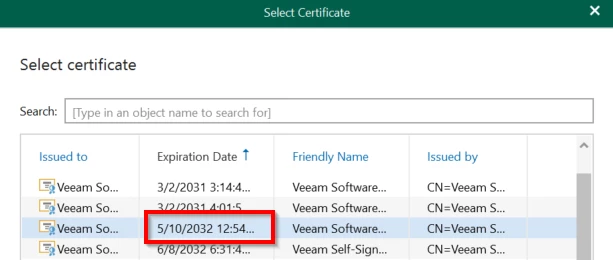
Now compare the certificate thumbprint with the one on your vb365 server. (you can also sort by expiration date in vb365 and compare this with the Entra ID certificate. 


  • Author
  • Comes here often
  • April 21, 2026

thanks guys.


MarkBoothman
Forum|alt.badge.img+8
  • Veeam Vanguard
  • April 21, 2026

You could update the friendly name using PowerShell… Replace the cert thumbprint with the relevant thumbprint


(Get-ChildItem -Path Cert:\LocalMachine\My\41FAF135A9517F2A78AC646399CB9B5CE683DEC3).FriendlyName = "Exchange Server Let's Encrypt"