The Why Now Community Challenge: Veeam Data Platform 13.1. It’s time to vote!
News, guidelines and various community projects
Recently active
The Veeam Vanguard program has announced its members for the 2026 class. Congratulations once again to all the members who have renewed their membership, as well as to those who are joining the program for the first time or returning after a break. This year is no different from previous ones in terms of the presence of this group, which is full of top worldwide Veeam experts. It's been tougher than in previous years to make the final selection of new members because we stick to disciplined growth, which means that not all great candidates make it in. Why? The Veeam Vanguard program is the longest-running community program at Veeam. Since the beginning, it has had one rule: disciplined growth. We have never aimed to grow to hundreds of members simply because we value the intimate atmosphere that this distinctly large group of 50–60 members creates. As community managers, we know all the Vanguards by name and remember their stories and successes, while the group members interact organic
My recent discovery so it could help someone not to loose time. And maybe if there is a solution I’ll be most thankful.So with Proxmox version 9 you need to set Machine type to version 9.2 instead of Default as it defaults to 10 and that causes Veeam backup to fail. That will insure that your backup will be sucesful and restore will work too. I have issue, where I am migrating servers from Hyper-v to Proxmox and usual and most painless solution was to use Veeam Backup&Restore as intermediary as we are already using it.But in this case restore to proxmox fails as when VM is created is created with default version for machine type and this defaults to 10 and this results in: Failed to prepare disks for restore. (If anybody knows how to convince the process to default to 9.2 Mychine type I’ll buy you a beer).I tested this on 12.3 and on veeam appliance 13 with the same result. I can restore VM, that was originally backed from Proxmox as it will bring it’s machine type version along.
Hey guys,I’m installing a VM on our Synology NAS to act as a Veeam Hardened Repo. I already had it before but now doing it trough Infrastructure Appliance.When I start the installation I get’s stuck in this process: Any recommendations for it?
In this article, I will discuss the mistakes being made with backups, which I frequently hear about from my customers.Let’s be honest—most backup environments look perfectly fine… right up until you actually need them.Jobs are green. Reports look clean. Nobody’s complaining.Then something breaks.And suddenly you’re discovering—live—whether your backups are real or just a comforting illusion.Here are the 10 most common backup mistakes I’ve seen (and probably fixed at inconvenient hours), plus how to actually solve them using Veeam. I've tested all of these in my lab environment. 1. Not Testing RestoresThe problem:A successful backup job does NOT mean you can restore.The reality:If you haven’t tested it, it doesn’t exist.The fix:Use Veeam’s SureBackup to automatically verify recoverability. It spins up your backups in an isolated environment and proves they actually work.If your first restore test is during an outage… that’s a bad day. 2. No Immutable BackupsThe problem:Ransomware doesn’
We’re excited to introduce the 2026 VeeaMVP class—a group of outstanding Veeam employees who consistently go the extra mile to support their peers and strengthen the Veeam community through their knowledge, enthusiasm, and commitment to our solutions. What is the VeeaMVP Program?The VeeaMVP program is an internal recognition initiative that celebrates individuals who actively share their expertise and contribute to the success of others across the Veeam ecosystem. These champions help foster collaboration, promote best practices, and inspire their colleagues to get the most out of Veeam technologies.Why Become a VeeaMVP?VeeaMVPs gain access to a variety of exclusive opportunities, including: Private sessions and webinars with Product Management and R&D Reserved seats in advanced technical deep-dive trainings Invitations to the prestigious V100 Summit Recognition across the global Veeam community These experiences provide valuable product insights while also creating opportuni
While managing and upgrading Linux agents through Veeam, you may encounter a seemingly misleading error:Host is unreachable. Failed to connect to <hostname>. Details: Cannot find a compatible console test instruction. All known instructions are not available or executed with errors. At first glance, this looks like a network connectivity issue, but in many cases it actually points to a failure during authentication or remote command execution.Problem analysisIn this scenario, the error occurred while attempting to connect to the Linux host server-vm1 for agent installation/upgrade operations.The root cause was traced back to the credentials used by Veeam for remote access (typically via SSH). When the password of the dedicated service account becomes invalid or out of sync, Veeam fails to execute its preliminary console checks, triggering the “console test instruction” error.Fix: Password expiry check:chage -l vbruserCheck whether your account is blocked or has expiredpasswd -S v
I wanted to abandon my bare-metal Windows Server/VBR12 instance because of Microsoft and finally switch to VSA.So I set up and configured a bare-metal test installation of VSA on the server.This server has a direct connection to the HPE MSL 4048 tape library via a SAS controller.Full of anticipation, I then read: "Note that Veeam Software Appliance cannot be used as a tape server." at: https://helpcenter.veeam.com/docs/vbr/userguide/connecting_tape_devices.html?ver=13Seriously? That's incredibly counterproductive!Now I'm supposed to set up and maintain another server because VSA doesn't have the usual integrated tape server role? I also haven't found any option in the web UI to integrate and use the currently running tape library via a tape server, as is usually the case.Seriously? Did the DevOps team drop the ball here?
Is Your Disaster Recovery Plan Actually Ready — Or Just Ready on Paper?Let's be honest. Most IT teams have some kind of disaster recovery plan. A document somewhere, a few backup jobs running, maybe a virtual lab that hasn't been tested since it was set up. But when the moment comes — ransomware hits, a site goes down, VMs get corrupted — that's when you find out whether your plan is real or just a formality.That gap between "we have a plan" and "we can actually execute it" is exactly the problem Veeam Recovery Orchestrator (VRO) was built to close. And it's exactly why the VRO Essentials course exists.VRO isn't just another backup tool. It's a platform for building, automating, and testing full disaster recovery workflows — so that when something breaks, your team isn't scrambling through a checklist hoping nothing was missed. Recovery happens in the right order, at the right time, with the right verification baked in.The course starts from the ground up: what VRO actually is, what i
Sorry to rant, but I have nowhere else to turn, and it's beginning to impact our clients. Veeam 13 has been absolutely horrible to install on all our backup servers. The upgrades are breaking the installs on current backup servers. It is straight up failing to install and start the Veeam service on a brand new server, and Veeam support has been unable to figure it out for two weeks. I've put escalation requests in and I'm getting nowhere. has anybody seen behaviour like this? The people on the Veeam subreddit agree that Veeam 13 has been horrible to roll out.
Hello,I’m currently planning to migrate from Windows VBR to VEEAM VSA. I’m currently working with tape library, when i installed the VSA, and logged via the WEB interface, i was amazed that the console doesn’t support adding tape servers (Am i missing something ?)Installing the desktop console will fix this ? the desktop client support creating tape libraries ?If working with the client desktop console, the MFA is still supported? we can benefit from the update feature of the VSA or updating the console should be manually ? is there a way to disable the VSA Backup and replication WEB UI to keep only the console working ?Thanks in advance
Hello everyone! So currently we have deployed VBR 12 CE on a virtualized Windows machine running on Proxmox VE 8.4.11. We are backing up our OES Server running on version 24.3.3. We want to be able to backup our OES Server including the network volumes running on NSS and all the metadata for the files on these volumes. Currently we are only doing VM backups. Is this enough to backup the metadata?If not, what would be the best way to ensure the metadata is getting backed up aswell?Is it possible to perform File level restores in this configuration? Thank you, Nico
Does anyone know if the issues with adding a workgroup (non-domain) host is limited just to VSA? Or are the same requirements in the Windows version of v13?
In this article, I will explain Instant Recovery with Veeam, its functionality, and its significance. I'll run through a quick demo (screenshots) of the Instant Recovery process with VeeamIn today’s always-on digital environment, downtime isn’t just inconvenient—it’s expensive, disruptive, and sometimes catastrophic. Businesses are under constant pressure to ensure systems are available at all times, even in the face of hardware failures, cyberattacks, or human error. That’s where Instant Recovery technology from Veeam becomes a game-changer. What Is Instant Recovery?Instant Recovery is a feature that allows you to restore and run a virtual machine (VM) directly from a backup file, without waiting for full data restoration. Instead of transferring large amounts of data back to production storage—which can take hours—Veeam lets you start the VM immediately from the backup repository.Think of it as running your system “in place” while the full recovery happens in the background. How It W
Hi everyone,Lately, "AI Agents" (especially autonomous agents, agentic AI, etc.) have become super popular. Lots of companies are starting to automate their business processes with AI agents. So I got curious:On the Veeam side (Backup & Replication, Veeam ONE, Veeam Recovery Orchestrator, etc.), is there any custom-built or in-use AI Agent project / tool / integration specifically for Veeam?From what I know:Veeam officially released something called Agent Commander (announced in February 2026). This focuses on detecting risks created by AI agents, protecting against them, and even undoing AI mistakes (rollback/restore). But it's more about "managing / protecting AI agents" rather than an agent that automates Veeam backup operations itself. In the community, I came across BackupPaw (shared around March 2026). It's an AI agent built on top of n8n, using Veeam REST API to let you manage backups via natural language with AI (probably an LLM). Sounds like a real AI assistant/agent for V
A lot of small IT teams skip 4-Eyes Authorization because it sounds like something built for bigger shops with a separate security team.That is the wrong way to look at it.If you are the only admin touching Veeam, you probably need it more, not less. The whole point of the feature is to stop one compromised account from doing irreversible damage. If someone gets your Veeam admin credential and 4-Eyes is not enabled, they can try to tear down jobs, remove repositories, delete backup data, and make recovery harder before ransomware ever starts encrypting production. Your backup server becomes part of the attack path instead of the last line of defense.What 4-Eyes changes is simple. A destructive action no longer completes just because one account asked for it. The request gets parked in a pending state and waits for a second account with the right role to approve it. If an attacker only has your primary credential, they can create the request, but they cannot finish it.That is why this
I am running Veeam V12 in a vSphere 7 environment and trying to upgrade to 12.3.2.4465. I mount the ISO, run setup and click Upgrade. The upgrade fails every time with the following message."An error has occurred: The system cannot open the device or file specified". I click ok to the message and the upgrade stops. We identified Possible OS or Windows Installer cache corruption.Potential missing or inaccessible .msi files.Potential ISO corruption or mounting issue. Would it be possible to move to a virtual appliance instead of preparing a new Windows Server, install the same or newer version of Veeam Backup & Replication, and restore configuration backup to this new server? Please advise.
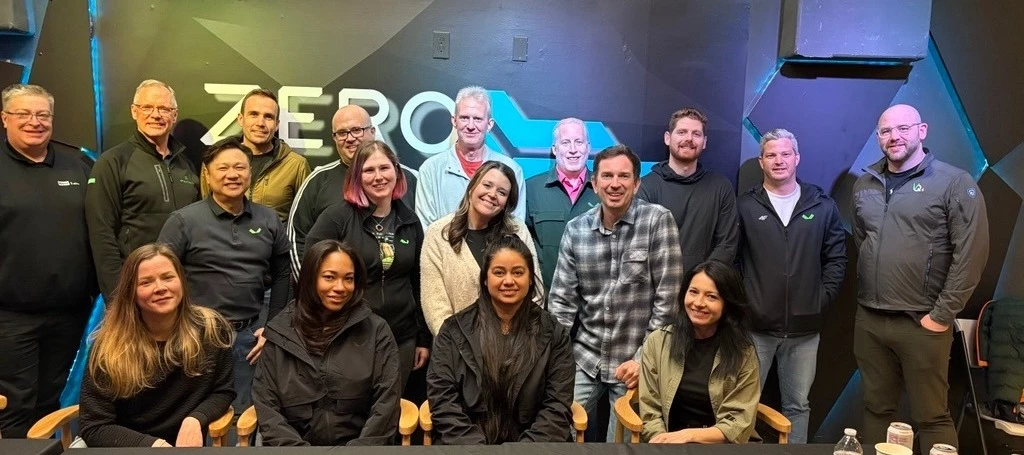
What a week! This week @Madi.Cristil and the entire Product Strategy team (check out the pic!) were in a team meeting and ironically, we had such a packed agenda we didn’t have time to record a video. We’ll be back at it next week! The community is still rocking the content however!Featured Contentvia @Andreas Buhlmann via @Iams3le via @kciolek Vanguard Blog Podcast Spotlight - Geoff BurkeThat @Geoff Burke is so sneaky! Has a new share here with a podcast on communities. Great stuff! Why IT Communities Matter.Special Department Newsvia @leaha @kira.bezhanova and Bianca Navarrovia @HannesK Congratulations VeeaMVP classs!Veeam Backup & Replication updates available! Please see the following KB articles for V12 and V13 (the Veeam Software Appliance will update automatically). Reminder via VUG EcuadorReminder via VUG PanamaReminder via @Viperian, @CMF and @lukas.k Reminder via @Chetan Back at it Next Week!We will be back at it next week under half-normal circumstances, an
I am trying to deploy Veeam Data Platform v13 on my windows server however i am getting the error “License is not valid for this product” when attaching the license to it before the deployment. Deployment cant proceed like the previous versions with no license.The foundation license was purchased late September before V13 was released so I suspected that was the case, I went into the license portal and generated a new license for V13 however the same error occurred. I have the windows defender the Kaspersky antivirus disabled to avoid having any error in deploying the license however I am stuck here.
I have ran a backup for the microsoft exchange, now i am testing the restore. We have deleted an email from the inbox. Now I have selected restore application item, microsoft exchange mailbox, the veeam explorer for microsoft exchange opened, I went to the mailbox, selected the email and started the restore. Step by step i added the target mailbox that i want to restore to, selected the onprem microsoft exchange server, i specified the admin user that has access to the exchange server, it didnt automatically populate, so i added the mailbox server manually and selected restore to original folder, is that correct? It is stuck at validating for a whileI am following the guide step by step : https://helpcenter.veeam.com/docs/vbr/userguide/restore_to_onprem.html?ver=13
Hi,I try install Veeam Backup and Replication trial, but I receive this error==An error has occurred: One or more errors occurred. (This action is only valid for products that are currently installed.)==Before I try other Veeam product veeam one.RegardsJaroslav Jasek
Veeam's Hardened Linux Repository has been the gold standard for immutable backup storage since v11. Veeam v13 ships a pre-hardened alternative: the Veeam Software Appliance (VSA). The question is whether you build your hardened repo manually or take the appliance. The security calculus is not as obvious as it looks.This post breaks down the architectural differences, where the VSA wins, and where DIY is still the right call. The Three-Pillar Security Model Both the VSA and a correctly built DIY hardened repo implement the same core security model: Single-use credentials - the Veeam backup service account is used once, then cannot authenticate again XFS immutability - backup files cannot be deleted or modified for a configurable retention period SSH disabled by default - no remote shell access to the system from the backup network The VSA ships with all three in place at build time. The DIY repo requires you to implement and validate all three correctly. What the VSA Ships With The
Veeam University Pro is a training program developed by Veeam with focus at end users. The platform is part of Veeam’s educational program and offers in-depth technical courses designed to help professionals achieve official Veeam certifications. It is a paid professional training program offered through an annual subscription. CertificationsVeeam has recently changed its certification program. Through Veeam University Pro, you can now prepare for the following certifications:VMCE – Veeam Certified Engineer Validates that a professional can install, configure, and manage the Veeam Data Platform.VMCE+ (new)Focuses on more advanced knowledge of the platform and integration between tools.VMCSE – Veeam Certified Security Expert (new)Specialization in security, ransomware protection, and cyber resilience using Veeam. The PlatformVeeam University itself is not new — the platform has been around for some time. However, it traditionally offered only introductory and awareness-level content fo
Hello,I‘m very frustrated now. Had Community for years in use without any problems. Yesterday I could not open management console and get an error message. I try to reinstall software but get this error. Tried an installation on new W2022 same error. Search google - no success. Tried to solve this problem 8 hour. Now I‘m at the end of my knowlegde.
Good afternoon, all!My customer is at the very front edge of a complete virtualization refresh - hardware, software, virtualization platform, the whole picture.We’re currently using Veeam B&R and VeeamONE to support our VMware stack, with an onsite performance layer and a cloud storage tier for long-term archiving.If we moved to Hyper-V or Nutanix, would we be able to retain our VMware-based backups for file and data recovery or would we need to repatriate and convert?Thanks!
In this article, we’ll explore why backup validation matters and how you can validate backup integrity using Veeam Backup & Replication.A question I always ask customers. Do you test your backups? The answer I get is I don’t have the time or the resources. So, how do you know if the backup is good? Well, it's successful. A successful backup isn't always effective and should be tested periodically. Veeam can help validate the backups.Backups are often considered the last line of defense in any data protection strategy. However, a backup that cannot be restored is effectively useless. Many organizations invest heavily in backup infrastructure but overlook one critical aspect: backup validation.With modern cyber threats, ransomware attacks, and increasing data volumes, verifying the integrity of backups is essential. Fortunately, Veeam provides built-in mechanisms to ensure that backups are not only created successfully but can also be restored when needed. Why Backup Validation Matte
Already have an account? Login
Enter your E-mail address. We'll send you an e-mail with instructions to reset your password.