Join discussions around Veeam community projects, Veeam events, industry and technology news
Recently active
hello, i am not able to install veeam agent VeeamAgentWindows_13.0.3.1220.exe on my personal laptop running W11.25H2 and latest windows updatesplease advise and thanks muchfrom the logs[19.06.2026 09:38:18][INFO] Creating Installer Application instance.[19.06.2026 09:38:18][INFO] Enumerating OpenSSL v3.0.0 FIPS related products...[19.06.2026 09:38:18][ERROR] System.ComponentModel.Win32Exception (1605): This action is only valid for products that are currently installed. at Veeam.Setup.MsiLibrary.VmMsiCommon.GetProductInfo(String strProductCode, String strProperty) at Veeam.Setup.Endpoint.Core.VmRelatedProductsCollector.Collect(ProductConfiguration msi) at Veeam.Setup.Endpoint.Core.VmRelatedProductsCollector.Collect(VmProductList`1 products) at Veeam.Setup.Endpoint.Core.VmSuiteStateManager.Initialize() at Veeam.Setup.Endpoint.Core.InstallerApp..ctor(StartupConfiguration startupConfiguration) at Veeam.Setup.Endpoint.App.App_OnStartup(Object sender, StartupEventArgs e) at Sy
Hi everyone,I updated Veeam B&R to version 12.3.2.4854 following a known security issue.After the update, all jobs no longer start automatically, even though they are correctly scheduled.Even new jobs don't start automatically.If started manually, the jobs run correctly.All Veeam services are up and running correctly.Could anyone give me some advice on how to resolve this?Thanks to anyone who can help.
Transaction logs are not able to start on DB servers, which could be the issue. Error: Failed to use DB:UpdateDirectBackupInfoIsOutOfSync in managed mode Case already been opened with Support.
First, a huge thank you to everyone who participated in our inaugural debate. The quality of the discussion exceeded my expectations, and it was fantastic to see so many different perspectives backed by real-world experience. The statement was:"Immutable backups are the only effective defense against ransomware." To help select the winners, I asked @ddomask from Product Management to review the discussion and share his perspective. Thank you, David! David's takeaway:A lot of very good posts and advice were shared in the topic, and a great question for the first debate.Some advice to everyone for future debates: don't aim for a semantic or purely technical response. This isn't Civilization where you play for specific victory conditions—it's a debate. The strongest posts went beyond technical definitions and took the time to explain their position and overall approach to ransomware mitigation. Those were the most interesting contributions.This is exactly the type of question customers
Details: Files visible: Central_AD.vbm → metadata/config fileCentral_AD2026-06-01...vbk → Full backup (~73 GB ✅ normal)Central_AD2026-06-02...vib → ~2.4 GBCentral_AD2026-06-03...vib → ~2.6 GBCentral_AD2026-06-04...vib → ~2.1 GBCentral_AD2026-06-05...vib → ~2.5 GBCentral_AD2026-06-06...vib → ~2.5 GBCentral_AD2026-06-07...vib → ~1.5 GB👉 These .vib files are incremental backups (daily changes only)Hello Veeam Community,I am using Veeam Agent for Microsoft Windows free for office use, with no big data exchange, and noticed that the incremental backup (.vib) files for a single machine are relatively large (around 1.5 GB to 5.6 GB per day), while the full backup is about 73 GB. Machine details: - Role: Active Directory server (Central_AD) - Backup type: Incremental (daily) I would like to understand:1. Is this incremental size normal for this type of workload?2. What factors could cause such daily change rates?3. Are there recommended optimizations to reduce incremental backup size?4. How
Hi,We have a client which has Veeam Windows Agent free edition version 13 installed. The agent back up to a local USB disk. Now the client would like to have a second job to back up to our Veeam Cloud Connect console.However we still have VSPC version 8.1.0.21999 installed and our Cloud Connect Server is at level 12.3.3I know ideally we should upgrade our infrastructure to version 13 and also the VSPC console. Question is: Is it possible to add the client with the new Windows agent to our VSPC without needing to downgrade the Window agent? Ideally I’d like to install the management agent to the client laptop and use the already installed Windows agent which converts to a license version and install the second job to back up to the data center.I don’t like the idea to upgrade the infrastructure in a rush for that client.Thanks,
They want a detailed description but truncate it at about 2.000 characters :("Provide a detailed issue description and error messages." field does not accept more than that.Usually I prepare my issues in text editor and in the end copy/paste into support portal.Now I realize only half of it made it through while I don't have my original any more.I'd expect the GUI at least to give a warning. Noone serious will type his message into some web form initially and realize the input no longer works as he’s typing live.Who can fix that? Open a case for it? ;)
Hello. I am a single user, and I have a Windows 11 Home mid-range gaming PC with a 1 terabyte internal SSD for personal use. I presently have Veeam Agent for Windows (free edition, can do only one job at a time). It was 176 megabytes. It backs up my filesystem to an external 1 terabyte mechanical hard disk. There are no virtual machines here. I figured out how to use Agent without problems. It works like a charm. Set and forget. I want to add a second job, being a whole-volume-to-external hard disk job. But the free version of Agent can’t do two jobs for free. In fact, I wouldn’t mind a third job, which is to backup my most sensitive files more often. I would buy a license for Agent, but they’re only available in the UK in packs of 5! I downloaded Backup & Replication Community Edition, which is 17.9 gigabytes. It is said to allow up to 10 jobs at once. It is obviously much more powerful and gargantuan than Agent. I can’t figure out how to use it. I don’t have a separate server. I
How do I create a recovery USB drive using Veeam Backup & Replication Console 13?The methods described online and by the “Veeam Intelligence” agent don’t work for me.
Hi all,I’m getting the above error trying to install components on my managed physical server for Veeam 12.3 . I proceeded to manually mount the iso on that server and install the components myself, but still getting the error. I’ve checked and the Remote Procedure Call (RPC) windows service is running fine.Installed the Veeam VSS Hardware Snapshot provider and checked the Registry - all present.Checked logs for the transport service at ‘C:\ProgramData\Veeam\Backup\Svc.VeeamTransport.log’ on the managed server, and seems to connect fine with agent. Did a configuration backup and performed a clean install of the backup server as some other posts suggested but still getting the error.Not sure if a clean install should be done on the managed server as well.. but not sure what else to try either. Any suggestions will be greatly appreciated. Thanks.
Hello everyone,I am using Veeam Agent for Microsoft Windows Free and am currently facing issues restoring a full computer backup. At this point, I have run out of ideas and hope that someone in the community can help.EnvironmentI have a PC that was protected with Veeam Agent for Microsoft Windows Free. The backup job was configured to perform a full computer backup and store it on an external HDD.Recently, the PC's Intel Optane SSD failed and had to be replaced. After installing a new SSD, I attempted to restore the system from the existing Veeam backup.ProblemWhen I start the recovery process and open Volume Level Restore, Veeam does not automatically detect the backup. However, I am able to manually browse to and select the backup files (see attached screenshot). After selecting the backup, nothing happens. When I click "Next", I receive the following error message:InvestigationAfter spending quite some time troubleshooting and reviewing the logs, I inspected the .vbm file manually.
Hello everyone, I am trying to connect the Veeam software appliance and my NAS via iSCSI. It won't work directly, so I installed Veeam Infrastructure Server, where I tried to connect the NAS, but I have no idea how to connect it there. I looked through the documentation, but couldn't find anything. Could you please advise me?Thank you in advance.
We are using Veeam Data Cloud Vault for offsite copies of our backups. When I look at the copy properties in VBR console, I see under the “Immutable Until” column a whole lot of restored points that say Expired with a date in the past. What does this mean?If they are expired does that mean I can delete them and if so, how would I do this?Many ThanksRoy
in this configuration we run daily incrementals (Monday thru Friday) to disk (Linux Repository)on Saturday Morning (just after Midnight) we start our Tape Backups job,(there is only 1 job that looks at the entire repository) it is a GFS job that Generates synthetic full backups for Weekly / Monthly retention. the HP Library target contains 2 LT08 Tape drive that are streaming at about 540MB/Sec. This would probably be acceptable with the exception of one 42 TB file server (starts about 1/3 of the way through the job and grabs one tape drive for 50 Hours+.) This causes the Overall tape Backup to run up to 76 Hours. Spilling into the next days incremental Jobs. I’m considering a change to the Daily’s Backups jobs to have them Generate Weekly Full backups on the repository, and then use Tape Copy Jobs to move the Full backups to tape? is it worth the effort? is it Supported?
I upgraded to Veeam 13 a few weeks ago. I finished adding my 2.5G network and VLANs on Thursday. My Ubuntu 24.04 servers are backing up fine. Veeam 13 in my workgroup wants certificates now. I had to spin up a Windows 2022 Standalone CA to create certificates for all Windows 10 and 11 workstations. I will be creating the workstation certs from it today and installing them. Any suggestions on getting Windows 11 to backup? I hope the cert does the trick. 2.5G network is much faster. I will post numbers tonight.
I want the Hyper-V VMs backed up to restore each of the 6 (600GB+)I want the Windows 2022 Standard Server to be bare metal recoveredWhat is the best way of doing it?
Previously, we were able to CTRL+C rows from the Tape Infrastructure tab and paste them into an Excel sheet for tracking. Now when copying the rows and pasting into Excel, it results in empty cells. Pasting into notepad and other text editors shows blank spaces as well. Is this some sort of bug that anyone else is experiencing?
Could you please help with the script in powershell to fetch the backup health check / maintenance schedule for backup jobs and the status or can this be fetched from Veeam ONE ?
Quick question.How do I view the attachments that I previously uploaded to a case?Just to make sure they're there.I have a feeling attachments from my email responses do not get attached to the case (although noone reacts on it even though I explicitly refer to those filenames) I’m asking because I had a Zoom session with one of the support guys and he only looked at my screen for a second before telling me how to proceed, however it was the exact screen I already attached to one of my responses as an e-mail attachment.Thanks.
Someone can help me to understand how forward forever incremental work on immutable storage?Example the retention set to 7, the immutable period set to 7 days, block generated is 10 days and the source job with ‘no periodic full’ configuredThe time line is :Day 1: full backup Day 2 - 16 : incremental Day 17 : Day 1 full backup will be expired and can be deleted. Will veeam delete this point since the retention is over? If yes then how we can restore if there no full backup? Or will full backup merged with 2nd incremental, but 2nd incrementall still in immutable.
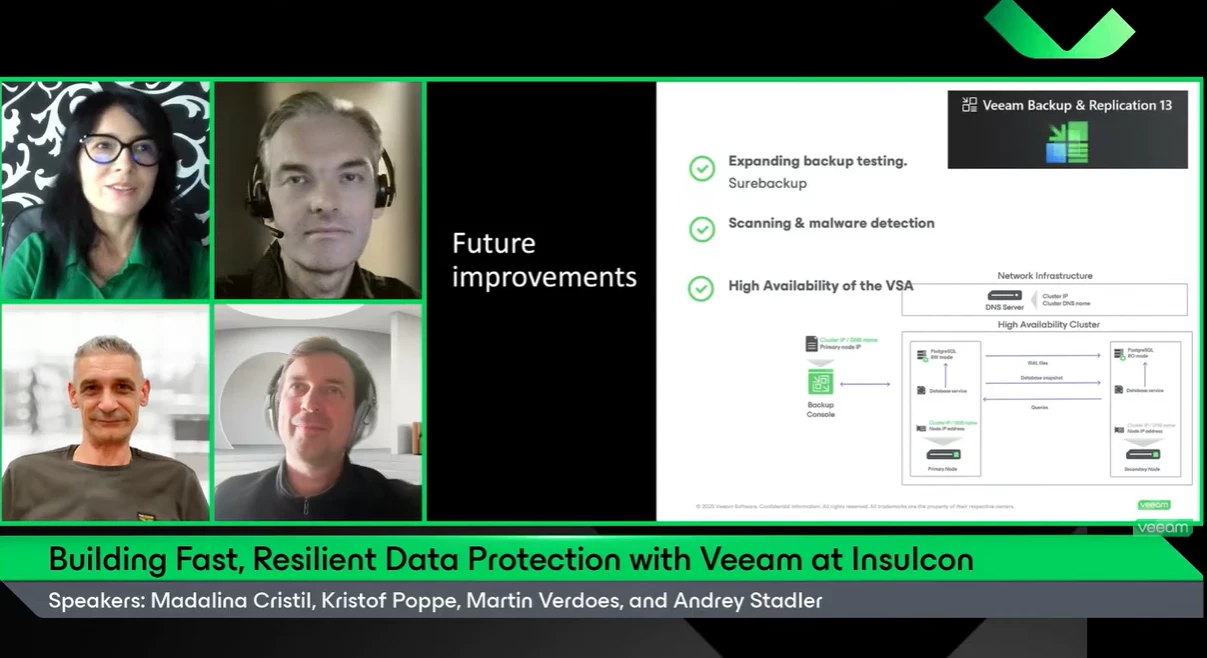
What a great Veeam 100 Show we had! A huge thank you to Martin, @kristofpoppe and @Andrey Stadler for the discussion on Insulcon's data protection journey. It was great to hear how Insulcon have relied on Veeam for many years and how they continue to evolve their strategy to strengthen resilience and stay ahead of emerging threats.I always enjoy hearing real customer stories and learning how organizations are putting technology into practice to solve real-world challenges.Thank you for the insights and the authentic discussion!
Veeam Backup & Replication 13.0.2 has officially landed.While this isn't a feature-heavy release, it is an important one from a security perspective, addressing a couple of recently disclosed vulnerabilities.For those already running V13, I'd recommend taking a look at the release notes and planning the upgrade.Curious to hear from the community:Have you already upgraded? Any observations from your lab or production environments? What's your typical process for validating VBR updates before rollout? Any advice for the ones that are planning to upgrade?Let's discuss!
In the current Veeam Backup & Replication V13, a daily software updates summary is sent automatically.According to support, this can only be disabled as an “AI-powered summary” in “Veeam Intelligence Advanced mode.”Can this be disabled in all editions, please?
I hope this is the correct forum to ask this question. When you use VDC Vault as 3rd offsite copy for your backups, but want to write archive data for 5 year retention to Azure (same datacentre) - what costs do you incur (ingress/egress/transactional costs) when writing it off to archive storage? I have heard rumours of an archive tier coming into VDC Vault?
Hi there!I`ve been thinking a bit about this, and finally the time has come to share it with you all.After trying different apps, AI, classrooms, etc… it came to my mind,Why dont give this a shot?We are world wide, many languajes and tons of native people, with differet accents and slangs, but we do share something in common, IT and Veeam love! the idea is simple, to create different conversation groups depending on the Languaje you want to practice / learn.Im more than happy to share some of my time if somebody wants to practice some Spanish.I know we do have French, Dutch, German, English, Portuguese, Italian (😉), and many others…What do you think?Is it something you may be interested in?Summer is comming (for me) and would be a great time for sharing some experiences and give some time to others.cheers.Luis F.
Already have an account? Login
Enter your E-mail address. We'll send you an e-mail with instructions to reset your password.