Backup Jobs not doing Storage Snapshot using vSAN.
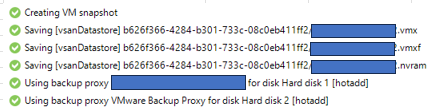
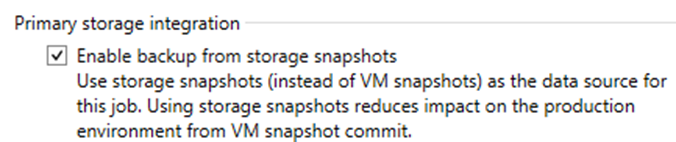
We have a VBR in Azure (AVS). The VMs are on volumes in vSAN. So the backup job finishes successfully. However, instead of doing a storage snapshot, the job does hot-add. The job has been configured to use storage snapshot. Since the VM snapshot is not removed right away, consolidation takes longer which affect the application running on the servers.
Best answer by coolsport00
Hi @spider32 -
As Chris shared, hotadd is the only transport method you can use with vSAN. For system requirements to use BfSS, see the Storage Integration Guide from Veeam:
As Chris shared, hotadd is the only transport method you can use with vSAN. For system requirements to use BfSS, see the Storage Integration Guide from Veeam:
Thanks. I will look into the articles closely. As far as the requirements of the proxy residing in the ESXi host connected to the vSAN and its disks being in the vSAN cluster, these have been both met.
Thanks. I will look into the articles closely. As far as the requirements of the proxy residing in the ESXi host connected to the vSAN and its disks being in the vSAN cluster, these have been both met.
Agreed, because from your screenshot you can see the Job is using “hotadd”, which is the Virtual Appliance mode.
Thanks. I will look into the articles closely. As far as the requirements of the proxy residing in the ESXi host connected to the vSAN and its disks being in the vSAN cluster, these have been both met.
Then you will be all set to use HotAdd with vSAN. 😁
Thanks so much for the links above. This is our first time working with vSAN in AVS and the info above very much helped in understanding what is going on with our backup process in AVS. Really appreciate all of your inputs.
Thanks so much for the links above. This is our first time working with vSAN in AVS and the info above very much helped in understanding what is going on with our backup process in AVS. Really appreciate all of your inputs.
Not a problem at all. That is what the community is here for.