The Why Now Community Challenge: Veeam Data Platform 13.1. It’s time to vote!
News, guidelines and various community projects
Recently active
This week Rickatron is on the road and @Madi.Cristil has prepared a solid set of content for this week’s recap. You can watch the episode here: Featured Contentvia @SSimpson via @coolsport00 via @Mohamed Ali Vanguard Blog Spotlight - Muhammad AdelThis week’s spotlight post is from @mhmdadl with this great though leadership post on understanding IT infrastructure and resiliency: Understanding IT Infrastructure & Application Availability and Integrity Confidence Levels - ArchtonicSpecial Department Newsvia VUG New Zealandvia VUG BeLux and @kristofpoppe via @Madi.Cristil -congruations @onurdemir for winning Blog of the Month:Congratulations to the 2025 Second Intake of Veeam Legends: Veeam Legends 2025 | Veeam Community Resource HubVeeam Data Cloud for Microsoft 365 users, see this KB: https://www.veeam.com/kb4780Who’s NewThank you @safiya for prepping the list this week, we are happy to welcome +115 new members. The coolest usernames are @Gummigreger, @ANGUSHENG, @VeeamTh
Hello Community! If you’re a Veeam Cloud Service Provider (VCSP), you know the challenges of handling licenses for tenants. The old way of emailing .lic files, waiting for tenants to install them, and then verifying everything worked correctly is time consuming and prone to errors. It may work for a few customers, but as you scale, it quickly becomes unmanageable. This is where the Veeam Service Provider Console (VSPC) changes the game. By integrating VSPC with the Veeam ProPartner Pulse portal, you can manage license distribution, usage reporting, and billing in a centralized, automated way. No more manual file exchanges and licenses are pushed directly into tenant environments with minimal effort. Think of Pulse as the master licensing database and VSPC as the control plane that brings those licenses to life in your tenants’ environments. In this post, I’ll walk through how this works and why it’s a game-changer for service providersHow to connect Veeam VSPC Console to Pro Partner
Hello Community Members, I am just trying to figure following scenario but unable to put into action.Scenario:-I want to copy a SMB Share/SAN Intergration Full Backup job from last day of previous month i.e 29th of 30th etc. I cannot find an option to handpick a specific restore point from last day of previous month. I want to retain this job with two-year retention on tapes. VBR just offers to copy Full Backups via Copy to Tape but does allow to handpick specific full backups from a list of previous backup jobs/restore points etc. Is this functionality only available via PowerShell?
Is there a way to search the Veeam database to see if a particular file is in a backup and which backup/s its stored in? I was taught to just go to disk, search the server name and then hunt & peck through backup dates until I find the backup that has that file in it.
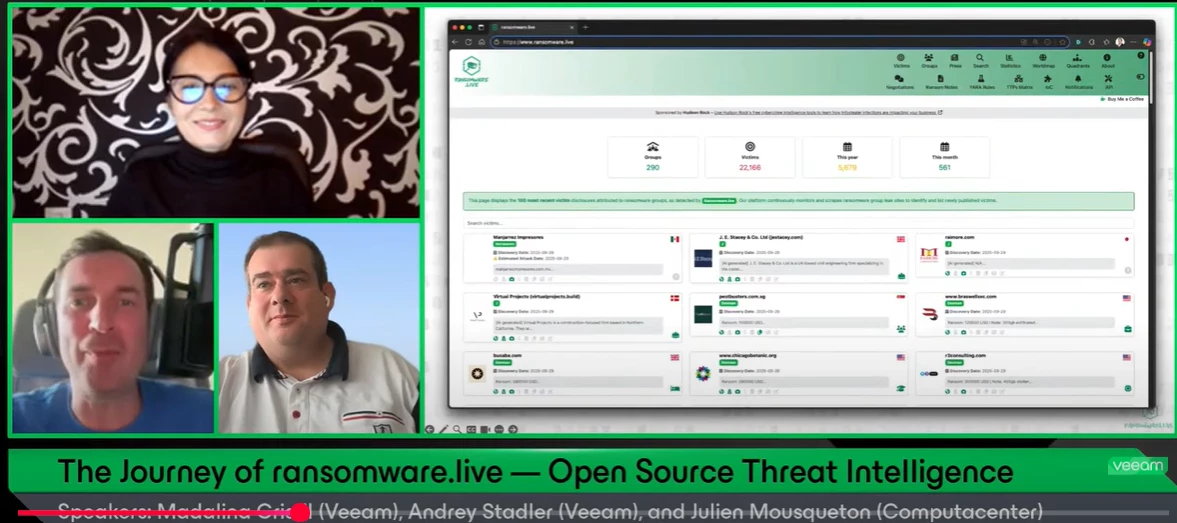
If you missed on the last Veeam 100 show, episode 19th '’The Journey of ransomware.live — Open Source Threat Intelligence'’ where @JMousqueton , @Andrey Stadler and myself are discussing Julien's personal project , ransomware.live, you can watch it in here. This open-source observatory shines a light on the hidden world of ransomware by tracking threat groups and their victims in real time. What started as a personal initiative has grown into a trusted source for the global cybersecurity community. Best, Madi
Hello, Veeam Community! I hope your week is going well. I've got something to make it even better: the September Veeam Vanguard Newsletter, which is incredibly long! 📜 This means one thing for you: an incredible amount of Veeamazing content in all kinds of formats. 👀 You can read articles, listen to podcasts or watch videos. Thank you to each Veeam Vanguard for dedicating your time, efforts and expertise to creating this content and helping us to keep the community's Veeam product adoption at the forefront. 💚 Now, make yourself a cup of tea or coffee, get comfortable, and enjoy reading this newsletter. 🤓 @AndreTheGiant- Veeam Backup and Replication 13 is available… but only the Linux version - https://vinfrastructure.it/2025/09/veeam-backup-and-replication-13-is-available-but-only-the-linux-version/Linux versions supported by Veeam Backup & Replication 12.3 (September 2025) - https://vinfrastructure.it/2025/09/linux-versions-supported-by-veeam-backup-replication-12-3-september
Normal circumstances, for the time being! Rickatron and @Madi.Cristil are up for #234 this week with a solid block of content, Special Department News and Who’s New! You can watch this week’s episode here: Featured Contentvia @onurdemir via @Iams3le via @Michael Melter Vanguard Blog Spotlight - Andre PuliaThis week’s Vanguard Blog Spotlight is from @AndrePulia with a fantastic blog that provides a storage mind map. Check out his post here: Block Repository – DAS Using Internal Disks. – BLOG PULIASpecial Department Newsvia @kira.bezhanova @jess.may and @leaha via VUG India and @Mohamed Ali and @JigarThakker via VUG Brazil and @joaquim @BethSouza and @Wesley.Martins via @Madi.Cristil And - check out that the XCP-ng beta has been released in the Veeam R&D Forums.Special Department Newsvia @safiya, we are happy to welcome +119 new members to the Veeam Community. The coolest usernames are @Spaceblade, @Voodoo, @shoemaja and @Rookie24. Alfred’s pick is @smartyparts →
We currently use Veeam B&R to backup the share’s to a local repo on the backup box. I then created a second job (agent) to backup the drive B:\backups to the clients VSPC repo. It works but when I attempt a restore of the cloud data its a restore of what looks like a database and not browsable files like a restore of the original B&R job produces. Hopping for a more elegant solution that doesn't require a two restores to get client data into a usable form. thanks and sorry for this being one of those out there kind of questions.
It is worth noting that Object First Out-of-the-Box Immutability (OOTBI) provides true data immutability and is very simple to deploy, as we will see shortly and addresses the issue of slow recovery times that can make ransomware attacks damaging to operations and reputation.I will recommend deploying an OOTBI appliance due to the pervasive nature of cyber-attacks on data protection infrastructure (backup). With OOTBI, you will achieve efficient data recovery, a user-friendly and cost-effective solution that can effectively stop ransomware attacks. As you all know, this storage solution was purposely built for Veeam.Before using this guide, read the following articles below Please follow the steps below to integrate Object First OOTBI with VBR. You may want to take a look at the original blog post for more information.Create an S3 KeyIn the previous guide, we have discussed the various ways to access Object first OOTBI web interface. Upon login, we will have to create an s3 key. To
When a PostgreSQL database crashes, traditional recovery methods can mean hours or even days of downtime. Veeam's Instant Recovery transforms this process, getting systems back online in minutes.Here's how it works: Instead of waiting for complete data restoration, the database starts directly from backup storage. Users regain immediate access while data migrates in the background.The process unfolds in three key phases:Instant Publication: Database instance launches directly from backup Background Replication: Data copies to production server while users work Smart SwitchOver: Final sync occurs with minimal interruptionKey benefits:Minutes instead of hours for system restoration Zero data loss protection Uninterrupted user productivity during recovery Automated process management Minimal production impactWatch the complete technical breakdown of PostgreSQL Instant Recovery mechanics in this video.👉#PostgreSQL #DatabaseRecovery #Innovation #Tech #BusinessContinuity
The release of Veeam Backup & Replication v13 marks a major milestone—especially with the debut of the Linux-based Virtual Software Appliance (VSA). No more mandatory Windows licensing or server setup: Veeam delivers a pre-hardened, Rocky Linux-based appliance that promises both security and simplicity. Whether you want to deploy via OVA on your favorite hypervisor or ISO on a physical server, installation is refreshingly straightforward.What I Like1. Security and Compliance Built-InThe Veeam v13 appliance comes pre-hardened and DISA STIG-compliant, with SSH disabled by default. There’s mandatory 2FA for administrator and Security Officer accounts, and a new Security Operator role to approve high-risk actions (like deleting backup data). Automatic patching and managed OS updates by Veeam further minimize risk and maintenance effort.2. Deployment is Easy and FastThe “just enough OS” philosophy means less bloat, faster deployments, and reduced attack surface. ISO/OVA options allow yo
Hi, I created “Backup Copy” and somehow is working if the Object Type is “Agents For Window Job” but not on “Repository”. Is there something I missed out ?
Hello Veeam Team and Community,I’d like to clarify something about partner and certification requirements.If my company plans to: Provide managed services to customers who use Veeam Data Platform (for backup and recovery management), and Also act as a reseller of Veeam licenses (via authorized distributor), do we need to hold any specific Veeam certification (e.g. VMSP, VMTSP, VMCE) or reach a certain partner tier in the ProPartner program?Or is being a registered ProPartner and sourcing licenses from an authorized distributor sufficient?Appreciate your guidance so we can ensure full compliance with Veeam’s partner requirements.
Hello Community!Thank you all for the votes you placed to select August’s Blog of the Month winner. It was a very close race between two blogs this month, but with 12 votes, the winner is…@PeteSteven with his blog, Virtual Lab/Sure Backup with small subnets! Congrats Peter 🎉Read his blog below: Congrats to the other nominees as well! Find their great work here here - Blog of the Month Nominations
Hello,VeeamONE till version 12 was using connection from VeeamONE to VBR on port 2805 to connect to Veeam Agent on VBR.In Veeam ONE 13 connection was exchanged from VBR to VeeamONE on port 2805, even VBR is on version 12.x.We had enabled only connection from central domain, where is located Veeam ONE, to customer domain, where VBR is located.So during adding VBR into Veeam ONE, Veeam Analytics Service (previously Veeam Agent) was installed, but connection timed out. Adding VBR failed due no response from Veeam Analytics Service - status “Failed to install”. Is not possible to download logs to troubleshoot as echo is not providing port number. On helpcenter is described VO → VBR connection only, even for Linux VBR. Once connection from VBR to VO was allowed, data update was successful.Finally, result is installed and Healthy.
Current LAB setup(all settings inherited from previous host): HypervHostB with a private switch 2 virtual machines on this private switch VM1 - ClientPC with windows 10 iso installedVM2 - PrimaryDC (Veeam restored from HypervHostA to HypervHostB - Session Type is Full VM Restore) - this server has roles(ad fs mgmt, dhcp, dns and gpo repectively) - has 2 vm switches, Data: ip 192.168.50.1, subnet 255.255.255.0, gw - 192.168.50.150, preferred dns:192.168.60.240(DC2) and secondary dns:192.168.50.1 Voice: 20.20.20.5 subnet:same, gw:20.20.20.1, dns1:PDC, dns2:DC2Observation:1.VM2 fired up nicely, AD components such as aduc, domains and trusts, gpo etc all open fine, able to logon with my local and domain AD accounts successfully 2. Fired up VM1, VM1 picked up IP via dhcp successfully, showing domain name schools.local on VM net adapter3. Both vm1 and vm2 can successfully ping each other via ip and dns name, nslookup works as well.4. vm1 is listed in dns on vm2Chec
QNAP QuObjects application is free and certificated for objects with immutability, which means you can use it as object storage within Veeam for a backup repository that supports their immutability feature.QNAT QuObjects Requirements: 1.Log on to the NAS as an administrator.2.Select App Center. 3.Click the Search icon on the App Center page. 4.Enter QuObjects and select the QuObjects and click Install. 5.Click Open after Installation is completed. 6.Ensure turn on Server Connection on the QuObjects S3 Compatible Object Service page and select User Management. 7.Click Add User on the User Management page. 8.Select a user on the Add an Authorized User page and click Add. 9.Click the Add key icon on the User Management page. 10.Ensure QuObjects creates an access key for the user and select Storage Space. 11.Click Create on the Storage Space page. 12.Enter the storage space name in the Folder Name field on the Create Storage Space page, select the user and click Create. 13.Select the new c
We are running a VMWare environment.We created a new iSCSI datastore for some of our VMs due to the previous Fastclass Fibrechannel datastore having issues.All of our VMs are running well on this new datastore but every Veeam backup job fails for VMs housed on it. All backups for VMs running on other datastores are fine. The VMs show up in Veeam and are able to be added to jobs and show their file sizes, but fail when the job is run.Any ideas? I’ve pasted the typical error message below that we get, with some of our info redacted. Note that some of the files do actually back up, namely the smaller files like the .vmx, .vmxf, and .nvram, but the .vmdk file seems to be where the error occurs. 10/1/2025 3:18:59 PM :: Processing ******** Error: Failed to open VDDK disk [[***NAME OF ISCSI DATASTORE***] ***NAMEOFVM***.vmdk] ( is read-only mode - [true] )Logon attempt with parameters [VC/ESX: [***VMWare HOST IP***];Port: 443;Login: [***USERNAME***];VMX Spec: [moref=9];Snapshot mor: [9-snapsho
Hi Everyone,Earlier today, during the delivery of the Veeam Backup & Replication v12.3: Configure, Manage, and Recover course, I felt compelled to write this article because I've noticed that most students, when they need to create a repository, only think about capacity and forget to consider throughput. Failure to properly configure the required throughput will certainly lead to several problems. Furthermore, the vast majority consider using only RAID 5, without a hot spare disk.In this article, I will make regular updates.https://pulia.com.br/backup-repositories-repositorio-em-bloco-das/ After reading this article, you'll understand that buying an Object First box is the best option to have a repository. Enjoy reading it! have a great week.
Active Full Backup and Synthetic Full Backup in Veeam essentially serve the same purpose: creating a full backup file containing the data of the entire virtual machine (VM). However, they differ significantly in how they do this and, consequently, their impact on the system.Here are the definitions and differences between these two backup types:What is Active Full Backup?Active Full is the traditional full backup method.Data Source: Reads data directly from the source data store where the virtual machine (VM) is located. Process: Veeam Backup & Replication retrieves all VM data from the source, compresses and deduplicates it, then writes it to the backup repository as a new .vbk (full backup) file. Areas of Influence: Production Environment (Source): The load on the source datastore and VM where the VM is located will be high because all the data needs to be read. Network Resources: Network bandwidth is intensive as all data must be transferred from the source datastore to the ba
This is a great day Community!At VeeamON in San Diego back in April, Anton shared how Veeam is looking to add more hypervisor support to their product. Late last year, they began answering customers’ call to do so by implementing support for Proxmox. In more recent months, Veeam announced support for both Scale Computing SC/Hypercore and HPE on VM Essentials. But, that’s not all….Some of us in the Veeam100 Community were approached about a month ago to test out a Veeam Plugin for XCP-ng. Based on our testing & feedback Veeam has been hard at it getting the Plugin updated, and just today released a new Public Beta ripe for you all to test out! That’s pretty amazing considering something else pretty significant was released a couple weeks ago (has anyone heard about the Veeam Software Appliance on v13??? 😉 )For testing instructions, download link, and password go to the following Forums post by Anton Gostev:https://forums.veeam.com/kvm-rhv-olvm-pve-schc-f62/veeam-plug-in-for-xcp-ng-
Hey all, we’ve got a new installment in our RegKey of the Month series up now! This month’s spotlight: the Classified Stripe banner in Veeam Backup & Replication.Why it matters: if you run multiple VBR servers (prod, test, branch, DR, etc.), a visual cue (e.g. “PROD – do not touch”) helps avoid costly mistakes. The post covers: how to implement it via registry keys in Windows deployments how to achieve the exact same result on the Veeam Software Appliance v13 (yes — even though there is no registry in VSA, we map the settings into config files) tooling tips, color code guidance, and gotchas Curious? Read the full deep dive here ➡️ https://integriservices.blogspot.com/2025/09/regkey-of-month-october.htmlVSA v13 ? No problem for Regkey-man !
Proxmox VE 9 introduces external QCOW2 snapshots on thick-provisioned LVM volumes over SAN (including FC and iSCSI). There is already an updated plugin, that supports not only this version but also those specific snapshots.@Iams3le already gave insight about the installation of the new plugin: Veeam Plug-in for Proxmox VE v12.1.5.17 update to Support Proxmox VE 9.0 | Veeam Community Resource HubNow, using a shared FC (or iSCSI) SAN is possible just like we did with VMware - while still being able to generate nice Veeam backups of the VMs on the LUNs: Plug-in for Proxmox VE v12.1.5.17 -> shared LVM? - R&D Forums Here's the breakdown:QCOW2 is required for snapshot functionality on SAN LUNs. Snapshots are implemented as external overlays (not internal QCOW2 snapshots). Each snapshot creates a new logical volume to store delta data. This allows rollback and versioning, even on raw block devices like FC LUNs.[TUTORIAL] - Inside Proxmox VE 9 SAN Snapshot Support | Proxmox Support For
The IdeaWhen the weather is bad on weekends, I listen to music and vacuum, and then I can become creative. This weekend, an unusual idea came to my mind:What if Monopoly was not about money and hotels but backups and recovery? And when I get creative, the idea doesn’t let me go; I start doing stuff. Here is the result:BackupOpolyA playful way to explore Veeam’s ecosystem, while still keeping the fun and strategy of the classic board game. The player tokens would be a tape cartridge, a notebook, a server, and more. I sketched a board design in Excel (Drawing with Excel relaxes me).Design for the game boardAnd then I put together some basic rules. Here's what came out of it.ObjectiveBuild the strongest data protection environment by acquiring Veeam products, storage systems, and advanced features. Collect VUL licenses, charge opponents when using your technologies, and avoid penalties for ransomware or audit. The last player not bankrupt wins.Instead of dollars, players pay and earn Veea
I’d like to share my current backup infrastructure and get feedback on best practices when using Synology NAS with iSCSI LUNs as Veeam repositories.🔹 Current Setup Main Site Backup Jobs → Repository on Synology NAS (connected via iSCSI LUN to VM). Secondary Site Backup Copy Jobs → Repository on Synology NAS (iSCSI LUN). Immutable Backups Another Synology NAS configured as a Hardened Repository (WORM / immutability). Backup Jobs First Backup is Full Backup, then after then we do incrementals and Synthetic Full Backups on Fridatys. Disks are configured as ReFS with 64KB block sizes since that was recommended when I was configuring this. Aprox 2 years agoAny recommnedations would help.
Already have an account? Login
Enter your E-mail address. We'll send you an e-mail with instructions to reset your password.