The Why Now Community Challenge: Veeam Data Platform 13.1. It’s time to vote!
News, guidelines and various community projects
Recently active
In the dialog where I can add servers there is no ption for Proxmox.I have Veeam Backup & Replication 13.0.2.29 Enterprise Plus Edition.How do I get the option for Proxmox
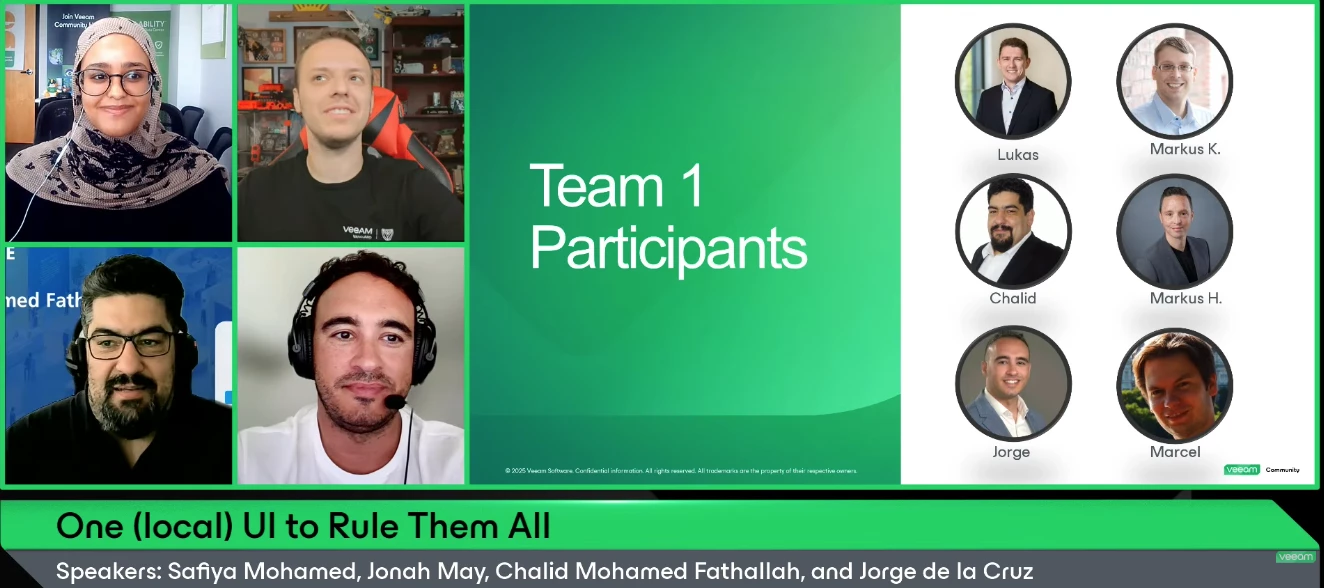
Hello Veeam Community!We just wrapped up our Hackathon-themed August V100 Show: One (local) UI to Rule Them All. Thank you to @jorge.delacruz, @CMF, and @JonahMay for joining, and to @Dynamic for his involvement in this show’s content 🤗Register for the Veeam Community Hackathon today! Registration is open until September 30. If you missed the show or want to rewatch, catch it below ⬇Overview:Born from the Veeam Community Hackathon 2025, Open Backup UI is a unified, self-hosted dashboard that brings VBR, Recovery Orchestrator, and Backup for Microsoft 365 together in a single modern web UI — built entirely by the community, for the community. In this special edition of The V100 Show, we go behind the scenes and dive into:How Team 1 turned a hackathon idea into a working monitoring dashboard — live demo included The tech behind it: Next.js, TypeScript, and the Veeam REST APIs, container-ready with Podman/Docker Lessons learned from building as a distributed community team From Jorge
In today’s digital world, data security is a top priority for organizations. Veeam Backup & Replication has evolved to meet these needs, and one of its key innovations is the Veeam Hardened Repository ISO—a solution designed to protect backup repositories from ransomware and other cyber threats.What Is the Veeam Hardened Repository ISO?The Veeam Hardened Repository ISO is a Linux-based solution that secures backup data by making it immutable. This ensures that data cannot be modified, deleted, or encrypted by unauthorized parties, even in the event of a ransomware attack. The repository allows organizations to set a retention period during which backups remain secure and unaltered.Key Features:Immutability and Retention Locks: Ensures backups are safe from external modifications. Ransomware Protection: Protects backups from being encrypted or deleted by ransomware. Linux-based Security: Utilizes Linux’s built-in security features for enhanced protection. Enhanced Data Availability:
Hello,A client have a Quantum LTO server connected by DAS cable to a Windows Server that host Veeam Backup Server. Is it possible in this case to migrate VBveeam Backup Server to a VM and keep access to the tape server ?
Hello awesome community! A huge thank you to everyone who participated, shared their votes, and helped make this challenge a success!As promised, the three most-voted articles will each receive a surprise prize. We’ll be reaching out to the winners directly with details on how to claim their prize.And now, the moment we’ve been waiting for…Congratulations to our winners! @lucasmagnum @matheusgiovanini @wolff.mateus Your contributions clearly resonated with the community — well deserved!Thank you again to everyone who took part. Keep sharing, keep contributing, and keep making the Veeam Community awesome! 💚
We have a scenario where the customer has a Tape Library currently connected to Bacula. Due to an issue with Bacula, they are carrying out a reconstruction or recovery process of the existing backups, which they intend to run from Monday to Friday.At the same time, the customer wants to incorporate Veeam Backup & Replication to perform Backup to Tape jobs during the weekends, using the same Tape Library.The question is to determine how feasible and advisable this approach is, considering that both applications would use the same library at different times, and what considerations or limitations should be taken into account to avoid conflicts in the access and control of the tape drives and media.
Hi, I’m having trouble implementing an immutable repository using Red Hat 10 with Veeam version 12.3.2. I installed it a few days ago and it was working fine, but today the Veeam server was shut down to fix an issue with an HBA card. Upon restarting, the machine failed to reconnect to the immutable repository, throwing errors such as: "Unexpected socket shutdown, Failed to rescan repository (...) Error Unexpected socket shutdown, host discovery failed," as well as warnings like: "Refresh linux host failed error: Unexpected socket shutdown, failed to rescan repository (...) Unexpected socket shutdown." I’ve run a number of tests: changing the user password to match what is configured in Veeam, disabling the Red Hat firewall, testing connections on ports 6160 and 6162 in both directions, and re-enabling port 22—yet nothing works. Oh, I almost forgot this warning that appears when rescanning the Linux host: "Unable to collect hardware info: Unexpected socket shutdown." It’s really frustra
Often when looking at Best Practices guides, software documentation, or even during education, I see and hear the answer “It depends.” This is probably my least favorite answer, as someone who likes to understand why something is right or wrong. While it does “depend,” it makes it very tough for people starting out to understand the “why” in many cases. One thing that is not going to be the same for every Veeam user is how the jobs are created. Over the years, Veeam has made some fantastic changes and for most environments, Per-Machine backups are the way to go, the minimal savings you get do not compare to the performance and portability of this mode. Additionally, with this mode you can often add a HUGE amount of VM’s to a job and just forget about it. I know of people who have 1 job. That is the definition of an easy button!Today I want to discuss some reasons that myself and others have gone the other direction to separate jobs. While I keep my jobs as large as I can for the perf
'Why Now' initiative around 13.1 Every time a new version of Veeam is released, the same question comes up:Do I really need to upgrade right now?It’s a fair question.If backups are running, jobs are completing successfully, and restores work, it can be difficult to justify changing an environment that seems to be doing exactly what it was built to do.But I think Veeam Data Platform 13.1 changes that conversation.After spending time working with Veeam 13.1 in the lab, I don't look at this release as simply another collection of new features. The bigger story is how Veeam continues to move from traditional backup and recovery toward a much broader cyber resilience platform.Customers today aren't just asking:“Did my backup complete successfully?”They're asking:“If we're hit with ransomware tonight, how quickly can we recover?”“How do I know the restore point I'm using is clean?”“What happens if Active Directory is compromised?”“Are my backup repositories protected from the attack?”“Have w
It would be nice if you could also upgrade a Cloud Connect server from the Service Provider Console.
I have veeam backup server running in primary site with vcenter integration and backup scheduled and running. Now, I am creating another veeam backup server in DR site, and I want to the same vcenter and esxi to be integrate with DR site veeam backup server. kindly clarify the above approach is correct
Well, another week and another blog as we are at #9 of 10 today. This blog focuses on Universal CDP and its fitment in to v13. Check out the link below and the blog.Universal CDP in v13: Where It Fits Universal CDP in v13: Where It Fits Introduction Continuous data protection gets attention because it promises extremely tight recovery points, but that does not mean it belongs everywhere. Universal CDP in Veeam v13 should be evaluated as a targeted design choice for workloads where small amounts of data loss carry outsized business impact.That framing is important in production. CDP is not a replacement for every backup or replication workflow. It is an additional protection method that changes how teams think about network paths, storage performance, and the operational meaning of recovery success. Match CDP to Real Recovery Needs The strongest CDP use cases are the ones where recovery point objectives are already difficult to meet with conventional periodic jobs. Systems with freque
Greetings. On a Veeam 12.3 install, whether there be an NFS or SBM datastore, and even while trying to hold the [CTRL] key and right-clicking on any datastore, the “Access Permissions...” menu does not show up, nor is there a ribbon icon visible for “Set Access Permissions” option.The logged in user into Veeam is a Veeam Backup Administrator. This option is visible on any other Veeam servers tested.What would be the cause for this effect? Thanks in advance.
Recently, I was involved in a production support case where a Veeam software appliance deployed on physical hardware failed to boot after an unexpected power interruption.The system dropped directly into:“You are in emergency mode. Cannot open access to console, the root account is locked.”At this point, many administrators assume the appliance is corrupted or that Veeam needs to be reinstalled. In this case, the backup administrator had already reinstalled VBR once, and the issue happened again. This is not a Veeam software issue. The problem occurs at the Linux storage layer, specifically with LVM and XFS.The Veeam appliance is built on LVM logical volumes formatted with XFS. During boot, Linux must detect storage, activate LVM volume groups, and mount all filesystems defined in /etc/fstab before any services start.If any of these steps fail, the system enters emergency mode to protect itself. This is a safety mechanism, not a catastrophic failure.Understanding this boot sequence ma
Unprotected DB from the primary node in SQL AG. Other DBs are being backed up successfully on the same primary server.Configured to run transactional logging periodically but one large DB shows as unprotected. The problem started when the old primary node was switched over to a new server and evicted. After the eviction, it started not backing up the DB(error: Transaction logs from some databases were not backed up for the last 8 intervals).Ran image level backup (the parent job), this was successful but transaction logging still not working. However, the error now shows as (error: SQL Server transaction log backup took longer than desired log backup intervalFailed to upload SQL Server transaction log backup for DB to LogShip server: Repository agent is stoppedSQL Server transaction log backup could not be completed within 10 RPO intervals and will not be retried)This was working before and no changes to any of the Veeam servers so this error is not accurate. Confirmed application-awar
Hi everyone,Another week, another little project. 😀I’ve been spending some of my spare time practicing and experimenting with Codex again, and last weekend’s result is AgentBridge. The idea came from something that has bothered me for a while when working with Veeam Agent management in v13 VSA:VBR does a great job managing Agents once a machine is under management — but starting from V13, onboarding Windows machines in non-domain environments is no longer as straightforward as simply pushing via username and password. Linux certification also require SSH-based preparation and manual steps before they can be added cleanly.For one or two machines, that’s fine. But once you start dealing with more hosts, it quickly becomes painful.So I built AgentBridge.It’s a small open-source tool focused specifically on that initial bootstrap and enrollment process.You run AgentBridge as a single application on Windows, Linux, or macOS, open its local Web UI, connect it to your VBR 13.1 server, and us
Hi everyone! Hope this will be helpful. The idea of the scheme was to imagine everything that could require troubleshooting and put that on the scheme. v13.1 with lots of improvements and new workloads is in progress. Attached you can find both .jpg and .pdf formats, in second one you can put any word in search and find it on the scheme if it exists there. Created in Miro, handmade with lots of user guide research :)
A greeting to allI have deployed a POC of OLVM 4 host Hypervisor version 4.5.4-1.0.31.el8, to replace Vmware infrastructure.I am successfully testing the Veeam Backup for Oracle Linux Virtualization Manager and Red Hat Virtualization 4.1. I enclose a fairly comprehensive guide with the ste by steps of configurationWith ISO version 12.1.2.172 the Ovirt KVM plug-in is already installed.for those who do not have latest version of VBR installed download and install the pluginDownload plug inhttps://www.veeam.com/it/products/downloads.html?ad=top-sub-menuVeeam Backup for Oracle Linux Virtualization Manager and Red Hat VirtualizationPerform the following Operations Architecture OverviewArchitecture Overview - Veeam Backup for Oracle Linux Virtualization Manager and Red Hat Virtualization • Virtualization managerVirtualization manager is a Linux-based physical or virtual machine that manages oVirt resources such as VMs, hosts, clusters, storage domains and networks. • Backup serverA backu
As many of us know, there is a migration path from Windows to VSA Appliance for VBR. Recently, this week I migrated another of our sites, but due to forgetting to remove the Windows VBK server from Enterprise Manager after I did the migration I could not enable some licensing checkboxes in the VSA. I opened a support ticket and worked with them to use PowerShell on the VSA to remove the link to VEM.CAVEAT - Please ensure to have a configuration backup and snapshots of your Veeam infrastructure for rollback, just in case.After doing this, I thought it would make for an interesting blog post to help others with this type of issue, so see the link below to my blog and the blog post itself. Enjoy.Blog - How to Remove Enterprise Manager Link after VSA Migration from Windows How to Remove Enterprise Manager Link after VSA Migration from Windows Introduction Veeam has a migration strategy for moving your Windows deployment to the new VSA Appliance by following KB4800. During this process w
Hi, we have a Fast LTA with 5 Silent Bricks. We plan to remove them weekly, and have one brick only in the system. We want to have weekly backups rotating offsite for one month (thatswhy 5 bricks). Whats the best strategy? Currently we have one volume and one S3 share per brick, and 5 backup copy jobs, they are running on first saturday, second saturday and so on, copy of the latest backups to the brick for the current week.But what happens if there are only 4 saturdays? I have no other scheduling options to get 5 weeks. How would you implement this? Thanks.Rene
In my last blog post, I covered the basics and requirements of HA in v13.0.1. With a short how-to and a step-by-step guide, I wanted to show how quickly HA can be set up in your own environment and what added value it brings. In my day-to-day work as a Systems Engineer at Veeam, I've also come into contact with HA at many customer sites. Most of the feedback was positive, but unfortunately there were also some issues around stability and node connectivity. That's why I'm even more excited about the release of v13.1, which brings further improvements to this topic. In this article, I want to focus on these improvements: what's changing in the new version, and what else we can expect. For everyone who just wants the summary, here's the TL:DR: TL:DR Requirements for HA remain unchanged (2x VSA, VDP Premium license, Remote Console) — HA is still exclusive to the Veeam Software Appliance. Cross-subnet deployment: HA nodes no longer need to be in the same subnet. A cluster DNS name now re
Hello everyone!A quick update for all of you!The waiting has an end!Veeam has officially released Data Platform 13.1 along with all its core components.Don't let the "point release" label fool you—this update is packed with over 70 new features!If you want to dive into the details, you can find all the essential information and documentation right here:🛡️ Veeam Backup & Replication 13.1:• What’s New: https://www.veeam.com/veeam_backup_13_1_whats_new_wn.pdf• Release Notes: https://helpcenter.veeam.com/rn/veeam_backup_13_1_release_notes.html📊 Veeam ONE 13.1:• What’s New: https://www.veeam.com/veeam_one_13_1_whats_new_wn.pdf• Release Notes: https://helpcenter.veeam.com/rn/veeam_one_13_1_release_notes.htmlAnd for the service providers under you like me, Version 9.3 of the service provider console has also been released!☁️ Veeam Service Provider Console 9.3:• What’s New: https://www.veeam.com/veeam_console_9_3_whats_new_wn.pdf• Release Notes: https://helpcenter.veeam.com/rn/vspc_9_3_r
Normal circumstances this week! We have a solid book of content to feature, a Vanguard blog to spotlight, Special Department and Who’s New. Let’s go! You can watch this week’s episode here:Featured Contentvia @Andreas Buhlmann via @tm67 via @Michael Melter Vanguard Blog Spotlight - Christian EmersoleThis week we feature @Iams3le in the spotlight with his recent post: Fix Veeam ONE License Mismatch and Property Errors QuicklySpecial Department Newsvia VUG Brazilvia VUG Chilevia @Madi.Cristil via @kirststoner12 Who’s NewThank you @safiya for prepping this week’s new users. We are pleased to welcome +137 new users to the Veeam Community, the coolest usernames are @kinghiholike, @Jumebone, @iamundo and @jackyboy. Alfred’s pick as a no-brainer, @CatGoesMeow → You have a badge coming your way. Have a great week everyone!
One of the biggest challenges in AWS data protection projects is the time required to provision all the necessary infrastructure. This timeline can vary significantly depending on the customer’s existing environment, cross-team dependencies, and the level of customization required for each deployment.With the goal of accelerating this process and bringing greater consistency across environments, I started developing a CloudFormation-based approach that leverages Infrastructure as Code (IaC) to automate the deployment of the required resources.The solution delivers a fully operational Veeam Data Platform 13.1 server within a VPC that is completely isolated from the internet. Administrative access is provided exclusively through AWS Systems Manager (SSM) Session Manager, eliminating the need for public IP addresses, bastion hosts, or open inbound ports. All management and operational traffic remains securely within the AWS network.My intention is to share this initiative with the communi
Hi,I created a full system backup with veeam agent for windows on a dell laptop with Win 11 installed. I boot from Veeam recovery media to a new laptop, select the backup from external usb drive, select bare metal recovery and whatever i do (Entire, volume, manual) i receive the same error message: Restore failed: The stub received bad data
Already have an account? Login
Enter your E-mail address. We'll send you an e-mail with instructions to reset your password.