The Challenge
You did everything right. You planned the maintenance window, cleared the pre-flight checks, upgraded your Veeam Backup & Replication server to v13, and expected the usual smooth ride when pushing the updated Veeam Agent to your protected workloads. Instead, the Protection Group rescan throws certificate errors, some of your agents stay on the old version, and your backup jobs on those endpoints start to look nervous.
I ran into exactly this on a customer environment recently, and since the root cause was neither obvious in the logs nor documented in an easy-to-find KB, here is the short write-up.
The Symptom(s)
After the VBR upgrade to v13, the console tries to push the new Veeam Agent binaries to the Windows guests in a Protection Group. The deployment fails with a certificate related error, typically along the lines of:
- A certificate chain processed, but terminated in a root certificate which is not trusted by the trust provider.
- Or a signature verification failure on the Veeam MSI or on one of the filter driver components.

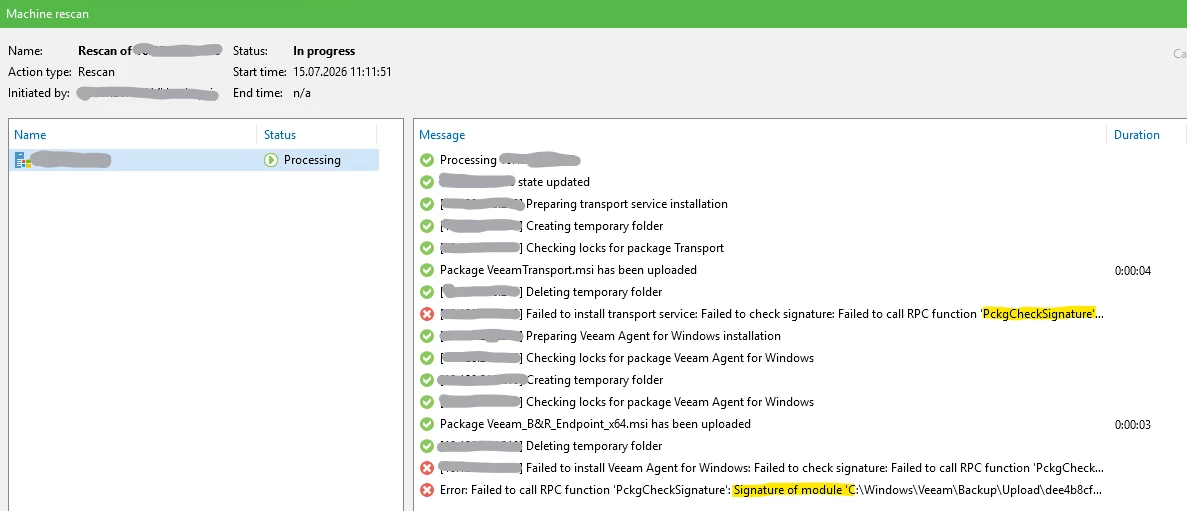

The interesting part: it does not fail on every machine. Freshly patched Windows systems pull the new agent without a hiccup. The problem shows up on guests that have been sitting on an older Windows patch level for a while, sometimes legacy 2012 R2 or 2016 boxes that were quietly excluded from the regular patch cycle. Also systems in a dark site without any connection to the outside.
The Root Cause
Starting with newer Veeam releases, the binaries are signed with a certificate chain that terminates in a more recent root CA. Specifically, the chain in my case relied on:
- Entrust Root Certification Authority G2
- An intermediate Entrust Code Signing CA (EVCS2)
- A Veeam code signing certificate issued underneath
Veeam has become much stricter in terms of certificates and trust - which is a good thing.
Windows validates the signature of the incoming MSI, the filter driver, and the service binaries against its local Trusted Root Certification Authorities store. If Windows Update has not been run for a longer period, that store simply does not know the required roots and intermediates. The signature check fails, and the agent deployment aborts before it even starts writing files.
In short: it is not a Veeam bug. It is a stale Windows trust store.
The Quick Fix
The clean fix is obviously to bring the guest OS back into the regular Windows Update cycle. In reality, that is not always possible on short notice, for example on isolated systems, appliances, or servers with a change freeze.
The pragmatic workaround is to install the missing certificates manually. In my case, three certificates were enough to get the chain valid again:
- Entrust_G2_CA into Trusted Root Certification Authorities (Local Machine)
- EVCS2 CSB (Entrust Code Signing intermediate) into Intermediate Certification Authorities (Local Machine)
- CSBR1 (the corresponding root, depending on the exact chain your Veeam build uses) into Trusted Root Certification Authorities (Local Machine)
You can grab the current certificates directly from Entrust’s public repository, or export them from a fully patched reference machine using certlm.msc.
| Filename | Common Name | Type | Download URL |
|---|---|---|---|
| entrust_g2_ca | Entrust Root Certification Authority – G2 | Root CA | https://files.entrust.com/root-certificates/entrust_g2_ca.cer |
| CSBR1 | Entrust Code Signing Root Certification Authority – CSBR1 | Root CA | https://files.entrust.com/root-certificates/CSBR1.cer |
| EVCS2-CSB... | Entrust Extended Validation Code Signing CA – EVCS2 (Cross-Cert unter CSBR1) | Intermediate CA | https://files.entrust.com/subca-certificates/EVCS2-CSBR1-crosscert.cer |
Deployment steps on the affected guest:
- Copy the three .cer files to the guest, for example to C:\Temp.
- Open certlm.msc as Administrator.
- Import the root certificates into
Trusted Root Certification Authorities → Certificates. - Import the intermediate certificate into
Intermediate Certification Authorities → Certificates. - Back in the VBR console: Rescan the Protection Group and let the deployment run again.
At this point the agent installs, the filter driver loads, and the endpoint reports the new version.
A Few Things Worth Remembering
- Do not disable signature verification as a workaround. It solves the symptom but leaves the box in a bad state and violates just about every hardening baseline you care about.
- Domain wide rollout: if you see this on many guests, push the certificates via GPO, Trusted Root Certification Authorities under Computer Configuration → Policies → Windows Settings → Security Settings → Public Key Policies. Much cleaner than touching each server. They would also come with Windows Updates on systems being able to phone home to MS.
- After the fix, patch anyway. A machine that is behind on root certificate updates is also behind on everything else. Treat it as a signal, not a target state.
- Check your golden images and templates. If you deploy new VMs from an old image, you will keep re-creating the problem.
Takeaway
An upgrade to VBR v13 does not just move Veeam forward, it also raises the bar on what your guest OS trust store needs to know about. If you see certificate errors during agent rollout after the upgrade, look at the Windows Update state of the target machines first, before you go hunting through Veeam logs. Nine times out of ten, a missing Entrust root is the whole story.
Hope this saves someone a couple of hours in the next maintenance window. 😎