The Why Now Community Challenge: Veeam Data Platform 13.1. It’s time to vote!
News, guidelines and various community projects
Recently active
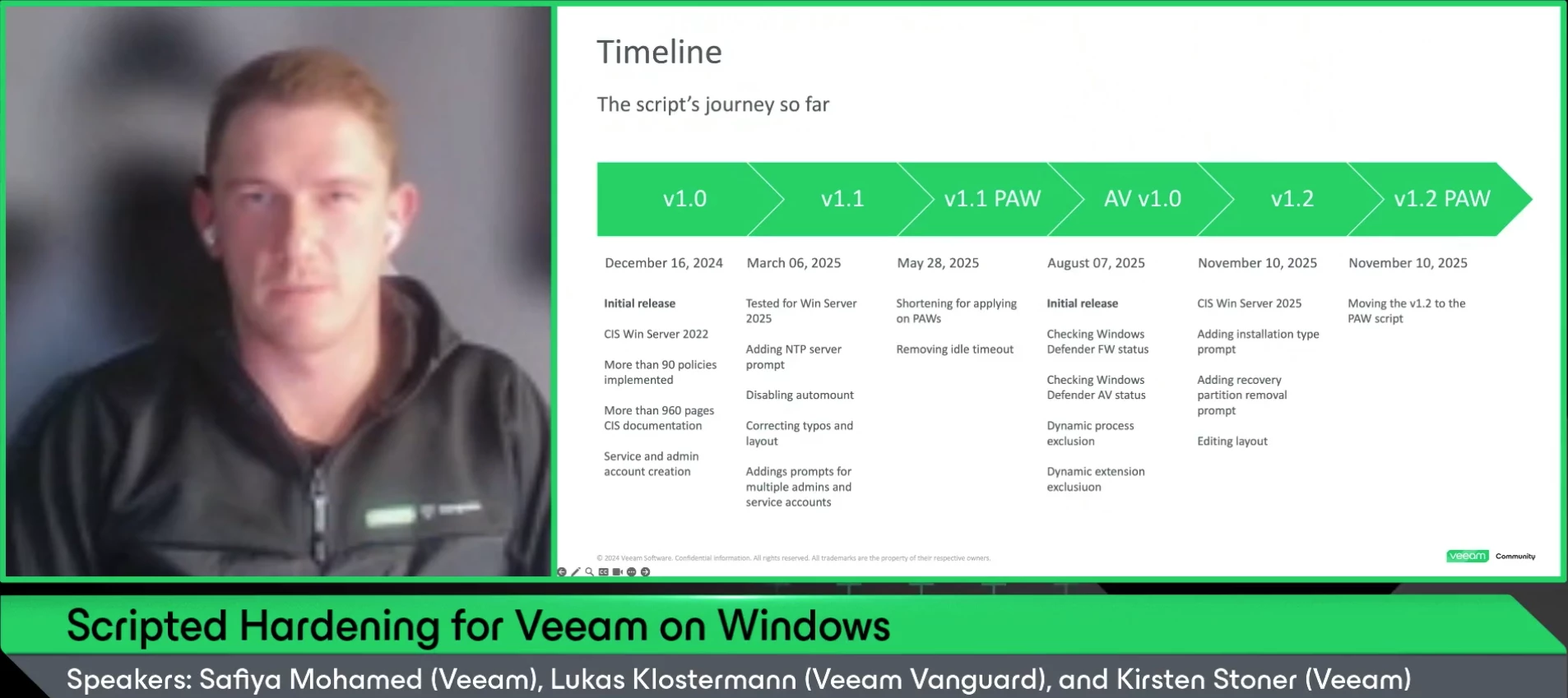
ICYMI We had our 20th V100 Show last Thursday with Veeam Vanguard (and incoming Veeam Employee) @lukas.k How do you bring Windows Server to a solid security baseline - CIS-aligned and tested with Veeam - in just under 5 minutes? ⏲️ In this episode, Lukas shares his field-tested script: secure defaults, Workgroup support, clean rollout for both new and existing installs, plus lessons learned and ready-to-use snippets. He'll also show a live demo and give an overview about his roadmap for further developing the script. Catch the replay below! Thanks @lukas.k @kirststoner12 for joining the show again! We’ll return in a few weeks with our final, special V100 Show of the year. 💫 Stay tuned!
Hi Community, I just keep getting this error on one of my esxii and I am stuck in here. we already tried to troubleshoot the esxii by restarting every servicies and the esxii itself but it is not working. We have 3 other esxii that are just working fine but this one just show this error.NB: We gave an account with max privilege to try the backup Error: Failed to open VDDK disk [[Datastore_DELL_PowerEdge_120] VM-DNS1/VM-DNS1-1-000001.vmdk] ( is read-only mode - [true] ) Logon attempt with parameters [VC/ESX: [192.168.1.170];Port: 443;Login: [xxx];VMX Spec: [moref=vm-32];Snapshot mor: [snapshot-135];Transports: [nbd];Read Only: [true]] failed because of the following errors: Failed to open disk for read. Failed to upload disk 'vddkConnSpec>' Agent failed to process method {DataTransfer.SyncDisk}.
I am currently working on my first larger V13 deployment outside of my lab. There are a few stumbling blocks here, because the procedure is slightly different from V12 and the Help Center is unfortunately not yet complete at this point in time (Veeam is working hard to change this quickly and have it complete soon).One of these stumbling blocks was connecting the Veeam VBR V13 server to the Veeam ONE V13 server, which I would like to describe to you in this post. First off, my problem was a user/login issue.Firewall PoliciesIf the servers are located in separate networks, the appropriate firewall policies must always be configured.https://helpcenter.veeam.com/docs/one/userguide/ports.html?ver=13Access to host managementAccess to host management via port “10443” on the VBR server must be available, and the login details for “veeamso” and “veeamadmin” or an other Host Admin and Security Officer must be provided.Creating usersWhen creating users, I made a crucial mistake that cost me a lo
I’m testing several On-Prem S3 Object Backups ( Backing up Object Storage in 12.1) no matter which of the 4 systems I try I get the attached error. All of the systems have “buckets” that Veeam 12.1 has written to, and they have data in them, and are set as repo’s in VBR that I am using for this test. Suggestions? Error is attached - I get it on all of them.
I am having trouble accessing the remaining 3 workstations I don't know where they are I only have 4 workstations here. I am here at the VBR.
Hi, I have a protection group of 8 windows machines. The machines were added to the protection group using their host names. The machines get their ip from a DHCP server. I see that one of the machines, originally with ip 192.168.1.151, is not 192.168.1.155 and is not being backed up. Is there a way to update the protection group for the new ip? Unfortunately, I cannot revert back to the original ip because that ip is now being used by another machine (that’s not part of the protection group).
Hello Everyone,We are using Veeam Data Cloud for Microsoft 365 Flex with a license for 250 users.During the initial setup, we tested with 1 user to validate the configuration. After confirming everything was working properly, we deleted this backup job and created a new policy to protect the actual 250 production users.However, we are still seeing the backup for the original test user, and the license usage shows 251 users consumed, even though our license count is 250.I have a few questions regarding this situation: How can we delete or revoke this test user so that it no longer consumes a license? If we keep the test user without removing it, will this impact production users (e.g., only 249 users protected)? Is there any automatic cleanup or retention process that eventually removes old test accounts from the license count, or must it always be handled manually? Any guidance on how to properly handle this case would be greatly appreciated.Thanks in advance for your support.
Object First storage is used in our main data center.Regional backups are first stored locally, then copied to Object First at the main site using a forever incremental job (using Scale Out repo and Object First configured as capacity tier)Now If full backup data needs to be sent to AWS (e.g., when decommissioning a regional application server), it can be done from the main site through a secondary copy—without using the regional office’s primary copy.
I always having this issue when perform the backup or replication, the virtual machine will create the snapshot and once finish will delete the snapshot. When this activity happen the VM will like stun and loss ping. How can we perform resolve this?
Build new windows (2022) server for Veeam B7R 12.3.2.4165 and imported the config from older server.Since then every backup job has a warning “Sending e-mail report Details: Failed to wait mutex VeeamMailServiceAzureToken: timeout 00:01:00 sec exceeded” Opening options takes sometimes 10 min or more, but when it does I can send test mails successfully.After saving the first backups work with email, after a day its the same error.When opening options sometimes this message appears: I don't know what's wrong here server has plenty of power.Grtz.Bart P.s. old server did not have this problem.
This was my second V100, and it definitely had a rougher story than the first one. Mostly because my previous company — a Veeam VASP partner — basically shut down, and just a month before the event I had started at a new company. I had no clue what I’d be doing there, whether I’d still work with Veeam clients, or if they’d even let me attend.Actually, they told me I’d probably be assigned full-time to a client using a totally different backup system. Not exactly thrilling, but the location was super convenient (close to home), and given the collapse of my old company and how hard it was to find something else, I took the job.Luckily, the new company let me go and assigned me to another client using Veeam — a win, though one I’m paying for dearly 😅. At that point I regretted not flying in on Sunday to attend the Monday workshop I really wanted to join. But since spots were limited, I didn’t feel right reserving one without being sure I could go.sunset on flightI also regretted it becau
We are getting a VMAStopDrivers error message when trying to uninstall the Veeam Backup & Replication software. We are running from Programs & Features on an account with full admin access to the computer, on Windows 11 Pro v25H2.Trying to update to the most recent version of Veeam (in order to refresh the program files) doesn’t go through, due to the same error message, so stuck in a position with an older version installed (vulnerability) but unable to remove or update
This week, amazingly, Rick and Madi are in normal circumstances; but Rick pranks Madalina in this episode. Maybe he shouldn’t do that again 😀!! Watch this week’s episode here: Featured Contentvia @jorge.delacruz via @HunterLAFR via @atinivelli Vanguard Blog Spotlight @falkob This week’s Vanguard Blog Spotlight is from Falko for his Veeam Object Storage Benchmarking post, part 4 of the series. Check it out on his blog: Veeam Object Storage Benchmarking - Part 4 - virtualhome.blogSpecial Department Newsvia VUG Francevia VUG Czech RepublicUpcoming trickery from @Madi.Cristil No Who’s New this week as @safiya and @kirststoner12 were on a special assignment. Have a great weekend everyone!
Hello Community, This is a failover cluster setup, and node one is working fine; the second node is having the error below. While taking the DB level backup, including logs being truncated every second? Unable to retrieve next block transmission command. Number of already processed blocks: [173]. Error: bad allocation
This year is my first as a Veeam Legend, and along with that recognition came an invitation to attend the Veeam 100 Summit in Prague. When first hearing I was invited, I experienced two emotions, excitement and trepidation. After all, this would not only be my first time visiting Czechia, it would also be my first time visiting the EU. However, seeing blog posts on the community from previous summits gave me an idea of what to expect. What I did not expect (but was pleasantly surprised about) was how quickly I was adopted into a small group of V100ers. Throughout the sessions I was able to understand their roles within their respective organizations, and their unique challenges, and afterwards when we went for dinner and to explore the city I felt that I was getting to know them as friends more than colleagues.Towards the end of the Summit and during the Dalrymple Toast and Brad Jervis Memorial Award presentation, I was struck by emotion while we remembered Brad and the impact he had o
Let's continue setting up our Proxmox Lab.Previous entry: Download the ISO file from the Proxmox site .I then wrote it to a USB Thumb drive to boot and Install, I use a Mac, so I did it with BalenaEtcher.Now, I will post a few screenshots of the installation process.I did the same steps on the three nodes, just changing the managing IP address and hostname, the rest, the same:Here, IP Adress and hostname!!the other two hosts look the same, different IP address and hostname. The OS installation is super simple, Now, in the next entry, we will get into details with the console, initial configurations and shared CEPH storage.Cheers.https://lfconsulting.org/building-a-lab-with-proxmox-part-2-hypervisors-installation
BackgroundRecovery tokens are available for agent and plugin backups. They allow for easy and secure access to backups within repositories from a remote system, without the need to allow access to the full repository via credentials. To keep things easy, Veeam decided to have a fixed timeout for these tokens of 24h once created. This is usually sufficient for most recovery cases. So, the token is delivered to the workload owner and he can recover his - and only his - workload within these 24h.Creating Recovery Token - Veeam Agent Management GuideCreating Recovery Token - Veeam Plug-ins for Enterprise Applications ChallengeWe recently faced the challenge to recover a large SAP-HANA system of more than 10TB database size. From the repository used (a Dell DataDomain in our case) the recovery took more then 24h. Therefore, the recovery will fail, as the token times out during the recovery. SolutionThere is no way to have VBR create longer valid tokens from the GUI. But there are PowerShell
Greetings community, it was so good seeing you last week. We've discussed during the sessions, and after about the strict DISA STIG password complexity, and password rotation, there is a forum on the public VBR when using hundreds of appliances. Since then I couldn’t sleep properly as I imaged myself changing dozens of appliances with the 2 default accounts. So I’ve built an script of course.TLDR Automate rotation of local OS accounts on VSA, Hardened Repos, and VIA nodes through Host Management API only. Handles OTP, does self change for veeamadmin, proper self flow for Security Officer, writes CSV for your vault. GitHub Code on GitHub: https://github.com/jorgedlcruz/veeam-appliance-password-rotate Important NOT OFFICIALLY SUPPORTED. Use at your own risk. Protect your env files. Move CSV to your password manager then delete local copy. Test in a lab first. What you get API only. No SSH into nodes. OTP prompt or TOTP secret. Self rotation for veeamadmin (uid 2000) using /v2/users
Hi,I have a few backups running to a Repository on an NAS, shared by nfs3://[IP ADDX]/Backups/etc…It works fine for my esxi backups. I’m trying too backup a hyper-V VM and and getting the below message. It does succeed in creating as folder in the repository for the packup to go, and the permissions are are same as the others, so I’m not sure what credentials its trying to use since it’s writing to the same place that works for other backup jobs:“… Processing … Error: Failed to reset previous connection exception: Permission deniedFailed to open storage for read/write access. Storage: [target path] ....Agent failed to process method {Stg.OpenReadWrite}. “I’m not sure if this means it can’t read the source or can’t write the target. If the former, what do I have to do because use a local admin to access the source? If the letter, why can this job not write to the repository when other jobs can?Thanks,
Hey everyone, I started a blog series for my obsession topic “Object Storage” and created 4 blog posts on “everything you need to know to size and architect for Object Storage”. My last and final one was around Benchmarking, which you can find here. Part 4/4 https://www.virtualhome.blog/2025/11/04/veeam-object-storage-benchmarking-part-4/This last part of the series concentrates on how to benchmark object storage systems and how to benchmark “Veeam I/O patterns” + “Object Lock Retention” settings. Feel free to have a look and give feedback :) This blog post was originally created to collect all my experience in a series with Object Storage.Here is a little sneak peak: https://www.virtualhome.blog/wp-content/uploads/2025/11/Benchmark-Testing.mp4?_=1The other parts of the blog you can find here: Sizing and Architecting for Object Storage with Veeam – Part 1 Sizing and Architecting for Object Storage with Veeam – Part 2 Sizing and Architecting for Object Storage with Veeam – Part 3 Sizing
We use paid Veeam B&R v12.x (VUL/Essentials) to back up NetApp ONTAP SMB/NFS to a local repo and are evaluating off-site immutable copies via SOBR + S3/Wasabi/Azure (Object Lock) vs Cloud Connect (VCSP). What’s your real-world take on job layout (per-share vs per-volume), snapshots, NAS proxies, performance and €/TB/month, plus restore/ACL fidelity, cross-protocol restores, and immutability/lifecycle gotchas? Any proven tuning or pitfalls to avoid?
The walkthrough of the official #VMCA 2022 practice exam question 02 is ready.
The walkthrough of the official #VMCA 2022 practice exam question 28 is ready.Did you have to check the scenario document? Which section did you locate the information inside?
The walkthrough of the official #VMCA 2022 practice exam question 07 is ready.
The walkthrough of the official #VMCA 2022 practice exam question 01 is ready.
Already have an account? Login
Enter your E-mail address. We'll send you an e-mail with instructions to reset your password.