


🔑 Enable MFA for your Veeam Account

  • March 28, 2025
  • 8 comments
  • 326 views

regnor
Forum|alt.badge.img+14

Enabling Multi-Factor Authentication (MFA) or Two-Factor Authentication (2FA) is the best way to protect accounts from password theft or phishing. Therefore it’s recommended to enable such options, when they’re available. Since some time it’s possible to use MFA for Veeam Accounts, which are used to access the my.veeam.com portal or also the Veeam Community 😉

Login to your Veeam account at my.veeam.com and click on edit profile in the top right corner.

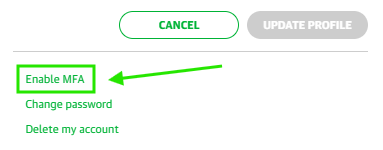
At the bottom of your profile details, you need to click on “Enable MFA”. As a side note, even after enabling MFA this link still states “Enable” instead of “Disable”.
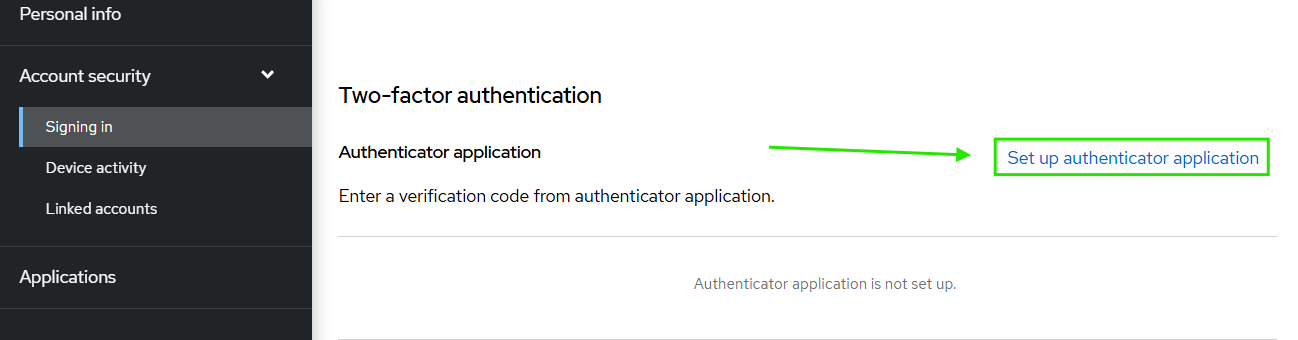
On the following page, you need to click on “Set up authenticator application” and follow the instructions. While FreeOTP or Google Authenticator are recommended, you can use any other OTP app; for example I’m using Aegis.
 

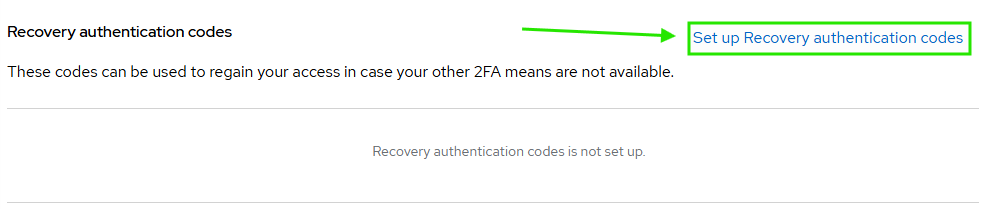
Afterwards it’s recommended to create recovery authentication codes, for the case that your MFA app isn't available. Of course you should not store those codes together with your password.
More details on this procedure can be found in KB4716.

8 comments

Tommy O'Shea
Forum|alt.badge.img+5
  • Veeam Legend
  • March 28, 2025

Lately it feels like I spend more time using authenticator apps than I do on actual work 😂

But regardless, it’s great to see MFA in more places, it really is vital to security these days.


Chris.Childerhose
Forum|alt.badge.img+21
  • Veeam Legend, Veeam Vanguard
  • March 28, 2025

This is great and time to enable MFA.  Nice to see this in the Veeam Portal now.


matheusgiovanini
Forum|alt.badge.img+7

Lately it feels like I spend more time using authenticator apps than I do on actual work 😂

But regardless, it’s great to see MFA in more places, it really is vital to security these days.

Me too! Hahaha. But it's really important—I have like 100 MFAs, but I know I'm safer than before!


Iams3le
Forum|alt.badge.img+11
  • Veeam Legend
  • March 28, 2025

Lately it feels like I spend more time using authenticator apps than I do on actual work 😂

But regardless, it’s great to see MFA in more places, it really is vital to security these days.

Security may feel inconvenient at times, but when you receive a notification about a login attempt, you’ll be glad you had it in place.


Iams3le
Forum|alt.badge.img+11
  • Veeam Legend
  • March 28, 2025

This is great and time to enable MFA.  Nice to see this in the Veeam Portal now.

Thank you for the info ​@regnor


coolsport00
Forum|alt.badge.img+21
  • Veeam Legend
  • March 30, 2025

Good reminder Max! Thanks for sharing.


Link State
Forum|alt.badge.img+11
  • Veeam Legend
  • March 31, 2025

Hi ​@regnor  enable MFA and setup recovery code Thx


Iams3le
Forum|alt.badge.img+11
  • Veeam Legend
  • November 27, 2025

> More details on this procedure can be found in KB4716.

While this is great and I advocate for it ​@regnor. When one loses his token, he/she is in a very bad state as the recovery code option does not work and you cannot effectively track the issue submitted via the link (form) referenced. ​@Link State, in this case, you cannot even use the recovery code as you have stated.






