The Why Now Community Challenge: Veeam Data Platform 13.1. It’s time to vote!
News, guidelines and various community projects
Recently active
I have been validating MongoDB full instance restore using Veeam Explorer for MongoDB (VBR v13) and would like to raise a discussion related to file ownership and permissions after restoring.Observed BehaviorWhen restoring a full MongoDB instance to a Linux server, the restored MongoDB data files are owned by the OS user used during the restore process (restore authentication user).As a result:MongoDB service fails to start under the original mongod service account, or The node cannot be cleanly added back to an existing MongoDB replica set Manual post‑restore steps are required (chown / chmod) to revert ownership to the original MongoDB service userThis aligns with current permission requirements documented for MongoDB restore operations, where the restore user must have root privileges on the target system. [helpcenter.veeam.com]Challenge / RiskFrom an operational and security perspective, this introduces several challenges:Requires manual intervention after every full instance resto
WOW 250 Episodes! Thank you Veeam Community! This week El Rickatron and @Madi.Cristil are in normal circumstances; and happy to feature some amazing content this week. You can watch this week’s episode here: Featured Contentvia @Link State via @coolsport00 via @Iams3le Vanguard Blog Spotlight - Markus “AKA Dynamic” HartmannThis week we are happy to feature @Dynamic with his post: Veeam Software Appliance – High Availability – Onboarding – Lessons learned – better veeam than sry GOOD STUFF!Special Department NewsReminder via VUG BrazilVUG USA - Ohio at the Veeam office with me and @safiya!Who’s NewThank you @safiya for prepping the Who’s New this week. We are happy to welcome +554 new users (to be fair it’s 3 weeks worth) to the community. The coolest usernames are @Sailorsteve47, @RapGod89, @PirateZebedee (are you related to @PirateZededee1?), @Me Llamo and @splashd! Alfred’s pick is @0hno → You have a badge coming your way. Have a great weekend everyone!
Happy Friday, Veeam Community! I am bringing you another packed newsletter from our Veeam Vanguards heroes who published an incredible amount of a veeamazing content during the last month. Take a look for yourself and see what topics resonate with your interests. 🤓 @AndreTheGiant - Veeam acquires Object First - https://vinfrastructure.it/2026/01/veeam-acquires-object-first/Veeam Backup & Replication 13 patch - https://vinfrastructure.it/2026/01/veeam-backup-replication-13-patch/ Veeam Kasten for Kubernetes v8.5 - https://vinfrastructure.it/2026/01/veeam-kasten-for-kubernetes-v8-5/@benharmer - Migrating to the Veeam Software Appliance – Part 1 - https://benharmer.blog/2026/01/30/migrating-to-the-veeam-software-appliance-part-1/@BethSouza - Veeam University Pro: Novas ofertas de treinamento e certificação da Veeam - https://medium.com/@ec.desouza/novas-ofertas-de-treinamento-e-certifica%C3%A7%C3%A3o-da-veeam-8a922a48d940A importância da base de conhecimento da Veeam - https:
I would like to consult your suggestions and recommendations for my case. Please refer to the Veeam infrastructure diagram below. There are two Linux Hardened Repositories in the environment. The customer needs to upgrade the operating system from RHEL 9.7 to a supported version, as RHEL 9.7 will reach end of support soon. ConstraintsThe hardware for the Linux Hardened Repositories was purchased in 2023, and the customer intends to continue using it. The license subscription of RHEL will expire in December 2026. The customer is planning to upgrade to Veeam v13.
Shared Mailboxes seem to pose a unique challenge for many customers because in VDC a Shared Mailbox can be backed up without consuming a VDC license, as long as the Shared Mailbox meets the following criteria:• It is less than 49.5 GB in size.• It does not have a Microsoft license associated with it.When a Shared Mailbox reaches 49.5 GB in size, Microsoft attaches a license to it. Since at that point it has a Microsoft license, Veeam also requires a VDC license to back it up.Some customers enable Archiving for their Shared Mailboxes. In this case, even if the Shared Mailbox is less than 49.5 GB in size, the Archiving feature requires a Microsoft license. Since at that point it has a Microsoft license, Veeam also requires a VDC license to back it up.Many of our customers have hundreds or even thousands of Shared Mailboxes, but they don’t know how many of those are less than 49.5 GB in size and how many of them have a Microsoft license.We created this document to help our customers find
For those who joined my online and VeeamON sessions on migrating from VMware to Hyper-V or Proxmox, I promised I would share my cleanup scripts. It took longer than planned to prepare them, but they are now ready.Online session HERE unfortunately there is no video of the VeeamON session that was migrating to Proxmox.When you use Veeam to migrate a Windows virtual machine, the work is not done when the job finishes. Your migrated VM is now running on a new platform, but it still contains old drivers and devices from VMware.These leftovers can cause instability, performance issues, or future driver conflicts. This post explains how to use my PowerShell scripts to safely clean the VM after your migration, making it ready for the new platform.Get the Scripts on GitHub All the tools discussed here are available in my public GitHub repository. You can clone or download them to get started.My GitHub: My GitHub Repository Before You Begin: A Safety Checklist Before running any scripts, take th
Hello, I have a cluster on my Veeam v13 software appliance I’m looking to configure with CDP, however when i go to install the I/O filter the cluster doesn’t show up. What am I missing. I do have CDP configured on Veeam and another cluster is configured with it. Any ideas?
Hi everyone,I’ve recently needed to automate some tasks using PowerShell and started looking for study resources online. I found a YouTube video from 2022 and another one from VeeamON 2020. I know it’s a bit old, but based on what I learned from it, you can still use many of the concepts to understand the basics and how to work with PowerShell.Here is the link and some screenshots for those who would like to learn. Enjoy learning Power Shell!
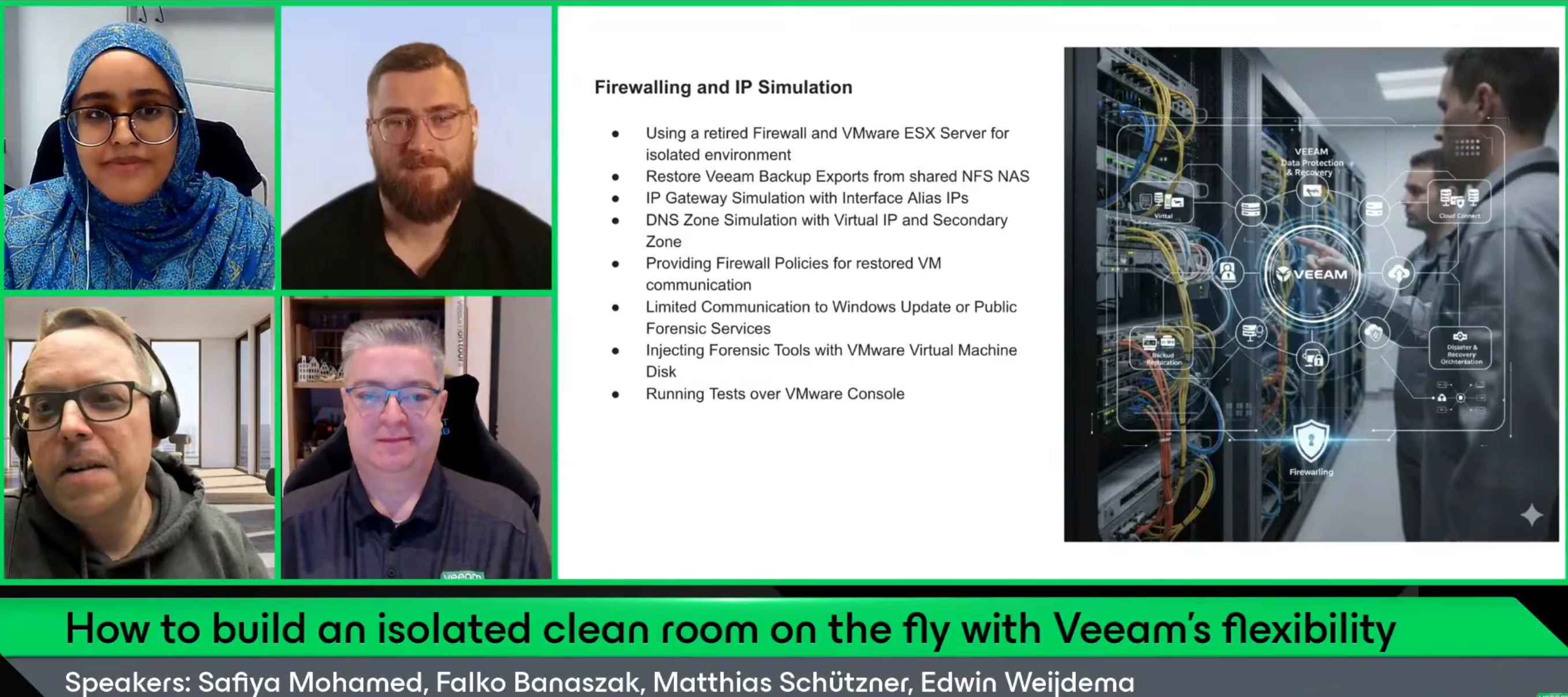
ICYMI V100 Show is back!Hello Community!Last Thursday, we had our first V100 Show of the year. If you didn’t know, we are slightly changing the V100 Show format this year, with a deeper focus on customer stories.For the first show of the year, we had on @falkob and Matthias Schützner, along with co-host @Viperian for a discussion on “How to build an isolated clean room on the fly with Veeam's flexibility”. This session is for anyone who wants a practical, real-world example of how to stay ready for a recovery emergency without overcomplicating things.If you missed the show or want to rewatch, catch it below: Matthias and Falko’s presentation is attached.
I installed the Veeam 12.3.2.3617 on a virtual Windows Server 2025 and this has been a very bad experience. I started to migrate the repository data to the new server, but it has become very unusable. Now when I look up the issues on the web with Veeam, other people seem to have similar issues when using server 2025 with the repository on a ReFS file system. At this point, everything is in limbo, meaning that the server randomly hangs when Veeam runs. 30% of the repository has been moved, but I can’t seem to do anything with the server. Every time we try to access Veeam repository it just hangs.Does anyone have any suggestions other than scrapping the Veeam backup installation completely?thanksMatt
We have to diable Backup Jobs for Updates and reboots. There is a risk of letting the jobs diabled after reboot! It would be great to disable the Jobs in the GUI for some time only! With API calls we have to diable MFA for this account what can bring a security risk!
We had a great community summit last week, so sorry no episode (We’ll talk about that in the video!) but we are back this week with a solid recap. You can watch this week’s episode here: Featured Contentvia @JonahMay via @eprieto via @Marcel.K Vanguard Blog Spotlight - Ben HarmerWe are happy to feature @benharmer for this week’s Vanguard Blog Spotlight, with some “Spot-on” advice to migrate to the Veeam Software Appliance: Migrating to the Veeam Software Appliance – Part 1 – benharmer.blogSpecial Department Newsvia VUG Turkeyvia VUG BrazilWelcome VUG Panama! 🇵🇦 https://community.veeam.com/groups/vug-panama-191via @Jean.peres.bkp Who’s New Next WeekWe will be back with Who’s New Next week and believe it or not… Normal Circumstances! Have a great weekend everyone!
Finally sharing this with all of you! 💚I’ve been looking forward to this for a while — the Veeam 100 Summit recap video is finally here! Seeing everyone in action, sharing ideas, and just bringing all that energy together was amazing, and this video really captures those unforgettable moments.I can’t wait for you to watch it, relive the highlights, and maybe even spot yourself or your friends in the crowd! What was your favorite moment or what excited you the most? Share it in the comments! — And let’s keep celebrating the Veeam 100 community together 🤝🎉💚
Let me explain the customer environment first.Customer has 3 Dell Poweredge servers (will name them pe1, pe2, pe3) and 1 Dell Powervault server. Customer uses pe1 and pe2 and has deployed 2 windows machines on them with hyperv on them respectively, pe1 has hyperv1 and pe2 has hyperv2. Customer has taken the storage of these hypervs from the Del Powervault server so that they have a large size. Customer has deployed a windows server on pe3 where veeam has been installed and the backup repository is on that pe3. Now, we added the 2 hyperv on veeam by adding them as standalone hyperv, hyperv 1 has 6 windows VMs under it and hyperv2 has 5 windows VMs under it.One of the windows VMs is showing a used capacity of 50 GB. Now this windows machine is a file server, has 2 partitions, the C partition where the 50 GB is used , and another Partition, the D partition that has almost 3 TB of files on them.On Veeam i only see the 50 GB used. If i run a backup schedule in order to backup the VM, this m
Dear,Have a good day!!I would like to report an issue with Veeam Backup & Replication version 12.2.0.I upgraded Veeam Backup & Replication from version 12.1.1 to 12.2.0. After the upgrade, I attempted to update the server components in Veeam, but the process failed, as shown in the attached picture.Could you please assist me in resolving this issue? Thank you!
Many companies breathe a sigh of relief once they have implemented a professional backup solution like Veeam Backup for Microsoft 365 for their Microsoft 365 environment. The assumption is: „Now our data is safe, and the backup topic is taken care of.“ However, it’s not that simple. Unlike traditional SaaS services, where the provider often bears full responsibility for the service, with Veeam Backup for Microsoft 365, a crucial part of the responsibility remains with the customer.’’ This means: Even though Veeam reliably handles the backup and recovery of your M365 data, you as the customer are responsible for the availability and integrity of the backup service itself. This includes maintaining and managing the underlying infrastructure (such as the backup VM), ensuring accessibility of the backup software, and guaranteeing the permanent availability of the backup files.But it’s not just the actual backup data that deserves attention. A frequently overlooked but essential aspect is t
This article explains how to set up Veeam Backup Enterprise Manager (VBEM) and manage user roles. VBEM provides a centralized web-based management and reporting platform that allows administrators to control multiple Veeam Backup & Replication servers from a single console.This article covers deployment steps, accessing the Enterprise Manager interface, and configuring user accounts with specific roles. The guide also highlights best practices for assigning permissions and securing access, ensuring efficient management of Veeam environments.Since my goal is to create articles detailing every product and feature, today I bring you a walkthrough on how to set up Veeam Enterprise Manager and manage user roles. How does VBEM fit into the broader Veeam ecosystem?In architectural terms, VBEM is a centralised management and reporting layer as discussed above. It is positioned above multiple Veeam Backup & Replication instances, as shown in the image below.Data aggregation layer: Enter
Hello, I try to restore some email for specific user let say user1@mydomain.com but i have error :When restore using user1@mydomain.comNone of the required roles (Global Administrator, Exchange Administrator) is assigned to the user : user1@mydomain.com When restore using administrator accountFailed to open mailbox : user1@mydomain.com. Failed to Access mailbox. The specific object was not found in the store. Default folder root not found. Anyone know why?
[Post updated on January 23rd]As a Solution Engineer, I never demo or validate a solution in production, and I shouldn’t. MS Dev tenants are the standard: isolated, safe, and disposable.On paper, they’re ideal: all M365 services are provisioned, licensed, and ready.In reality, they’re empty shells. Blank mailboxes. Empty SharePoint sites. Silent Teams. No data, no history, no behavior. And without behavior, I can’t properly demonstrate, test, or stress a solution.That’s the real issue: I don’t need just a tenant, I need a living environment. One that reflects real-world structures, volumes, permissions, and inconsistencies. Without that, demos feel artificial, performance tests are misleading, and edge cases only appear in production.I started by building scripts to automate content creation in M365. It worked, up to a point.As soon as I needed randomness in the assets, multiple item types, and all their specific behaviors, the setup became increasingly hard to manage. Too many scripts
Many vendors talk about "ransomware resilience".In real production environments, what are you actually doing with Veeam?Immutable repositories? Air-gapped? Object Lock?What failed in real attacks?Looking forward to your experiences and honest feedback.This could be valuable for everyone designing resilient backup environments.
A new blueprint has been added to the Veeam Communities hub site in collaboration with Joe Gremillion. The E-Series is a general-purpose all-block SAN array. This design includes copying jobs to Veeam Vault. We currently pair an E-Series model with a Veeam hardened repo for immutability support. The E-series family includes the E4012 and the E4060 The E4012 has a 12-drive disk shelf with external storage capabilities of up to 96 drives hybrid HDD or SSD. The E4060 has a 60-drive disk shelf with external storage capabilities of up to 300 HDDs or 120 SSDs. Customers have been buying this SAN array for backup targets, HPC, Video Surveillance and a JBOD. The link to the NetApp E-Series tech specs are below.Veeam NetApp E-Series Security BlueprintNetApp E-Series Technical Specifications
Hi AllI’m currently assisting a client with a Veeam ONE deployment and they would like to send alarm notifications directly to Telegram in addition to the standard email alerts.Has anyone successfully implemented this type of integration? What method did you use? Was it done specifically with Veeam ONE or through Veeam Backup & Replication events? Has anyone tested or confirmed that it still works with Veeam 13? From what I have found it is possible, by default Veeam ONE natively supports email and SNMP notifications, with other integrations typically handled through scripts or external tools.I’m trying to confirm real-world experiences and any recommended approaches before implementing it for the client.Any guidance, scripts, or best-practice recommendations would be appreciated.
The error that I am getting is Outdated being agents, please upgrade or remove the following theme Agents from the production configuration. Shared-FS01 Veeam agent for windows 3.0.1.1039. And we got rid of that file share. But for some reason Veeam is still seeing it as a stale agent. I went back to the beam backup and replication console went to infrastructure physical. I found it an unmanaged, but it wouldn't allow me to delete it. So I tried creating a temp protection group. And the era I got was remote deployment and management is available for license agents only. Please change your backup service settings to allow manage agents to consume the license then perform a protection. Rescan. Then I went back to unmanaged and it disappeared.Sorry, I know to this whole Veeam thing. I have been tasked with it and I have very little experience with Veeam. Thanks.
Last Fall Veeam released Veeam Data Platform (VDP) version 13. I have yet to upgrade myself, but have reviewed their What's New document and skimmed through the User Guide a bit. After doing so, I thought I would share with the Community some hidden features in this newest release I think you should be aware of. I have done similar posts for previous Veeam VDP versions, but this will no doubt have more content because 1. this is such a drastically new & feature-rich release, and 2. there is just so much more I think I should mention!I think we are all aware the new VDP v13 release now comes not only as an optional Linux Veeam Software Appliance based on Rocky Linux (Community Edition not supported) and has High Availability capability (Premium Edition only), but there's also a nifty WebUI available you can use to manage your backup environment. Though keep in mind, as was with the VMware vCenter Software Appliance when it was first released, there are quite a few missing features i
Hello, Is there some Visio / Draw IO sample about common Veeam architecture ? I’m not “good” to create them and I guess there are some provided by veeam :) Thanks for your help
Already have an account? Login
Enter your E-mail address. We'll send you an e-mail with instructions to reset your password.