
Question

Best backup architecture for two sites (1 Gbps IPSec) with repositories in both locations

  • March 4, 2026
  • 7 comments
  • 35 views

NemanjaJanicic
Forum|alt.badge.img+1

Hello everyone,

I would like to get some advice regarding the optimal Veeam architecture for a two-site environment.

Infrastructure

  • Hyper-V environment

  • Two locations:

    • Vienna

    • Novi Sad

  • Sites connected with 1 Gbps IPSec tunnel

  • Repository available in both locations

Current components:

  • Backup Server

  • Hyper-V hosts acting as on-host proxies

  • Repository Vienna

  • Repository Novi Sad

Current design

Right now the backup jobs run like this:

VMs from both locations → backup to Vienna repository

Then we run Backup Copy jobs from:

Vienna Repository → Novi Sad Repository

This means that VMs located in Novi Sad follow this path:

Novi Sad VM → Vienna Repo → Backup Copy → Novi Sad Repo

So effectively the data crosses the WAN twice.

Example

VM located in Novi Sad:

  • Backup goes NS → Vienna

  • Backup Copy goes Vienna → NS

Observation

During the first full backup we see relatively low throughput (~7 MB/s) and Veeam reports Network bottleneck.

This is expected since the traffic goes through an IPSec tunnel.

Question

Would it be a better design to do the following:

  1. Backup Vienna VMs → Vienna repository

  2. Backup Novi Sad VMs → Novi Sad repository

  3. Use Backup Copy jobs between the repositories for DR

7 comments

Jason Orchard-ingram micro
Forum|alt.badge.img+1

NemanjaJanicic


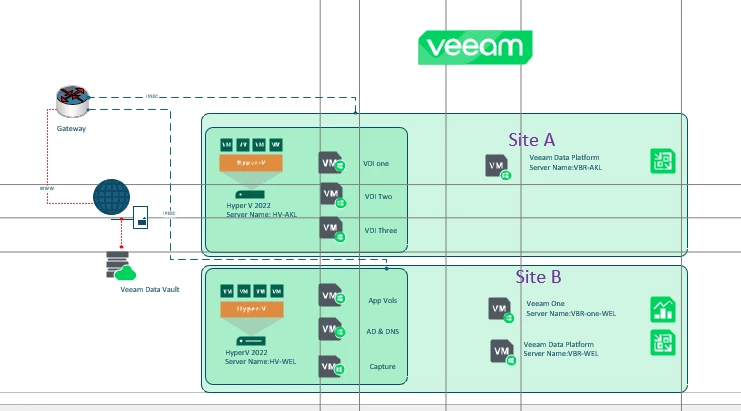
I’ve build a similar model for a customer a few weeks ago as a proof of concept.


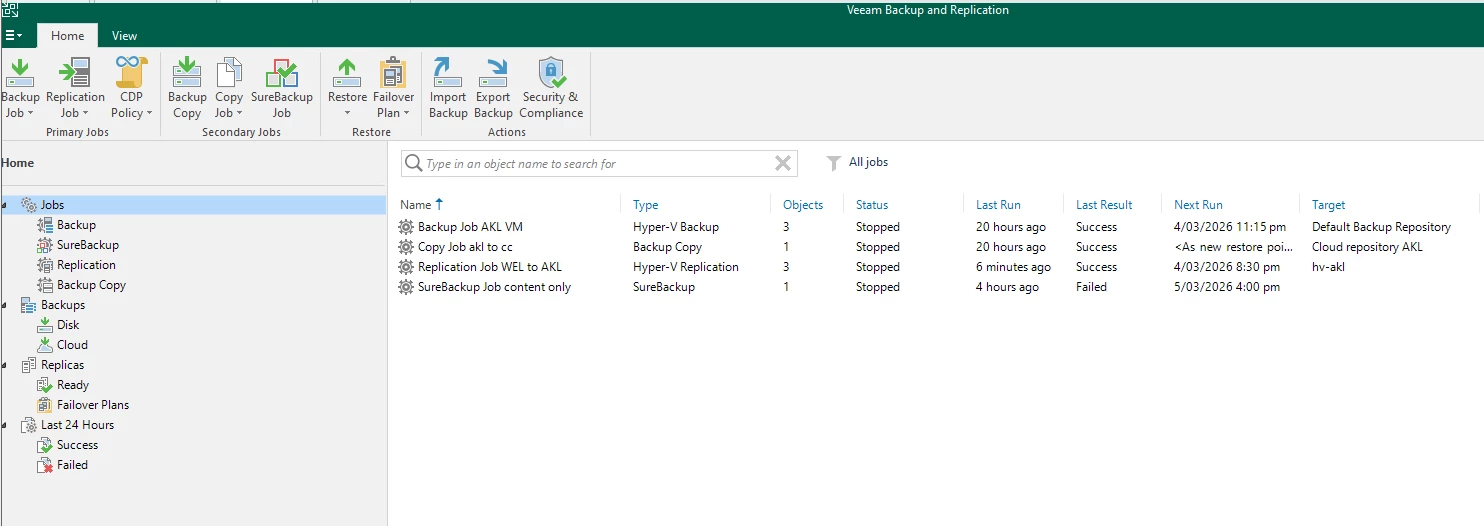
Site A backup jobs

  • Backup job local Hyper VM storage on local disk repo
  • Backup copy to Veeam Data Cloud Vault for remote recovery (Immutable storage)
  • Replication form Site B for VM (Pulled from site B)
  • Surebackup to verify backup are good 3-2-1-1-0


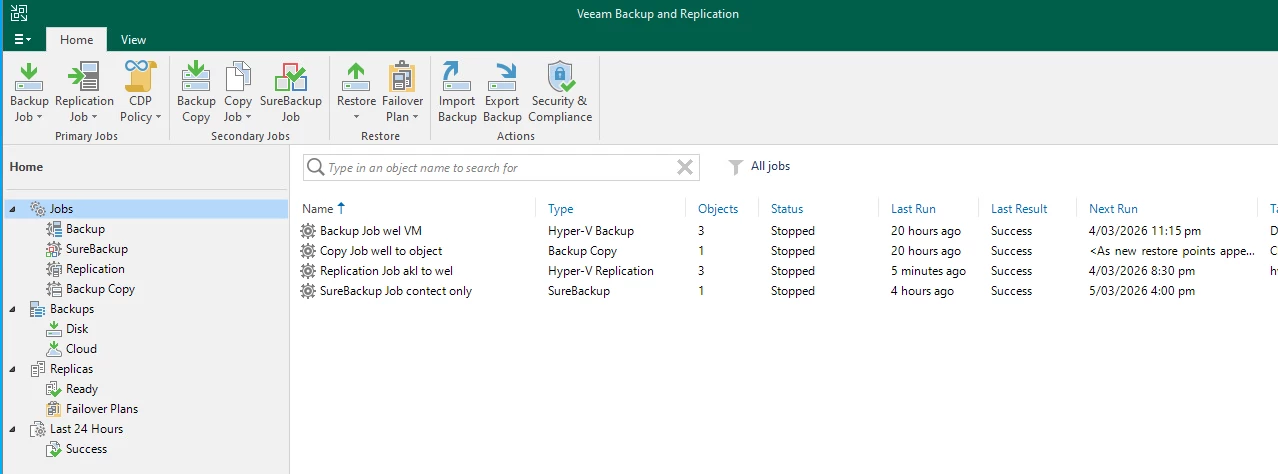
Site B backup Jobs

  • Backup job local Hyper VM storage on local disk repo
  • Backup copy to Veeam Data Cloud Vault for remote recovery (Immutable storage)
  • Replication form Site A for VM (Pulled from site A)
  • Surebackup to verify backup are good 3-2-1-1-0


NemanjaJanicic
Forum|alt.badge.img+1

NemanjaJanicic


I’ve build a similar model for a customer a few weeks ago as a proof of concept.


Site A backup jobs

  • Backup job local Hyper VM storage on local disk repo
  • Backup copy to Veeam Data Cloud Vault for remote recovery (Immutable storage)
  • Replication form Site B for VM (Pulled from site B)
  • Surebackup to verify backup are good 3-2-1-1-0


Site B backup Jobs

  • Backup job local Hyper VM storage on local disk repo
  • Backup copy to Veeam Data Cloud Vault for remote recovery (Immutable storage)
  • Replication form Site A for VM (Pulled from site A)
  • Surebackup to verify backup are good 3-2-1-1-0


Hello ​@Jason Orchard-ingram micro,

I would probably just do BackupCopy Jobs from Site A to Site B.
Think something similar should be just fine.


Jason Orchard-ingram micro
Forum|alt.badge.img+1

Fixing Low Throughput Across IPSec (Short Version)

Your low throughput (~7 MB/s) happens because Novi Sad VMs are backed up across the WAN twice:

  1. Novi Sad → Vienna (backup)
  2. Vienna → Novi Sad (backup copy)

This introduces unnecessary WAN load and IPSec overhead.

1. Fix the Architecture (Most Important)

Back up each site locally:

  • Vienna VMs → Vienna repository
  • Novi Sad VMs → Novi Sad repository
  • Use Backup Copy for DR

This removes the double traversal and typically increases performance 5–20× immediately.

2. Ensure a Local Proxy Is Used

Make sure the Hyper‑V hosts in Novi Sad act as the source proxy for Novi Sad VMs.
If Vienna is accidentally used as the proxy, Veeam will pull data across the WAN before backup.

3. Enable Source‑Side Compression & Dedupe

In job settings:

  • Compression: Optimal
  • Storage optimization: Local target
  • Inline dedupe: On

Reduces WAN traffic by up to 90%.

4. Optimize the IPSec Tunnel

Most IPSec performance issues are due to MTU and encryption settings.

Do these:

  • Set tunnel MTU to ~1380–1400
  • Use IKEv2 + AES‑GCM (hardware‑accelerated)
  • Avoid double NAT
  • Enable crypto acceleration on firewalls

This usually doubles or triples throughput.

5. Enable WAN Acceleration for Backup Copy Jobs

A WAN accelerator on both sites reduces copy job traffic significantly.

6. Use Per‑VM Backup Chains

Allows parallel streams → higher throughput.

🎯 What You Should Expect After Fixes

Typical results in similar environments:

  • Throughput increases from 7 MB/s → 80–150 MB/s
  • WAN traffic reduced by 60–90%
  • Copy job times drop dramatically

NemanjaJanicic
Forum|alt.badge.img+1

Fixing Low Throughput Across IPSec (Short Version)

Your low throughput (~7 MB/s) happens because Novi Sad VMs are backed up across the WAN twice:

  1. Novi Sad → Vienna (backup)
  2. Vienna → Novi Sad (backup copy)

This introduces unnecessary WAN load and IPSec overhead.

1. Fix the Architecture (Most Important)

Back up each site locally:

  • Vienna VMs → Vienna repository
  • Novi Sad VMs → Novi Sad repository
  • Use Backup Copy for DR

This removes the double traversal and typically increases performance 5–20× immediately.

2. Ensure a Local Proxy Is Used

Make sure the Hyper‑V hosts in Novi Sad act as the source proxy for Novi Sad VMs.
If Vienna is accidentally used as the proxy, Veeam will pull data across the WAN before backup.

3. Enable Source‑Side Compression & Dedupe

In job settings:

  • Compression: Optimal
  • Storage optimization: Local target
  • Inline dedupe: On

Reduces WAN traffic by up to 90%.

4. Optimize the IPSec Tunnel

Most IPSec performance issues are due to MTU and encryption settings.

Do these:

  • Set tunnel MTU to ~1380–1400
  • Use IKEv2 + AES‑GCM (hardware‑accelerated)
  • Avoid double NAT
  • Enable crypto acceleration on firewalls

This usually doubles or triples throughput.

5. Enable WAN Acceleration for Backup Copy Jobs

A WAN accelerator on both sites reduces copy job traffic significantly.

6. Use Per‑VM Backup Chains

Allows parallel streams → higher throughput.

🎯 What You Should Expect After Fixes

Typical results in similar environments:

  • Throughput increases from 7 MB/s → 80–150 MB/s
  • WAN traffic reduced by 60–90%
  • Copy job times drop dramatically

Similar answer with my ChatGPT as well. :-D


Jason Orchard-ingram micro
Forum|alt.badge.img+1

NemanjaJanicic


I’ve build a similar model for a customer a few weeks ago as a proof of concept.


Site A backup jobs

  • Backup job local Hyper VM storage on local disk repo
  • Backup copy to Veeam Data Cloud Vault for remote recovery (Immutable storage)
  • Replication form Site B for VM (Pulled from site B)
  • Surebackup to verify backup are good 3-2-1-1-0


Site B backup Jobs

  • Backup job local Hyper VM storage on local disk repo
  • Backup copy to Veeam Data Cloud Vault for remote recovery (Immutable storage)
  • Replication form Site A for VM (Pulled from site A)
  • Surebackup to verify backup are good 3-2-1-1-0


Hello ​@Jason Orchard-ingram micro,

I would probably just do BackupCopy Jobs from Site A to Site B.
Think something similar should be just fine.

Your correct, There are many different way you can achieve this. In my opinion there every option has its merits and it comes down what your comfortable with. 

I always work on principle of keeping it simple and avoid single points of failure. 


Forum|alt.badge.img+3
  • Experienced User
  • March 4, 2026


Observation

During the first full backup we see relatively low throughput (~7 MB/s) and Veeam reports Network bottleneck.

This is expected since the traffic goes through an IPSec tunnel.

Question

Would it be a better design to do the following:

  1. Backup Vienna VMs → Vienna repository

  2. Backup Novi Sad VMs → Novi Sad repository

  3. Use Backup Copy jobs between the repositories for DR

Don’t you have a Gigabit though? Still seems a little slow IMO even if there is other backup activity or network activity happening on the link.

Your plan naturally will reduce bandwidth usage, but main question is what is your desired retention / recoverability plan? Having a copy job on each site I think probably is best, if you have a lot of machines with similar GuestOS you probably would get great use out of WAN Accelerators if you have license for them.

But I would maybe put iperf on the repositories on both sites and see if iPerf gets a similar 7 MB/s, that seems low for me personally.


Chris.Childerhose
Forum|alt.badge.img+21

I would do local backups at each site and then copy jobs to the opposite site but using WAN accelerators as David noted.  This would help for the link.