Question

Backup Copy error DataTransfer.SyncDisk

  • February 9, 2026
  • 7 comments
  • 51 views

Good day


Running Veeam Community v12 with a VMWare environment.


I am running a backup of 3 VMs. Since I installed Veeam I cannot do a backup copy of a job for one of my servers. The 2 other servers that I run a backup copy and send it in a remote location works but that server I always get this error:


Processing [server name] Error: Times out waiting for NFS async IO block callback. Timeout: 180000 msec Failed to download disk 'filenameofserver-flat.vmdk'. Shared memory connection was closed. Failed to upload disk 'filenameofserver-flat.vmdk' Agent failed to process method {DataTransfer.SyncDisk}.
Some restore points were not processed


The local backup works but I cannot get the backup copy to work

I created a different backup job for this server alone but I also get that error.


The option I was thinking to do is to do a backup job just for this but i’d like to figure out why only that server on the same host as the 2 other servers is causing me this problem.


Thanks for the help

7 comments

CMF
Forum|alt.badge.img+8
  • Veeam Legend
  • February 9, 2026

Hi ​@ITKM ,

I found a thread on Reddit where they fixed it by using NFS3 instead of NFS4. 

https://www.reddit.com/r/Veeam/comments/1mgjw2i/random_backup_failures/

maybe its worth a try to check on this even though it wouldn´t really explain why it works on some VMs and not on the one in question. 


Regards

Chalid


matheusgiovanini
Forum|alt.badge.img+8

This error can sometimes appear when the proxy is trying to use Direct NFS access. It may be worth checking if this option is enabled and testing the job with it disabled:

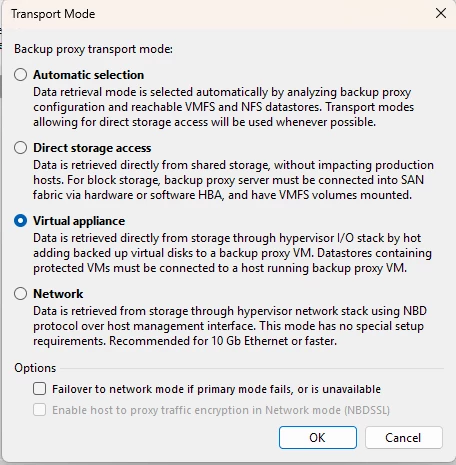
Backup Infrastructure → Backup Proxies → Edit → Transport Mode → uncheck “Direct NFS access”.

Times out waiting for NFS async IO block callback
Shared memory connection was closed
Failed to download disk

Not saying it’s the cause, but this test often helps rule out transport-mode issues, especially in v12. If the job runs normally after that, you’ll know the direction to investigate.

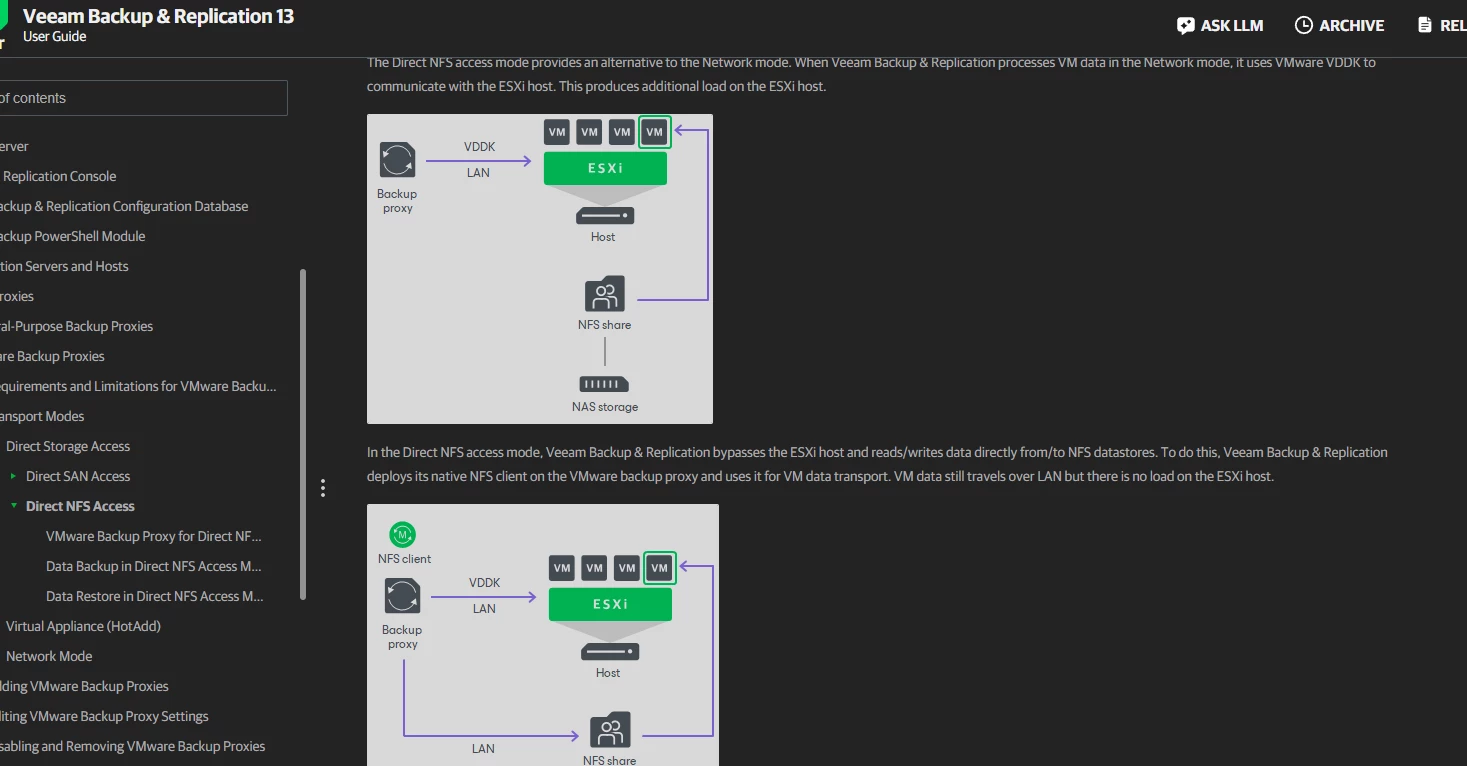
“Veeam Backup & Replication bypasses the ESXi host and reads/writes data directly from/to NFS datastores. To do this, Veeam Backup & Replication deploys its native NFS client on the VMware backup proxy and uses it for VM data transport.”

https://helpcenter.veeam.com/docs/vbr/userguide/direct_nfs_access.html?ver=13


  • Author
  • New Here
  • February 9, 2026

Thanks Matheus for the tip, I don’t have those exact options but I changed it from Automatic to Virtual appliance. I’ll check and see if it works with the offsite


Andanet
Forum|alt.badge.img+12
  • Veeam Legend
  • February 9, 2026

Please ​@ITKM set the Failover option too.


Link State
Forum|alt.badge.img+11
  • Veeam Legend
  • February 9, 2026

Hi ​@ITKM 


Are the VMware datastores not in NFS mount mode? Is the offsite backup repository using the NFS share?


Is the problematic VM significantly larger (e.g., 2 TB+) than the two that are working? If so, Async IO simply times out because the remote storage is unable to acknowledge the massive amount of metadata for a disk of that size within the default 3-minute window.

Would you like me to show you how to check the specific 'Agent' logs for this VM to see if there is a network MTU mismatch or packet loss during the transfer?"


The issue may be caused by NFS session exhaustion on the storage array, misbehavior of ESXi NFS VAAI hardware acceleration affecting async I/O callbacks, network congestion leading to packet loss on the storage network, or latency spikes when handling very large VMDK files over NFS, which can terminate the process if delays exceed 180 seconds.


regards


  • Author
  • New Here
  • February 9, 2026

Been a while I played with VMWare but since all the other VM’s are being backed up correctly locally on the same type of NAS and that NAS is configured exactly the same, I don’t think NFS on VMWare is the problem.


As for size, the different VM’s are around the same size, server itself is less than 2TB, that VM is around 500GB.

I have the same setup on my remote site that is another company with their Veeam installed and the backup copy works, so i’m wondering if it’s not something with the VM itself that something is incorrect in the configuration. The other company has the same setup as I installed them at the same time and use their respective NAS as the backup of the other site.


I’ll see tonight if the backup works with the modifications done, if not i’ll try to do a new backup job that will send directly to the remote NAS instead of doing a backup copy


  • Author
  • New Here
  • February 10, 2026

Same error with the changes.


I’ll try a regular backup job, the backup copy was made to do this as well but i’ll try a direct approach instead of a backup copy.