Question

VBR v13 - Can't conncet to Backup Server


NemanjaJanicic
Forum|alt.badge.img+1

Hello guys,

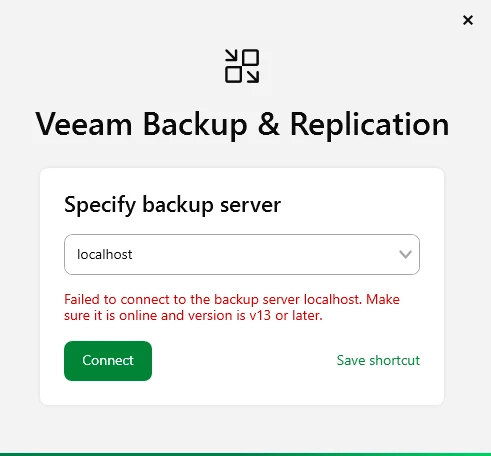
After a basic restart of the VM I can't no longer access our VBR console.
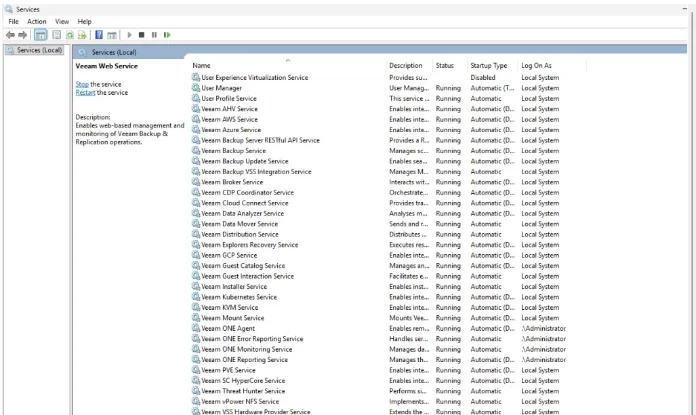
All services are up and running.

Any recommendations?

10 comments

kciolek
Forum|alt.badge.img+1
  • Experienced User
  • March 5, 2026

Only time I’ve seen this error was if the services aren’t all started or a version mismatch in the windows consolde. Did you try with the FQDN? You can ping the gateway? The server is on the network?


lukas.k
Forum|alt.badge.img+13
  • Influencer
  • March 5, 2026

Hi,

Is the VBR server “localhost” - so is this the correct target?

In case yes, I’d suggest to reboot the server once more. If that doesn’t help, you could open a Veeam support ticket to get more detailed assistance.


Are there any errors in the Windows event log that could be related to this?


Best regards

Lukas


NemanjaJanicic
Forum|alt.badge.img+1

Only time I’ve seen this error was if the services aren’t all started or a version mismatch in the windows consolde. Did you try with the FQDN? You can ping the gateway? The server is on the network?


@kciolek Hello, yes, everything is okay from the network side..


NemanjaJanicic
Forum|alt.badge.img+1

Hi,

Is the VBR server “localhost” - so is this the correct target?

In case yes, I’d suggest to reboot the server once more. If that doesn’t help, you could open a Veeam support ticket to get more detailed assistance.


Are there any errors in the Windows event log that could be related to this?


Best regards

Lukas

@lukas.k  Hello Lukas,

I’m directly connected via RDP to the VBR server. That was always the case how I accessed the VBR console. Tried multiple restart already, services all up and running


coolsport00
Forum|alt.badge.img+21
  • Veeam Legend
  • March 5, 2026

@NemanjaJanicic - at this point...it’s best to open a Veeam Support case as was suggested.

Let us know what they say.

Best.


Chris.Childerhose
Forum|alt.badge.img+21

Hi,

Is the VBR server “localhost” - so is this the correct target?

In case yes, I’d suggest to reboot the server once more. If that doesn’t help, you could open a Veeam support ticket to get more detailed assistance.


Are there any errors in the Windows event log that could be related to this?


Best regards

Lukas

@lukas.k  Hello Lukas,

I’m directly connected via RDP to the VBR server. That was always the case how I accessed the VBR console. Tried multiple restart already, services all up and running

Then open a support ticket as the console should launch with all services running.


kciolek
Forum|alt.badge.img+1
  • Experienced User
  • March 5, 2026

Only time I’ve seen this error was if the services aren’t all started or a version mismatch in the windows consolde. Did you try with the FQDN? You can ping the gateway? The server is on the network?


@kciolek Hello, yes, everything is okay from the network side..

I would try rebooting, and if you still have the issue open a case with support. 


CMF
Forum|alt.badge.img+8
  • Veeam Legend
  • March 5, 2026

Have you tried logging in through the web UI? I recently had a case with a customer where we couldn’t connect via the Windows client, but accessing it through the web UI worked without any issues.

We don´t have a final solution for the issue but after a reboot we where able to connect via both consoles. 


victorwu
Forum|alt.badge.img+7
  • Veeam Vanguard
  • March 5, 2026

Hello guys,

After a basic restart of the VM I can't no longer access our VBR console.
All services are up and running.

Any recommendations?

Is it the new deployment or upgraded from v12?


Iams3le
Forum|alt.badge.img+11
  • March 5, 2026

I had a similar error recently and a simple restart fixed the issue.

... could be stuck services in your cases. Kindly try to restart the necessary services once more