Answer

Failed to connect to ADMIN$ on local server

  • July 26, 2024
  • 8 comments
  • 23306 views

Hi all. Running Windows Server 2019 as a standalone Hyper-V server. The server is in a workgroup.

I have installed the community edition of VBR 12, and configured my backup repository.

When trying to configure a new Hyper-V backup job, Veeam gives me a message to say that it cannot connect to the ADMIN$ share. However, if I type \\localhost\ADMIN$ into the run box, then the folder does open.

I’ve tried setting my host name to localhost, to the server name and to it’s IP address. I’ve also tried with the current logged in credentials, and have tried by enabling the administrator account.

Any help would be appreciated.

Thanks, and have a great weekend!

Best answer by coolsport00

This is a common question on here..I’ve also seen it where Win updates needed installed on both HV and VBR, then both servers rebooted, and connection then works.

When trying to use the admin account, maybe use .\ before it?
 

You also get this error with local admin accounts. The problem occurs due to remote UAC restrictions. Try the below to mitigate the issue
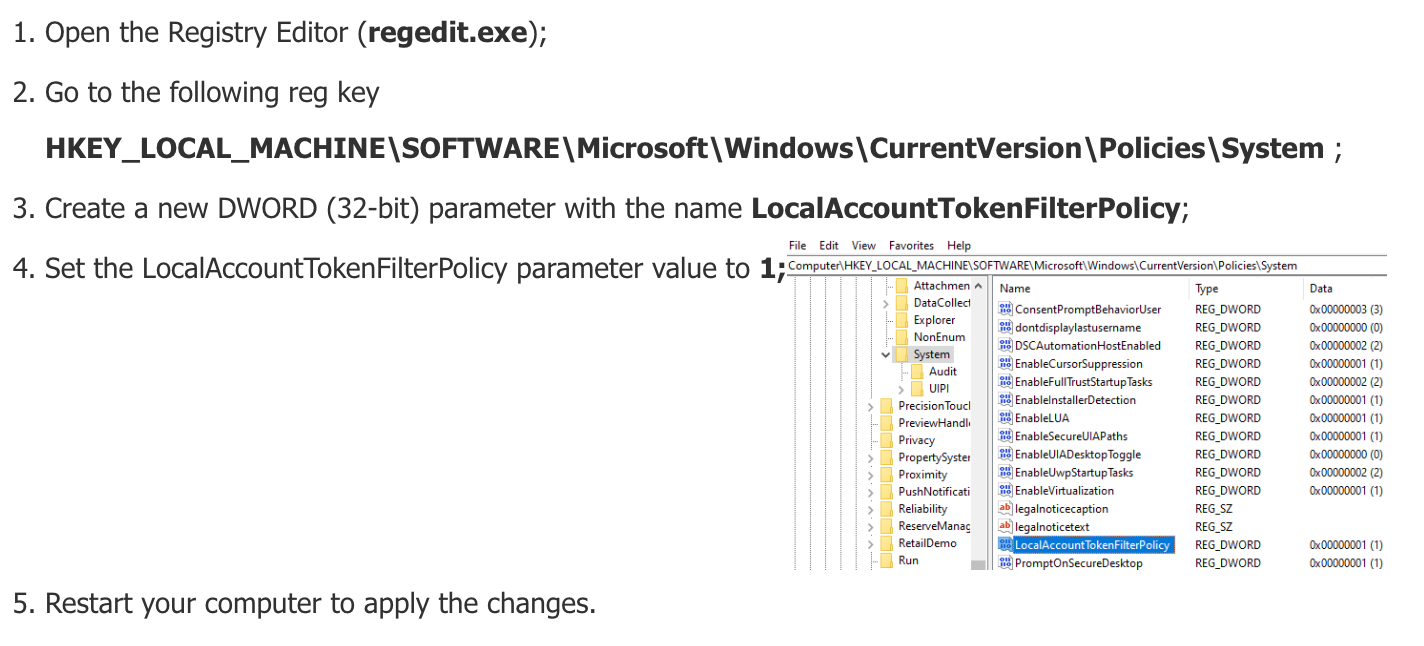
 

After you perform the above, go back to your Veeam server and test your credentials again, using the local account format I specified above (hostname\username). It should then be successful.

If the above doesn’t work, see if the Answer in the below Community post helps you:

 

8 comments

Chris.Childerhose
Forum|alt.badge.img+21

For the credentials have you tried - hostname\username?  Try this and see for the backup job.


coolsport00
Forum|alt.badge.img+21
  • Veeam Legend
  • July 26, 2024

Hi @Chris M -

Have you typed in hostname\username?

Have you disabled firewall to see if rules are messing with communication?

Disabled UAC?

Added the HV host into the hosts file on VBR?


coolsport00
Forum|alt.badge.img+21
  • Veeam Legend
  • Answer
  • July 26, 2024

This is a common question on here..I’ve also seen it where Win updates needed installed on both HV and VBR, then both servers rebooted, and connection then works.

When trying to use the admin account, maybe use .\ before it?
 

You also get this error with local admin accounts. The problem occurs due to remote UAC restrictions. Try the below to mitigate the issue


After you perform the above, go back to your Veeam server and test your credentials again, using the local account format I specified above (hostname\username). It should then be successful.

If the above doesn’t work, see if the Answer in the below Community post helps you:



MatzeB
Forum|alt.badge.img+5
  • Veeam Vanguard
  • July 26, 2024

What @coolsport00 says regkey will help, this will resolve the issue and is common when you use workgroup with local Accounts


  • Author
  • New Here
  • July 29, 2024

I added the reg key. I didn’t actually have to reboot, but was then able to use .\username and connected successfully.

Thank you for your help!


coolsport00
Forum|alt.badge.img+21
  • Veeam Legend
  • July 29, 2024

Glad to hear the reg key add helped Chris. 

Best. 


Chris.Childerhose
Forum|alt.badge.img+21

Great to hear you resolved the issue with the reg key.  Comes in handy.  😂


Forum|alt.badge.img
  • Experienced User
  • July 29, 2024

The UAC key is a great one to keep around. It comes up weekly on our 19/22 deploys.