Join discussions around Veeam community projects, Veeam events, industry and technology news
Recently active
Hi guys, Yesterday we attempted to upgrade our VBR server from V12.3.2.4465 to V13.0.2.29 but were met with the below error during the installation process - The upgrade failed and did not allow us to retry at all. Certain options were greyed out - Checking Apps and Features, Veeam reported that it was upgraded but the app was inaccessible. - In the end, we were forced to back out of out upgrade.Has anyone seen this before? ShaunB.
Hi All,I have upgraded VEM and VBR using host Management updater service from 13.0.x to 13.1.x,however after that when I opened vbr console it started upgrade of proxies server but only gives message ' Appliance OS needs upgrade'. I then go to host management of proxies deployed using infra appliance and started upgrade but it updated packages etc ...but vbr still says os need upgrade and proxies go to out of date and unavailable..i then downloaded and attached newer 13.1.x iso ti vm to upgrade and after upgrade to newer rockey linux completed, proxies are back..is there any thing i am doing wrong that updater service not upgrading os and is this iso method is ok for production..
Hello Everyone,I am currently planning a migration of an existing Veeam Backup & Replication v12 (Windows-based) environment to a new Veeam Backup & Replication v13 Software Appliance deployment and would appreciate guidance from anyone who has completed a similar migration.Migration RequirementsThe objective is to migrate the existing environment while maintaining backup and replication operations with minimal disruption. Key requirements include:Migration of existing backup jobs, backup copy jobs, replication jobs, and related configurations.Migration of backup repositories and historical backup data from the existing repositories to the new repository infrastructure.Migration of Veeam Backup & Replication components, configurations, and associated resources.Maintaining replication operations between the Production (DC) and Disaster Recovery (DR) sites throughout and after the migration.Ensuring backup chains, retention policies, and restore capabilities remain intact.Min
Hi,I use communuty edition and wonder how i can acheive my backup goals.I haveOne site with production Hyper-V hostBacked up to a NAS on same site.Backup copy of the first NAS to a second NAS on a second siteAnd a second Hyper-V host on the second site.I cannot figure out how to use my second Hyper-V host and its storage :-If i set up a backup copy job from second nas to second hyperV, the backup do nothing as it has 0 objects to process.-Schedule a replication of my VM from the second NAS to second hyperV? But can i restrict it to only replicate from nas 2? I can select the sources, but its not clear if it will replicate from the selected one.-I tried file backup from nas2 to hyperV 2 storage, but then it seem not much can be done with datas on hyperV2 storage.I dont need HA and in case of disaster can accept the time to rebuild the VM, or loose 1 day of work.Any advices would be appreciated.Merci de m'avoir lu,
Hey Veeam Community,I am having a problem backing up my personal workstation to an external hard drive.I am using the free version of Veeam Agent for Windows.When I backup, my main (C:) Internal SSD shows:Local SSD (C:) (476.1 GB) 262.5 GB read at 142 MB/sHowever, my other Internal SSD ‘terabyte’ (X:)Terabyte (X:) (953.9 GB) 3.8 GB read at 4 MB/s.I benchmarked both of my drives with CrystalDiskMark and they both got good similar results being Sata SSD’s, so the X: drive should not be this slow.I’ve tried swapping sata ports, changing cables, disable throttling when system is in use, etc. Nothing seems to help.Can anyone help me diagnose what is causing one drive to backup so much faster? Thanks, Mike
Hi,My Veeam Agent for Windows backup is stuck at 0% on snapshot creation.When I run vssadmin list providers in PowerShell, no providers are listed. It seems the default Microsoft VSS provider is missing or unregistered.What is the proper procedure to re-register the VSS provider without corrupting existing shadow copies ?Thanks !
Hi, I get that since I have two servers to backup, both physical windows servers, that it is two licenses (instances?). From what i gather the Veeam essentials package will let me backup a server as a whole server for the $475, which includes 5 licenses. If so does the 500 gig per licence apply still? I am told that if I am backing up the entire server it does not. I dont know for sure. I rather not backup the whole server. I rather backup just the data folders/shares.I have 7tb on the file server, and 1 tb on the sql server. I will replace backup exec with Veeam on my dedicated backup server whose only job is to run backup software to its local huge raid volume. No cloud involved.Or do I need to instead buy enoughj licenses at 500 gigs each to cover the 8 total tbs? Do I need both server license and data license? Then i heard that Veeam has a new third option : "Veeam's June 2026 licensing policy lists Capacity Pack Essentials, specifically for larger NAS/unstructured-data
The polls are open again!You’ve been busy sharing, writing, testing, explaining, and probably arguing with your lab environment again… 😄We’ve picked six articles from this month’s submissions, and now it’s over to you.Have a read, pick your favourite, and cast your vote for Blog of the Month. I’m curious to see if the community agrees with our shortlist!And I’m adding a little challenge for October.🛡️ October is Cybersecurity Awareness Month, so let’s fill the community with some security knowledge. Share an article this month about something you’ve worked on, learned, discovered, or simply think other Veeam people should know about. No need to make it complicated. If it’s useful to you, chances are it’ll be useful to someone else too. So… who’s taking the Blog of the Month title this month, and who’s taking on the October cybersecurity challenge? 😉Good luck to our six finalists and happy voting!@TidusandYuna , @fabian.papenfuss , @Marcel.K , @eprieto , @Michael Melter , @Dyn
I’m getting the below error after upgrading Veeam servers from v12 to the latest release of v13. It’s a windows based install of Veeam, and it is connected to a (dedicated to Veeam only) AD domain.My user has local administrator permissions, Veeam Backup Administrator permissions, and MFA disabled for testing/troubleshooting purposes. The is happening across each of the Veeam v13 servers I have on the domain.It is only happening for mine and one other engineer’s user accounts, but other engineer’s accounts are not affected. We are all in the same AD groups so permissions are the same.I have tried removing Veeam Backup Administrator permissions from my account, rebooting, and re-adding, to no effect.Has anyone seen this before? Any suggestions for what else to check? In the meantime I have a case open with Veeam support, and hoping they can come up with something.Relevant logs:[19.01.2026 21:07:36.194] <126> Error (1) Veeam.Backup.IdentityService.Shared.CSystemAccountProvid
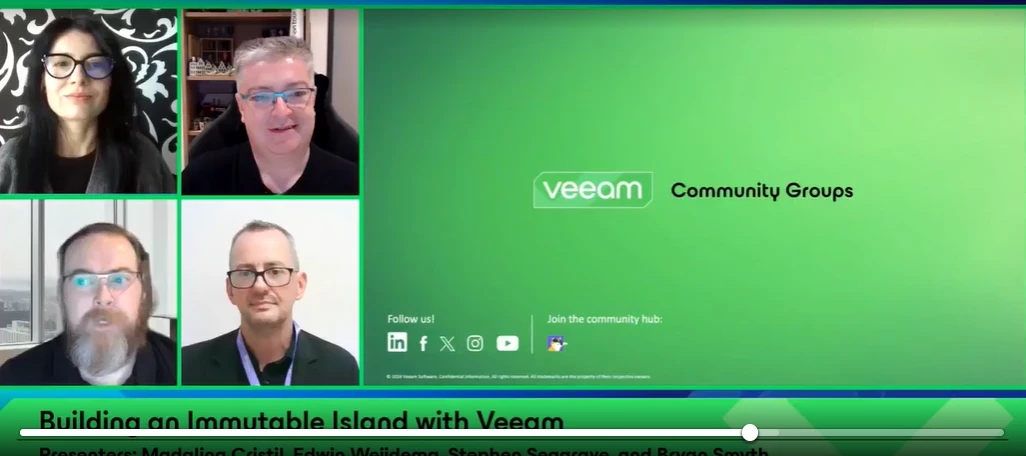
Yesterday, our October episode of the Veeam 100 Show went live! This time, we explored “Building an Immutable Island with Veeam” and how Coombe Hospital, a leading women’s hospital in Dublin, Ireland, strengthened its local resilience with a Veeam-powered secure and immutable local retention solution.The solution uses hardened, redundant Linux-based backup storage delivered as a service by Veeam VCSP provider Vault365, helping the hospital recover quickly when it matters most.A big thank you to @Stephen Seagrave , Bryan, and @Viperian for joining us and sharing the story! Missed the show or want to watch it again? Catch it below.
Hi all,I am setting up a multi-VM multi-network restore test environment using Surebackup. Our DNS-server is a physical box so I would like to perform name resolution from within the isolated environments towards that physical box - as the resolved IP-addresses would be running inside the isolated environment as well, this should not form any issues.However, I did not find a (supported) way to customize the routing rules on the lab proxy VM, and eventually the egress NAT-rules (for masquerading the DNS-requests) in case I should add them.Any advice is very welcome.Best regards,Jan
We are looking to migrate our 10 vm’s, currently on VMware, to Hyper-V. The host has to be stripped down to bare metal before installing the new hypervisor on it. The plan is to spin up a temporary server on a loaner machine, and migrate our critical VMs to the temp server to continue running our operations during the migration. My question is, how does one take a copy of the critical VM’s, and put them on the temp server if the temp server does not have Veeam or VMware? The temp server will have Hyper-V. Thank you.
Is anyone else waiting for Veeam support for “Azure Database for PostgreSQL Flexible Server Support” ? It’s been GA since November 2021 and replaced the Single Server which was retired in March 2025, so it seems a bit surprising there is no support to back it up using Veeam, and my support ticket indicated there is no ETA for this feature !This seems a big gap in Azure PaaS support to me. I’d also be interested in any work arounds people have in place. Thanks, Graham
I enabled EWS via Veeam Data Cloud - and it created a new enterprise that seems to be needed for this task (we did it manually anyway) - but it stays after completion of the task.Can we delete that?BRStephan
Hi,I am kinda new to Veeam Backup. We do have some remote linux hosts without any internal connection to our local infrastructure.Now, to not use the internet directly, I installed Netbird (just like Tailscale) and connected both, the Veeam Server and the Linux Host. That works, all good.Now when I add the Host as Managed Server, the initial SSH Connection works and the Netbird IP is being used but then everything else is trying the WAN IPs which, of course, is not wanted and also blocked. So the Setup never finishes. Does anyone know what I could do here?ThanksAndreas
Veeam Community Edition how to connect to Nutanix Cluster
Hello everyone!!! 🚨 Recently, we identified incidents affecting some customers where the mouse cursor disappears while using the Veeam Console. During our investigation, we identified a possible connection to Microsoft Edge.Although permanent fixes are still being worked on, applying the command below, which makes a change to the Windows Registry (Regedit), has shown positive results and temporarily resolved the issue.We are continuing to monitor the environments and follow the progress of the ongoing fixes to ensure operational stability.Has anyone in the community experienced the same issue? If so, please share your experiences, possible root causes, or solutions you have implemented. Let's collaborate and exchange information to help the community find a more permanent solution! 🤝 command reg add "HKLM\SOFTWARE\Policies\Microsoft\Edge\WebView2" /v "HardwareAccelerationModeEnabled" /t REG_DWORD /d 0 /f
We have a Veeam Backup Enterprise Manager that connects to several Veeam B&R servers at our remote sites and child companies. As we’ve been upgrading to V13, the requirement to use HTTPS to connect to the VBR server is causing endless issues. Most of these sites are smaller, and only have one external IP that’s used for something user-facing, such as client VPN. (You know, because default ports are good for end users that wouldn’t know how to specify them.)V12 used Veeam-specific custom ports that we could forward to the VBR servers and there was no issue whatsoever, but the upgrade to V13 has ruined this. It is necessary to be able to specify a custom port for BEM to collect data from VBR servers. We’re not pointing a web browser at this, and backup software is an ideal place for knowledgeable IT staff to use and document custom ports, or even just a single nonstandard port that Veeam uses by default (like is used to with 9392). I don’t know who decided it was a good idea to use t
I read this post but it doesn’t include any details on how to setup the backup job:Can anyone provide details on how to use Netbird to backup/restore a remote Linux VPS?From the Veeam B&R server, I can ping the Netbird host name and IP of the remote Linux server but I have tried for hours to get it to work. I can’t even get Veeam to install the agent on the remote Linux host.
Hi,When I upgraded vsa from 13.0.x to 13.1.x from host Managementconsole, it was smooth however when I opened vbr console present on remote server,it started components upgrade with message 'Appliance Os needs upgrade" something similar to that but it never got updated automatically and all the previous proxys become unavailable and out of date ..i reverted back using snapchat,anyone has Solution or explanation for this behaviour, my vsa has internet but not individual proxys..
We have an online event coming up for VUG Canada on October 8th with guests @Pybarra and @MatzeB and including NetApp. Check out to registration link below to register. Hope to see many there.Can’t delete this! Better together with Veeam and NetApp
After a failed Veeam backup, a Hyper-V VM (ADCC130HP01) was left with multiple nested Veeam Recovery Checkpoints that cannot be removed.Current situation:4 Recovery Checkpoints are chained together. The oldest Recovery Checkpoint dates back to 06/08/2026. The VM is still running normally. The VM disks currently point to the base VHDX files. Multiple AVHDX files still exist on disk.When attempting to delete the checkpoints from Hyper-V Manager, I receive the following error:"Cannot delete checkpoint: Catastrophic failure (0x8000FFFF). Virtual machine failed to generate VHD tree."When attempting removal via PowerShell, I receive:"Cannot delete a checkpoint subtree that contains a recovery checkpoint."I have already tried:Deleting checkpoints from Hyper-V Manager. Deleting checkpoints using PowerShell. Attempting manual merge operations.Has anyone experienced a similar issue and successfully removed these orphaned/chained Veeam Recovery Checkpoints without rebuilding the VM or risking dat
Happy Monday, Veeam Community! 😊Thank you all for voting once again! It looks like we have a winner for this edition! 🎉Congratulations, @kciolek ! Your blog, “Lab: Veeam 13.1 in the Real World: ‘Why Now’ Customers Should Upgrade?”, received 15 votes from our community members.A well-deserved congratulations — and your badge is on its way! Thanks again to everyone who took the time to read, vote, and support our community bloggers. See you next month!
Well, Episode 3 definitely gave us something to argue about! 😄 And yes, I’m a little late announcing the winners — August was a pretty hectic month for me!Thank you to everyone who jumped into the latest Veeam Oxford Style Debate. We had strong opinions, great technical arguments, and plenty of real-world experience from both sides — exactly what I was hoping for when we started this series.This episode statement was:“Joining your Veeam backup infrastructure (VBR server, proxies, repositories, Enterprise Manager, etc.) to Active Directory is a security mistake.”This was @DChiavari challenge to the community, and I invited him back to review the discussion and help select the winners.And his verdict? Well, even he admitted this one wasn’t easy:“This thread contains so many great insights and valid points, I genuinely struggled to pick a clear winner for each side! The initial statement is (intentionally) quite strong, and I'll be the first to admit that the ‘correct’ answer might be
After updating VBR im having an issue with backups from Nutanix.Jobs finish with errors:9/18/2026 8:01:17 AM Failed : ... : No available worker was foundWhile testing worker getting following errors:9/18/2026 4:00:11 AM Succeeded : Testing the worker WORKERNAME9/18/2026 4:00:12 AM Succeeded : Finished searching for uploaded worker VM images9/18/2026 4:00:49 AM Succeeded : The worker VM was deployed successfully (0:00:37)9/18/2026 4:00:51 AM Succeeded : Configuration settings of the WORKERNAME were synchronized successfully (0:00:02)9/18/2026 4:00:53 AM Succeeded : The worker VM was powered on successfully on the host HOSTNAME (0:00:02)9/18/2026 4:01:16 AM Succeeded : The following IP address was successfully obtained: 10.XXX.XXX.XX (0:00:22)9/18/2026 4:01:16 AM Succeeded : Successfully synchronized updater settings of the worker9/18/2026 4:01:18 AM Succeeded : Local bundle available (0:00:01)9/18/2026 4:06:28 AM Warning : Failed to install the local bundle: Cannot access a closed Strea
Already have an account? Login
Enter your E-mail address. We'll send you an e-mail with instructions to reset your password.