Join discussions around Veeam community projects, Veeam events, industry and technology news
Recently active
A customer uses the copy function for capacity tier to instantly copy on-premises Veeam backups (retention of 30 days) to object storage. They’ve configured object lock on the object storage (60 days) that has a duration longer than the local backup policy. As Veeam cannot delete a backup in object storage at 30 days, will it delete it after the object lock expires (60 days) or does the customer need to manually delete the files on object storage?My thoughts are Veeam will clean up those files once the the 60 day lock has expired, but got me scratching my head for sure
Hello,We have three ESXi servers connected to our Nimble storage using a Brocade Fibre Channel switch, each ESXi server connects to Nimble storage with individual zone as: ESXi1_Nimble, ESXi2_Nimble, ESXi3_Nimbe.A few months after this configuration was done, we added a physical server for Veeam B&R v12 as backup server and repository, which is also a backup proxy server. This is connected to the same FC switch and I created zone between the Veeam B&R server and the Nimble storage as: VeeamBR_NimbleAnd most recently, we added a HPE tape library to this mix for GFS tape backups. Added the library to the FC switch and created a zone between VeeamBR_HPETapeDrive. Each night, the Veeam B&R server runs backup jobs then stores into its local repository (D: drive). Then it runs backup to tape, which writes from the Veeam B&R backup repository into tape drive. I have already configured "Direct storage access" while configuring Backup proxy's Transport mode. The backup jobs do
Fresh install of VBR 12.1.0.2131. New user. Not using Azure. Hyper-V VMs on Server 2016, V.1607, Build 14393.6614. I get: 6/02/2024 10:01:35 AM Warning Failed to connect to AWS plug-in: Failed to login to platform service: No connection could be made because the target machine actively refused it [2001:0:348b:fb58:34c2:214d:c31d:5c8d]:9402 6/02/2024 10:01:39 AM Warning Failed to connect to Microsoft Azure plug-in: Failed to login to platform service: No connection could be made because the target machine actively refused it [2001:0:348b:fb58:34c2:214d:c31d:5c8d]:20443 Backup and backup copy to removable media working well. Any ideas?
Hello,i would like to ask, if its possible to set retention period of each database different.Based on Veeam helpcenter there is an option to set - “delete backups older than”, which will delete all backups of all databases due not native SQL backup supported.Is there any option how to achieve that? thank you
Hey Guys, Sorry for the weekend help, I am just too excited to leave VEEAM aloneI have googled and read other forum discussions to this topic but they all point towards a service not being started and in my case, everything is running, and I have rebooted everything also coming here for some helpI am in no rush this weekend, this can wait until MondayError message: Error: Managed session has failed: No connection could be made because the target machine actively refused it x.x.x.x:10005 Thanks in advance guys,
Not sure if I am missing something obvious but I have been poking around and I can’t find how to increase a CDP Proxy cache, without removing and re-adding. Thats seems a bit drastic and alot more work. Anyone been across this before ? Thanks Phil
Hi,I’m testing out the free Veeam Backup Agent for Windows (or whatever it’s called). I’m using the option to automatically start a backup when I plug in my USB Hard Drive. The option seems to work fine, but I don’t get any notification when the job starts so I always have to expand my tray and then hover over the icon to make sure it says Processing...Is there any way to get a standard Windows 11 pop up notification thing that would tell me when a job starts so I know it’s working? I have the box checked for Enable control panel notifications, but I don’t know what that does because it doesn’t seem to do anything.Thanks!
Hi community, Another question I get a lot regarding object storage is the absence of Synthetic Full backup in the advanced setting: There is no toggle for Synthetic option, but it can be activated via GFS: https://helpcenter.veeam.com/docs/backup/vsphere/direct_backup_to_object_storage_limitations.html?ver=120Unlike block or file storage type, it is not required to schedule additional fulls in Advanced, when configuring GFS: Generally, object storage doesn’t need periodic Active Full backups due to the structure of the files and there is no notion of .vbk or .vib. I recommend using GFS option and not going to Advanced settings. Synthetic full on object storage works similarly to the one stored on XFS and REFS based repositories. Thanks!
I studied about Veeam’s GFS, as I understand, it’ll consume a lot of disk space to work? If I want to keep 31 daily, 4 weekly, 12 monthly, I’ll end up with 1+4+12 = 17 full copies disk space + 30 daily incrementials ? What if I create 3 different jobs on the same VM, daily (30days), weekly (4 weeks), monthly (12 months)I’ll end up with:one daily full + 29 daily incrementalsone weekly full + 3 weekly incrementalsone monthly full + 11 monthly incrementals Total 3 full + 43 increments, should use much less space than build-in GFS?
Hello, I thought I would give the new BETA2 version of the Veeam Linux deployment a spin. Booting up to the jeOS, I was surprised to see two new options:Veeam Infrastructure Appliance Veeam Infrastructure Appliance (with iSCSI & NVME)Detailed in the screenshot below, with the BETA1 version following:BETA2 BETA1Is this the new name for a Proxy or is this something else? And, the thing I’m probably most excited about….are we finally getting NVMe fabric support on Veeam?
Hi,I’m brand new to Veeam and have a question. Is there any way to get Veeam to work in conjunction with OneDrive’s Free Up Space feature?I have 800 Gigs of files in OneDrive but only a 512 Gig drive. I use the Free Up Space feature so my local drive only has pointers to the files and the OD client downloads them when I need them. I just ran a Backup and it only backed up 2 Gigs of files because I had recently “Freed Up Space” on my whole OneDrive folder.If I download half the OneDrive files, I could run a backup. If I then Freed Up Space and downloaded the other half, what would happen if I ran another backup? Would it treat the first group of files as being Deleted and see the second group as New? I can’t download them all at once as my Drive isn’t big enough so I’m not sure how to proceed.Any suggestions?Thanks.
Hi,Just lately, like over the last 2 weeks only I think, we’ve been getting emailed warnings from our Veeam server. They’re warnings, so do I assume that these eventually complete? Warnings are basically the same theme, as below for example...Background Removal JobFailed to remove checkpoints for the backup <JobName> from the repository <S3RepoName>: Amazon S3 External connection has returned an untrusted certificate..Processing finished with warnings at 21/08/2025 03:00:50Seems to be almost daily now, early hours of the morning after the VCC jobs have run. Quite annoying to keep getting the emails, annoying to not really understand what it’s really saying here also. I normally take warnings as almost ‘soft fails’ typically there is a retry that works and that’s that?Thanks in advance for any steer on this.
Hi community, We recently performed a failover of vm100 to maintain server operations during a scheduled upgrade. The replica VM is currently running as expected.However, we are now unable to initiate a failback to the production site. The process fails due to an invalid disk configuration on the running replica vm100. When attempting to edit the VM settings to remove the problematic disk, vSphere returns the following error:"Invalid configuration for device '0'"Scsi 0.5 mapped to Hard disk 6 in vm100_replica.Supposedly, in original VM, there should be no Hard Disk 6. But the replica somehow attached the Hard disk 6 Does deleting the oldest VM snapshot will help anything. Is there a way to delete this Hard Disc 6? Thanks!
Hi everyone,I wanted to raise a question about compatibility and support in RHEL-compatible environments.SUSE offers something called Multi-Linux Support (MLS), which provides enterprise support, updates, and lifecycle management for unmodified, 100% RHEL-compatible environments. It’s not a fork or clone—it’s the same binaries and behavior as RHEL, just supported by SUSE instead of Red Hat.Given that Veeam already supports a wide range of Linux platforms, including SUSE Linux Enterprise Server and Red Hat Enterprise Linux, would there be any issue with a customer running Veeam products in a fully RHEL-compatible environment supported by SUSE MLS?Our understanding is that Veeam support is based on the underlying OS behavior, so a customer in this scenario should still be fully supported. Can anyone—maybe a PM or support engineer—confirm this assumption?Thanks in advance for any clarification!Steve C.
Hi,When using hardened linux repository, veeam services add some temporary rules to UFW, allowing traffic between backup components:[ 4] 6162/tcp ALLOW IN Anywhere # Veeam transport rule[ 5] 2500/tcp ALLOW IN Anywhere # Veeam rule eeba7ea1-3cd4-4251-8800-9fa455f03ece[ 6] 2501/tcp ALLOW IN Anywhere # Veeam rule eeba7ea1-3cd4-4251-8800-9fa455f03ece[ 7] 2507/tcp ALLOW IN Anywhere # Veeam rule eeba7ea1-3cd4-4251-8800-9fa455f03ece Is there any way to limit source IPs ?Is there any config file to insert source IPs, so that veeam service can use those IP for creating UFW rules?
Hi,I’m experiencing issues with deploying VBR Agent on 2 Domain Joined Workstations using VBR 12.2.0.334 Community Edition.I know that I am on my own here, but maybe someone has a good idea what could cause the problem.When I try to install the client from the VBR console, it fails with the error: 25-09-2024 17:30:10 Failed Unable to install backup agent: failed to connect to COMPUTER1 Error: Cannot find package version for component EpAgent package Msi platform X86. I can install the agent manually, but that doesn't help either. VBR can see the computer in the console and get’s the OS edition (Windows 10 Pro 22H2) and IP address.Thanks in advance, Bjorn Dirchsen
If we completed the VMCE on 2023 then if we want to take VMCE 2025 for example, then the training is mandatory or we can go directly by taking the exam?
I have some question about VDC for M365 below.If I have 500 license, is there any tolerance how much the user can excedeed than owned license? 1 license will be counted if the user have mailbox? If we have 200 user have mailbox and 500 sharepoint site how we can understand how much license will be consumed?
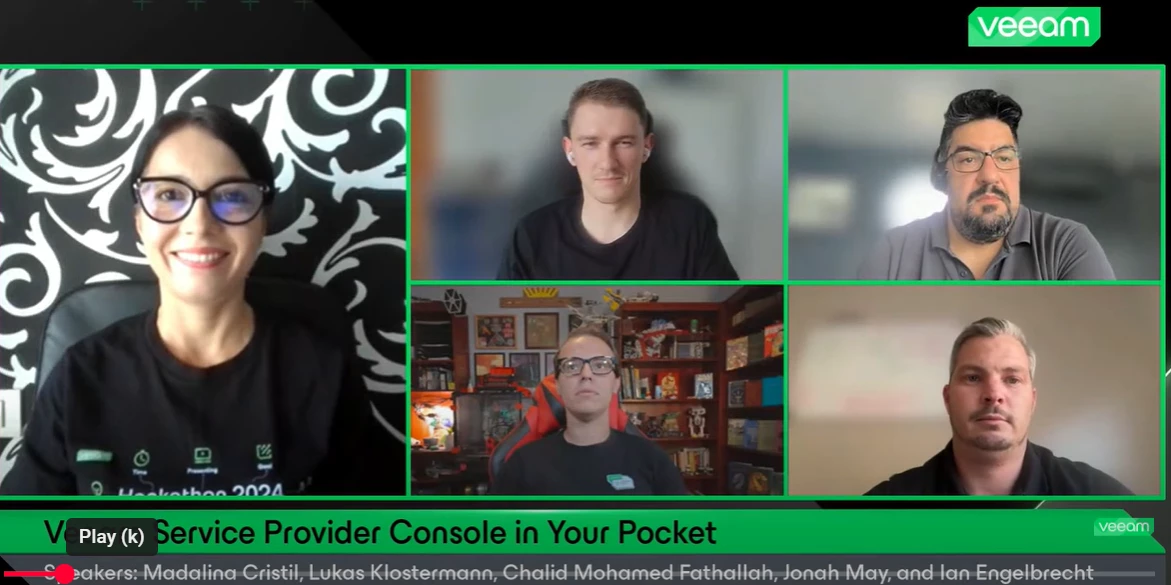
If you missed our latest Veeam 100 Show — a special edition all about the Veeam Community Hackathon 2024 — don’t worry, you can still watch the replay! Jonah joined me as co-host, and together we chatted with the winning team - @Ian_RSA , @lukas.k and @CMF - about their incredible project '’Veeam Service Provider Console in Your Pocket '’To enhance the accessibility and usability of the VCSP Console (VSPC), the team developed a mobile app for Android and iOS designed specifically with customers in mind. The app provides on-demand access to critical cloud service data, anytime and anywhere, putting essential information right at your fingertips. By leveraging AI and the VCSP APIs, they successfully launched the first version of the app during the 2024 Hackathon. Hear all about the project in this session!
Today i googling that VBR can connect to the VDC for backup repository. Anyone ever using this scenario? And if VBR conencted to VDC is there any additional cost?
Came across a new error a bit ago within the Veeam Agent and I’m sharing this for my future self (and anyone else). If all of the actions I performed took care of the issue, or if it it was just a single item, but here’s what I had to do for the below errors. The Errors10/18/2023 1:35:22 AM :: Data Partition (F:) (604.9 GB) 342.2 GB read at 69 MB/s10/18/2023 3:00:25 AM :: Error: The device is not ready. Failed to schedule asynchronous read operation Failed to upload disk. Agent failed to process method {DataTransfer.SyncDisk}. Exception from server: The device is not ready. Unable to retrieve next block transmission command. Number of already processed blocks: [1402697]. Failed to download disk '0f9d11e0-8171-459b-819c-ebf55d31c45c' The Actions/ResolutionIn my case, researching this error indicated there was an issue with the volume, possibly with a disk table not matching the actual size or something along those lines. It was indicated that I should try shrinking the volume. There
Recovered VMs not powering up in Datalab test due to unable to access virtual hard disks.Have a couple of large VMs with multiple disks (60 and 90 TBs and 10 disks on each VM) that will not power up due to the error above. We are using storage failover and we have daily replication of the production volumes to our DR volumes. Replication status on our Storage device show that replication is successful but vsphere shows host incompatibility/permission issue accessing the disks.I don’t think that this is either a host or permission issue since the other virtual disks for the same VMs can be seen in vCenter. There are other VMs in the Orchestration and these are the only 2 servers that would not come up. Below is a screenshot from vCenter.
Hi All,We have the Veeam Service Provider Console 8.1 installed and it is generally working fine, but suddenly on many job for Windows Agents, operation mode Workstation, we see this error message. Error: Cannot set many inner exceptions to exception System.Exception VSPC and VBR is installed on the same VM. As a first step we upgraded VBR to the latest version. Windows Agent Version are on 6.3Any hint is highly appreciated.Thanks,Edy
Hi,I am using the free Windows Agent program. I have two 4TB external drives that I want to use for backups. I don’t know if this can be done, but this is what I’m envisioning:Drive A is in my house. Drive B is off-site.I connect Drive A to my laptop and kick off a full backup. Every couple days, I reconnect Drive A and run another backup (incremental). At the start of the next month I will go swap Drive A and Drive B.When I connect Drive B, I want to run another Full backup. Then every few days I run an incremental. At the start of the next month I swap drives again.At this point, I want to treat it as a new chain of backups and start with a Full and then go to incremental. As long as the drive isn’t full, I don’t want to ever delete backups just because they are “old”. Can any/all of this be automated with the Free Agent for Windows program? Is there a better way to handle this whole thing?Just looking for advice for this whole process.Thanks!
I’ve been using the free Veeam Windows agent for quite sometime, to backup my 3 Windows desktops to my TrueNAS server. Wonderful product, I might add!One of my Windows machines is a Windows 10 box that cannot be upgraded to Windows 11 due to hardware limitations. So I have installed Linux Mint Cinnamon on this machine. I have then installed the free Linux agent to allow me to backup this system to my backup server. This is where the problems begin.The machine now running Linux Mint will not wake up at the specified time to do a Veeam backup. I have installed the Linux agent (blksnap) and have created a backup configuration, performed a full backup, created and patched the recovery imaged and tested the recovery all without any problems. Now, I have put my Linux system into “suspend” mode and then waited till 02:30 to see if it would wake and do an incremental backup.Well, nothing happens; the system does not wake up at 02:30.I have done a manual incremental and it works fine, but
Already have an account? Login
Enter your E-mail address. We'll send you an e-mail with instructions to reset your password.