


Answer

VSA v13 - "failed to check for updates" GUI bug?

  • September 14, 2025
  • 6 comments
  • 177 views

lukas.k
Forum|alt.badge.img+12

Hi all,


I finally found time to deploy the most recent version of v13 (final first release) within my lab and I quickly ran into the issue that the Web GUI shows "failed to check for updates" even after I ran through the process and updates the appliance.


The host management GUI shows that the system is up-to-date, so I assume that the update was installed successfully - the VSA even rebooted during that process.
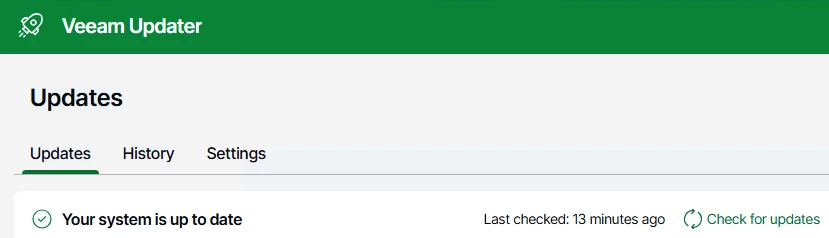
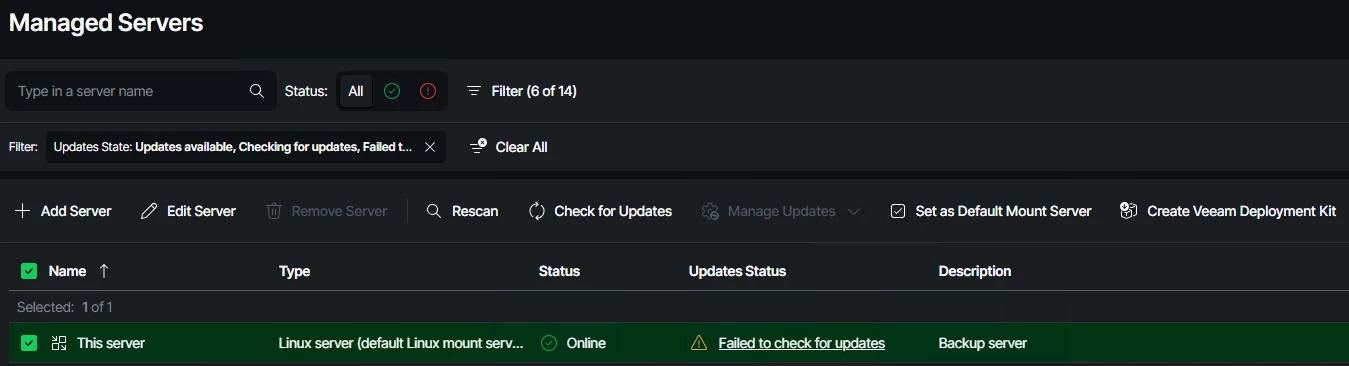


I already restarted the VSA (and the whole lab environment tbh) so there can't be any caching issue as far as I can tell.


Veeam Support Case is already open.


R&D: https://forums.veeam.com/veeam-backup-replication-f2/v13-failed-to-update-but-system-is-up-to-date-t100160.html


Any ideas on that?


Best regards
Lukas

Best answer by lukas.k

I now found out that this seemed to be an issue with the DNS settings. I had the same but as ​@Dynamic faced with not-set DNS servers in the GUI. After setting up the DNS servers using the DCUI the error was gone!


I’ll have an eye on this since I have multiple VSAs running.

6 comments

Chris.Childerhose
Forum|alt.badge.img+21
  • Veeam Legend, Veeam Vanguard
  • September 14, 2025

Don't recall seeing this issue with my deployment and hopefully it gets sorted.  There are a few minor things I have found and reported for 13.0.1 fix.


coolsport00
Forum|alt.badge.img+21
  • Veeam Legend
  • September 14, 2025

If memory serves Lukas...I wanna say I had the same behavior while testing out the BETA version. I woulda thought it got sorted by ‘early release’ version? 🤔 Curious to hear about the fix...or if a bug, hopefully gets resolved for GA release.


lukas.k
Forum|alt.badge.img+12
  • Author
  • Veeam Vanguard
  • Answer
  • September 15, 2025

I now found out that this seemed to be an issue with the DNS settings. I had the same but as ​@Dynamic faced with not-set DNS servers in the GUI. After setting up the DNS servers using the DCUI the error was gone!


I’ll have an eye on this since I have multiple VSAs running.


lukas.k
Forum|alt.badge.img+12
  • Author
  • Veeam Vanguard
  • September 15, 2025

Don't recall seeing this issue with my deployment and hopefully it gets sorted.  There are a few minor things I have found and reported for 13.0.1 fix.

Hopefully I didn’t double-mention this, I wasn’t able to find a similar post.


Where exactly did you report the issues you found? I posted this into R&D yesterday and Anton replyed that this isn’t normally a topic for R&D so I might have misunterstood R&D forums - haven’t been active there recently tbh.


coolsport00
Forum|alt.badge.img+21
  • Veeam Legend
  • September 15, 2025

Hmm..interesting. Pretty sure I had my DNS all setup. Regardless, good to know of the resolution. Thanks for the update Lukas 


Chris.Childerhose
Forum|alt.badge.img+21
  • Veeam Legend, Veeam Vanguard
  • September 15, 2025

Don't recall seeing this issue with my deployment and hopefully it gets sorted.  There are a few minor things I have found and reported for 13.0.1 fix.

Hopefully I didn’t double-mention this, I wasn’t able to find a similar post.


Where exactly did you report the issues you found? I posted this into R&D yesterday and Anton replyed that this isn’t normally a topic for R&D so I might have misunterstood R&D forums - haven’t been active there recently tbh.

I did put the VEM UI bug in the forums but the rest I did here.  Glad to hear you were able to fix things.  Who never said it wasn't DNS. 😜😂


