The Why Now Community Challenge: Veeam Data Platform 13.1. It’s time to vote!
News, guidelines and various community projects
Recently active
I studied about Veeam’s GFS, as I understand, it’ll consume a lot of disk space to work? If I want to keep 31 daily, 4 weekly, 12 monthly, I’ll end up with 1+4+12 = 17 full copies disk space + 30 daily incrementials ? What if I create 3 different jobs on the same VM, daily (30days), weekly (4 weeks), monthly (12 months)I’ll end up with:one daily full + 29 daily incrementalsone weekly full + 3 weekly incrementalsone monthly full + 11 monthly incrementals Total 3 full + 43 increments, should use much less space than build-in GFS?
Hello, I thought I would give the new BETA2 version of the Veeam Linux deployment a spin. Booting up to the jeOS, I was surprised to see two new options:Veeam Infrastructure Appliance Veeam Infrastructure Appliance (with iSCSI & NVME)Detailed in the screenshot below, with the BETA1 version following:BETA2 BETA1Is this the new name for a Proxy or is this something else? And, the thing I’m probably most excited about….are we finally getting NVMe fabric support on Veeam?
Recently I shared a post on how to set up Veeam HA in the VDP v13 BETA preview. In this post I’ll walk you through how to perform a Switchover and Failover operation to the 2nd VBR node. There are no pre-requisites per se’ before performing the steps listed below, except for the HA enable configuration steps I shared in my Part 1 post. So let’s get to it, shall we? 😊Perform a SwitchoverFirst, log into the Remote Console to the Cluster IP. Review my previous post on what that IP is Next, go into the Backup Infrastructure Node > Managed Servers, find your 2nd VBR node and rt-click > Switchover VBR HA Cluster Switchover Verify the items in the next message are taken care of. If not, just click Cancel and take care of them before proceeding; otherwise, click Switchover VBR HA Cluster Switchover Message After you click to Switchover, the Remote Console will be logged out in 5 seconds VBR HA Cluster Switchover Logout Message After the Console is logged out of, wait roughly 10-
Hi,I’m brand new to Veeam and have a question. Is there any way to get Veeam to work in conjunction with OneDrive’s Free Up Space feature?I have 800 Gigs of files in OneDrive but only a 512 Gig drive. I use the Free Up Space feature so my local drive only has pointers to the files and the OD client downloads them when I need them. I just ran a Backup and it only backed up 2 Gigs of files because I had recently “Freed Up Space” on my whole OneDrive folder.If I download half the OneDrive files, I could run a backup. If I then Freed Up Space and downloaded the other half, what would happen if I ran another backup? Would it treat the first group of files as being Deleted and see the second group as New? I can’t download them all at once as my Drive isn’t big enough so I’m not sure how to proceed.Any suggestions?Thanks.
Hi,Just lately, like over the last 2 weeks only I think, we’ve been getting emailed warnings from our Veeam server. They’re warnings, so do I assume that these eventually complete? Warnings are basically the same theme, as below for example...Background Removal JobFailed to remove checkpoints for the backup <JobName> from the repository <S3RepoName>: Amazon S3 External connection has returned an untrusted certificate..Processing finished with warnings at 21/08/2025 03:00:50Seems to be almost daily now, early hours of the morning after the VCC jobs have run. Quite annoying to keep getting the emails, annoying to not really understand what it’s really saying here also. I normally take warnings as almost ‘soft fails’ typically there is a retry that works and that’s that?Thanks in advance for any steer on this.
Hi community, We recently performed a failover of vm100 to maintain server operations during a scheduled upgrade. The replica VM is currently running as expected.However, we are now unable to initiate a failback to the production site. The process fails due to an invalid disk configuration on the running replica vm100. When attempting to edit the VM settings to remove the problematic disk, vSphere returns the following error:"Invalid configuration for device '0'"Scsi 0.5 mapped to Hard disk 6 in vm100_replica.Supposedly, in original VM, there should be no Hard Disk 6. But the replica somehow attached the Hard disk 6 Does deleting the oldest VM snapshot will help anything. Is there a way to delete this Hard Disc 6? Thanks!
Managing complex backup environments just got smarter.Veeam Intelligence is our new AI-powered assistant, integrated into Veeam ONE and Veeam Backup & Replication, designed to streamline your day-to-day operations.Whether you’re troubleshooting, optimizing, or automating tasks, Veeam Intelligence helps you get answers faster and work more efficiently.🔍 What Can It Do?✅ Answer technical questions via natural language chat✅ Search Veeam documentation & KBs in real time✅ Provide environment-specific insights (in Advanced Mode)✅ Detect threats using AI/ML✅ Recommend optimizations & generate automation scripts (PowerShell, REST API, YARA rules)💡 Real-World Use Cases:“How do I set up alarm notifications in Veeam ONE?” “List all protected VMs in my environment.” “Generate a YARA rule to detect sensitive data in backups.”🔐 Good to Know:Requires a paid or trial license (not available for Community Edition) Needs internet access and is available to Veeam ONE Admins Continually ev
Hi everyone,I wanted to raise a question about compatibility and support in RHEL-compatible environments.SUSE offers something called Multi-Linux Support (MLS), which provides enterprise support, updates, and lifecycle management for unmodified, 100% RHEL-compatible environments. It’s not a fork or clone—it’s the same binaries and behavior as RHEL, just supported by SUSE instead of Red Hat.Given that Veeam already supports a wide range of Linux platforms, including SUSE Linux Enterprise Server and Red Hat Enterprise Linux, would there be any issue with a customer running Veeam products in a fully RHEL-compatible environment supported by SUSE MLS?Our understanding is that Veeam support is based on the underlying OS behavior, so a customer in this scenario should still be fully supported. Can anyone—maybe a PM or support engineer—confirm this assumption?Thanks in advance for any clarification!Steve C.
When you try to install or upgrade the Veeam Backup Enterprise Manager 12.1, it might fail to create a website, and the error code is 0x80070020. You can follow the instructions to open the logs folder and try to check the cause of the issues. The folder path is C:\ProgramData\Veeam\Setup\Temp. I noticed the error message: The process cannot access the file because it is being used by another process. Failed to create website. Error code: 0x80070020. Bae on Veeam KB1992 https://www.veeam.com/kb1992, this known issue--Local antivirus or antimalware software interferes with installation.In my case, the Windows Defender Advanced Threat Protection caused this issue. Unfortunately, I cannot temporarily disable the Microsoft Defender Advanced Thread Protection service. The service properties greyed out. Also, I don't want to offboard the server from the Windows Defender Advanced Threat Protection and risk it.Please follow the steps to set Microsoft Defender Antivirus to passive mode by s
Hi,When using hardened linux repository, veeam services add some temporary rules to UFW, allowing traffic between backup components:[ 4] 6162/tcp ALLOW IN Anywhere # Veeam transport rule[ 5] 2500/tcp ALLOW IN Anywhere # Veeam rule eeba7ea1-3cd4-4251-8800-9fa455f03ece[ 6] 2501/tcp ALLOW IN Anywhere # Veeam rule eeba7ea1-3cd4-4251-8800-9fa455f03ece[ 7] 2507/tcp ALLOW IN Anywhere # Veeam rule eeba7ea1-3cd4-4251-8800-9fa455f03ece Is there any way to limit source IPs ?Is there any config file to insert source IPs, so that veeam service can use those IP for creating UFW rules?
Hi,I’m experiencing issues with deploying VBR Agent on 2 Domain Joined Workstations using VBR 12.2.0.334 Community Edition.I know that I am on my own here, but maybe someone has a good idea what could cause the problem.When I try to install the client from the VBR console, it fails with the error: 25-09-2024 17:30:10 Failed Unable to install backup agent: failed to connect to COMPUTER1 Error: Cannot find package version for component EpAgent package Msi platform X86. I can install the agent manually, but that doesn't help either. VBR can see the computer in the console and get’s the OS edition (Windows 10 Pro 22H2) and IP address.Thanks in advance, Bjorn Dirchsen
If we completed the VMCE on 2023 then if we want to take VMCE 2025 for example, then the training is mandatory or we can go directly by taking the exam?
I have some question about VDC for M365 below.If I have 500 license, is there any tolerance how much the user can excedeed than owned license? 1 license will be counted if the user have mailbox? If we have 200 user have mailbox and 500 sharepoint site how we can understand how much license will be consumed?
Greetings to everyone here!😎 Following the Broadcom disruptions in the market, many customers told us they’re investigating alternatives. Those of you who closely follow Veeam might have heard about the work we’re doing to satisfy those needs. But have you heard about the Veeam and Scale Computing strategic announcement with the intent to bring our proven data protection capabilities to the Scale HyperCore hypervisor? We initially targeted Q4 ’25 for this project, but thanks to the incredible work of the R&D team, the Veeam Backup for Scale Computing plug-in is live and you can try it today. While the official announcement and related marketing activities are scheduled for October, let’s not hesitate and take a look right away. Over the last few weeks, I’ve been playing with the solution and with Scale HyperCore, and I’m going to share my findings so you can do the same and save some time fighting configs.A few words about Scale HyperCore. It’s a KVM-based hyperconverged platform
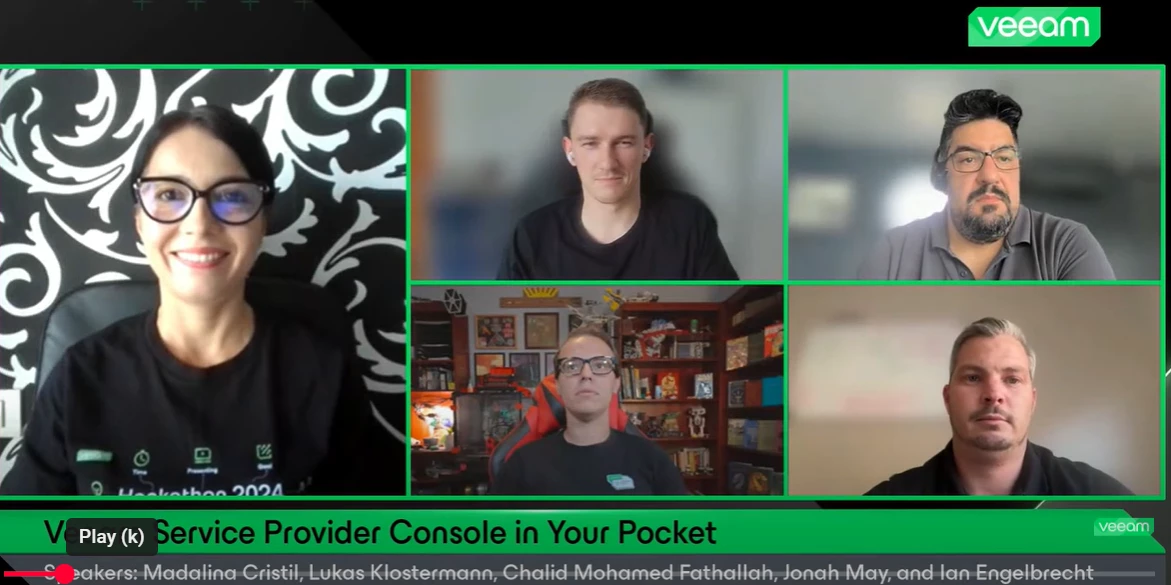
If you missed our latest Veeam 100 Show — a special edition all about the Veeam Community Hackathon 2024 — don’t worry, you can still watch the replay! Jonah joined me as co-host, and together we chatted with the winning team - @Ian_RSA , @lukas.k and @CMF - about their incredible project '’Veeam Service Provider Console in Your Pocket '’To enhance the accessibility and usability of the VCSP Console (VSPC), the team developed a mobile app for Android and iOS designed specifically with customers in mind. The app provides on-demand access to critical cloud service data, anytime and anywhere, putting essential information right at your fingertips. By leveraging AI and the VCSP APIs, they successfully launched the first version of the app during the 2024 Hackathon. Hear all about the project in this session!
Today i googling that VBR can connect to the VDC for backup repository. Anyone ever using this scenario? And if VBR conencted to VDC is there any additional cost?
Came across a new error a bit ago within the Veeam Agent and I’m sharing this for my future self (and anyone else). If all of the actions I performed took care of the issue, or if it it was just a single item, but here’s what I had to do for the below errors. The Errors10/18/2023 1:35:22 AM :: Data Partition (F:) (604.9 GB) 342.2 GB read at 69 MB/s10/18/2023 3:00:25 AM :: Error: The device is not ready. Failed to schedule asynchronous read operation Failed to upload disk. Agent failed to process method {DataTransfer.SyncDisk}. Exception from server: The device is not ready. Unable to retrieve next block transmission command. Number of already processed blocks: [1402697]. Failed to download disk '0f9d11e0-8171-459b-819c-ebf55d31c45c' The Actions/ResolutionIn my case, researching this error indicated there was an issue with the volume, possibly with a disk table not matching the actual size or something along those lines. It was indicated that I should try shrinking the volume. There
Recovered VMs not powering up in Datalab test due to unable to access virtual hard disks.Have a couple of large VMs with multiple disks (60 and 90 TBs and 10 disks on each VM) that will not power up due to the error above. We are using storage failover and we have daily replication of the production volumes to our DR volumes. Replication status on our Storage device show that replication is successful but vsphere shows host incompatibility/permission issue accessing the disks.I don’t think that this is either a host or permission issue since the other virtual disks for the same VMs can be seen in vCenter. There are other VMs in the Orchestration and these are the only 2 servers that would not come up. Below is a screenshot from vCenter.
Hi All,We have the Veeam Service Provider Console 8.1 installed and it is generally working fine, but suddenly on many job for Windows Agents, operation mode Workstation, we see this error message. Error: Cannot set many inner exceptions to exception System.Exception VSPC and VBR is installed on the same VM. As a first step we upgraded VBR to the latest version. Windows Agent Version are on 6.3Any hint is highly appreciated.Thanks,Edy
Guess who’s back?!?! That’s right, I’m back and in the recap with @Madi.Cristil this week. We have a great list of content to share in this week’s episode. You can watch it here:Featured Contentvia @Scott via @MarcoLuvisi via @Geoff Burke Vanguard Blog Spotlight - Andrea MauroThis week @AndreTheGiant is featured in the Vanguard blog spotlight. This recent blog gives a great overview of Veeam security capabilities: Veeam security features and required licenses - vInfrastructure BlogRelated to this, if you didn’t see it, in May of this year @ertelle1 and I presented at Security Field Day 13, be sure to check out the video playlists there: Veeam Presents at Security Field Day 13 - Tech Field Day Special Department Newsvia @Jonty and @Ian_RSA HOT TOPICvia @Madi.Cristil Who’s NewWe are happy to welcome +489 new members to the Veeam Community. The coolest usernames are @SirGivenFear, @VeeamRanger, @desertsailor, @CozyFriend, @RocketSam and @Optimus-Chang! Alfred’s pick is @
Hi thereToday, I want to share with you all a technology/partner that caught my eye at VeeamOn 2025 in San Diego, CA.Have you ever wondered how to «enforce» or «protect» your Veeam Windows Setup, with local / presented Storage, without modifying or adding Appliances/devices to your Infrastructure?Here is where Blocky comes into Play.The Only Ransomware Protection That Runs on the Veeam Windows Server.Blocky installs and runs directly on Windows-based Veeam Backup & Replication (VBR) servers—securing backup jobs at the source without requiring added hardware, Linux, or infrastructure changes.Blocky hardens the Windows VBR against ransomware threats by transforming the ReFS and NTFS volumes into a zero-trust, Write Once Read Many (WORM) volume.This creates robust ransomware protection for Veeam backup volumes without disrupting operations.Another important aspect is that the learning curve is relatively easy to learn/manage.No extra Hardware/tech needed, and no modifications (or big
Hi,I am using the free Windows Agent program. I have two 4TB external drives that I want to use for backups. I don’t know if this can be done, but this is what I’m envisioning:Drive A is in my house. Drive B is off-site.I connect Drive A to my laptop and kick off a full backup. Every couple days, I reconnect Drive A and run another backup (incremental). At the start of the next month I will go swap Drive A and Drive B.When I connect Drive B, I want to run another Full backup. Then every few days I run an incremental. At the start of the next month I swap drives again.At this point, I want to treat it as a new chain of backups and start with a Full and then go to incremental. As long as the drive isn’t full, I don’t want to ever delete backups just because they are “old”. Can any/all of this be automated with the Free Agent for Windows program? Is there a better way to handle this whole thing?Just looking for advice for this whole process.Thanks!
Im trying to run a powershell script to turn off/on a service on the remote computer. I run Veeam VBR as a local service instead of an AD service account. Is this why my script is failing?Ive tried both of these and using SNMP as an example. Of course they both work interactively from the VBRserverGet-Service -computername RemoteComputer -DisplayName "SNMP Service"| Stop-Serviceinvoke-command -ComputerName RemoteComputer -ScriptBlock {Get-Service -Name "SNMP"| Stop-Service} **********************Windows PowerShell transcript startStart time: 20250807125230Username: WCG\SYSTEMRunAs User: WCG\SYSTEMConfiguration Name: Machine: VBRserver (Microsoft Windows NT 10.0.17763.0)Host Application: powershell.exe -ExecutionPolicy ByPass -Command try {& 'C:\VeeamScripts\freeze-tk.ps1' -ErrorAction Stop } catch { exit 1 } Process ID: 24996PSVersion: 5.1.17763.7553PSEdition: DesktopPSCompatibleVersions: 1.0, 2.0, 3.0, 4.0, 5.0, 5.1.17763.7553BuildVersion: 10.0.17763.7553CLRVersion: 4.0.30319.4
Now that V12.1 is available, I wanted to share with you a featured YARA rule set that can give you on-demand scanning for some top ransomware threats. Attached to this post is a file named: Top10RW_YARArules.zip. In this file are YARA rules for some common ransomware threats that have been seen recently:Attribution: This great collection was made by Felix Bilsten. Links: X: Felix Bilstein (@fxb_b) / X (twitter.com), website: Felix Bilstein - project overview (cocacoding.com) and Github: fxb-cocacoding (Felix Bilstein) · GitHub
I’ve been using the free Veeam Windows agent for quite sometime, to backup my 3 Windows desktops to my TrueNAS server. Wonderful product, I might add!One of my Windows machines is a Windows 10 box that cannot be upgraded to Windows 11 due to hardware limitations. So I have installed Linux Mint Cinnamon on this machine. I have then installed the free Linux agent to allow me to backup this system to my backup server. This is where the problems begin.The machine now running Linux Mint will not wake up at the specified time to do a Veeam backup. I have installed the Linux agent (blksnap) and have created a backup configuration, performed a full backup, created and patched the recovery imaged and tested the recovery all without any problems. Now, I have put my Linux system into “suspend” mode and then waited till 02:30 to see if it would wake and do an incremental backup.Well, nothing happens; the system does not wake up at 02:30.I have done a manual incremental and it works fine, but
Already have an account? Login
Enter your E-mail address. We'll send you an e-mail with instructions to reset your password.