Solved

13.0.1.1071 -> 13.0.1.2067 Veeam B&R Console error

  • April 14, 2026
  • 9 comments
  • 107 views

  • Not a newbie anymore

Hello all,

Veeam Backup & Replication Community Edition
Version before Update: 13.0.1.1071

After applying the patch for version 13.0.1.2067: 
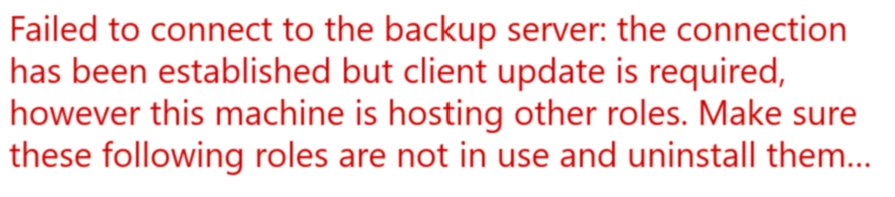
When I launch the Veeam Backup & Replication Console on the backup server, I am unable to connect and the following error appears: "Failed to connect to the backup server localhost. Make sure it is online and version is v13 or later".

I updated Veeam with the patch and when I launch the full ISO, only the “Modify” option appears, and I could install "Veeam Backup Enterprise Manager".

Either the error message mentioned above appears or this one, when I launch the console:
"Failed to connect to the backup server: Client update is required but it is linked to a local server installation version. Use a standalone console installation or update your local server first."

The Full-ISO contains a Shell.x64.msi, when I run it as admin, I can repair it, but doesnt change anything.

Does someone have an idea how to fix that?

Thanks in advance!

Kind regards
Tim

Best answer by MatteoCe

FIXED


1. Close the local console
2. Add the reg values to HKEY_LOCAL_MACHINE\SOFTWARE\Veeam\Veeam Backup and Replication

ClientAutoUpdate_DisabledRequestHandlers 
Type: REG_SZ
Default value: Array.Empty<String>()
Add value: backup-service-handler
Description: This option was made to completely disable the console update processing of the hotfixes installed on backup service.

3. Open the console again and login
4. You'll see an "Update" button -- update the console
5. Proceed with an updated console
6. Delete the key immediately once the console is updated. As keeping the key will update all consoles that may connect to that VBR server.

9 comments

lukas.k
Forum|alt.badge.img+13
  • Influencer
  • April 14, 2026

Hi ​@WHTK and welcome to the community!

Did you make sure to reboot the server after the upgrade? That error message often states that the Veeam services are not running properly on the backup server. Maybe you can check, if the services are running and if not, start them manually.

Please keep in mind that after a reboot it can take around 5 minutes until all the services are started, they are set to “delayed start” on purpose by default.


In case that doesn’t work, I’d suggest reaching out to Veeam Support, they might be able to assist further and quicker than we can. If you would run the console on a different server (PAW / jumphost), I’d recommend opening it as administrator to trigger the auto-update, but since you run it on the backup server itself, it should be upgraded with the full installer.


Hope that helps!

Lukas


  • Author
  • Not a newbie anymore
  • April 14, 2026

Hello ​@lukas.k 

Thanks for your quick response. Yes I rebooted it and all services are running except of Veeam CDP Coordinator Service, Veeam Data Analyzer Service and Veeam Broker Service which failed with the error 1069: The service did not start due to a logon failure.

I have already contacted the Veeam Support, but since we are using the community edition, were low prio. Thats why i trying here :)

Kind regards
Tim


  • Author
  • Not a newbie anymore
  • April 14, 2026

Thanks for the hint. I can access it with a jumphost.


  • New Here
  • April 16, 2026

Did you ever get this resolved?  I have the exact same issue.


  • Author
  • Not a newbie anymore
  • April 16, 2026

@jeffcander No, Im accessing it via a jump host and will probably have to wait for the next patch.


  • New Here
  • April 16, 2026

I have not been able to access mine through a jump host.  I installed the console on another host but it won’t connect.  If I try to go to the IP in a browser on the remote host it just gets an err ssl version or cipher mismatch error. ​@WHTK 


  • Author
  • Not a newbie anymore
  • April 17, 2026

@jeffcander I dont use the enterprise manager…

what error do you get with the jumphost (connection problem?)?


  • New Here
  • April 17, 2026

We are also encountering the same error after installing patch 13.0.1.2067. Looking at the logs, the following error appears:

'Client requires restricted components to be updated: private-fixes. This client cannot be updated automatically because it is installed near backup service... Client update is required but it is linked to a local server installation version. Use a standalone console installation or update your local server first.'

Unfortunately, it is not even possible to update Veeam again by downloading the full ISO. I have opened a support ticket with Veeam and I am currently awaiting their response.


  • New Here
  • Answer
  • April 17, 2026

FIXED


1. Close the local console
2. Add the reg values to HKEY_LOCAL_MACHINE\SOFTWARE\Veeam\Veeam Backup and Replication

ClientAutoUpdate_DisabledRequestHandlers 
Type: REG_SZ
Default value: Array.Empty<String>()
Add value: backup-service-handler
Description: This option was made to completely disable the console update processing of the hotfixes installed on backup service.

3. Open the console again and login
4. You'll see an "Update" button -- update the console
5. Proceed with an updated console
6. Delete the key immediately once the console is updated. As keeping the key will update all consoles that may connect to that VBR server.