Solved

Veeam Backup & Replication Debug Logs

  • February 4, 2026
  • 5 comments
  • 77 views

waqasali
Forum|alt.badge.img+4

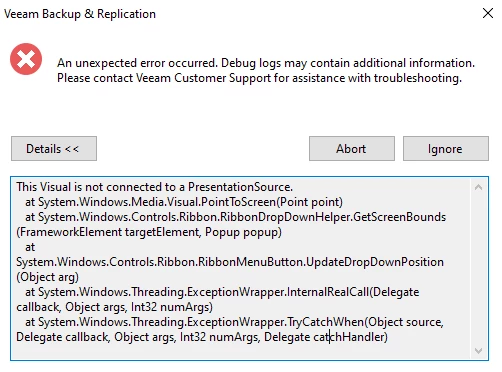
What is this type of issue ? Anyone, please explain.



Best answer by waqasali

it was resolved after reconnecting and adjusting display scaling.

5 comments

matheusgiovanini
Forum|alt.badge.img+9

This error is related to the Veeam console UI (WPF/Ribbon), not to the backup engine itself. It happens when the visual component tries to open or position a dropdown/menu and loses the window context, common in RDP sessions, multi-monitor setups, resolution changes, or Windows DPI issues.


you can try close and reopen the Veeam console, reconmect the RDP session, temporarily set display scaling to 100%


If the error persists, it’s best to open a support case with Veeam so they can review the logs in detail.


Chris.Childerhose
Forum|alt.badge.img+21

@waqasali  - Just wanted to follow up to see if you received a response from Support to answer your question. Please mark a best answer if this is resolved including your own if needed.


waqasali
Forum|alt.badge.img+4
  • Author
  • On the path to Greatness
  • Answer
  • June 3, 2026

it was resolved after reconnecting and adjusting display scaling.


Chris.Childerhose
Forum|alt.badge.img+21

Great to hear you got this resolved.  👍


waqasali
Forum|alt.badge.img+4
  • Author
  • On the path to Greatness
  • June 4, 2026

Great to hear you got this resolved.  👍


thank you ​@Chris.Childerhose




