Question

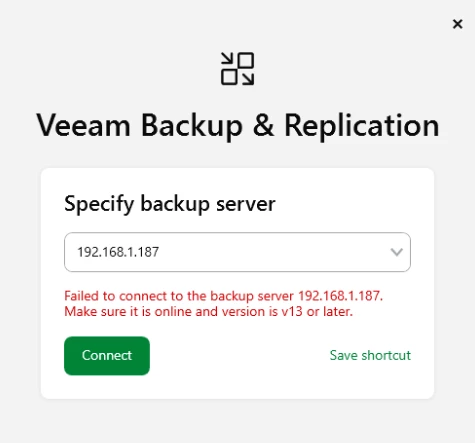
Failed to connect to the backup server localhost.

  • March 16, 2026
  • 23 comments
  • 2489 views

Hello


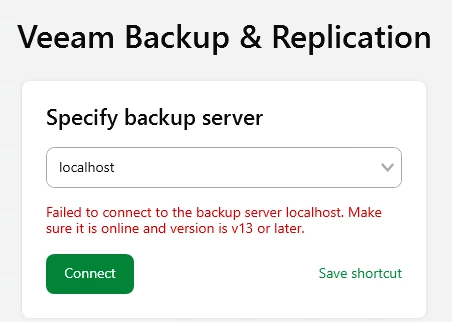
Im very new to Veeam and i installed on a server Veeam Backup and Replication. Now i get this error message: (it never worked)


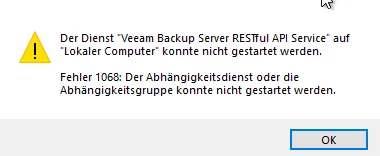
I read that the API Service needs to be started, but this is not working and an error occurs.



Also its not possible do uninstall the Veeam Software with the Error → Windows cannot access the specified device, path, or file. You may not have the appropriate permissions to access the item. It is the adiminstrator user.


The new Update i was able to install but also after this update from march i get the same error message.


Does anyone have a idea how i can fix this issue?

23 comments

Chris.Childerhose
Forum|alt.badge.img+21
  • Veeam Legend, Veeam Vanguard
  • March 16, 2026

I would check the logs here - C:\ProgramData\Veeam\Backup and if nothing seems to stand out, then open a support ticket as this message could be various things as I am sure there is no one specific solution.


kciolek
Forum|alt.badge.img+5
  • Influencer
  • March 16, 2026

have you tried putting the FQDN or IP of the backup server? I’ve had this before and some of the services were still starting. If this doesn’t work open a case with support as Chris suggested. 


Andanet
Forum|alt.badge.img+13
  • Veeam Legend
  • March 16, 2026

hi ​@manuel2711 have you used a DOMAIN Administrator during installation to start the services? 


Jason Orchard-ingram micro
Forum|alt.badge.img+3

Hello


Im very new to Veeam and i installed on a server Veeam Backup and Replication. Now i get this error message: (it never worked)


I read that the API Service needs to be started, but this is not working and an error occurs.


Also its not possible do uninstall the Veeam Software with the Error → Windows cannot access the specified device, path, or file. You may not have the appropriate permissions to access the item. It is the adiminstrator user.


The new Update i was able to install but also after this update from march i get the same error message.


Does anyone have a idea how i can fix this issue?



Ensure that the service is running under the correct account or local system service. 
If it is configured to run under a user account, verify that the user has the required permissions.
If none of the above resolves the issue, apply the standard remediation step: restart the reboot the system.


  • Author
  • New Here
  • March 17, 2026

@kciolek Yes i tried the IP also it doesnt working.

@Andanet Yes it is a Domain Administrator.

@Jason Orchard-ingram micro All Services run with local system and i did already several reboots.

@Chris.Childerhose In the Logs i get this error messages in the attachment


I think i will create a support ticket to resolve this with the support. Thanks for the answers.


kciolek
Forum|alt.badge.img+5
  • Influencer
  • March 17, 2026

I’m sorry to hear that. Yes, I would open a case with support. 


Let us know how you make out.


Chris.Childerhose
Forum|alt.badge.img+21
  • Veeam Legend, Veeam Vanguard
  • March 17, 2026

@kciolek Yes i tried the IP also it doesnt working.

@Andanet Yes it is a Domain Administrator.

@Jason Orchard-ingram micro All Services run with local system and i did already several reboots.

@Chris.Childerhose In the Logs i get this error messages in the attachment


I think i will create a support ticket to resolve this with the support. Thanks for the answers.

I think support is the best route to get it resolved.  Let us know what they say.


Andanet
Forum|alt.badge.img+13
  • Veeam Legend
  • March 17, 2026

Hey ​@manuel2711 in your log file I notice 2 different issues:

  • [WindowsServiceLifetime] Failed to start service. → this is a .NET issue
  • Unable to find distributive veeam-openssl3-*.rpm (System.Exception) → this is a linux package issue

So I don’t know your istaller version but you can try using latest version, but I remember an issue for Restful API related. 

Please run the following command in an elevated PowerShell prompt:

Set-ItemProperty -Path "HKLM:\SYSTEM\CurrentControlSet\Control" -Name ServicesPipeTimeout -Value 60000 -Type DWord

and reboot your VBR server.

This changes the service start timeout to 60 seconds.

Let me know what happens. 


  • New Here
  • May 12, 2026

any direct solution to thsi error right?


Marcel.K
Forum|alt.badge.img+12
  • Veeam Legend
  • May 12, 2026

Hi, 

are you trying to connect locally on VBR via IP?

all services are running?

try to use loopback 127.0.0.1, if you are locally

do you have default route on VBR? you should have 0.0.0.0/0

did you set internet proxy inside of windows VBR? disable it


Chris.Childerhose
Forum|alt.badge.img+21

@manuel2711 -- Were you able to get an answer to your question?  If so please help the community by posting the answer and then selecting the best answer that helped you achieve this even if it is your own.


  • New Here
  • June 11, 2026

Hello everyone,

Two days ago, I updated from version 13.0.1 to 13.0.2.29.

The update process went smoothly.

However, for the past two days, I haven't been able to launch Veeam.

I have the exact same problem and the same error message. Several services also fail to start.

I have a server that's not on a domain.

I've already modified the registry key for the timeout.

I'm also getting errors in the Svc.VeeamInstaller.log file.

I checked the installed .NET versions:
PS C:\Users\AVA6> dotnet --list-runtimes
Microsoft.AspNetCore.App 3.1.16 [C:\Program Files\dotnet\shared\Microsoft.AspNetCore.App]
Microsoft.AspNetCore.App 6.0.32 [C:\Program Files\dotnet\shared\Microsoft.AspNetCore.App]
Microsoft.AspNetCore.App 8.0.15 [C:\Program Files\dotnet\shared\Microsoft.AspNetCore.App]
Microsoft.AspNetCore.App 8.0.27 [C:\Program Files\dotnet\shared\Microsoft.AspNetCore.App]
Microsoft.NETCore.App 3.1.16 [C:\Program Files\dotnet\shared\Microsoft.NETCore.App]
Microsoft.NETCore.App 5.0.17 [C:\Program Files\dotnet\shared\Microsoft.NETCore.App]
Microsoft.NETCore.App 6.0.20 [C:\Program Files\dotnet\shared\Microsoft.NETCore.App]
Microsoft.NETCore.App 6.0.32 [C:\Program Files\dotnet\shared\Microsoft.NETCore.App]
Microsoft.NETCore.App 8.0.27 [C:\Program Files\dotnet\shared\Microsoft.NETCore.App]
Microsoft.WindowsDesktop.App 6.0.32 [C:\Program Files\dotnet\shared\Microsoft.WindowsDesktop.App]
Microsoft.WindowsDesktop.App 8.0.27 [C:\Program Files\dotnet\shared\Microsoft.WindowsDesktop.App]

Has Veeam found a solution to fix this issue?


Chris.Childerhose
Forum|alt.badge.img+21

@lberardi -- seems you have multiple .NETCore versions.  Do all your .NET versions match?

Try running this -

dotnet --info


  • New Here
  • June 11, 2026

I have the exact same error. Any updates how to solve that?


  • New Here
  • June 11, 2026

@lberardi -- seems you have multiple .NETCore versions.  Do all your .NET versions match?

Try running this -

dotnet --info


Should not be a problem to have multiple versions of dotnet on the server.


Chris.Childerhose
Forum|alt.badge.img+21

I have the exact same error. Any updates how to solve that?

Did you check .NET versions?  Do the registry tweak for longer start timeout?  Might be better to open a support ticket.


Chris.Childerhose
Forum|alt.badge.img+21

@lberardi -- seems you have multiple .NETCore versions.  Do all your .NET versions match?

Try running this -

dotnet --info


Should not be a problem to have multiple versions of dotnet on the server.

No, it should not but if the three variations do not match that is a problem for Veeam.


coolsport00
Forum|alt.badge.img+23
  • Veeam Legend
  • June 11, 2026

@lberardi - The .NET version consistency is really for Veeam Agent for Windows:

https://helpcenter.veeam.com/docs/agentforwindows/userguide/system_requirements.html?ver=13

VBR having differing versions should be ok:

https://helpcenter.veeam.com/docs/vbr/userguide/system_requirements_backup_server.html?ver=13#windows-based-backup-server

But, at the very least...as a test, you could remove the older versions you have if you don’t need them. Veeam does check for the .NET version it needs and will install it if it’s not there; but Veeam won’t remove older versions.

At this point...it would really be beneficial and highly recommended you open a Support case with Veeam. If it indeed is a bug, they can get a fix and provide it to not only to you, but to others experiencing the issue.


  • New Here
  • June 12, 2026

Hello, here is the result of the command


PS C:\Users\AVA6> dotnet --info

Host:
  Version:      8.0.27
  Architecture: x64
  Commit:       a6bde67c45
  RID:          win-x64

.NET SDKs installed:
  No SDKs were found.

.NET runtimes installed:
  Microsoft.AspNetCore.App 3.1.16 [C:\Program Files\dotnet\shared\Microsoft.AspNetCore.App]
  Microsoft.AspNetCore.App 6.0.32 [C:\Program Files\dotnet\shared\Microsoft.AspNetCore.App]
  Microsoft.AspNetCore.App 8.0.15 [C:\Program Files\dotnet\shared\Microsoft.AspNetCore.App]
  Microsoft.AspNetCore.App 8.0.27 [C:\Program Files\dotnet\shared\Microsoft.AspNetCore.App]
  Microsoft.NETCore.App 3.1.16 [C:\Program Files\dotnet\shared\Microsoft.NETCore.App]
  Microsoft.NETCore.App 5.0.17 [C:\Program Files\dotnet\shared\Microsoft.NETCore.App]
  Microsoft.NETCore.App 6.0.20 [C:\Program Files\dotnet\shared\Microsoft.NETCore.App]
  Microsoft.NETCore.App 6.0.32 [C:\Program Files\dotnet\shared\Microsoft.NETCore.App]
  Microsoft.NETCore.App 8.0.27 [C:\Program Files\dotnet\shared\Microsoft.NETCore.App]
  Microsoft.WindowsDesktop.App 6.0.32 [C:\Program Files\dotnet\shared\Microsoft.WindowsDesktop.App]
  Microsoft.WindowsDesktop.App 8.0.27 [C:\Program Files\dotnet\shared\Microsoft.WindowsDesktop.App]

Other architectures found:
  x86   [C:\Program Files (x86)\dotnet]
    registered at [HKLM\SOFTWARE\dotnet\Setup\InstalledVersions\x86\InstallLocation]

Environment variables:
  Not set

global.json file:
  Not found

Learn more:
  https://aka.ms/dotnet/info

Download .NET:
  https://aka.ms/dotnet/download


  • New Here
  • June 12, 2026

Okay, I'll open a ticket with Veeam support. I hope the solution will be something everyone can help with.


  • New Here
  • June 12, 2026

Strangely enough, I tried launching the application again today (still on localhost) and it's working again. No idea why — nothing has changed since then. PCs can be really weird sometimes 😄


coolsport00
Forum|alt.badge.img+23
  • Veeam Legend
  • June 12, 2026

Yeah ​@lberardi ...that is your best bet. The cmd shows different dotnet versions, but that should be ok. If you were using VAW, that would indeed be a problem though...keep us posted what Support says if you could.

@Trace - glad to hear it’s working. I will say this about the Console that someone else revealed on another thread (I’ll try to find it) → when a user logged in to a jumpbox with the Console as a regular user...or maybe it was the VBR server (i.e. not a local admin), they would get an error opening the Console. But, when they logged into the server having the Console as a local admin, the Console would open. Be worth trying that to see if you have the same behavior.

Best.


Chris.Childerhose
Forum|alt.badge.img+21

Strangely enough, I tried launching the application again today (still on localhost) and it's working again. No idea why — nothing has changed since then. PCs can be really weird sometimes 😄

I found sometimes patients works too as I saw similar things with the services on upgrade.  😂