Question

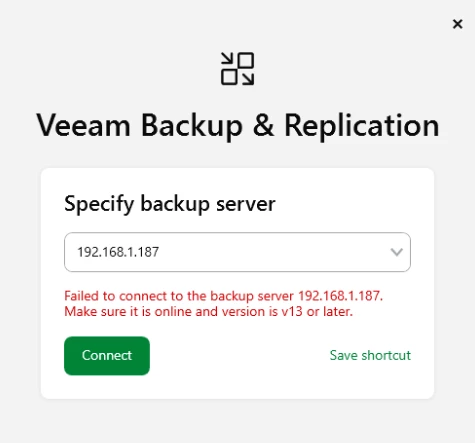
Failed to connect to the backup server localhost.

  • March 16, 2026
  • 8 comments
  • 175 views

Hello


Im very new to Veeam and i installed on a server Veeam Backup and Replication. Now i get this error message: (it never worked)
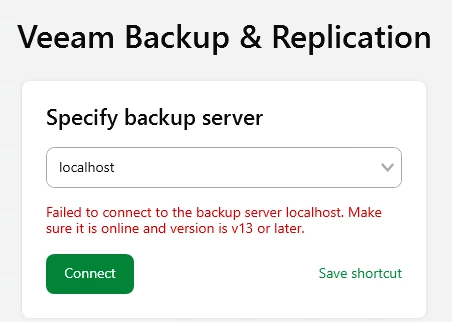


I read that the API Service needs to be started, but this is not working and an error occurs.



Also its not possible do uninstall the Veeam Software with the Error → Windows cannot access the specified device, path, or file. You may not have the appropriate permissions to access the item. It is the adiminstrator user.


The new Update i was able to install but also after this update from march i get the same error message.


Does anyone have a idea how i can fix this issue?

8 comments

Chris.Childerhose
Forum|alt.badge.img+21

I would check the logs here - C:\ProgramData\Veeam\Backup and if nothing seems to stand out, then open a support ticket as this message could be various things as I am sure there is no one specific solution.


kciolek
Forum|alt.badge.img+1
  • Influencer
  • March 16, 2026

have you tried putting the FQDN or IP of the backup server? I’ve had this before and some of the services were still starting. If this doesn’t work open a case with support as Chris suggested. 


Andanet
Forum|alt.badge.img+12
  • Veeam Legend
  • March 16, 2026

hi ​@manuel2711 have you used a DOMAIN Administrator during installation to start the services? 


Jason Orchard-ingram micro
Forum|alt.badge.img+2

Hello


Im very new to Veeam and i installed on a server Veeam Backup and Replication. Now i get this error message: (it never worked)


I read that the API Service needs to be started, but this is not working and an error occurs.
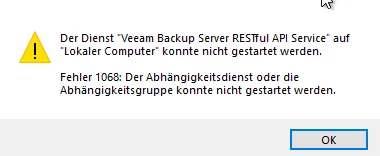


Also its not possible do uninstall the Veeam Software with the Error → Windows cannot access the specified device, path, or file. You may not have the appropriate permissions to access the item. It is the adiminstrator user.


The new Update i was able to install but also after this update from march i get the same error message.


Does anyone have a idea how i can fix this issue?



Ensure that the service is running under the correct account or local system service. 
If it is configured to run under a user account, verify that the user has the required permissions.
If none of the above resolves the issue, apply the standard remediation step: restart the reboot the system.


  • Author
  • New Here
  • March 17, 2026

@kciolek Yes i tried the IP also it doesnt working.

@Andanet Yes it is a Domain Administrator.

@Jason Orchard-ingram micro All Services run with local system and i did already several reboots.

@Chris.Childerhose In the Logs i get this error messages in the attachment


I think i will create a support ticket to resolve this with the support. Thanks for the answers.


kciolek
Forum|alt.badge.img+1
  • Influencer
  • March 17, 2026

I’m sorry to hear that. Yes, I would open a case with support. 


Let us know how you make out.


Chris.Childerhose
Forum|alt.badge.img+21

@kciolek Yes i tried the IP also it doesnt working.

@Andanet Yes it is a Domain Administrator.

@Jason Orchard-ingram micro All Services run with local system and i did already several reboots.

@Chris.Childerhose In the Logs i get this error messages in the attachment


I think i will create a support ticket to resolve this with the support. Thanks for the answers.

I think support is the best route to get it resolved.  Let us know what they say.


Andanet
Forum|alt.badge.img+12
  • Veeam Legend
  • March 17, 2026

Hey ​@manuel2711 in your log file I notice 2 different issues:

  • [WindowsServiceLifetime] Failed to start service. → this is a .NET issue
  • Unable to find distributive veeam-openssl3-*.rpm (System.Exception) → this is a linux package issue

So I don’t know your istaller version but you can try using latest version, but I remember an issue for Restful API related. 

Please run the following command in an elevated PowerShell prompt:

Set-ItemProperty -Path "HKLM:\SYSTEM\CurrentControlSet\Control" -Name ServicesPipeTimeout -Value 60000 -Type DWord

and reboot your VBR server.

This changes the service start timeout to 60 seconds.

Let me know what happens.