Question

Best Option for Veeam backups and Repositories


Hello All


I am reconfiguring my Backups, and trying to achieve disaster recovery, i want to backup local VMs,

Microsoft 365 and Entra ID, for that i am using 

  1. Veeam Backup and replication V13 (VM)
  2. Veeam Microsoft 365 for Email, OneDrive and SharePoint.
  3. look to add Entra ID but not sure which Veeam product will be best.

for repositories i am thinking one local (immutable backup), Azure Blob (immutable backup)


now my question is which product i should use for Entra ID backup, what i should use for local immutable backup, is “Object First” devices good? my backup will be under 8 TB, and what i should use for remote backup Azure or i think Veeam have product cloud vault? what will be best.



12 comments

Chris.Childerhose
Forum|alt.badge.img+21

For EntraID that is located in VBR not in VB365 and uses Postgres DB to store the backups.  You need a repo for log data, but it is not large.

Object First is definitely a good device to use as it is Immutable out of the box.  For the remote backup you have many choices - Azure as you mentioned, Veeam Cloud Vault, and even Wasabi is pretty cheap.  This will be a preference vs recommendation.  I use Wasabi and it is great.


  • Author
  • New Here
  • March 3, 2026

Thank you Chris for quick reply,


how license works with VBR for EntraID if i am doing one tenant groups, CA etc.?


Chris.Childerhose
Forum|alt.badge.img+21

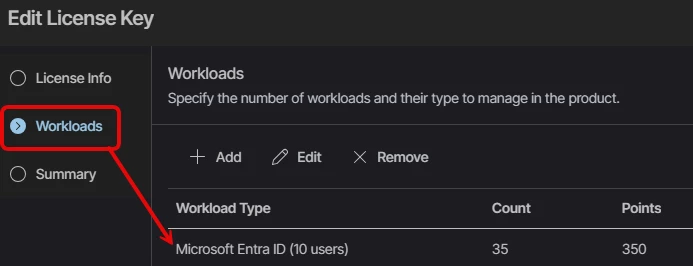
You need to ensure the license you have has EntraID in it.  See below as this is one of my licenses used in a DC and you can see EntraID.

Enterprise Plus License with EntraID Seats


  • Author
  • New Here
  • March 3, 2026

Thank you Chris, 


Chris.Childerhose
Forum|alt.badge.img+21

Not a problem at all.  Here if you have any other questions.  😁


kciolek
Forum|alt.badge.img+1
  • Experienced User
  • March 3, 2026

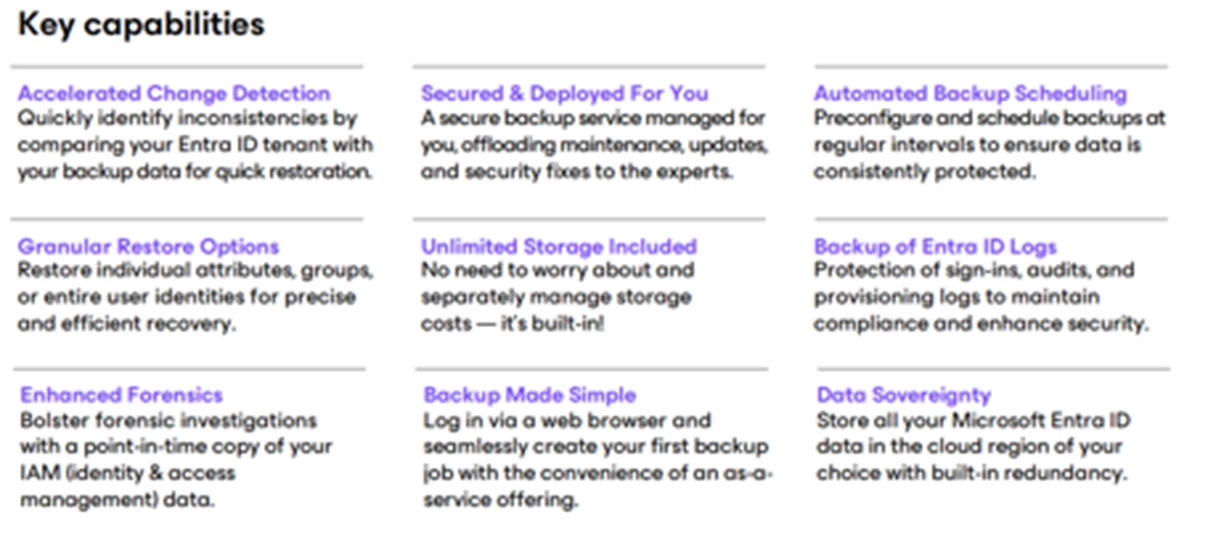
For EntraID you also have the option for Veeam Data Cloud - EntraID, with this option it would be 100% managed by Veeam for infrastructure, updates, provisioning, etc. The subscription also comes with unlimited storage


Jason Orchard-ingram micro
Forum|alt.badge.img+1

Backup Office 365 Data with the #1 Microsoft 365 Backup — Veeam

Veeam’s Microsoft 365 backup solutions ensure you maintain complete access and control over your Office 365 data, including Exchange Online, SharePoint Online, OneDrive for Business, and Microsoft Teams. These solutions help protect your environment against accidental deletion, ransomware, retention gaps, and other data loss risks—keeping your information secure, protected, and recoverable whenever needed.

Below is a clear overview of the two deployment options available when protecting Microsoft 365 with Veeam.

Veeam Deployment Options for Microsoft 365

You can choose between two approaches:

  • Veeam Data Cloud for Microsoft 365 – Fully managed by Veeam (SaaS)
  • Veeam Backup for Microsoft 365 – Self‑managed in your own environment

Both deliver powerful, industry-leading protection for all Microsoft 365 workloads.

1. Veeam Data Cloud for Microsoft 365

A fully managed, cloud-hosted backup service

Veeam Data Cloud removes all infrastructure overhead by delivering Microsoft 365 backup as a SaaS solution. There is nothing to deploy, patch, or maintain — Veeam manages everything for you.

Key Benefits

  • Fully managed service — Veeam handles servers, scaling, updates, and maintenance.
  • Unlimited storage included — predictable monthly or annual pricing.
  • Fast, API-based backups — efficient and secure data protection.
  • Granular restores — recover mail, files, sites, Teams data, and more.
  • No infrastructure required — perfect for IT teams wanting simplicity.
  • Secure and compliant — encrypted in transit and at rest.

Ideal for organisations wanting a hands‑off backup experience with minimal operational effort.

2. Veeam Backup for Microsoft 365

A self-managed deployment you control

This option provides complete flexibility. You deploy Veeam Backup for Microsoft 365 in your own infrastructure—on‑premises, in the cloud, or hybrid—and choose your own storage.

Key Benefits

  • Full control over deployment and configuration.
  • Any storage supported — on‑prem NAS/SAN, Azure Blob, Amazon S3, or S3‑compatible object storage.
  • Custom retention policies — keep data for months, years, or indefinitely.
  • Use existing resources — leverage current storage or cloud platforms.
  • Supports hybrid Exchange environments.
  • Scales to any size — from SMB to enterprise.

Ideal for organisations with strict data residency needs, existing storage investments, or specialised compliance requirements.

Feature Comparison

Feature Veeam Data Cloud Veeam Backup for Microsoft 365
Deployment Fully managed SaaS Self-managed
Storage Unlimited, included Your choice (on‑prem or cloud)
Maintenance Veeam manages everything You manage infrastructure
Pricing Per‑user subscription License + your storage
Best For Simplicity + no overhead Maximum control + flexibility

Which Option Fits Best?

Choose Veeam Data Cloud if you want:

  • Zero infrastructure to deploy
  • A predictable, all-inclusive price
  • A cloud-first, maintenance-free approach
  • Rapid onboarding and simplified operations

Choose Veeam Backup for Microsoft 365 if you want:

  • Full control of backup architecture
  • To choose and optimise storage
  • To meet strict governance or residency requirements
  • Integration with existing IT systems


Jason Orchard-ingram micro
Forum|alt.badge.img+1


Veeam Data Cloud for Microsoft 365  Plans provides you with 3 plan options: Foundation, Advanced and Premium. You can utilize multiple plan types within one tenancy of Veeam Data Cloud for Microsoft 365. You can purchase through authorized Veeam partners or in the Microsoft Azure Marketplace. For more information, see this Veeam webpage.


 plans for Veeam Data Cloud for Microsoft 365.

Foundation

Flex backup policies can be implemented under Foundation. This prioritizes control and flexibility. Supports Microsoft Exchange Online, Microsoft SharePoint Online, Microsoft OneDrive for Business and Microsoft Teams. Offers comprehensive control and customization of backups and retention periods. Granular and bulk data recovery options. Data is stored separately from your Microsoft 365 tenant in the Azure location of your choice. Offers advanced security capabilities including granular Role Based Access Control.

Advanced

Combines the features available in Foundation with the addition of Entra ID protection. This includes data resilience for Entra ID users, groups, policies, logs and granular restore of Entra ID tenant data.

Premium

All features included in Advanced with addition of Express backup policies. Prioritizes speed and scale. Powered by Veeam’s integration with Microsoft 365 Backup Storage. Fast backup of initial Microsoft 365 tenant and other large datasets. Offers bulk restores at scale. Provides the strictest adherence to the 3–2–1 rule with multiple backup and restore options.


kciolek
Forum|alt.badge.img+1
  • Experienced User
  • March 3, 2026

Great article ​@Jason Orchard-ingram micro ! I did a customer demo this morning for M365 SaaS, this is very useful information and might add to my technical slides. 

One question I’m unclear about with the SaaS subscription - you have a monthly price that includes the services/user but how does the licensing model come into play. Is there an additional charge for the type you choose. 


Jason Orchard-ingram micro
Forum|alt.badge.img+1


it depends on how the reseller is setup under distribution model. 

Veeam offer both annual subscription [Value added reseller (VAR)]  and/or Month to Month plan under Veeam Cloud & Service Provider (VCSP) accounts. 

of course the Microsoft market place offers both options. 


Jason Orchard-ingram micro
Forum|alt.badge.img+1

Veeam Licensing Models for Microsoft 365 Backup

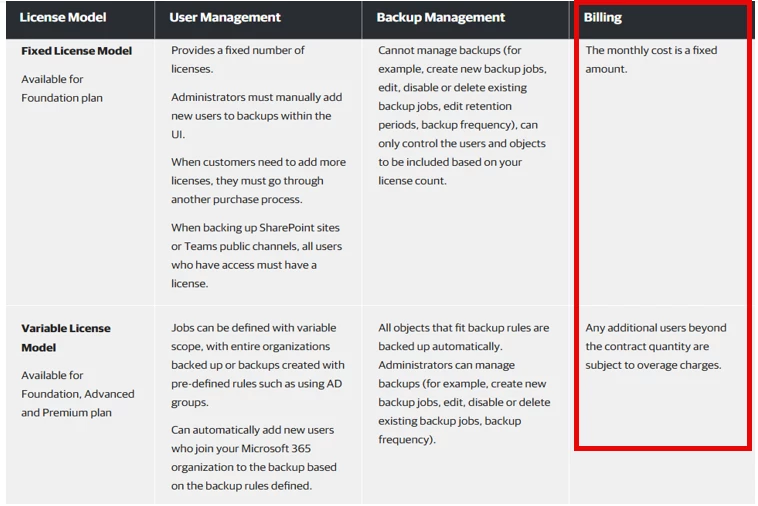
Fixed License Model

With the Fixed License Model, Veeam sets a hard limit on the number of users you can back up. Because of this, Veeam recommends that when creating the initial backup policy, you explicitly define which users are included. This ensures you remain within the licensed capacity and avoid backup errors caused by exceeding the fixed user limit.

Variable License Model

Veeam Data Cloud for Microsoft 365 uses the Variable License Model, which offers broader automation and greater flexibility compared to the fixed model. This license type can be purchased through authorized Veeam partners or directly via the Microsoft Azure Marketplace.

Key Capabilities

  • Flexible backup policy scope
    Backup policies can target the entire organisation or be defined using dynamic rules such as Azure AD groups, departments, or other attributes.

  • Automatic inclusion of new users
    Any new users added to Microsoft 365 who match the defined backup rules are automatically protected without requiring manual updates.

  • Automated object protection
    All objects that meet the backup criteria (users, groups, sites, etc.) are backed up automatically.

  • Full administrative control
    Administrators can create new backup policies, modify existing ones, or disable/remove policies as needed.

  • Overage handling
    If the number of protected users exceeds the contracted quantity, the additional users are billed as overage according to the license terms.


  • I would recommend reading Veeam Data Cloud Service Agreement Overview section 8.3
     

    • 8.3 Audit: No more than once every twelve (12) months, Veeam may audit Your use of the Services to confirm You are in compliance with these terms and any applicable order form. Veeam must (a) provide You with forty-five (45) days’ notice and (b) not unreasonably interfere with Your normal business operations. You shall (a) cooperate with Veeam’s audit and (b) provide reasonable assistance and access to relevant information or documentation reasonably requested by Veeam. Veeam further agrees that any findings during the audit shall be considered confidential information. You agree that if there is non-compliance, You will remedy such non-compliance within thirty (30) days of written notification by Veeam and pay Veeam any outstanding fees you owe. You further agree that Veeam shall not be responsible for any of Your costs incurred during the audit.


Stabz
Forum|alt.badge.img+9
  • Veeam Legend
  • March 4, 2026

Also it’s recommended to have S3 storage for M365 backup. So you plan to choose an OOTBI by Object First you could mutualize the repository for backup your VMs and M365.

For Entra ID, if you have a lot of user I recommended to deploy a VBR dedicated for this.