Sticky

How to install a YARA rule with Veeam

  • December 15, 2023
  • 25 comments
  • 2256 views

Rick Vanover
Forum|alt.badge.img+10

We’ve updated the Script Library section to include YARA rules. I’ve made a quick video (sorry for the cheesy graphics...) on how to install a YARA rule from this site and perform your first scan!


 

25 comments

Chris.Childerhose
Forum|alt.badge.img+21
  • Veeam Legend, Veeam Vanguard
  • December 15, 2023

Thanks for sharing this, Rick.  I was about to ask if you were going to do a “how to” video for installing the rules.  😋


coolsport00
Forum|alt.badge.img+22
  • Veeam Legend
  • December 15, 2023

Absolutely GREAT beginner ‘how-to’ vid on using these rules Rick. Thanks!


Rick Vanover
Forum|alt.badge.img+10
  • Author
  • RICKATRON
  • December 15, 2023

Thanks for sharing this, Rick.  I was about to ask if you were going to do a “how to” video for installing the rules.  😋

Hahaha that’s funny. But I think that screen that has the scan needs some explanation and people just need to use it.


Rick Vanover
Forum|alt.badge.img+10
  • Author
  • RICKATRON
  • December 15, 2023

Oh and I didn’t want everyone to wait during the video, but here is the result of the scan:


coolsport00
Forum|alt.badge.img+22
  • Veeam Legend
  • December 15, 2023

Personally, I don’t like how the date is formatted after choosing the dates...can be confusing. And yeah...how you choose it is odd, but makes sense. I think the wording on those 2 dates could be changed to be more descriptive, like “Start from (today)” instead of Start Date; and “End Date (until)”, or something similar for the ‘End Date’.

Hopefully folks will read up on what each option is used for.


coolsport00
Forum|alt.badge.img+22
  • Veeam Legend
  • December 15, 2023

Oh and I didn’t want everyone to wait during the video, but here is the result of the scan:


Cool! I forgot about even seeing the results! 😂😆


Chris.Childerhose
Forum|alt.badge.img+21
  • Veeam Legend, Veeam Vanguard
  • December 15, 2023

Thanks for sharing this, Rick.  I was about to ask if you were going to do a “how to” video for installing the rules.  😋

Hahaha that’s funny. But I think that screen that has the scan needs some explanation and people just need to use it.

Yeah, going to take some getting used to for sure.  Going to play in the homelab with these sample rules.


Geoff Burke
Forum|alt.badge.img+22
  • Veeam Vanguard
  • December 16, 2023

Excellent video and will really help everyone just starting out with Yara scans!


Chris.Childerhose
Forum|alt.badge.img+21
  • Veeam Legend, Veeam Vanguard
  • December 16, 2023

Got them installed in the lab and testing.  Very interesting for sure.


  • New Here
  • January 30, 2024

Thanks for the video. Will there be an option later to run multiple YARA rules at the same time?


Rick Vanover
Forum|alt.badge.img+10
  • Author
  • RICKATRON
  • January 30, 2024

Thanks for the video. Will there be an option later to run multiple YARA rules at the same time?

Thanks for the video. Will there be an option later to run multiple YARA rules at the same time?

Hi Mike - it is not implemented currently (nor scan on multiple images). Both are feature requests on our side/internally.


Rick Vanover
Forum|alt.badge.img+10
  • Author
  • RICKATRON
  • January 30, 2024

Thanks for the video. Will there be an option later to run multiple YARA rules at the same time?

Oh and welcome to the Veeam Community @Mike Edwards - looks like your first comment here.


Jason Orchard-ingram micro
Forum|alt.badge.img+2

@Rick Vanover 
Can point me how to you update the yara rule inside the Veeam software appliance. 

My 1st thought would be via SCP or SFTP process, but wonder if there was any official documentation on how to go about this?


coolsport00
Forum|alt.badge.img+22
  • Veeam Legend
  • April 15, 2026

I’m wondering if they’re updated not within the VSA but where the Console is installed ​@Jason Orchard-ingram micro ? Probably best to get in touch with Support on that one. That’s a great question.


Jason Orchard-ingram micro
Forum|alt.badge.img+2

I’m wondering if they’re updated not within the VSA but where the Console is installed ​@Jason Orchard-ingram micro ? Probably best to get in touch with Support on that one. That’s a great question.

@coolsport00 that question i can answer within the VSA.  

login via the VSA console via shell request or SSH. (with 4eyes auth)
Navigate to the 

/var/lib/veeam/yara_rules

I’ve also found that Backup are sorted 
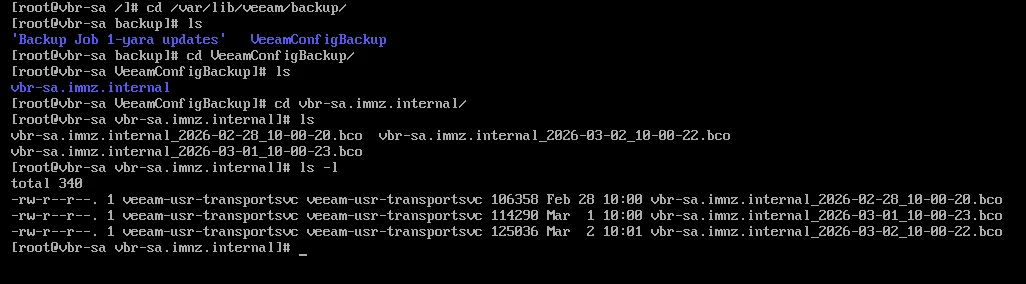
/var/lib/veeam/backup

I’m going to try today to see if SCP or SFTP work to update the rules. (may not the official process but it worth trying.)


coolsport00
Forum|alt.badge.img+22
  • Veeam Legend
  • April 15, 2026

Interesting. Keep us posted ​@Jason Orchard-ingram micro 👍🏻


Jason Orchard-ingram micro
Forum|alt.badge.img+2

Note: This may not the official process, but testing showed you can get files on the VSA. 

  1. SFTP into the VSA using the veeamadmin user (after enabling SSH from the console).
  2. Navigate to the folder:
    /var/lib/veeam/yara_rules
  3. Copy the required YARA files into the VSA.
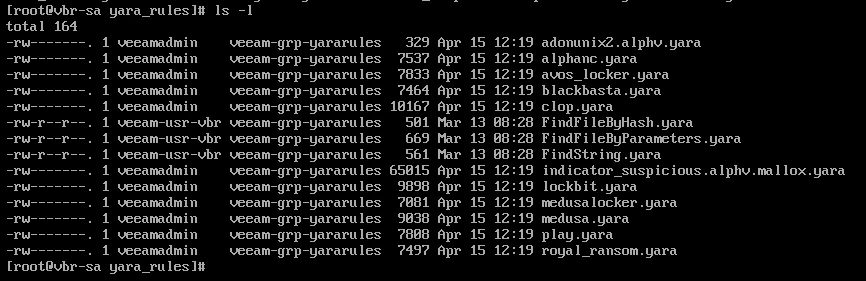
  4. Verify that the files exist on the VSA:


  5. Validate that the files have the correct ownership and permissions.

File check inside VSA after SFTP. 

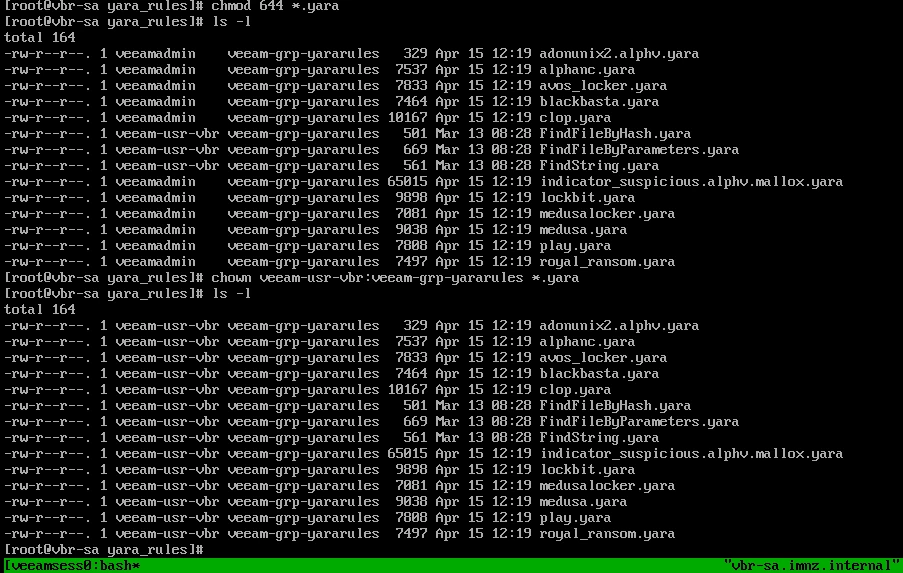
  1. update file owner and file permission

    chown veeam-usr-vbr:veeam-grp-yararules *.yara
    chmod 644 *.yara
  2. Perform a final file check inside the VSA after the SFTP transfer to confirm:
    Files are present
    Ownership is veeam-usr-vbr
    Group is veeam-grp-yararules
    Permissions are rw-r--r--
     

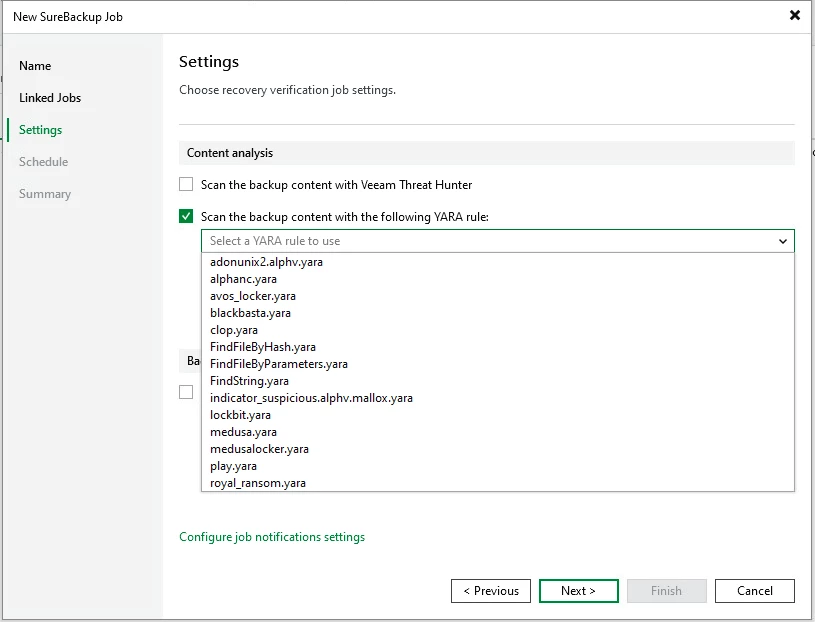
  1. Run a SureBackup job and verify that the YARA rules are detected and used successfully during the malware scan.
  1. Test it the sure backup job run. 


Summary of test. 
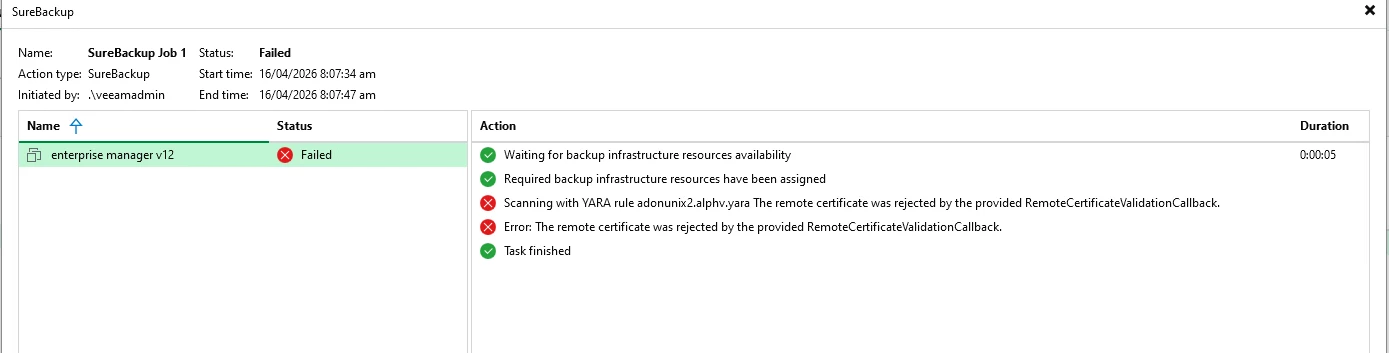
it didn’t work while the files exist inside VSA, third item on common cause “Copying Yara rules Manually” most likely cause of the issues. 
 

What the error actually means

From the SureBackup job log:

“Scanning with YARA rule adonumix2.alphv.yara
The remote certificate was rejected by the provided RemoteCertificateValidationCallback.”

This is not a YARA syntax or file-permission problem anymore.

This error means: 👉 Veeam could not trust the TLS certificate presented by the Linux system that is running YARA (your VBR Linux helper / malware detection component).

In short: certificate trust between VBR and the Linux YARA service is broken or outdated.

This is very common after:

  • Upgrades
  • Reinstalling Linux packages
  • Copying YARA rules manually
  • Certificate store changes
  • Hostname / IP changes

Most common root causes (in order)

  1. Linux Malware Detection service certificate is stale
  2. Veeam certificate cache on the VBR server is stale
  3. Hostname mismatch (DNS vs IP)
  4. Time skew between VBR and Linux host
  5. SELinux blocking certificate access


Chris.Childerhose
Forum|alt.badge.img+21

Well at least we have an "unofficial" way to test thia.  Thanks for working on this and here is to an official way or even via the update process even.


Jason Orchard-ingram micro
Forum|alt.badge.img+2

@Chris.Childerhose 


side note: Found the config backup in default VSA repo. Question now. 

How get these files out of VSA and resorted into different VSA. 
I’m going to start a next topic with question around VSA. 


coolsport00
Forum|alt.badge.img+22
  • Veeam Legend
  • April 15, 2026

@Jason Orchard-ingram micro - there is a way to export/import files. And I think it’s via either the Host Mgmt UI or Web Console. I can’t remember which. Jim Jones (Vanguard) was inquiring about this on our Signal channel several wks ago. Chris, do you remember?


Chris.Childerhose
Forum|alt.badge.img+21

Not off hand no.


Rick Vanover
Forum|alt.badge.img+10
  • Author
  • RICKATRON
  • April 16, 2026

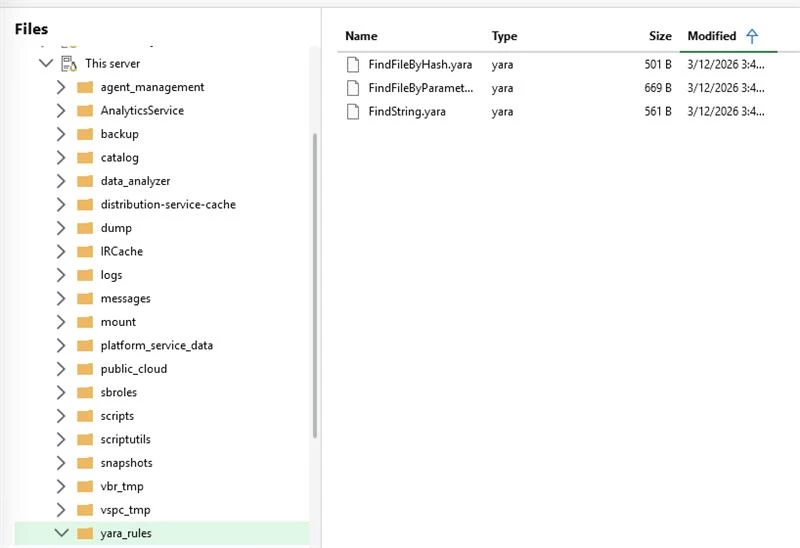
Hi apologies for the late response.  YARA files are var/lib/veeam/yara_rules/ and the file node in the backup console is the trick, think of using the B&R Console app “FastSCP Style” to get YARA rules in for the VSA...


Rick Vanover
Forum|alt.badge.img+10
  • Author
  • RICKATRON
  • April 16, 2026


Chris.Childerhose
Forum|alt.badge.img+21

Nice! That makes it easier and you can probably use the same to get the configuration backups.  I know someone was asking about that.


coolsport00
Forum|alt.badge.img+22
  • Veeam Legend
  • April 16, 2026

Ah yes...that’s the trick! Thanks Rick! 🙌🏻