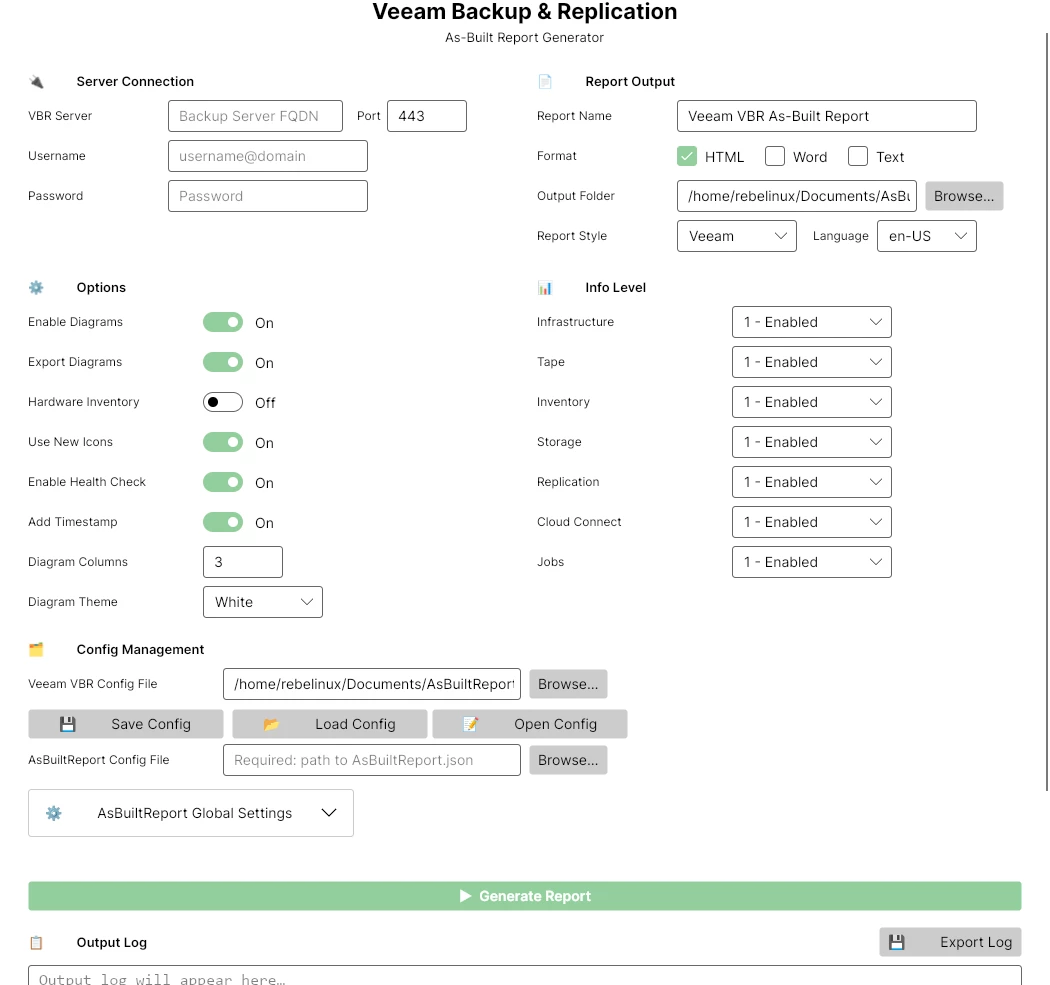
Announcing AsBuiltReport.Veeam.VBR 1.0.0

  • April 11, 2026
  • 60 comments
  • 553 views

Show first post

60 comments

jcolonfzenpr

I’ve installed the module and the “New-AsBuiltReport” and “Start-AsBuiltReportVBR” cmdlets are available.  The “New-AsBuiltReport” cmdlet works fine, but running the “Start-AsBuiltReportVBR” throws an error “The term ‘Start-AsBuiltReportVBR’ is not recognized as the name of a cmdlet...”; I *know* it’s there, because I used autocomplete to run it.

It only works with pwsh v7, so it is designed exclusively for Veeam Backup & Replication v13.


Forum|alt.badge.img+2

I keep getting errors “Export-AbrDiagram : Cannot validate argument on parameter ‘ImageInput’.  The argument is null, empty, or an element of the argument condition contains a null value.”  Is there a parameter that I neglected to pass?


jcolonfzenpr

Which version of the report do you have installed?


Get-Module -ListAvailable @("AsBuiltReport.Core";"AsBuiltReport.Veeam.VBR";"AsBuiltReport.Chart";"AsBuiltReport. Diagram";"PScribo") | Select Name, Version


Forum|alt.badge.img+2
  • Experienced User
  • May 8, 2026

Which version of the report do you have installed?


Get-Module -ListAvailable @("AsBuiltReport.Core";"AsBuiltReport.Veeam.VBR";"AsBuiltReport.Chart";"AsBuiltReport. Diagram";"PScribo") | Select Name, Version

AsBuiltReport.Chart : 0.3.2

AsBuiltReport.Diagram: 1.0.7

AsBuiltReport.Veeam.VBR: 1.0.1

PScribo: 0.11.1


Forum|alt.badge.img+2
  • Experienced User
  • May 8, 2026

Another question, if I may: Where does the data in the report come from?  I ask because the report is including a number of very old ESXi hosts (5.5 and 6.0) that haven’t existed in my environment in years and aren’t in the GUI anywhere.  


jcolonfzenpr

Another question, if I may: Where does the data in the report come from?  I ask because the report is including a number of very old ESXi hosts (5.5 and 6.0) that haven’t existed in my environment in years and aren’t in the GUI anywhere.  

From the Veeam Powershell modules.


Could you tell me which specific section is experiencing this anomaly?


I've seen this anomaly in environments where, for some reason, the hosts weren't properly removed from the vCenter database or in Veeam and there are stale records in de DB.


Forum|alt.badge.img+2
  • Experienced User
  • May 8, 2026

Another question, if I may: Where does the data in the report come from?  I ask because the report is including a number of very old ESXi hosts (5.5 and 6.0) that haven’t existed in my environment in years and aren’t in the GUI anywhere.  

From the Veeam Powershell modules.


Could you tell me which specific section is experiencing this anomaly?


I've seen this anomaly in environments where, for some reason, the hosts weren't properly removed from the vCenter database or in Veeam and there are stale records in de DB.


Section 1.2.1.1 - VMware vSphere.  Specifically, in the “Esxi Host” subsection.  They’re definitely stale data from somewhere as even the hardware no longer exists, and it wouldn’t surprise me to find out that they weren’t removed from Veeam correctly.  


jcolonfzenpr

I keep getting errors “Export-AbrDiagram : Cannot validate argument on parameter ‘ImageInput’.  The argument is null, empty, or an element of the argument condition contains a null value.”  Is there a parameter that I neglected to pass?

Export-AbrDiagram cmdlet is related to the diagram generation, Could you confirm that the diagrams are generated in the report? 


If not, could you check the contents of the $Error variable after the report is generated to see if there are any more specific errors?  


Forum|alt.badge.img+2
  • Experienced User
  • May 8, 2026

I keep getting errors “Export-AbrDiagram : Cannot validate argument on parameter ‘ImageInput’.  The argument is null, empty, or an element of the argument condition contains a null value.”  Is there a parameter that I neglected to pass?

Export-AbrDiagram cmdlet is related to the diagram generation, Could you confirm that the diagrams are generated in the report? 


If not, could you check the contents of the $Error variable after the report is generated to see if there are any more specific errors?  

There are bar charts, pie graphs and diagrams from PDFs in the report.  There are also entries in $Error.  Lots and lots of entries.  The most relevant seem to be these:


Export-AbrDiagram : Cannot validate argument on parameter 'ImageInput'. The argument is null, empty, or an element of the argument collection contains a null value. Supply a collection that does not contain any null values and then try the command again.
At C:\Program
Files\WindowsPowerShell\Modules\AsBuiltReport.Veeam.VBR\1.0.1\Src\Private\Diagram\New-AbrVeeamDiagram.ps1:672 char:34
+ ... utDiagram = Export-AbrDiagram -GraphObj ($diGraph | Select-String -Pa ...
+ ~~~~~~~~~~~~~~~~~~~~~~~~~~~~~~~~~~~~~~~~~~~~~~~~~~~~~~~~~
+ CategoryInfo : NotSpecified: (:) [Write-Error], WriteErrorException
+ FullyQualifiedErrorId : Microsoft.PowerShell.Commands.WriteErrorException,Export-AbrDiagram
ConvertTo-Base64 : Cannot validate argument on parameter 'ImageInput'. The argument is null, empty, or an element of the argument collection contains a null value. Supply a collection that does not contain any null values and then try the command again.
At C:\Program Files\WindowsPowerShell\Modules\AsBuiltReport.Diagram\1.0.7\Src\Private\Export-AbrDiagram.ps1:220 char:50
+ ConvertTo-Base64 -ImageInput $Document
+ ~~~~~~~~~
+ CategoryInfo : InvalidData: (:) [ConvertTo-Base64], ParameterBindingValidationException
+ FullyQualifiedErrorId : ParameterArgumentValidationError,ConvertTo-Base64


jcolonfzenpr

Please update the module to version 1.0.2 and import it:

Update-Module -Name AsBuiltReport.Veeam.VBR -Force

Import-Module -Name AsBuiltReport.Veeam.VBR -Force

Re-Run the report as usual. After the report generation completes, run the following command to retrieve the logs:

Get-AbrVbrLog -outputFolderPath . -IncludeErrorDetails

This command will save the logs to the current directory. You can specify a different path by changing the value of the -outputFolderPath parameter. The logs will include detailed information about any errors that occurred during the report generation process.

If possible, please provide the logs to assist in troubleshooting the issue: jcolonf@techmyth.blog