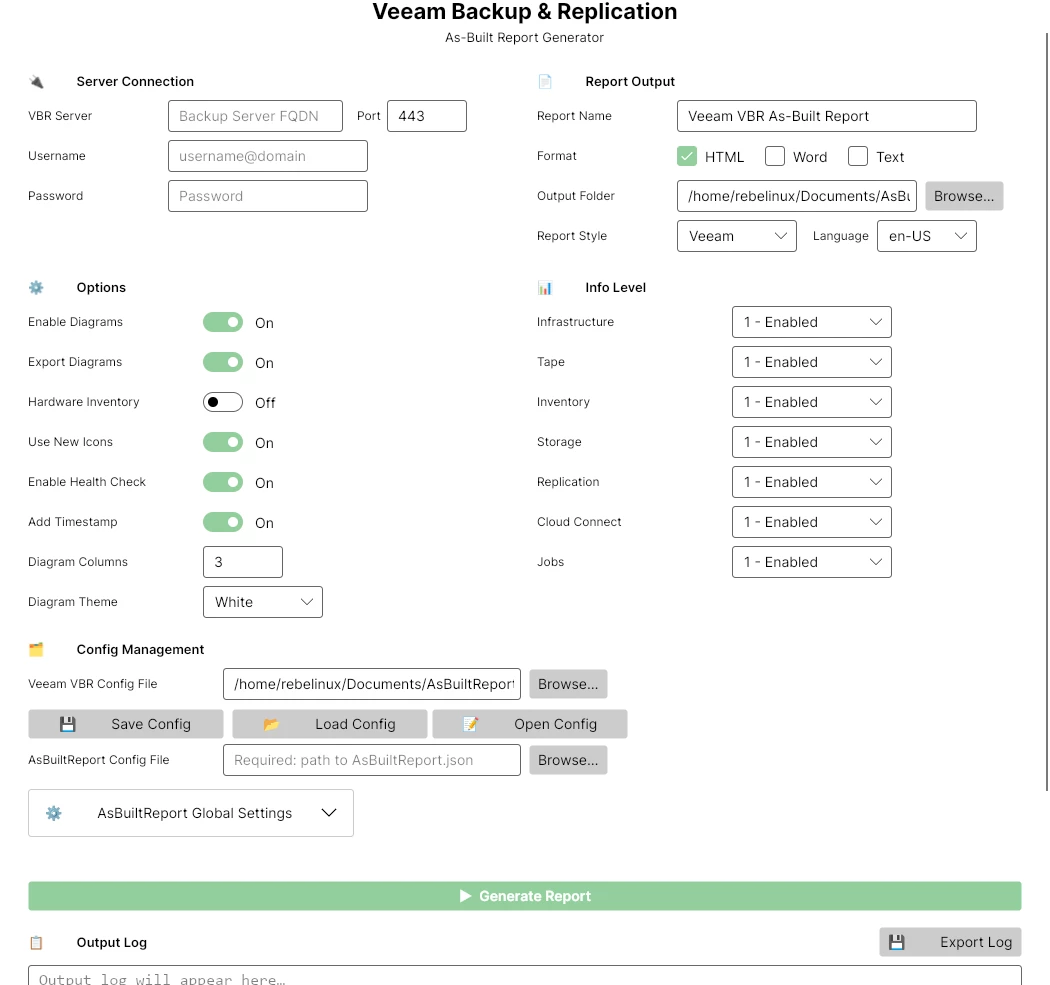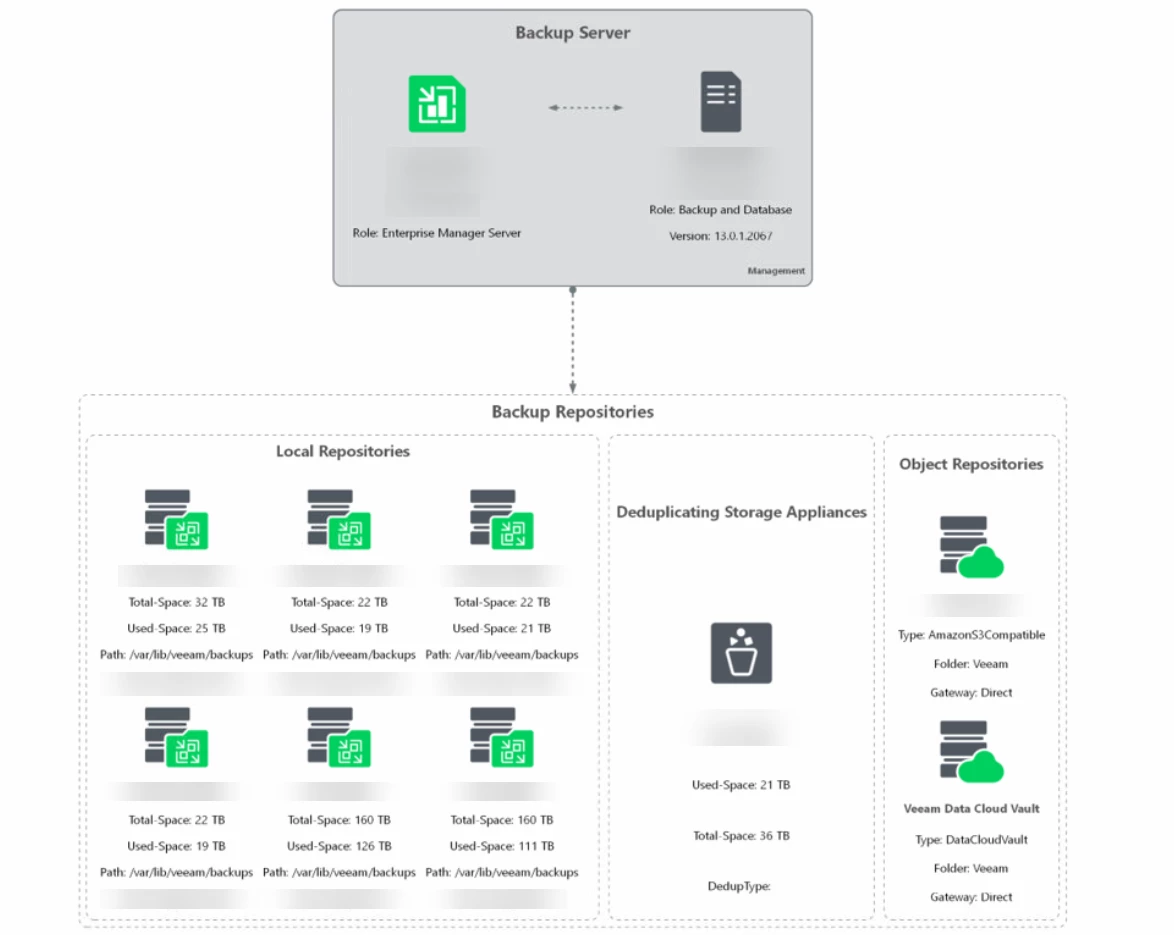
Announcing AsBuiltReport.Veeam.VBR 1.0.0

  • April 11, 2026
  • 41 comments
  • 212 views

Show first post

41 comments

jcolonfzenpr

Hi again, I just implemented the current release in a VBR v13 VSA with HA deployment. Also tried the new GUI. What I can say so far: It’s like Veeam! It Just Works 😀 wow!


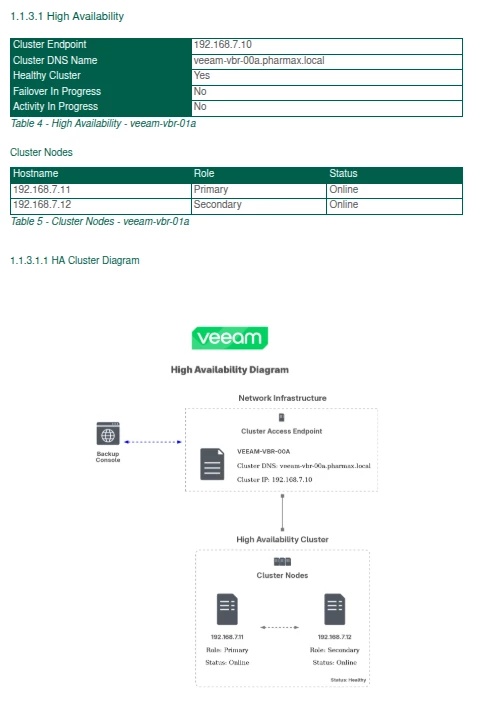
Maybe a feature request, If possible - in the Report there’s no Hint about the HA configuration (afaik or can see...). It would be very nice to see, which Nodes are Build the HA construct.

Great Job Jonathan! Thank you!
My vote for Blog of the month!
 

I will integrate the scheduled task for this later this week at this customers Installation and also the encrypted credentials. Both my customers, colleagues and me, we are sooooooo happy to have this back!

"Maybe a feature request, If possible - in the Report there’s no Hint about the HA configuration (afaik or can see...). It would be very nice to see, which Nodes are Build the HA construct."

Done!


jcolonfzenpr

@jcolonfzenpr - So the VCC report completed and created the documents.  In the Window UI (Beta) I noticed the following warnings and quite a few of them (see below).  I did export the log in case you wanted it to check things, so please let me know.

[WARN] [ 08:56:58:480 ] [ Document ] - Unable to export the CloudConnectTenant Diagram: No Cloud Connect Tenant infrastructure available to diagram


Can you send me the log?

to: jcolonf@techmyth.blog

@jcolonfzenpr - logs emailed to you from my Gmail.

I can't figure out why the error is showing up :( Without an environment to test it in my home lab, it's going to be very difficult for me to fix the problem.


Chris.Childerhose
Forum|alt.badge.img+21

@jcolonfzenpr - So the VCC report completed and created the documents.  In the Window UI (Beta) I noticed the following warnings and quite a few of them (see below).  I did export the log in case you wanted it to check things, so please let me know.

[WARN] [ 08:56:58:480 ] [ Document ] - Unable to export the CloudConnectTenant Diagram: No Cloud Connect Tenant infrastructure available to diagram


Can you send me the log?

to: jcolonf@techmyth.blog

@jcolonfzenpr - logs emailed to you from my Gmail.

I can't figure out why the error is showing up :( Without an environment to test it in my home lab, it's going to be very difficult for me to fix the problem.

No worries I can keep testing.


Chris.Childerhose
Forum|alt.badge.img+21

Hi again, I just implemented the current release in a VBR v13 VSA with HA deployment. Also tried the new GUI. What I can say so far: It’s like Veeam! It Just Works 😀 wow!


Maybe a feature request, If possible - in the Report there’s no Hint about the HA configuration (afaik or can see...). It would be very nice to see, which Nodes are Build the HA construct.

Great Job Jonathan! Thank you!
My vote for Blog of the month!
 

I will integrate the scheduled task for this later this week at this customers Installation and also the encrypted credentials. Both my customers, colleagues and me, we are sooooooo happy to have this back!

"Maybe a feature request, If possible - in the Report there’s no Hint about the HA configuration (afaik or can see...). It would be very nice to see, which Nodes are Build the HA construct."

Done!


That looks awesome 😎 


Dynamic
Forum|alt.badge.img+13
  • Veeam Vanguard
  • April 23, 2026

….


Maybe a feature request, If possible - in the Report there’s no Hint about the HA configuration (afaik or can see...). It would be very nice to see, which Nodes are Build the HA construct.

…..

"Maybe a feature request, If possible - in the Report there’s no Hint about the HA configuration (afaik or can see...). It would be very nice to see, which Nodes are Build the HA construct."

Done!


Thanks this is great!


Dynamic
Forum|alt.badge.img+13
  • Veeam Vanguard
  • April 23, 2026

Hi ​@jcolonfzenpr, any chance to add:

  • an option to export the whole DOCX or HTML to PDF as well?
  • an option for an optional anonymize the data (like the plaintext Hostnames of all components and customer informations) → to something like ******** or maybe even a *custom text field*


Chris.Childerhose
Forum|alt.badge.img+21

Hi ​@jcolonfzenpr, any chance to add:

  • an option to export the whole DOCX or HTML to PDF as well?
  • an option for an optional anonymize the data (like the plaintext Hostnames of all components and customer informations) → to something like ******** or maybe even a *custom text field*


If you open the docx or HTML can you not print to PDF?  I know Word you can.  Maybe I am missing something 😂 


Dynamic
Forum|alt.badge.img+13
  • Veeam Vanguard
  • April 23, 2026

Hi ​@jcolonfzenpr, any chance to add:

  • an option to export the whole DOCX or HTML to PDF as well?
  • an option for an optional anonymize the data (like the plaintext Hostnames of all components and customer informations) → to something like ******** or maybe even a *custom text field*


If you open the docx or HTML can you not print to PDF?  I know Word you can.  Maybe I am missing something 😂 


This was not the question 😉 But yeah, but it would be an additional step. 
As he currently can export the Diagram already as PDF, maybe it’s also possible. Would be an option, you don’t must use it 😅


jcolonfzenpr

Hi ​@jcolonfzenpr, any chance to add:

  • an option to export the whole DOCX or HTML to PDF as well?
  • an option for an optional anonymize the data (like the plaintext Hostnames of all components and customer informations) → to something like ******** or maybe even a *custom text field*


  • an option to export the whole DOCX or HTML to PDF as well? That's not possible at this time, since the PScribo module doesn't support it
  • an option for an optional anonymize the data (like the plaintext Hostnames of all components and customer informations) → to something like ******** or maybe even a *custom text field* Could you explain that in more detail?

Chris.Childerhose
Forum|alt.badge.img+21

Hi ​@jcolonfzenpr, any chance to add:

  • an option to export the whole DOCX or HTML to PDF as well?
  • an option for an optional anonymize the data (like the plaintext Hostnames of all components and customer informations) → to something like ******** or maybe even a *custom text field*


  • an option to export the whole DOCX or HTML to PDF as well? That's not possible at this time, since the PScribo module doesn't support it
  • an option for an optional anonymize the data (like the plaintext Hostnames of all components and customer informations) → to something like ******** or maybe even a *custom text field* Could you explain that in more detail?

@Dynamic - looks like you are taking those extra steps to print to PDF.  😋🤣


Dynamic
Forum|alt.badge.img+13
  • Veeam Vanguard
  • April 23, 2026

Hi ​@jcolonfzenpr, any chance to add:

  • ...
  • an option for an optional anonymize the data (like the plaintext Hostnames of all components and customer informations) → to something like ******** or maybe even a *custom text field*
  • ….
  • an option for an optional anonymize the data (like the plaintext Hostnames of all components and customer informations) → to something like ******** or maybe even a *custom text field* Could you explain that in more detail?


OK, about the anonymize data option:

For example, a customer has to give his documentation out of the house, but don’t want his original hostnames in this document… Something to hide or not to propagate the Hostnames.


Another thing, as I want to execute the whole details in a single PS1. When running:


New-AsBuiltReport -Report Veeam.VBR -Target *HOSTNAME* -Username $credential.UserName -Password $credential.GetNetworkCredential().Password -Format Html,Word -OutputFolderPath 'C:\AsBuiltReport' -ReportConfigFilePath 'C:\AsBuiltReport\Config\AsBuiltReport.Veeam.VBR.json' -Timestamp -AsBuiltConfigFilePath 'C:\AsBuiltReport\Config\AsBuiltReport.json' -SendEmail


I receive an error like this:
New-AsBuiltReport: The term 'Draw-AsciiBox' is not recognized as a name of a cmdlet, function, script file, or executable program.
Check the spelling of the name, or if a path was included, verify that the path is correct and try again.


When I’m execute the whole command without -SendEmail, everything is running fine. In old versions this was not a problem. Any idea?


jcolonfzenpr

Hi ​@jcolonfzenpr, any chance to add:

  • ...
  • an option for an optional anonymize the data (like the plaintext Hostnames of all components and customer informations) → to something like ******** or maybe even a *custom text field*
  • ….
  • an option for an optional anonymize the data (like the plaintext Hostnames of all components and customer informations) → to something like ******** or maybe even a *custom text field* Could you explain that in more detail?


OK, about the anonymize data option:

For example, a customer has to give his documentation out of the house, but don’t want his original hostnames in this document… Something to hide or not to propagate the Hostnames.


Another thing, as I want to execute the whole details in a single PS1. When running:


New-AsBuiltReport -Report Veeam.VBR -Target *HOSTNAME* -Username $credential.UserName -Password $credential.GetNetworkCredential().Password -Format Html,Word -OutputFolderPath 'C:\AsBuiltReport' -ReportConfigFilePath 'C:\AsBuiltReport\Config\AsBuiltReport.Veeam.VBR.json' -Timestamp -AsBuiltConfigFilePath 'C:\AsBuiltReport\Config\AsBuiltReport.json' -SendEmail


I receive an error like this:
New-AsBuiltReport: The term 'Draw-AsciiBox' is not recognized as a name of a cmdlet, function, script file, or executable program.
Check the spelling of the name, or if a path was included, verify that the path is correct and try again.


When I’m execute the whole command without -SendEmail, everything is running fine. In old versions this was not a problem. Any idea?


I'm already working on the SendEmail bug. Thanks

https://github.com/AsBuiltReport/AsBuiltReport.Core/issues/74


Chris.Childerhose
Forum|alt.badge.img+21

@jcolonfzenpr - love the new 1.0.1 release with the GUI as it matches the system theme so dark for me. 😎

Testing it out for the HA Cluster piece, but the Global Settings now work fine and don’t throw that previous error.  Looking good.  👍🏼


Chris.Childerhose
Forum|alt.badge.img+21

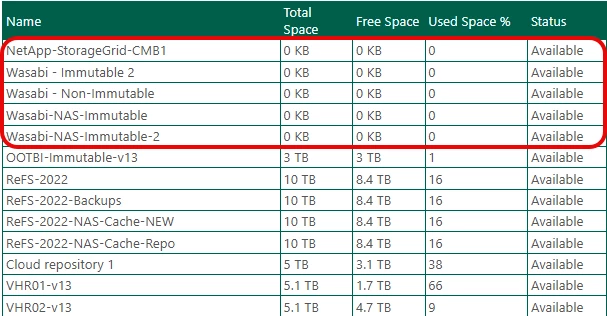
@jcolonfzenpr - not sure if possible but would be nice if you could input API information to get external S3 Object Storage sizing.  I have both Wasabi and NetApp StorageGrid which I test from my lab, as the NetApp is something we just implemented.


jcolonfzenpr

@jcolonfzenpr - not sure if possible but would be nice if you could input API information to get external S3 Object Storage sizing.  I have both Wasabi and NetApp StorageGrid which I test from my lab, as the NetApp is something we just implemented.


Could you check if the Backup Console displays usage information for the object storage repos?

I can't retrieve the information from PowerShell using my Wasabi S3 repository…

PS C:\Users\jocolon> $Object = (Get-VBRBackupRepository -name Wasabi)
PS C:\Users\jocolon> $Object.GetContainer().CachedTotalSpace.InBytesAsUInt64
PS C:\Users\jocolon> $Object.GetContainer().CachedTotalSpace

InBytes             : -1
InKilobytes         : 0
InMegabytes         : 0
InGigabytes         : 0
InTerabytes         : 0
InPetabytes         : 0
InExabytes          : 0
InBytesAsInt32      : -1
InKilobytesAsInt32  : 0
InMegabytesAsInt32  : 0
InGigabytesAsInt32  : 0
InTerabytesAsInt32  : 0
InPetabytesAsInt32  : 0
InExabytesAsInt32   : 0
InBytesAsUInt64     :
InKilobytesAsUInt64 : 0
InMegabytesAsUInt64 : 0
InGigabytesAsUInt64 : 0
InTerabytesAsUInt64 : 0
InPetabytesAsUInt64 : 0
InExabytesAsUInt64  : 0

I'm pretty sure that worked in version 12


jcolonfzenpr

Hi ​@jcolonfzenpr, any chance to add:

  • ...
  • an option for an optional anonymize the data (like the plaintext Hostnames of all components and customer informations) → to something like ******** or maybe even a *custom text field*
  • ….
  • an option for an optional anonymize the data (like the plaintext Hostnames of all components and customer informations) → to something like ******** or maybe even a *custom text field* Could you explain that in more detail?


OK, about the anonymize data option:

For example, a customer has to give his documentation out of the house, but don’t want his original hostnames in this document… Something to hide or not to propagate the Hostnames.


Another thing, as I want to execute the whole details in a single PS1. When running:


New-AsBuiltReport -Report Veeam.VBR -Target *HOSTNAME* -Username $credential.UserName -Password $credential.GetNetworkCredential().Password -Format Html,Word -OutputFolderPath 'C:\AsBuiltReport' -ReportConfigFilePath 'C:\AsBuiltReport\Config\AsBuiltReport.Veeam.VBR.json' -Timestamp -AsBuiltConfigFilePath 'C:\AsBuiltReport\Config\AsBuiltReport.json' -SendEmail


I receive an error like this:
New-AsBuiltReport: The term 'Draw-AsciiBox' is not recognized as a name of a cmdlet, function, script file, or executable program.
Check the spelling of the name, or if a path was included, verify that the path is correct and try again.


When I’m execute the whole command without -SendEmail, everything is running fine. In old versions this was not a problem. Any idea?


"OK, about the anonymize data option:

For example, a customer has to give his documentation out of the house, but don’t want his original hostnames in this document… Something to hide or not to propagate the Hostnames."

That´s a feature I've long wanted to implement for AsBuiltReport.Microsoft.AD report, particularly for government and military sector clients who face compliance restrictions on sharing sensitive infrastructure data. However, I haven't yet identified a practical algorithm or design pattern to make it work reliably :(