Question

I would like to output tape backup details in CSV format. Using PowerShell, for example.

  • March 6, 2026
  • 5 comments
  • 37 views

  • Not a newbie anymore
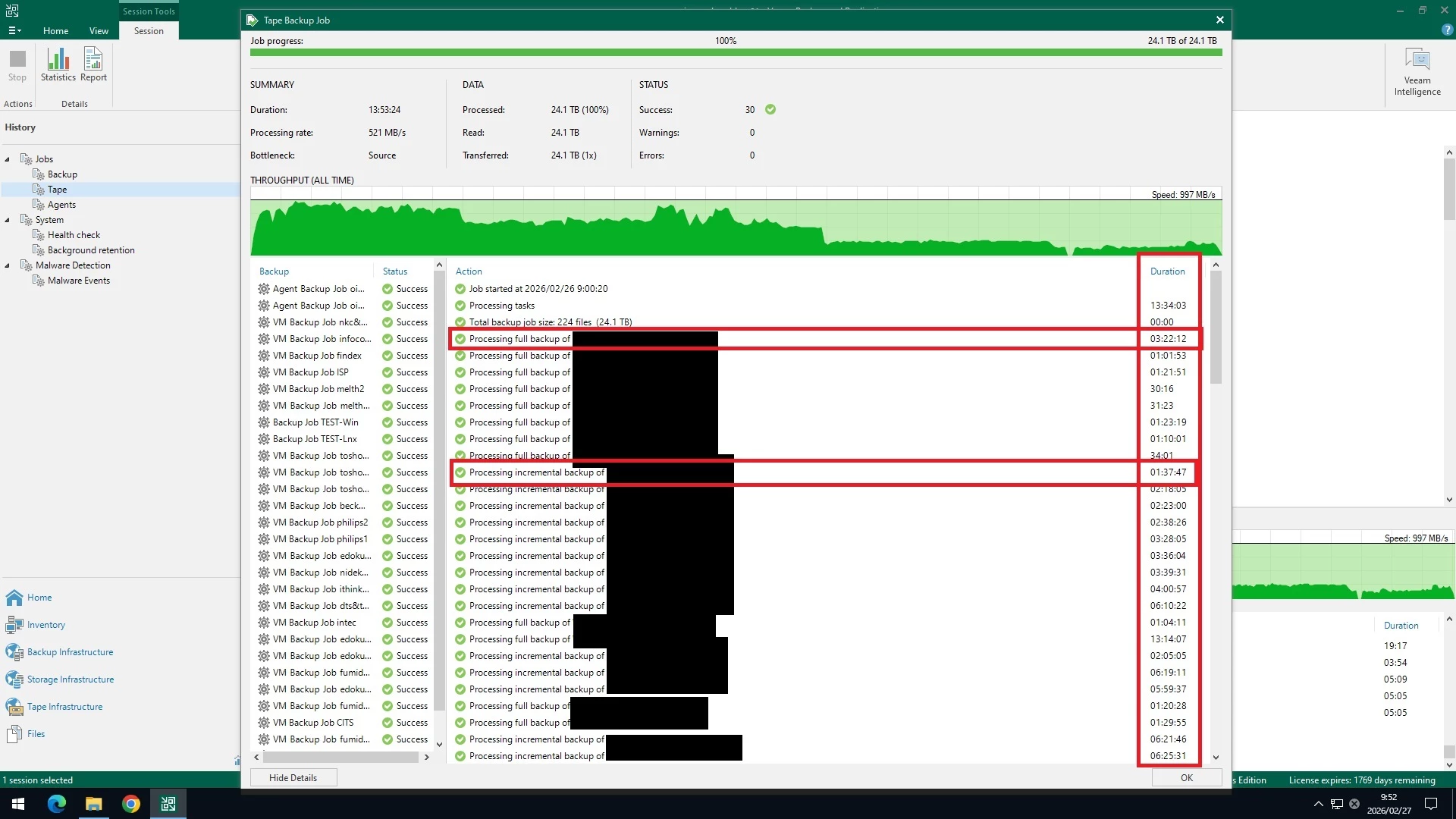
I would like to output tape backup details in CSV format.Using PowerShell, for example.The output contains the execution time for each virtual machine, which can be confirmed in the history details in the GUI, and whether a full backup or differential backup was performed.When I copy and paste from the history details in the GUI, I am having trouble because when I analyze the data, an execution time of 40 minutes is sometimes calculated as 40 hours.Does anyone know how to output this information?

5 comments

coolsport00
Forum|alt.badge.img+21
  • Veeam Legend
  • March 6, 2026

I don’t have any tape jobs to even try and test help you ​@kamo . Maybe ​@ddomask or ​@SteveHeart can help?


Chris.Childerhose
Forum|alt.badge.img+21

Try this attached PowerShell script - rename the extension from TXT to PS1.  Usage commands below -

# Console-only output
.\Get-VeeamTapeBackupDetails.ps1

# Remote server + HTML report
.\Get-VeeamTapeBackupDetails.ps1 -VBRServer "vbr01.contoso.com" -ExportHTML -OutputPath "C:\Reports"

# Full export (HTML + per-section CSVs)
.\Get-VeeamTapeBackupDetails.ps1 -ExportHTML -ExportCSV


  • Author
  • Not a newbie anymore
  • March 6, 2026

Thank you for your kind advice.

In my environment,
all of the region - 4. Tape Backup Jobs and the JobName of RECENT TAPE BACKUP SESSIONS were not output.
I was able to resolve the JobName of RECENT TAPE BACKUP SESSIONS by setting JobName = $sess.Name on line 351.

I believe the commands I want in the script you provided are "Get-VBRTapeJob" and "Get-VBRTapeBackupSession," but while both can output information for each job, unfortunately they do not output information for each virtual machine.

If you know of a command that will output the time required for each virtual machine to execute a tape job, could you please let me know?


The black area contains the VM name.


Chris.Childerhose
Forum|alt.badge.img+21

This is where you will need to experiment with the script to get the output you need.  I provided that from Claude so you can run it back through an AI of you want or Google commands.


  • Author
  • Not a newbie anymore
  • March 9, 2026

Thank you for comments.

I tried your script made by Claude.

But, I couldn't get information that Duration per objects(VMware).