Question

Kanister kando blueprint pod getting OOMKilled

  • June 12, 2025
  • 4 comments
  • 47 views

Hi,

I’m using a blueprint to backup Odoo databases and using kando to export them to a S3 bucket.

The output backup file is around 10GB. 

I’m seeing a RAM spike in the kanister-job container doing the job, and then crashing with exit code 137 (OOMKilled), but there’s no limits and there’s enough RAM on the node it was scheduled on.


Here’s the status of the pod : 

status:
  conditions:
  - lastProbeTime: null
    lastTransitionTime: "2025-06-12T17:36:31Z"
    status: "False"
    type: PodReadyToStartContainers
  - lastProbeTime: null
    lastTransitionTime: "2025-06-12T17:07:18Z"
    status: "True"
    type: Initialized
  - lastProbeTime: null
    lastTransitionTime: "2025-06-12T17:36:29Z"
    reason: PodFailed
    status: "False"
    type: Ready
  - lastProbeTime: null
    lastTransitionTime: "2025-06-12T17:36:29Z"
    reason: PodFailed
    status: "False"
    type: ContainersReady
  - lastProbeTime: null
    lastTransitionTime: "2025-06-12T17:07:18Z"
    status: "True"
    type: PodScheduled
  containerStatuses:
  - containerID: containerd://0eef6a65b0f8798be4f116ffe6ad316e92406ad5652e7f0b5802c4cf7f56f655
    image: harbor/kanister-tools:top
    imageID: harbor/kanister-tools@sha256:6c626b188bc41f1b2c65f4f638689e009dc157f19817795d59bb29135b7dcc0d
    lastState: {}
    name: container
    ready: false
    restartCount: 0
    started: false
    state:
      terminated:
        containerID: containerd://0eef6a65b0f8798be4f116ffe6ad316e92406ad5652e7f0b5802c4cf7f56f655
        exitCode: 137
        finishedAt: "2025-06-12T17:36:28Z"
        reason: OOMKilled
        startedAt: "2025-06-12T17:07:19Z"
  hostIP: 10.148.10.21
  hostIPs:
  - ip: 10.148.10.21
  phase: Failed
  podIP: 10.42.1.38
  podIPs:
  - ip: 10.42.1.38
  qosClass: BestEffort
  startTime: "2025-06-12T17:07:18Z"


And snag from the pod describe : 

Events:
  Type     Reason        Age   From               Message
  ----     ------        ----  ----               -------
  Normal   Scheduled     50m   default-scheduler  Successfully assigned odoo/kanister-job-7kw8g to node1
  Normal   Pulled        50m   kubelet            Container image "harbor/kanister-tools:top" already present on machine
  Normal   Created       50m   kubelet            Created container container
  Normal   Started       50m   kubelet            Started container container
  Warning  NodeNotReady  21m   node-controller    Node is not ready


And the RAM usage : 
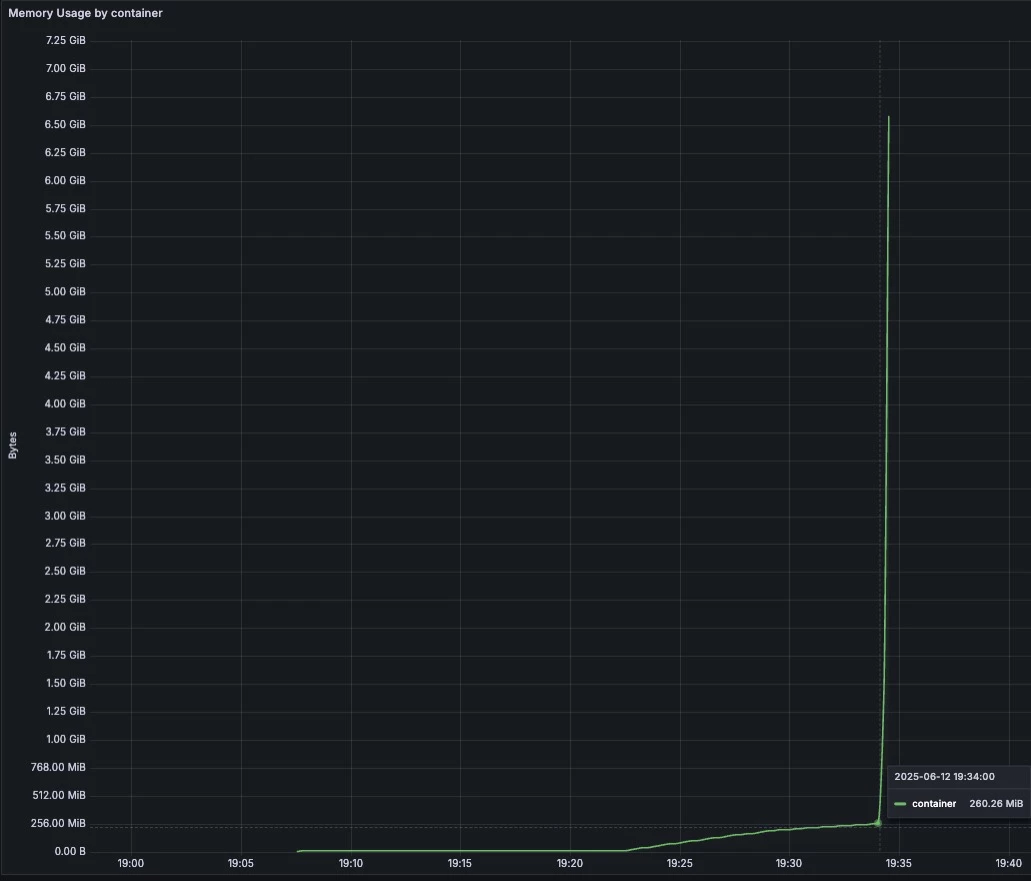
I’ve added notification to the job itself and can confirm that the S3 upload (cmd: kando -v debug location push --profile '{{ toJson .Profile }}' $ZIPFILE --path $BACKUP_LOCATION) starts at 19:34.


Any clue on how to let the pod finish the upload or limit the RAM used by kando ?


Thanks :)

4 comments

  • Author
  • Comes here often
  • June 13, 2025

Update :

Switching from kando to mc (minio client), topped up the RAM usage at 128MiB for the 10GB file upload.


Hagag
Forum|alt.badge.img+2
  • Experienced User
  • June 13, 2025

Hi ​@lgromb  also you can limit the resources in the kanister pod using ActionPodSpec or using helm option genericVolumeSnapshot.resources.[requests|limits].[cpu|memory]

more details about actionpodSpec can be found here.
https://docs.kasten.io/latest/operating/footprint/#actionpodspecs


could you please share a snippet from your solution ? does the kanister image support the mc ( minio client ) ?


  • Author
  • Comes here often
  • June 13, 2025

Hi ​@Hagag ,

There’s no limit applied to the kanister pod actually so even settings it thru helm values won’t help I guess. 


mc isn’t included in the kanister image but can be installed or use a different image totally. 

I guess the real problem is out of the scope of Kasten since an issue has already been raised on Kanister repo (https://github.com/kanisterio/kanister/issues/3036) and there’s no fix coming from Kasten considering this :).


I’m now using mc to upload, and kando output to extract the path from the S3 bucket to be reinjected in the delete phase, and that works really well.


I’ll close the thread in a few days if somebody has something else to say :)


mark.lavi
Forum|alt.badge.img
  • Comes here often
  • June 20, 2025

Hello ​@lgromb , sorry for the delay in my response (I was on time off last week, this week had three days of other commitments and I am still digging out of my backlog).


We’ll review this in the next Kanister community meeting, I’ll try to raise this sooner!
This was recently assigned to a new developer; we’ll update in the issue.

Thanks for commenting on the GitHub issue. Please consider joining the Kanister community meeting, Github discussions, or Slack as well!

--Mark (Kasten Product Manager, responsible for Kanister.io)