Question

veeam software appliance - physical or virtual?

  • June 6, 2026
  • 9 comments
  • 64 views

Hi all,


I'm planning to deploy the Veeam Software Appliance and wondering — is it generally better to run it on physical hardware or as a virtual machine (e.g. on vSphere)?

I know both are supported, but looking for real-world experience on pros/cons of each approach. Things like performance, reliability, and best practice recommendations would be helpful.


Thanks in advance!

9 comments

Chris.Childerhose
Forum|alt.badge.img+22

Either works as stated.  To me physical would have a slight edge as it removes the virtualization layer, but then you don't have HA within virtualization.  Plus if you want to do HA Cluster it would be easier on a virtual platform.


coolsport00
Forum|alt.badge.img+23
  • Veeam Legend
  • June 6, 2026

Virtual gives you more flexibility ​@vladensClaz , some of which Chris shares. You have mobility, virtual server h/a, snapshotting to test updates/upgrades, & VM DRS; but hardware (physical) gives you more power (i.e resources). So, in reality, the answer is “it depends” 😊 Depends on your environment. For me...I go with virtual because of the flexibility and snapshot capability. Really up to you though.


Forum|alt.badge.img+1
  • Comes here often
  • June 7, 2026

How much are you backing up?  Are you doing tape or cloud?    My data center tape server has 62 Gbps of network bandwidth.   6 x 10 Gbps connections that one goes to each subnet/VLAN.  2 Gbps that backs up other stuff.   3 tape drives, LTO 5.   21-23 GB/min backup speed.   I use tapes because once ejected they are safe from ransomware attacks.  


kciolek
Forum|alt.badge.img+5
  • Influencer
  • June 8, 2026

either would work. In my opinion I think virtual is best. But it would depend on your requirements and space availability to build out. 


AndrePulia
Forum|alt.badge.img+9
  • Veeam Vanguard
  • June 8, 2026

@vladensClaz I would recommend a virtual deployment only if you have a separate cluster/datacenter available and have a Physical box available. Otherwise, you risk creating a circular dependency, similar to locking the drawer with the keys inside. Also, consider the opinions of the other folks involved before making a final decision.


AndrePulia
Forum|alt.badge.img+9
  • Veeam Vanguard
  • June 10, 2026

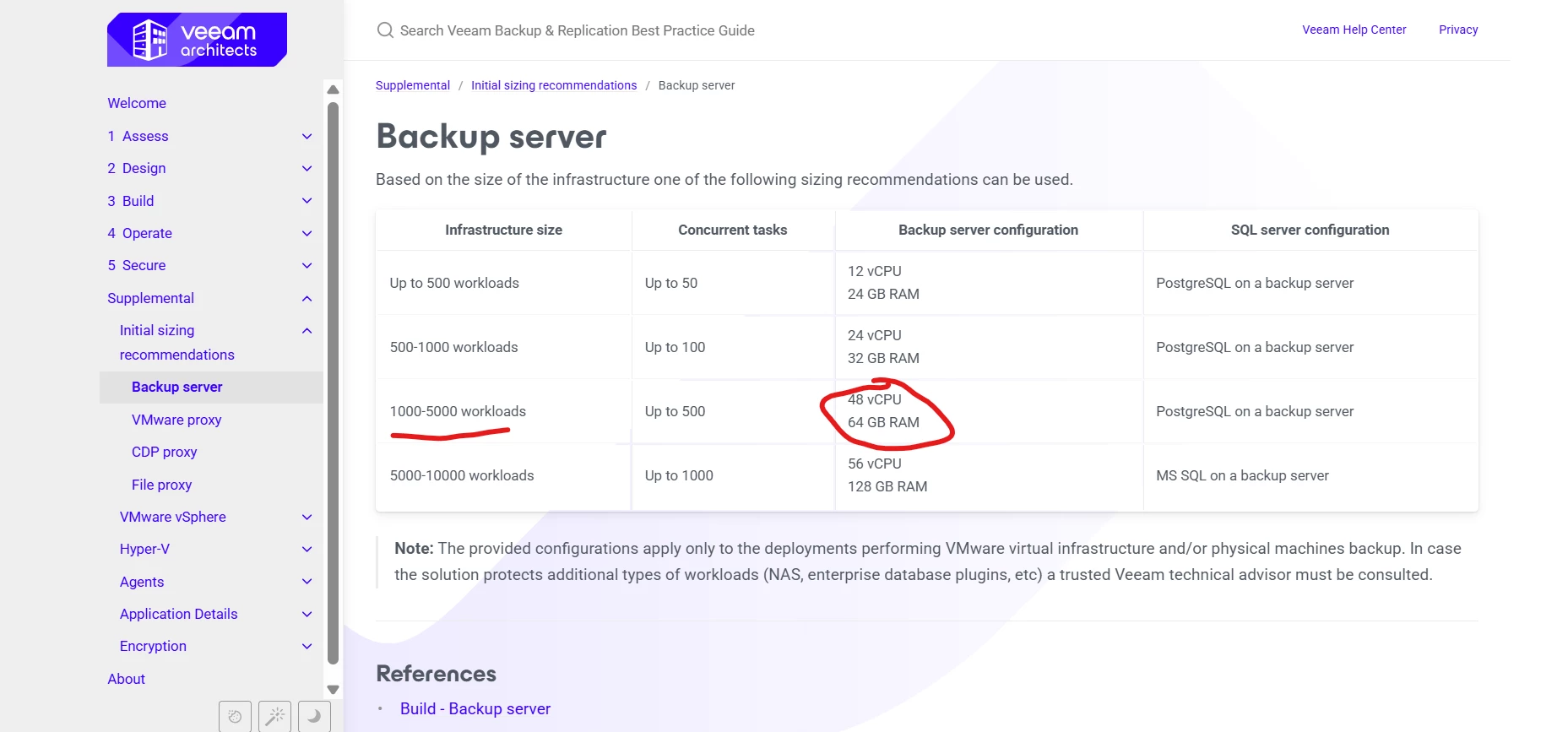
@vladensClaz After I gave my opinion above, I remembere teht ou can use the Veeam BP to make your decision better.


Look at what the BP says.

so, to have a 48vCPU VM you shold have at lease 48 core on your ESXi, but of course you need to have much more physical CPUs on your ESX to avoid co-stop situations.
Using the BP you can hav a starting point to decide between virtual or physical

https://bp.veeam.com/vbr/Support/configurations/backup_server.html 


Forum|alt.badge.img+1
  • Comes here often
  • June 10, 2026

If you are going virtual, I was install a separate NAS or SAN.  Keeping backups on the same storage doesn’t protect from ransomware or hardware failure.   I use tape drives at work and home for backup safety.  

My EE Lab tape server uses Western Digital Black drives.  SAS speeds and 5 year warranty.  


Scott
Forum|alt.badge.img+10
  • Veeam Legend
  • June 15, 2026

Man, that’s a lot of CPU.  I don’t have that many workloads, and that is also concurrent. but knowing what your VM environment can handle and allowing for growth is important.


VM or Physical both work. Just keep the following in mind

  • CONFIG BACKUP is important. Either way, keep this on alternate storage, ready to have in any disaster to restore your Veeam environment.
  • If you use VM or Physical, your config backup can restore to both if needed. 
  • VM’s are nice because if you have a larger cluster, and hardware fails, things keep running, If your motherboard dies on a Physical Veeam server, there will be downtime and critical repairs.
  • Hardware is nice for Isolation.
  • Physical Repos and Proxies are more important to me for performance. Veeam itself in a VM is nice for uptime. Just make sure you can restore quickly and have a Windows Server VM or host available to save time.  

eblack
Forum|alt.badge.img+2
  • Influencer
  • June 15, 2026

I always build Virtual unless its a repo, those go on BareMetal 100% of the time. This process has served me well for years even in multi-tenant environments.