Question

Veeam Agent for Windows fails to create backup - stuck at 0% (VSS snapshot issue

  • October 1, 2026
  • 9 comments
  • 27 views

Hi,

My Veeam Agent for Windows backup is stuck at 0% on snapshot creation.

When I run vssadmin list providers in PowerShell, no providers are listed. It seems the default Microsoft VSS provider is missing or unregistered.

What is the proper procedure to re-register the VSS provider without corrupting existing shadow copies ?

Thanks !

9 comments

Chris.Childerhose
Forum|alt.badge.img+23

First off what version of Windows is this on?  Did you check Google?

You can use this article but with caution - Re-Registering VSS DLL Binaries in 32-bit and 64-bit Environments


coolsport00
Forum|alt.badge.img+23
  • Veeam Legend
  • October 1, 2026

Yep...recommend following the process Chris shared to attempt to re-register your Windows VSS as a first step, then re-attempt a backup. Let us know how it goes ​@japanon 


Jason Orchard-ingram micro
Forum|alt.badge.img+5

hi ​@japanon  before running Veeam again

look at Event Viewer. Check the Application log for VSS and VolSnap errors.
Create a test shadow copy with DiskShadow, as described in KB1980
check Service startup types. KB1785


  • Author
  • New Here
  • October 2, 2026

Hi, ​@Jason Orchard-ingram micro ​@coolsport00 ​@Chris.Childerhose 


Update / Solved:

I am on Windows 10 Pro

An important detail I forgot to mention: everything was working fine when Acronis was installed. The Veeam issue started right after I uninstalled Acronis. It looks like the Acronis uninstaller removed or unregistered the default Microsoft VSS provider / filter drivers during cleanup.

Progress update:
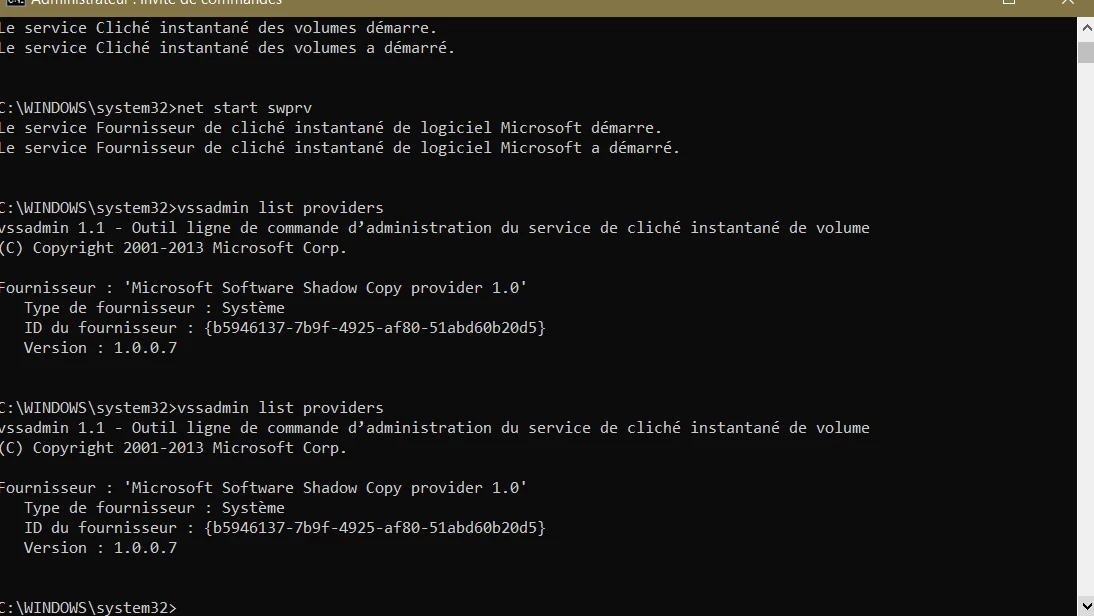
Following the DLL re-registration procedure (unregistering/registering VSS DLLs in system32 and restarting vss + swprv services), vssadmin list providers is now no longer empty !

It now properly shows:
Microsoft Software Shadow Copy provider 1.0 (ID: {b5946137-7b9f-4925-af80-51abd60b20d5}).

I will now reboot the machine and re-run the Veeam Agent backup job to verify if it completes successfully. I'll.


Forum|alt.badge.img+3
  • Veeam Product Management
  • October 2, 2026

An important detail I forgot to mention: everything was working fine when Acronis was installed. The Veeam issue started right after I uninstalled Acronis. It looks like the Acronis uninstaller removed or unregistered the default Microsoft VSS provider / filter drivers during cleanup.


Yeah would make sense, Acronis has its own (optional afaik) VSS provider and probably during the clean up something went screwy. 


Thanks for sharing the additional details, it sounds like probably you’ve got the solution :)


coolsport00
Forum|alt.badge.img+23
  • Veeam Legend
  • October 2, 2026

Hi, ​@Jason Orchard-ingram micro ​@coolsport00 ​@Chris.Childerhose 


Update / Solved:

Progress update:
Following the DLL re-registration procedure (unregistering/registering VSS DLLs in system32 and restarting vss + swprv services), vssadmin list providers is now no longer empty !

It now properly shows:
Microsoft Software Shadow Copy provider 1.0 (ID: {b5946137-7b9f-4925-af80-51abd60b20d5}).

Glad to hear you got it sorted ​@japanon 


Chris.Childerhose
Forum|alt.badge.img+23
  • Veeam Legend, Veeam Vanguard
  • October 2, 2026

Glad to hear it was something simple ​@japanon for the fix.  Here is hoping the Veeam Agent backups run. 😎


  • Author
  • New Here
  • October 2, 2026

 ​@ddomask ​@coolsport00 ​@Chris.Childerhose 

Why do you say I've solved it? Unfortunately, I'm still stuck. 😅


Chris.Childerhose
Forum|alt.badge.img+23
  • Veeam Legend, Veeam Vanguard
  • October 2, 2026

 ​@ddomask ​@coolsport00 ​@Chris.Childerhose 

Why do you say I've solved it? Unfortunately, I'm still stuck. 😅

Well, you never mentioned or followed up with whether the job ran or not, so we assumed I guess it was resolved.  I can unmark the answer until you get one that does solve the issue.

What is the issue now with the agent after getting VSS working?