Question

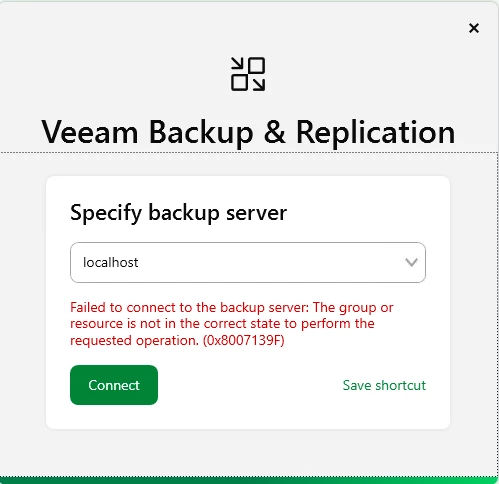
Veeam 13 console - The group or resource is not in correct state 0x8007139F

  • March 17, 2026
  • 6 comments
  • 24 views

After upgrading to Veeam 13 on Windows, I am unable to login with UI console. Access throw WEB conole works.

 

6 comments

Chris.Childerhose
Forum|alt.badge.img+21

Are all the services running on the server?  This is one typical issue for this.  If they are check the logs or open a support ticket.


coolsport00
Forum|alt.badge.img+21
  • Veeam Legend
  • March 17, 2026

Hi ​@Kikoos - Welcome to the Community!

Did you make sure the Veeam Backup Service and/or Veeam RestAPI Service is running? If the Backup Service isn’t running, you won’t be able to login with the Veeam Console, but the error you get is a bit different than what you shared. Maybe try to do a repair of your Veeam install, or a repair of the Console install.

You can attempt to check the Console logs located at:
%UserProfile%\AppData\Local\Veeam\Backup and see if anything shows there. But your best bet is probably just to get in touch with Veeam Support.

Let us know.


kciolek
Forum|alt.badge.img+1
  • Influencer
  • March 17, 2026

Yes - please verify all services are running. Also, if you can try rebooting the server. if that doesn’t work open a ticket with support


  • Author
  • New Here
  • March 18, 2026

All services are running. Where did you found that this specific error code is a standard error?


Marcel.K
Forum|alt.badge.img+11
  • Veeam Legend
  • March 20, 2026

did you try reboot or installation as “repair”?


kciolek
Forum|alt.badge.img+1
  • Influencer
  • March 20, 2026

All services are running. Where did you found that this specific error code is a standard error?

did you try rebooting as ​@Marcel.K suggested? If still an issue I would contact support. One more thing you can try is install the console on another machine and connect remotely. I had issues with running the console from the server but would work remotely. I still need to troubleshoot my issue.






