Question

VBR Connection Refused (127.0.0.1)

  • December 4, 2025
  • 20 comments
  • 75 views

waqasali
Forum|alt.badge.img+4
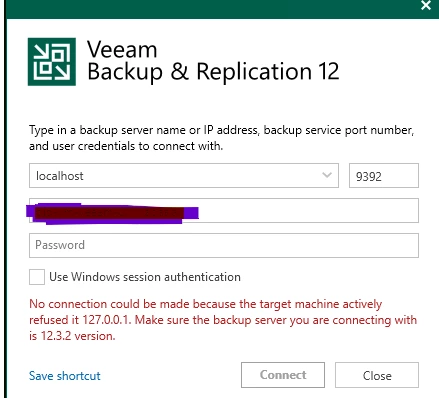
We are facing an issue with VBR where the application is down and cannot connect to the backup server.
 
The error message shown is:
 

“No connection could be made because the target machine actively refused it 127.0.0.1. Make sure the backup server you are connecting with is 12.3.2 version.”


Has anyone encountered this issue before? What steps or permanent solution can resolve this? Any guidance would be appreciated.



20 comments

MicoolPaul
Forum|alt.badge.img+23

Hi,


To confirm: you’re using the console on the same server as VBR is installed? Otherwise you must change localhost to the FQDN or IP address.


If this is the case then you need to ensure the Veeam services are running on windows. I’d assume they aren’t. Try to start them and if they fail to start, check the logs


waqasali
Forum|alt.badge.img+4
  • Author
  • On the path to Greatness
  • December 4, 2025

DB and console on the same server, all services are running. This comes suddenly 


MicoolPaul
Forum|alt.badge.img+23

And you’ve confirmed that the console and VBR are running the same version?


waqasali
Forum|alt.badge.img+4
  • Author
  • On the path to Greatness
  • December 4, 2025

yes right, VBR and Console are running on the same version.


MicoolPaul
Forum|alt.badge.img+23

If you’re confident this message is appearing when connecting locally, with console & server running the same build and services running, you could have a local firewall issue on device or the port not binding which typically would result in the service not starting. Try these next steps


morgan.munck

Hello,

Have you tried reboot the server? We have encountered this error on a few occasion, and reboot the server and then waiting for the services to restart has often solved the problem.


waqasali
Forum|alt.badge.img+4
  • Author
  • On the path to Greatness
  • December 4, 2025

Yesterday, I cross verified with the Network Security team, and they confirmed that nothing has changed from their end. This setup normally works as expected, but the issue suddenly appeared over the last three days.


I have logged a case with support, and according to their initial feedback:
“The issue is rather tricky, and it takes some extra time to investigate all the details.”


I am posting this update here to initiate a deeper technical discussion on what happens when such issues occur. Based on my experience, if in your environment the transaction logs are running continuously, those processes are impacted, and upcoming backup jobs do not run as expected. This essentially means the entire Veeam application becomes non functional until the issue is resolved.


waqasali
Forum|alt.badge.img+4
  • Author
  • On the path to Greatness
  • December 4, 2025

Hi ​@morgan.munck 


Rebooting the server temporarily fixes the issue, but I’m looking for a permanent solution. I believe rebooting the server multiple times for this error is not the best practice.


What is your feedback on this?


Mildur
Forum|alt.badge.img+12
  • Influencer
  • December 4, 2025

My suggestion: Open a case and ask our support team to investigate why it happens.


Thank you,

Fabian


waqasali
Forum|alt.badge.img+4
  • Author
  • On the path to Greatness
  • December 4, 2025

Hi ​@Mildur 


i got a response with a workaround and am working with a support engineer. 


morgan.munck

Hi ​@waqasali 

I agree. Personally, I have never encountered this problem with such frequency.

I am curious to know the response provided by support for this situation.


Chris.Childerhose
Forum|alt.badge.img+21

I know services are running but I have seen this when one is not.  Keep working with support on this one to see what they find.


waqasali
Forum|alt.badge.img+4
  • Author
  • On the path to Greatness
  • December 4, 2025

thank you ​@Chris.Childerhose  


waqasali
Forum|alt.badge.img+4
  • Author
  • On the path to Greatness
  • December 4, 2025

Hi ​@morgan.munck 

I received a very detailed email from a support engineer. I’m not sure if sharing feedback here is allowed or not, but their analysis included several important points that I wasn’t aware of before.


Chris.Childerhose
Forum|alt.badge.img+21

Hi ​@morgan.munck 

I received a very detailed email from a support engineer. I’m not sure if sharing feedback here is allowed or not, but their analysis included several important points that I wasn’t aware of before.


I am sure you can share them here as I have never seen anyone get in trouble.


waqasali
Forum|alt.badge.img+4
  • Author
  • On the path to Greatness
  • December 4, 2025

Hi ​@morgan.munck 

I received a very detailed email from a support engineer. I’m not sure if sharing feedback here is allowed or not, but their analysis included several important points that I wasn’t aware of before.


I am sure you can share them here as I have never seen anyone get in trouble.


Hi ​@Chris.Childerhose i will 


lukas.k
Forum|alt.badge.img+12
  • Veeam Vanguard
  • December 4, 2025

I had that issue with the usage of service accounts instead of local system (I prefer service accounts anyways), in case you use them please check the credentials etc.


Also make sure that you don’t change the default settings of the Veeam services regarding auto start, delayed auto start etc.


Do you have AV software installed? In case yes, can you confirm that all the required exclusions are set properly? https://www.veeam.com/kb1999


Please keep us posted on the support feedback.


Best

Lukas


waqasali
Forum|alt.badge.img+4
  • Author
  • On the path to Greatness
  • December 4, 2025

Hi ​@lukas.k 


thank you for your words i can confirm that no AV 


Mohamed Ali
Forum|alt.badge.img+2
  • VUG Leader
  • December 4, 2025

Check the Veeam database health and see if there are any errors in the DB logs as well, like permission or logon errors. 

Also, check whether TCP port 9392 is actively listening and not used by any other process.

netstat -ano | findstr :9392


Iams3le
Forum|alt.badge.img+11
  • Veeam Legend
  • December 4, 2025

DB and console on the same server, all services are running. This comes suddenly 

When you say all services, did you also take the Db service(s) into consideration?