Solved

Using 2 tape servers with Veeam

  • January 6, 2026
  • 11 comments
  • 59 views

Forum|alt.badge.img+1

I have a question. My current tape server has 4 SAS ports attached to my Quantum LTO-7 library. I can’t fit any more cards into this server, so that’s the max number of drives this one tape server will support.
However, my tape library physically has *6* tape drives installed in it. Obviously, at the moment, only 4 are in use, as that’s all my tape server can handle. But I have a 2nd  tape server I can use, and it has 4 unused SAS ports.


So what I want to do is, add this 2nd server to my Veeam environment as another tape server, and hook it up to my 2 used tape drives. That way, I should hopefully be able to drive all 6 tape drives at once., and Veeam will see the library as having 6 drives total.


There should be no problem with that config, right? Veeam can utilize more than 1 tape server, surely. And since the drives are all in the same library, even if I have media pools that says use up to 2 drives at once,  it wouldn’t matter if one of those tapes was serviced by tape server #1, and the 2nd drive was serviced by tape server #2. I’m just trying to verify that Veeam will show all 6 drives as part of a single library, even if they serviced by multiple tape servers.


Plus, I’ll have 2 unused SAS ports, and hopefully I can get the boss to buy 2 more tape drives, so I can run a total of 8 drives between the 2 tape servers.


thanks for any insights.

Best answer by Scott

- You also cannot attach the exact same library instance to multiple independent Veeam environments; they will compete for changer and drive locks and cause errors.[1]

   If you virtualize the library itself, in my case a TS4500, you can do this.


I have 2 Tape libraries connect to Veeam and it works great. I have a tape server for each library. each library has about 10 drives in it now.

So to the original question, you may need an additional Tape Server, and just mount the drives to that.


Be aware that a Tape Backup job can not point to both, you’ll need additional jobs if you want the data in both locations, or you’ll have to change a few of the current jobs to the new location.


Also, if you run file to tape jobs, it’s based on VUL. Because it’s from the original source data, in a second job, it will double the licenses and cost required. If you were to go File to Disk first, then run 2 tape jobs from the backed up data, it only hits the source data one time so it will not double the VUL’s used.


11 comments

Chris.Childerhose
Forum|alt.badge.img+21

Veeam will treat them as seperate tape servers/drives. It will not combine them together.  So you would need to ensure your tape unit can use partitions and set the two drives in one partition for the second server.  Then you could assign some pools to that one that are smaller and let the other tape server handle the larger jobs.


AndrePulia
Forum|alt.badge.img+9
  • Veeam Vanguard
  • January 6, 2026

@MikeLeone Could you share the model of the library?


Forum|alt.badge.img+1
  • Author
  • Comes here often
  • January 7, 2026

The library is a QUANTUM Scalar i3-i6 282G, there are 6 LTO-7 tape drives.


Chris.Childerhose
Forum|alt.badge.img+21

Not sure why the model matters here.  Veeam only allows one tape server for one library unless you partition it for a second tape server like I said.  This is from what Perplexity told me -


Veeam fully supports using multiple tape **drives** in a single tape library, but not multiple tape servers controlling the same single library instance, so design and configuration matter a lot here.[1][4] Below is how it works and what you can do.


## What is supported


- A single tape library with several drives (for example, 2–6 LTO drives) connected to one Veeam tape server is fully supported, and Veeam can write to multiple drives in parallel.[2][4]

- You can also manage multiple separate tape libraries from the same Veeam environment and use drives from several libraries at once.[4][9]

- Libraries with different drive generations usually need to be split into logical libraries so that each library has only one drive type.[2]


## What is not supported


- One physical library (or one library partition) cannot be simultaneously controlled by more than one tape server within Veeam for the same logical library instance.[1]

- You also cannot attach the exact same library instance to multiple independent Veeam environments; they will compete for changer and drive locks and cause errors.[1]


## Using multiple drives in one library


To actually make Veeam use several drives in that one library:


- Enable tape parallel processing and allow multiple drives in the media pool/job so Veeam can stream to multiple drives at the same time.[4][5]

- Ensure each drive is correctly presented to the tape server OS (SAS/FC/iSCSI), shows up in Device Manager, and then rescan the tape server/library in Veeam so the extra drives appear.[2][3]


## When multiple “libraries” on one chassis are needed


If you want several tape servers to work with what is physically one library:


- Use hardware partitioning on the library to carve it into multiple logical libraries, each with its own set of slots and drives.[1][10]

- Present each partition as a separate library to a different tape server or Veeam environment; from Veeam’s point of view they are independent libraries and are supported that way.[1][10]


If you share a bit more detail about your current hardware (library model, number of drives, how it is cabled, and how many tape servers you plan to use), a concrete wiring and Veeam configuration outline can be suggested.


Citations:

[1] Multiple Tape Servers Managing Single Multi-Drive Library https://community.veeam.com/discussion-boards-66/multiple-tape-servers-managing-single-multi-drive-library-1342

[2] Multiple Tape Drives in Single Autoloader : r/Veeam https://www.reddit.com/r/Veeam/comments/151vf6a/multiple_tape_drives_in_single_autoloader/

[3] How to add 2 more tape drives to a tape library in Veeam https://community.veeam.com/discussion-boards-66/how-to-add-2-more-tape-drives-to-a-tape-library-in-veeam-10334

[4] Tape Parallel Processing - Veeam Backup & Replication ... https://helpcenter.veeam.com/docs/vbr/userguide/parallel_processing.html

[5] Utilizing all tape drives in a library https://community.veeam.com/discussion-boards-66/utilizing-all-tape-drives-in-a-library-6163

[6] Using multiple tapedrives in a single job for a single server. https://forums.veeam.com/tape-f29/using-multiple-tapedrives-in-a-single-job-for-a-single-server-t93579.html

[7] Veeam is not using all available tape drives in library; why? https://community.veeam.com/discussion-boards-66/veeam-is-not-using-all-available-tape-drives-in-library-why-7767

[8] Tape Support - Veeam Backup & Replication Best Practices https://veeam-best-practices-guide-v9.readthedocs.io/resource_planning/tape_support.html

[9] Tape | Veeam Backup & Replication Best Practice Guide https://bp.veeam.com/vbr/3_Build_structures/B_Veeam_Components/tape.html

[10] Tape drives and library https://community.veeam.com/discussi

on-boards-66/tape-drives-and-library-5842


Scott
Forum|alt.badge.img+10
  • Veeam Legend
  • Answer
  • January 7, 2026

- You also cannot attach the exact same library instance to multiple independent Veeam environments; they will compete for changer and drive locks and cause errors.[1]

   If you virtualize the library itself, in my case a TS4500, you can do this.


I have 2 Tape libraries connect to Veeam and it works great. I have a tape server for each library. each library has about 10 drives in it now.

So to the original question, you may need an additional Tape Server, and just mount the drives to that.


Be aware that a Tape Backup job can not point to both, you’ll need additional jobs if you want the data in both locations, or you’ll have to change a few of the current jobs to the new location.


Also, if you run file to tape jobs, it’s based on VUL. Because it’s from the original source data, in a second job, it will double the licenses and cost required. If you were to go File to Disk first, then run 2 tape jobs from the backed up data, it only hits the source data one time so it will not double the VUL’s used.


Forum|alt.badge.img+1
  • Author
  • Comes here often
  • January 7, 2026

In my case, I have just the 1 tape library. And just the 1 instance of Veeam.

The part that is aggravating me at the moment, is that we bought the 2nd SAS card for the existing tape server, but Windows keeps saying it isn’t available. if I install that SAS card in a different Windows server, it correctly identifies it. 

I wanted 1 server, with all 6 drives connected to it, using 2 SAS cards. But we can’t get that config to work, hence my questions.

But the more I think about it, it might be better to have 2 tape servers. That way, I might get better throughput, since the total SAS output bandwidth of each tape server wouldn’t need to be spread across as many channels. Meaning each tape drive might be fed data faster this way, and jobs finish faster.

I’ll open a ticket with Quantum, ask what’s involved in partitioning my library this way. the existing 4 drives in 1 partition, connected to the existing tape server. And the other 2 drives (and hopefully more, in future) connected to a 2nd tape server.

BTW - point #3 above is me, asking questions like this before. LOL


Scott
Forum|alt.badge.img+10
  • Veeam Legend
  • January 7, 2026

well you would have to add a second windows server as another tape server, which will be another library. 

I am using windows servers as tape servers talking directly to my fiber channel tape drives.. There is no limit of 6 LTO drives in windows so keep trying.


Not sure if performance would increase much 400MB * 6= 2400MB = 2.4GB 

2.4GB = about 19.4 Gbps. 


If you have dual 10Gb nics or better using LACP or some type of teaming, you can meet that requirement rather than needing another server. 


With 25Gb network cards it’s very cheap now, and you could technically put your tape server beside the repo and hard wire them if you really needed to with static IP’s on additional ports. 


Forum|alt.badge.img+1
  • Author
  • Comes here often
  • January 7, 2026

well you would have to add a second windows server as another tape server, which will be another library. 

I am using windows servers as tape servers talking directly to my fiber channel tape drives.. There is no limit of 6 LTO drives in windows so keep trying.


Not sure if performance would increase much 400MB * 6= 2400MB = 2.4GB 

2.4GB = about 19.4 Gbps. 


If you have dual 10Gb nics or better using LACP or some type of teaming, you can meet that requirement rather than needing another server. 


With 25Gb network cards it’s very cheap now, and you could technically put your tape server beside the repo and hard wire them if you really needed to with static IP’s on additional ports. 


I never said anything about 6 drives being a limit. :-) 

I do not have fiber channel tape library (I wanted one, got overruled). So all my drives are SAS. Meaning they need to be physically connected to a server with a SAS cable.

6 or 8 SAS tape drives would overwhelm a single SAS card and PCI bus (or so Quantum tells me), meaning I would not be getting the best possible tape writing speeds. Hence why I want 2 tape servers, spread the load across. Gotta work with what they’re willing to buy me, or what I can cobble together if not.

I should be able to get 10G connections to the tape servers (we have those to other servers in that data center), but I’m still going to be dependent on how much data and how fast the tape server would be able to push that through the SAS card to the drives.


Scott
Forum|alt.badge.img+10
  • Veeam Legend
  • January 7, 2026

well you would have to add a second windows server as another tape server, which will be another library. 

I am using windows servers as tape servers talking directly to my fiber channel tape drives.. There is no limit of 6 LTO drives in windows so keep trying.


Not sure if performance would increase much 400MB * 6= 2400MB = 2.4GB 

2.4GB = about 19.4 Gbps. 


If you have dual 10Gb nics or better using LACP or some type of teaming, you can meet that requirement rather than needing another server. 


With 25Gb network cards it’s very cheap now, and you could technically put your tape server beside the repo and hard wire them if you really needed to with static IP’s on additional ports. 


I never said anything about 6 drives being a limit. :-) 

I do not have fiber channel tape library (I wanted one, got overruled). So all my drives are SAS. Meaning they need to be physically connected to a server with a SAS cable.

6 or 8 SAS tape drives would overwhelm a single SAS card and PCI bus (or so Quantum tells me), meaning I would not be getting the best possible tape writing speeds. Hence why I want 2 tape servers, spread the load across. Gotta work with what they’re willing to buy me, or what I can cobble together if not.

I should be able to get 10G connections to the tape servers (we have those to other servers in that data center), but I’m still going to be dependent on how much data and how fast the tape server would be able to push that through the SAS card to the drives.


I see what you are saying, you’d likely need a second SAS card, or add another server. 


Good luck.   Either way you’ll be fine, but the job config will get a bit messy as you’ll have to select where the jobs are pointed for the tape backups manually.  Maybe they'll add being able to pool multiple libraries together in a future version.


Hint Hint *Feature Request*   SOTL’s or Scale out Tape Libraries? haha


  • New Here
  • January 9, 2026

Hi Everyone,

Backups are duplicated to tape, with the tape being replaced on a weekly basis.
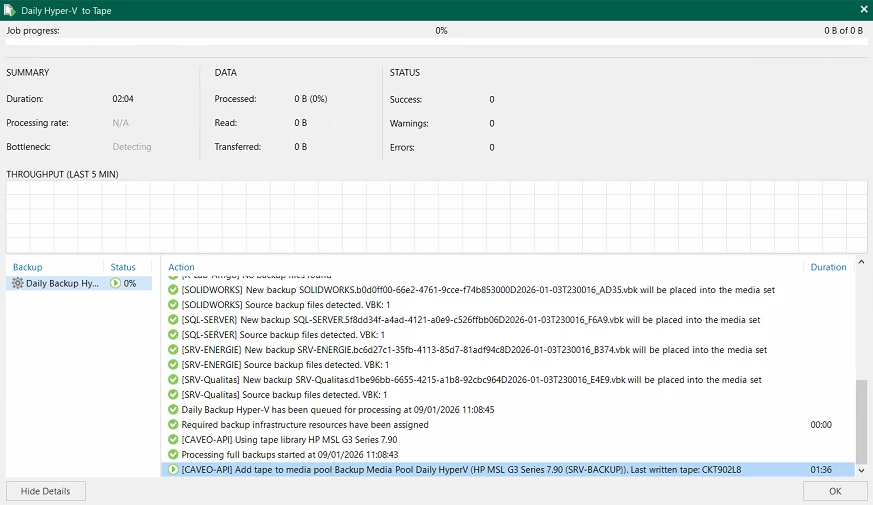
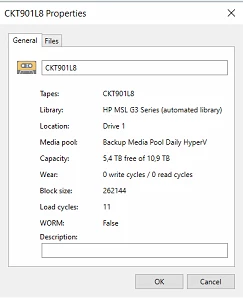
Recently, a tape that already contained data but still had available free space (approximately half of its total capacity) was reused. Veeam Backup was unable to read or properly handle this tape. After the tape was deleted (erased), the duplication process completed successfully.

Veeam Backup & Replication is unable to utilize the remaining space on an already used tape ?

Thanks in Advance,


AndrePulia
Forum|alt.badge.img+9
  • Veeam Vanguard
  • January 9, 2026

Not sure why the model matters here.  Veeam only allows one tape server for one library unless you partition it for a second tape server like I said.  This is from what Perplexity told me -


Veeam fully supports using multiple tape **drives** in a single tape library, but not multiple tape servers controlling the same single library instance, so design and configuration matter a lot here.[1][4] Below is how it works and what you can do.


## What is supported


- A single tape library with several drives (for example, 2–6 LTO drives) connected to one Veeam tape server is fully supported, and Veeam can write to multiple drives in parallel.[2][4]

- You can also manage multiple separate tape libraries from the same Veeam environment and use drives from several libraries at once.[4][9]

- Libraries with different drive generations usually need to be split into logical libraries so that each library has only one drive type.[2]


## What is not supported


- One physical library (or one library partition) cannot be simultaneously controlled by more than one tape server within Veeam for the same logical library instance.[1]

- You also cannot attach the exact same library instance to multiple independent Veeam environments; they will compete for changer and drive locks and cause errors.[1]


## Using multiple drives in one library


To actually make Veeam use several drives in that one library:


- Enable tape parallel processing and allow multiple drives in the media pool/job so Veeam can stream to multiple drives at the same time.[4][5]

- Ensure each drive is correctly presented to the tape server OS (SAS/FC/iSCSI), shows up in Device Manager, and then rescan the tape server/library in Veeam so the extra drives appear.[2][3]


## When multiple “libraries” on one chassis are needed


If you want several tape servers to work with what is physically one library:


- Use hardware partitioning on the library to carve it into multiple logical libraries, each with its own set of slots and drives.[1][10]

- Present each partition as a separate library to a different tape server or Veeam environment; from Veeam’s point of view they are independent libraries and are supported that way.[1][10]


If you share a bit more detail about your current hardware (library model, number of drives, how it is cabled, and how many tape servers you plan to use), a concrete wiring and Veeam configuration outline can be suggested.


Citations:

[1] Multiple Tape Servers Managing Single Multi-Drive Library https://community.veeam.com/discussion-boards-66/multiple-tape-servers-managing-single-multi-drive-library-1342

[2] Multiple Tape Drives in Single Autoloader : r/Veeam https://www.reddit.com/r/Veeam/comments/151vf6a/multiple_tape_drives_in_single_autoloader/

[3] How to add 2 more tape drives to a tape library in Veeam https://community.veeam.com/discussion-boards-66/how-to-add-2-more-tape-drives-to-a-tape-library-in-veeam-10334

[4] Tape Parallel Processing - Veeam Backup & Replication ... https://helpcenter.veeam.com/docs/vbr/userguide/parallel_processing.html

[5] Utilizing all tape drives in a library https://community.veeam.com/discussion-boards-66/utilizing-all-tape-drives-in-a-library-6163

[6] Using multiple tapedrives in a single job for a single server. https://forums.veeam.com/tape-f29/using-multiple-tapedrives-in-a-single-job-for-a-single-server-t93579.html

[7] Veeam is not using all available tape drives in library; why? https://community.veeam.com/discussion-boards-66/veeam-is-not-using-all-available-tape-drives-in-library-why-7767

[8] Tape Support - Veeam Backup & Replication Best Practices https://veeam-best-practices-guide-v9.readthedocs.io/resource_planning/tape_support.html

[9] Tape | Veeam Backup & Replication Best Practice Guide https://bp.veeam.com/vbr/3_Build_structures/B_Veeam_Components/tape.html

[10] Tape drives and library https://community.veeam.com/discussi

on-boards-66/tape-drives-and-library-5842

Hi Chris,

That's precisely why I asked about the model, to see if partitioning is possible or not. With the information, we can see what the best options are for him.
I asked so that I could evaluate this possibility for him.  :-)