
Solved

Tape library switch offline

  • August 21, 2026
  • 4 comments
  • 52 views

morgan.munck
Forum|alt.badge.img+1

We’re having a major tape library issue with one of our clients. Do you perhaps have any ideas or solutions to suggest?

(I’ve already asked the AI about this, but it didn’t help.)

In their Veeam Backup & Replication environment, our client originally had four libraries:
-    Scalar i3-i6 03255
-    Scalar i3-i6 03256
-    Scalar i3-i6 305G
-    Scalar i3-i6 341G (Offline)

I updated the Scalar i3-i6 03256 and Scalar i3-i6 03255 libraries at Quantum’s request following an incident involving one of the drives.
Once the update was complete, Veeam took the Scalar i3-i6 03256 library offline and changed the status of the Scalar i3-i6 341G library—which had been offline—to bring it back online. Veeam thus reversed their statuses.

I opened a ticket with Veeam Support, but I’m unable to provide them with the log bundles via SFTP (the file is empty every time, even though I verify that it isn’t before closing the connection), and they’re referring me to the standard documentation for tape libraries. These are solutions I’ve obviously already tried before opening my ticket, with no success.

Here are my findings so we can move forward urgently on this issue (since tape backups are currently not possible, and this is a priority for the client).

In my view, the “QUANTUM Scalar i3-i6 341G” and “QUANTUM Scalar i3-i6 03256” libraries (currently offline) correspond to a single library in Veeam, which was not initially the case.

Several factors lead me to believe this.

I’ve attached screenshots below that will serve as the basis for part of my reasoning.
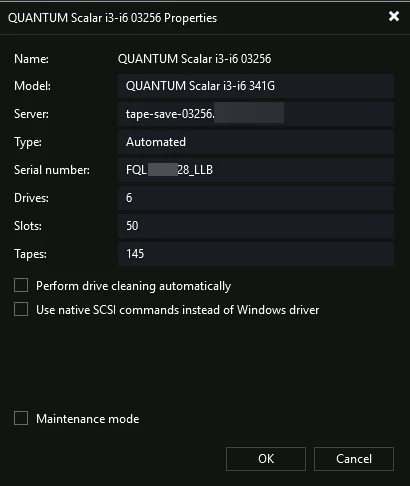
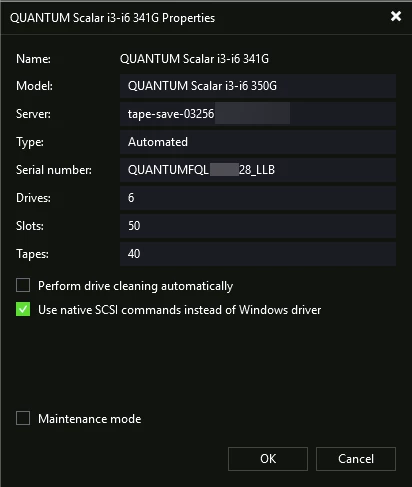
-    QUANTUM Scalar i3-i6 341G: QUANTUMFQL*****28_LLB
-    QUANTUM Scalar i3-i6 03256 (currently offline): FQL*****28_LLB

Unfortunately, I don’t have the original serial number for the QUANTUM Scalar i3-i6 341G.


2 – Firmware version visible in the model:

-    QUANTUM Scalar i3-i6 341G: QUANTUM Scalar i3-i6 350G (firmware version installed on 08/13)
-    QUANTUM Scalar i3-i6 03256 (currently offline): QUANTUM Scalar i3-i6 341G (old firmware version)

This suggests that Veeam did not update the existing library but rather the one that had been offline for a very long time.


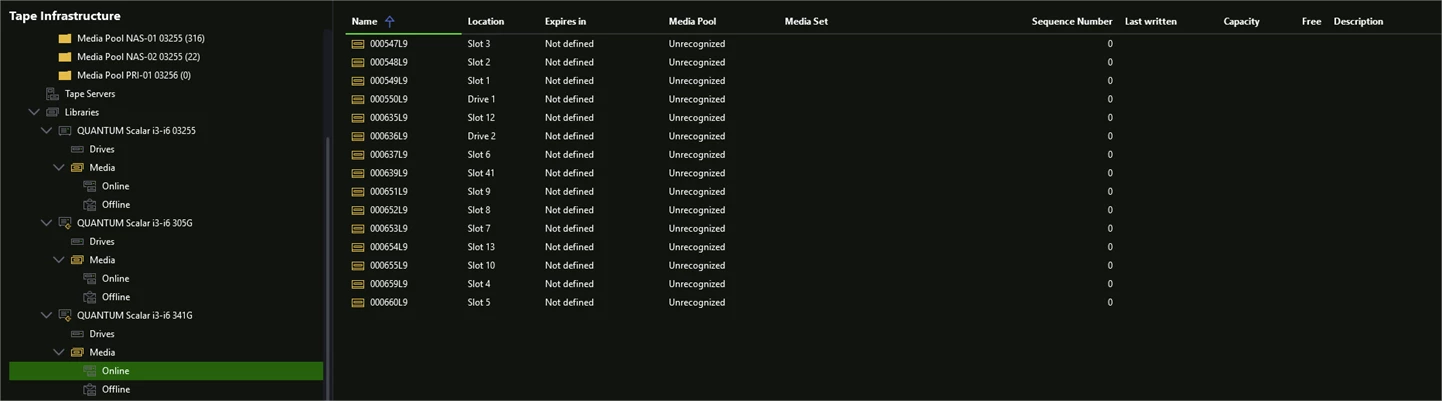
3 – Presence of the same tapes in both libraries:

-    QUANTUM Scalar i3-i6 341G: Online
-    QUANTUM Scalar i3-i6 03256 (currently offline): Offline
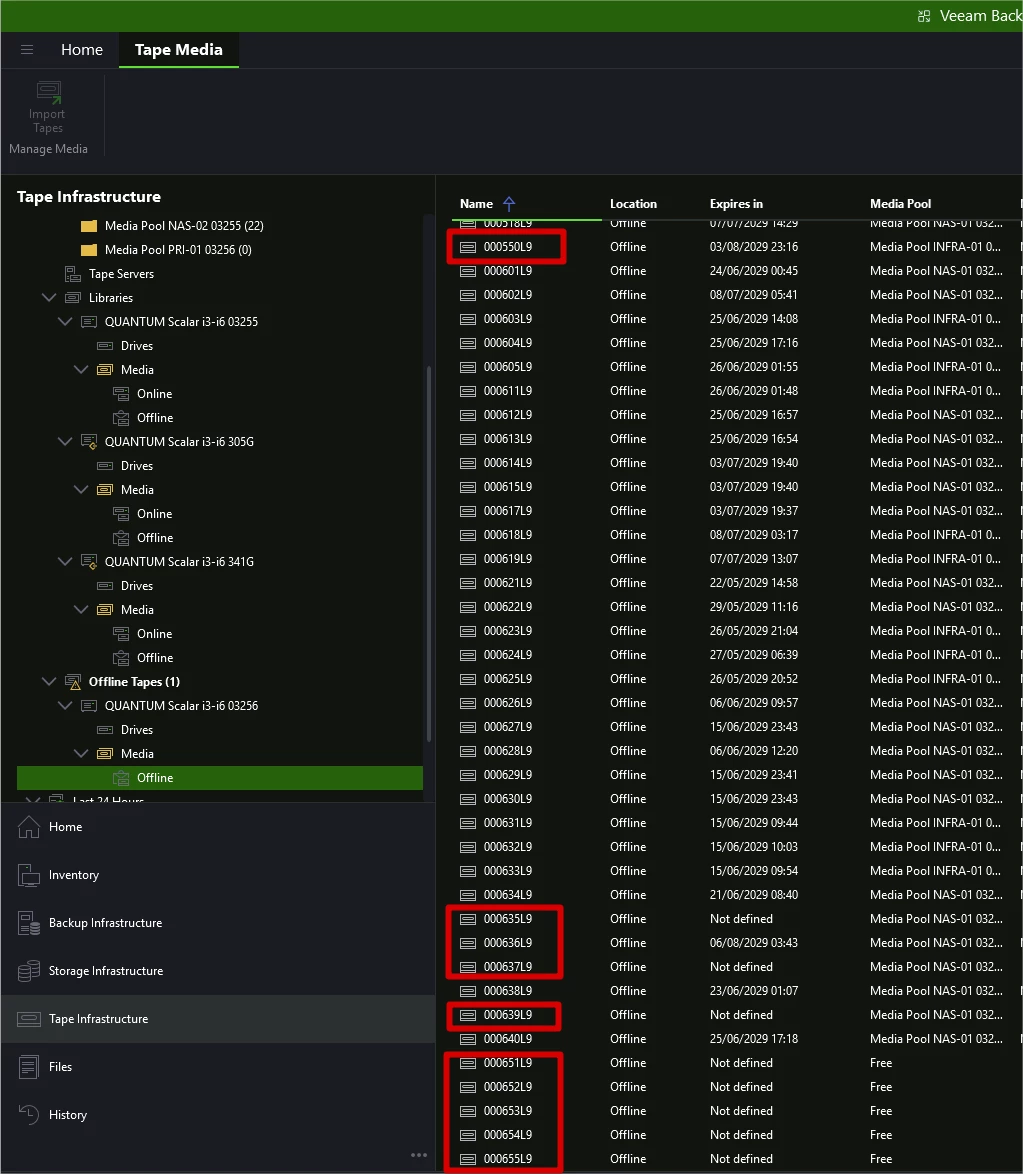
 

4 – The tapes shown as online on the QUANTUM Scalar i3-i6 341G are indeed those available on the QUANTUM Scalar i3-i6 03256 library.
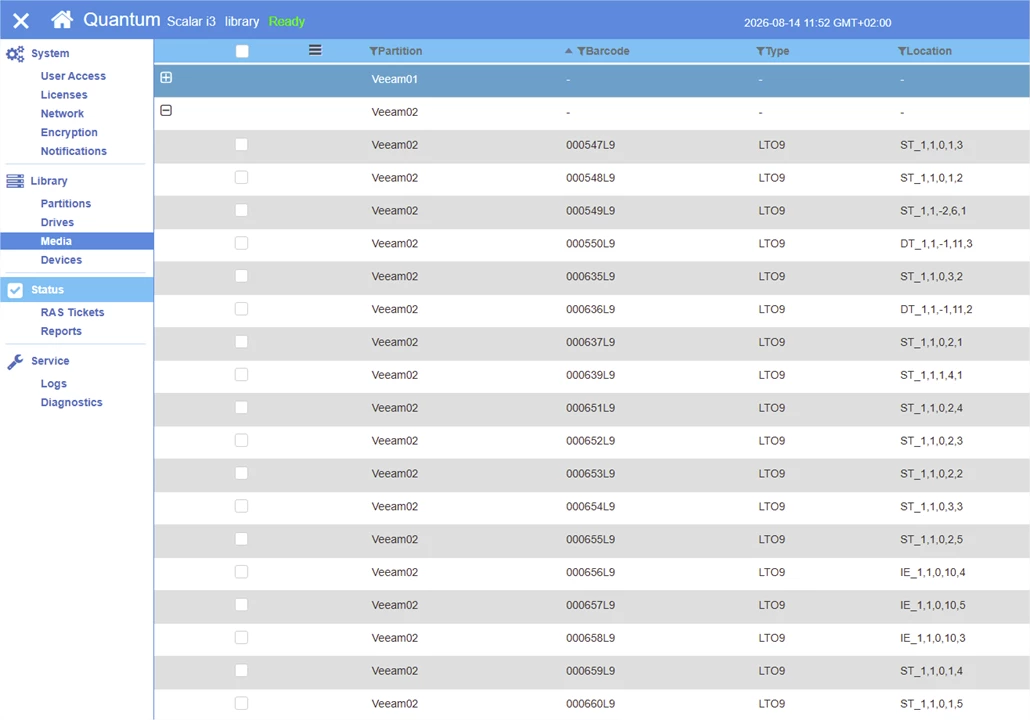
 

I have, of course, tried “rescan library,” “rescan tape servers,” and checked and tested the “Use native SCSI commands instead of Windows driver” option in the library properties under various configurations.


Have you ever encountered a similar problem?

Best answer by morgan.munck

I’m back to give you the final update.


I was able to bring the correct library back online after running a “Scan for hardware changes” in Device Manager on the tape proxy server associated with that library.


However, another issue has arisen:

• In the Scalar i3-i6 341G (offline), I see the following tapes:


• However, in the Scalar i3-i6 03256, the tapes in question are listed as “unrecognized”:


I need the correct “media pool” and “media set” to be recognized by the Scalar i3-i6 03256 library.

I performed a “Remove from catalog” on the relevant media in the Scalar i3-i6 341G, followed by an “Inventory” and a “Catalog” on that same media in the Scalar i3-i6 03256.


After completing these steps, everything was back to normal.

4 comments

Forum|alt.badge.img+3
  • Veeam Product Management
  • August 21, 2026

Hi ​@morgan.munck , 

First, must address that if there are concerns on the handling of the case or challenges with the logs, please use the Talk to a Manager button in the case portal and discuss the case with Support Management. I have comments on the scenario above but ultimately this situation is going to need a review of the debug logs to confirm next steps / resolution.


Once the update was complete, Veeam took the Scalar i3-i6 03256 library offline and changed the status of the Scalar i3-i6 341G library—which had been offline—to bring it back online. Veeam thus reversed their statuses.

….

3 – Presence of the same tapes in both libraries:

Purely a hunch, but I bet it has to do with drive replacement and potentially firmware updates. Your analysis about the firmware versions is spot on as this is considered during the tape_library_discovery process, more specifically the serial numbers; for whatever reason on firmware / hardware updates for many tape hardware loadouts, the serial number reported by the hardware is updated / changed.

I am in agreement with you about potential serial number collision here, and the “merging” of the libraries seems like the reasonable culprit, but this needs to be confirmed from the debug logs.

So, back to my original statement, I strongly advise that if the case is feeling stuck, use the Talk to a Manager button from the case portal and Support Management will assist with the situation. 

Regrettably I don’t think this is something you’ll be able to solve on your own as there is chance that it will require manual adjustment of the configuration database.


Stabz
Forum|alt.badge.img+9
  • Veeam Legend
  • August 21, 2026

Hey ​@morgan.munck 
 

I believe I’ve encountered this issue with Quantum units before. Veeam doesn't always update the database correctly, so you can end up with a "new" Quantum unit appearing in the configuration. I think something similar is happening here, unfortunately, short of digging into the database to perform the necessary cleanup, our options are limited.

Have you tried rolling back the firmware on the robotics?


morgan.munck
Forum|alt.badge.img+1
  • Author
  • VUG Leader
  • August 21, 2026

Hey ​@Stabz ,

Unfortunately, I'm currently dealing with an issue with Quantum regarding a drive, so I can't roll back the version right now.

Luckily, my Veeam ticket has just been escalated.


morgan.munck
Forum|alt.badge.img+1
  • Author
  • VUG Leader
  • Answer
  • August 27, 2026

I’m back to give you the final update.


I was able to bring the correct library back online after running a “Scan for hardware changes” in Device Manager on the tape proxy server associated with that library.


However, another issue has arisen:

• In the Scalar i3-i6 341G (offline), I see the following tapes:


• However, in the Scalar i3-i6 03256, the tapes in question are listed as “unrecognized”:


I need the correct “media pool” and “media set” to be recognized by the Scalar i3-i6 03256 library.

I performed a “Remove from catalog” on the relevant media in the Scalar i3-i6 341G, followed by an “Inventory” and a “Catalog” on that same media in the Scalar i3-i6 03256.


After completing these steps, everything was back to normal.