I'm doing a full VM restore in Veeam to an HPE VM Essentials host, and I want to understand how the disk provisioning gets decided.
Is there a way to force the restored disks to come back as thin-provisioned, or does Veeam just inherit whatever the target VME datastore or storage policy dictates?
Trying to work out whether I have any control over this at restore time or if it's entirely determined by the destination.
Best answer by Jason Orchard-ingram micro
Yeah...I saw with v13.1, injection of drivers into the newer supported hypervisors was supported. Still, would be nice to choose how one wants their virtual disks to be - thin, thick, etc. Maybe would be beneficial to place a feature request over on the Forums?
I'm still going to raise it R&D Forums. to we can some improvements in the workflow.
Probably your best bet is to ping Veeam Support on how disk types are handled. Obviously with VMW, you can choose how you want the disk to be restored. Curious what they say.
Probably your best bet is to ping Veeam Support on how disk types are handled. Obviously with VMW, you can choose how you want the disk to be restored. Curious what they say.
in testing completed a veeam restore into HPE-VME
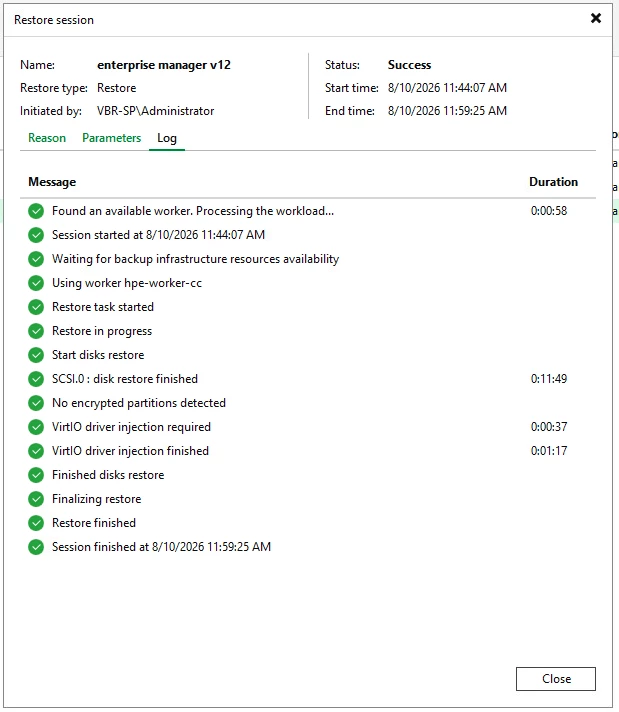
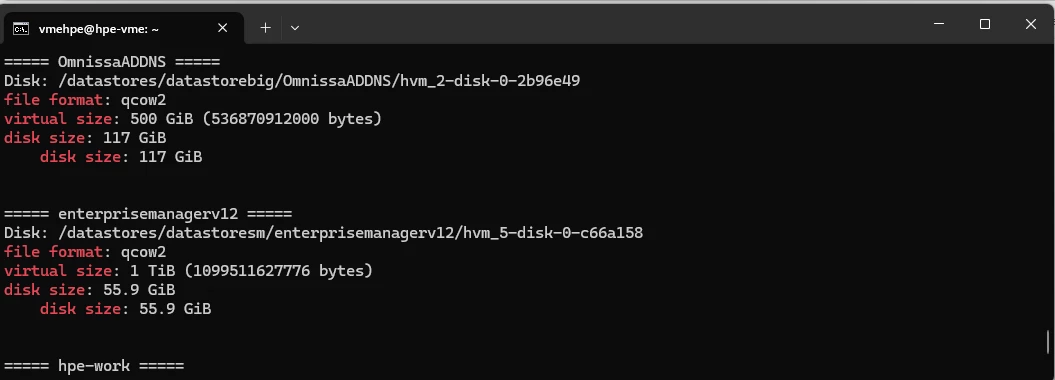
It does look like the disk has been thin provisioned, even though the workflow never prompted me to choose that option.It looks like the VirtIO driver injection is a new feature in v13.1, so that may explain the difference in behaviour.
Yeah...I saw with v13.1, injection of drivers into the newer supported hypervisors was supported. Still, would be nice to choose how one wants their virtual disks to be - thin, thick, etc. Maybe would be beneficial to place a feature request over on the Forums?
Yeah...I saw with v13.1, injection of drivers into the newer supported hypervisors was supported. Still, would be nice to choose how one wants their virtual disks to be - thin, thick, etc. Maybe would be beneficial to place a feature request over on the Forums?
I'm still going to raise it R&D Forums. to we can some improvements in the workflow.