Question

Question: HPE VM Essentials Storage Configuration

  • August 9, 2026
  • 2 comments
  • 5 views

Jason Orchard-ingram micro
Forum|alt.badge.img+5

I'm doing a full VM restore in Veeam to an HPE VM Essentials host, and I want to understand how the disk provisioning gets decided.


Is there a way to force the restored disks to come back as thin-provisioned, or does Veeam just inherit whatever the target VME datastore or storage policy dictates?

Trying to work out whether I have any control over this at restore time or if it's entirely determined by the destination.


2 comments

coolsport00
Forum|alt.badge.img+23
  • Veeam Legend
  • August 9, 2026

I don’t see anything in the Storage section of the HPE Morpheus Essentials restore process Jason

https://helpcenter.veeam.com/docs/vbr/userguide/hpe_restore_entire_vm_storage.html?ver=13

Probably your best bet is to ping Veeam Support on how disk types are handled. Obviously with VMW, you can choose how you want the disk to be restored. Curious what they say.


Jason Orchard-ingram micro
Forum|alt.badge.img+5

I don’t see anything in the Storage section of the HPE Morpheus Essentials restore process Jason

https://helpcenter.veeam.com/docs/vbr/userguide/hpe_restore_entire_vm_storage.html?ver=13

Probably your best bet is to ping Veeam Support on how disk types are handled. Obviously with VMW, you can choose how you want the disk to be restored. Curious what they say.

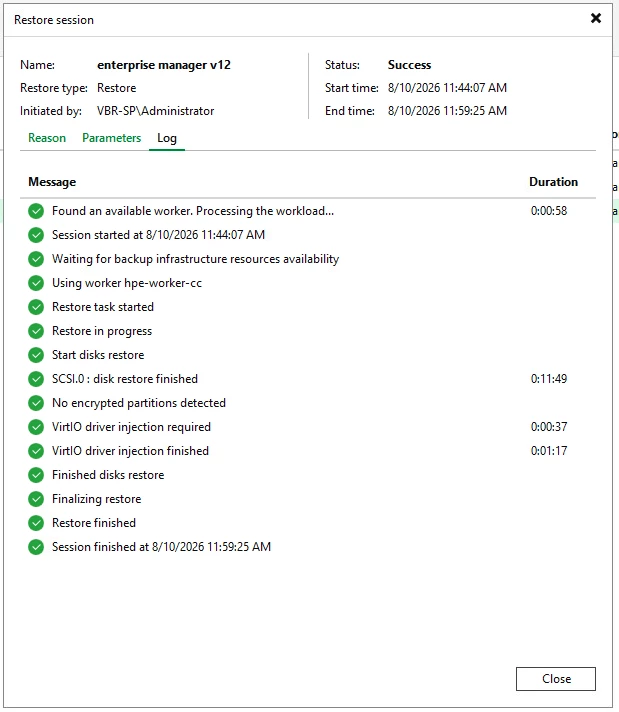
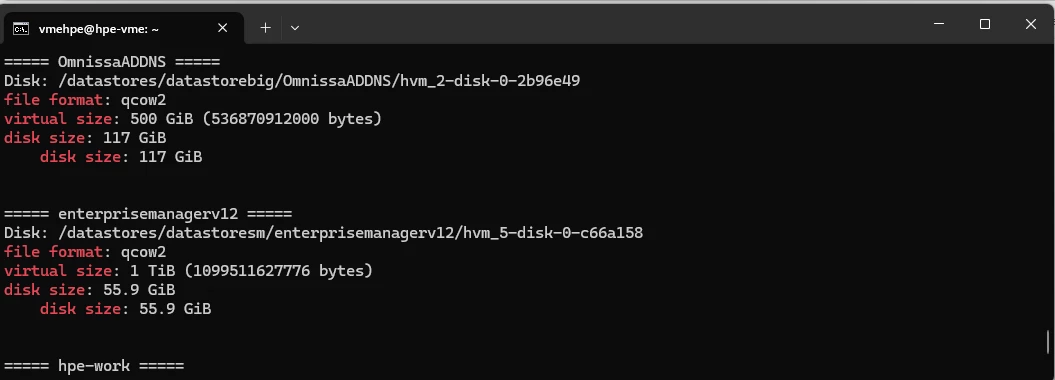
in testing completed a veeam restore into HPE-VME 


it does look like its thin provision the Disk, even though the workflow didn't ask me what wanted.  
it VirtO driver injection is new under v13.1.